
מָבוֹא
This manual provides detailed instructions for the assembly, operation, and maintenance of your TIQLAB 47-Inch L-Shaped Gaming Desk. Please read all instructions carefully before beginning assembly and retain this manual for future reference. Proper assembly and use will ensure the longevity and optimal performance of your desk.
מידע בטיחות
אמצעי זהירות חשובים:
- Ensure proper assembly of the desk to support the weight of electronic devices and other items.
- Follow all manufacturer instructions for safe use and maintenance.
- אין להעמיס את השולחן או המדפים מעבר לקיבולת המשקל המיועדת להם.
- Keep all electrical components (power outlets, LED lights) away from liquids.
- Ensure all power cords are routed safely to prevent tripping hazards.
- Use only the provided power cord and avoid using damaged cords or outlets.
תוכן החבילה
Before assembly, verify that all components are present and undamaged. Refer to the included parts list in your packaging for a complete inventory. If any parts are missing or damaged, contact TIQLAB customer support.
רכיבים אופייניים כוללים:
- Desk panels (main desktop, L-extension, monitor stand, shelves)
- רכיבי מסגרת מתכת (רגליים, מוטות תמיכה)
- Assembly hardware (screws, bolts, nuts, Allen wrench)
- Power outlet unit with integrated USB and Type-C ports
- פס תאורת לד עם שלט רחוק
- Fabric storage pouch
- כריות כף הרגל מתכווננות
הוראות התקנה והרכבה
Assembly typically requires two people. Clear a spacious area for assembly. Do not fully tighten screws until all components are loosely fitted.
- פירוק וזיהוי חלקים: Carefully remove all components from the packaging. Lay them out and compare them against the parts list provided in your box.
- הרכבת המסגרת הראשית: Begin by attaching the main desk legs and support bars according to the diagram in your specific assembly guide.
- חיבור לוחות שולחן עבודה: Secure the main desktop panel to the assembled frame.
- Install L-Extension: The L-shaped design is reversible. Decide whether you want the extension on the left or right side of the main desk. Attach the L-extension frame and desktop panel accordingly.
- מעמד למסך: Secure the monitor stand to the main desktop. This stand provides an ergonomic viewing angle and additional storage space.
- התקנת מדפי אחסון: Attach the double storage shelves to the L-extension frame. These shelves can be positioned on either side of the L-extension based on your preference.
- Integrate Power Outlets: Install the built-in power socket unit into the designated slot on the desk. Ensure it is securely fastened.
- החלת נורות LED: Adhere the LED light strip to the underside of the monitor stand or other desired location. Connect it to the power outlet unit.
- Attach Fabric Storage Pouch: Hook the fabric storage pouch to the side of the desk as desired.
- כוונון כריות כף הרגל: Once the desk is fully assembled, adjust the foot pads at the bottom of the legs to ensure stability and level the desk on uneven floors.
- הידוק סופי: Once all components are in place and the desk is level, fully tighten all screws and bolts.

Image: Desk dimensions and reversible design options. This diagram illustrates the overall dimensions of the desk and how the L-shaped section can be configured for left or right-hand use during assembly.

Image: Adjustable foot pad. This image shows a close-up of the adjustable foot pad at the base of a desk leg, used for leveling the desk.
הוראות הפעלה
שקעי חשמל
The desk is equipped with a built-in power socket for convenient charging and powering of your devices.
- רכיבים: The power unit includes 2 standard AC outlets (125V/12A), 1 USB port (5V/3A), and 1 Type-C port (5V/3A).
- קֶשֶׁר: Plug the desk's 5ft power cord into a wall outlet.
- נוֹהָג: Connect your laptops, monitors, smartphones, tablets, and other electronic devices directly to the integrated outlets and USB ports.

Image: Built-in power outlets. This image displays a close-up of the integrated power strip on the desk, featuring two AC outlets, one USB-A port, and one USB-C port, with devices plugged in.
נורות לד
The integrated LED strip enhances your workspace ambiance.
- לִשְׁלוֹט: Use the provided wireless remote control to manage the LED lights.
- תכונות: The LED strip offers adjustable brightness, 21 dynamic modes, speed control, and 20 static colors.
- כּוֹחַ: Ensure the LED strip is connected to the desk's power outlet unit.

Image: LED lights and remote control. This image shows the LED light strip illuminating the area under the monitor stand, along with the wireless remote control used to adjust its settings.
Monitor Stand and Storage
- מעמד צג: The raised monitor stand promotes an ergonomic viewing posture, reducing neck and eye strain. It also frees up space on the main desktop.
- מדפי אחסון: The double storage shelves on the L-extension provide space for books, files, gaming consoles, or other accessories.
- Fabric Pouch: Use the removable fabric pouch for convenient storage of headphones, controllers, or small items.

Image: Ergonomic design illustration. This diagram compares an incorrect sitting posture with a correct ergonomic posture, demonstrating how the monitor stand helps achieve better alignment.
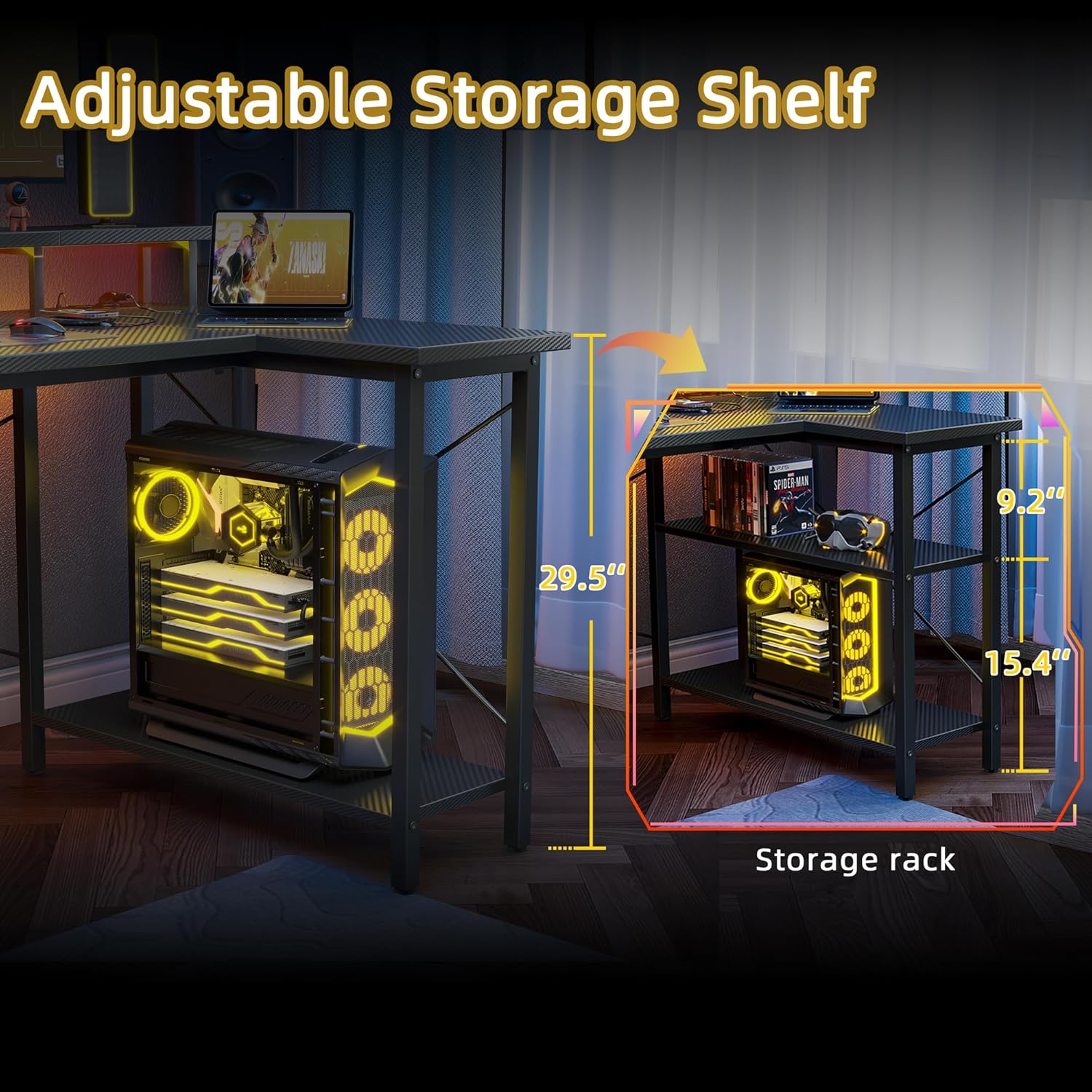
Image: Adjustable storage shelf. This image highlights the storage shelves on the L-extension, showing how they can accommodate a computer tower and other items.

Image: Desk with storage pouch. This close-up shows the fabric storage pouch attached to the side of the desk, providing convenient access to small items like controllers and headphones.
תַחזוּקָה
To maintain the appearance and functionality of your TIQLAB Gaming Desk:
- ניקוי: נגב את משטח השולחן עם חומר רך, דamp cloth. Avoid abrasive cleaners or harsh chemicals that could damage the carbon fiber finish.
- דליפות: יש לנקות מיד נזילות כדי למנוע כתמים או נזק לעץ המהונדס.
- רכיבים חשמליים: Ensure the power outlets and LED lights remain dry. Do not attempt to clean them with liquids while plugged in.
- חוּמרָה: בדקו והדקו מעת לעת את כל הברגים והברגים כדי להבטיח שהשולחן יישאר יציב.

Image: Carbon fiber finish detail. This image provides a close-up view of the carbon fiber texture on the desk surface, highlighting its scratch-resistant quality.
פתרון בעיות
אם אתם נתקלים בבעיות עם שולחן העבודה שלכם, עיינו בפתרונות הנפוצים הבאים:
- תנודות שולחן: Check that all screws are fully tightened. Adjust the leveling foot pads at the bottom of each leg to stabilize the desk on uneven surfaces.
- נורות LED לא עובדות: Ensure the LED strip is properly connected to the power outlet unit and that the desk's main power cord is plugged into a functional wall outlet. Check the remote control battery.
- שקעי חשמל לא פועלים: Verify the desk's main power cord is securely plugged into a live wall outlet. Test the wall outlet with another device.
- קשיי הרכבה: Review the assembly instructions carefully. Ensure all parts are oriented correctly before tightening screws. If a part seems misaligned, loosen adjacent screws, adjust, and then retighten.
מפרטים
| תכונה | פְּרָט |
|---|---|
| מותג | TIQLAB |
| צוּרָה | L- צורה |
| עיצוב שולחנות כתיבה | שולחן מחשב |
| מידות המוצר (D x W x H) | 31.5 אינץ' x 47 אינץ' x 29.5 אינץ' |
| צֶבַע | סיבי פחמן שחור |
| סִגְנוֹן | מוֹדֶרנִי |
| חומר בסיס | מַתֶכֶת |
| סוג החומר העליון | עץ מהונדס |
| סוג גימור | מְרוּבָּד |
| תכונות מיוחדות | Built-in Outlets, LED Lights, Monitor Stand, Storage Shelves |
| שקעי חשמל | 2 שקעי AC (125V/12A), שקע USB אחד (5V/3A), שקע Type-C אחד (5V/3A) |
| אורך כבל חשמל | 5 רגל |
| מספר מדפים | 2 |
| נדרשת הרכבה | כֵּן |
| אנשים מומלצים לאסיפה | 2 |
אחריות ותמיכה
For warranty information, product support, or to order replacement parts, please refer to the contact information provided in your product packaging or visit the official TIQLAB webאתר. שמור את קבלת הרכישה כהוכחת קנייה.