
I-SHUNFA WIFI-E27
מדריך למשתמש של נורת LED חכמה E27 של I-SHUNFA Wi-Fi
Model: WIFI-E27
1. המוצר נגמרview
The I-SHUNFA Wi-Fi Smart E27 LED Bulb offers advanced lighting control for your smart home. Featuring stepless dimming, adjustable color temperature from warm white (2700K) to cool white (6500K), and compatibility with voice assistants like Amazon Alexa, these bulbs provide versatile illumination. Control your lighting remotely via the Smart Life or Tuya Smart app, set schedules, and create custom scenes to enhance your daily life.

תמונה: מעלview of the I-SHUNFA Smart LED Bulbs, showing their design, app control interface on a smartphone, and an icon indicating voice control capability.
תכונות עיקריות:
- קישוריות Wi-Fi: Connects directly to your 2.4GHz home Wi-Fi network.
- ניתן לעמעום: בהירות ניתנת להתאמה מ-1% עד 100%.
- ניתן לכוונן לבן: Color temperature adjustable from 2700K (warm white) to 6500K (cool white).
- שליטה קולית: תואם עם Amazon Alexa ו-Google Assistant.
- בקרת אפליקציה: Remote control via Smart Life or Tuya Smart app.
- Scheduling & Scenes: Set timers, schedules, and pre-defined lighting scenes.
2. מדריך התקנה
2.1. התקנה
- Ensure the power to the light fixture is turned off before installation.
- Carefully screw the I-SHUNFA Smart E27 LED Bulb into a standard E27 light socket.
- Turn on the power to the light fixture. The bulb should flash rapidly, indicating it's in pairing mode. If not, turn the bulb off and on 3-5 times until it flashes.
2.2. הורדת אפליקציה וצימוד
To control your smart bulb, you need to download the "Smart Life" or "Tuya Smart" app on your smartphone.
- Download the "Smart Life" or "Tuya Smart" app from the App Store (iOS) or Google Play Store (Android).
- הירשם או התחבר לחשבונך.
- Ensure your smartphone is connected to a 2.4GHz Wi-Fi network. The smart bulb only supports 2.4GHz Wi-Fi.
- באפליקציה, הקישו על סמל ה-"+" (בדרך כלל בפינה הימנית העליונה) כדי להוסיף מכשיר.
- בחר "תאורה" או "מקור אור (Wi-Fi)" מרשימת המכשירים.
- Confirm that the bulb is flashing rapidly. If it's not, reset it by turning it off and on 3-5 times until it flashes.
- הזן את סיסמת רשת ה-Wi-Fi 2.4GHz שלך כאשר תתבקש.
- The app will begin pairing with the bulb. Once connected, you can rename the bulb for easier control.

Image: Visual guide to the bulb's features and compatibility, including app logos and Wi-Fi requirements.
3. הוראות הפעלה
3.1. בקרת אפליקציות
Once paired, you can control your I-SHUNFA Smart LED Bulb using the Smart Life or Tuya Smart app from anywhere with an internet connection.
- הפעלה/כיבוי: הקש על סמל ההפעלה שליד שם הנורה כדי להפעיל או לכבות אותה.
- התאמת בהירות: Slide the brightness bar (1%-100%) to adjust the light intensity.
- התאמת טמפרטורת צבע: Slide the color temperature bar to switch between warm white (2700K) and cool white (6500K).
- סצנות: Select from pre-defined scenes like "Reading," "Working," "Good Night," or "Relax," or create your own custom scenes.
- טיימר ולוחות זמנים: Set specific times for the bulb to turn on or off, or to activate certain scenes.

Image: The app interface for adjusting brightness and color temperature, illustrating the range from warm to cool white light.

Image: Setting timers and schedules through the app, allowing automated lighting control for convenience and security.
3.2. שליטה קולית
The I-SHUNFA Smart LED Bulb is compatible with Amazon Alexa and Google Assistant. To enable voice control, link your Smart Life/Tuya Smart account to your voice assistant app (e.g., Alexa app).
- Linking Account: Open your Alexa or Google Home app, navigate to "Skills" or "Works with Google," search for "Smart Life" or "Tuya Smart," and enable the skill. Log in with your app account credentials.
- גלה מכשירים: After linking, ask your voice assistant to "Discover devices" or manually discover them in the app.
- פקודות קוליות לדוגמהamples:
- "אלכסה, תדליקי את האור בסלון."
- "היי גוגל, תעמעמו את אור חדר השינה ל-50%."
- "Alexa, set the kitchen light to warm white."
- "Hey Google, change the office light to cool white."

Image: Demonstrating voice control functionality with Amazon Alexa, allowing hands-free operation of the smart bulbs.
4. תחזוקה
The I-SHUNFA Smart E27 LED Bulbs are designed for long-term use with minimal maintenance.
- ניקוי: לפני הניקוי, ודאו שהנורה כבויה וקרירה. נגבו את הנורה בעזרת מטלית רכה ויבשה. אין להשתמש בחומרי ניקוי נוזליים או בחומרים שוחקים.
- אִחסוּן: If storing the bulbs, keep them in a cool, dry place away from direct sunlight and extreme temperatures.
- תַחֲלִיף: These LED bulbs have an average lifespan of 30,000 hours. Replacement is only necessary at the end of their operational life.
5. פתרון תקלות
If you encounter issues with your I-SHUNFA Smart E27 LED Bulb, please refer to the following common solutions:
| בְּעָיָה | סיבה אפשרית | פִּתָרוֹן |
|---|---|---|
| הנורה לא מתחברת/מהבהבת. | Not in pairing mode; power cycle issue. | Turn the bulb off and on 3-5 times until it flashes rapidly. Ensure your Wi-Fi is 2.4GHz. |
| לא ניתן להתחבר ל-Wi-Fi. | תחום Wi-Fi שגוי; אות חלש; סיסמה שגויה. | Ensure your router is broadcasting a 2.4GHz signal. Move the bulb closer to the router. Double-check your Wi-Fi password. |
| בקרת קולית לא עובדת. | Account not linked; device not discovered. | Ensure your Smart Life/Tuya Smart account is correctly linked to Alexa/Google Assistant. Ask your voice assistant to "Discover devices." |
| Bulb unresponsive in app. | Loss of Wi-Fi connection; app glitch. | Check your Wi-Fi connection. Restart the app. Power cycle the bulb. |
| Bulb not dimming or changing color. | Not compatible with external dimmer switches. | These bulbs are controlled via the app or voice assistant. Do not use with traditional dimmer switches. |
6. מפרטים
| תכונה | פְּרָט |
|---|---|
| מספר דגם | WIFI-E27 |
| סוג בסיס | E27 |
| צריכת חשמל | 7 וואט (שווה ערך ללבון 70W) |
| שטף אור | 800 lm |
| טמפרטורת צבע | 2700K - 6500K (לבן חם עד לבן קר) |
| יכולת עמעום | 1% - 100% (via app/voice control only) |
| כרך ידtage | AC 220-240V |
| Wi-Fi בתקן | 2.4GHz (IEEE 802.11 b/g/n) |
| תוחלת חיים | 30,000 שעות |
| זווית קרן | 360 מעלות |
| מידות (L x W x H) | 3 x 3 x 8.45 ס"מ |
| מִשׁקָל | 64 גרם |
| הסמכה | חסכוני באנרגיה |
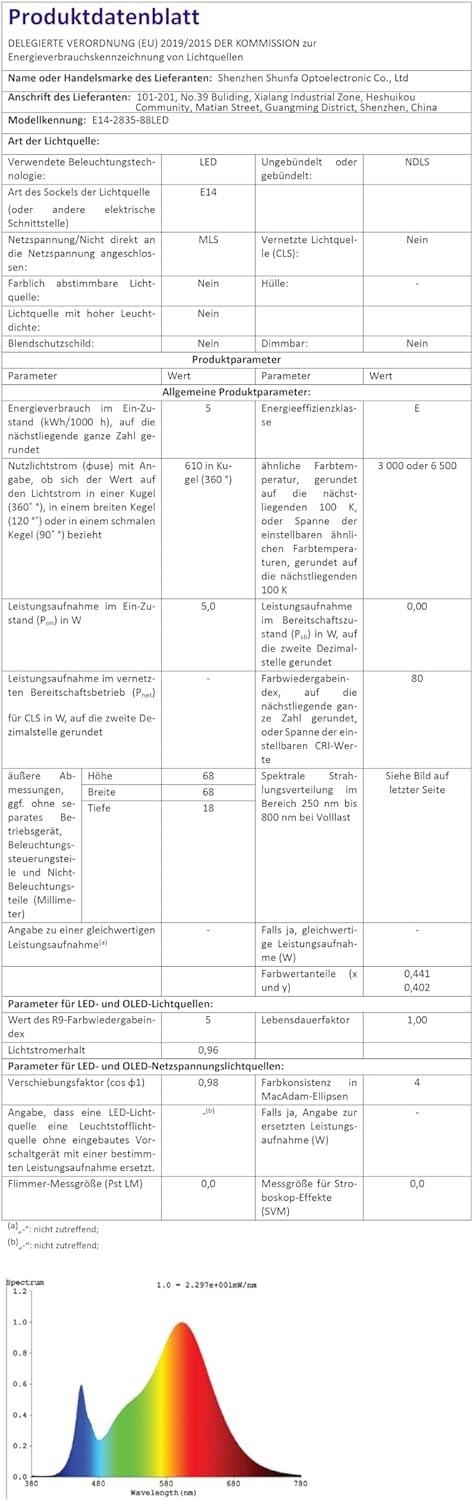
תמונה: גיליון נתונים רשמי של המוצר המספק מפרט טכני מקיף.
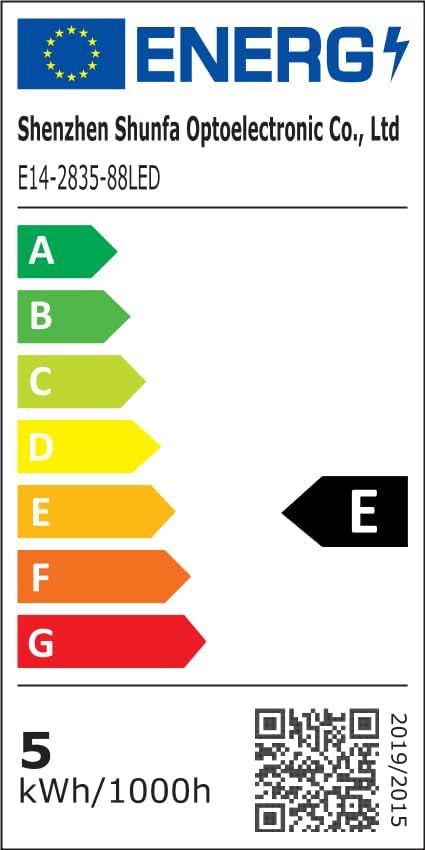
Image: EU Energy Label indicating the bulb's energy efficiency class and consumption. More details can be found via the QR code or by visiting eprel.ec.europa.eu/qr/1250502.
7. אחריות ותמיכה
I-SHUNFA is committed to providing high-quality products. For any issues or inquiries regarding your smart LED bulbs, please refer to your purchase documentation or contact our customer support.
- אַחֲרָיוּת: Please refer to your purchase documentation or the retailer's policy for specific warranty details.
- תמיכת לקוחות: For technical assistance or product support, please visit the I-SHUNFA brand store on Amazon or contact the seller directly.
- חֲלָפִים: לא סופק מידע בנוגע לזמינות חלקי חילוף.

Image: The official I-SHUNFA brand logo.