
1. הקדמה
This manual provides essential information for the installation, operation, and maintenance of your SYLVOX 43-inch Outdoor Signage TV (Model SS43A0KAGD). Please read this manual thoroughly before using the product to ensure proper function and safety. This television is designed for commercial outdoor use, offering high brightness and robust weather protection.
2. מידע בטיחות
יש להקפיד על אמצעי הזהירות הבאים כדי למנוע נזק למוצר ולהבטיח את בטיחות המשתמש:
- ספק כוח: ודא שמקור הכוח מתאים לנפחtagהדרישות המפורטות על תווית המוצר.
- מים ולחות: While the TV is IP55 waterproof, avoid direct high-pressure water jets. Ensure all port covers are securely closed when not in use.
- אוורור: אין לחסום פתחי אוורור. זרימת אוויר מספקת נחוצה כדי למנוע התחממות יתר.
- הַרכָּבָה: Use appropriate mounting hardware and follow VESA standards (400 x 200 mm) for secure installation. Professional installation is recommended for outdoor environments.
- ניקוי: נתק את החשמל לפני הניקוי. השתמש במטלית רכה, דקהamp בַּד. הימנע מכימיקלים קשים.
- טֶמפֶּרָטוּרָה: Operate the TV within the specified temperature range (-4°F to 113°F).
3. תכולת החבילה
ודא שכל הפריטים נמצאים בחבילה:
- SYLVOX 43-inch Outdoor Signage TV
- שלט רחוק (2 סוללות AAA כלולות)
- כבל חשמל
- מדריך למשתמש
- תעודת אחריות
- Screws for mounting (BM8X14MM for full motion cantilever mount, BM8X28MM & Gasket for fixed wall mount)

Figure 3.1: Included accessories with the SYLVOX 43-inch Outdoor Signage TV.
4. המוצר נגמרview
4.1 תכונות עיקריות
- לְהַצִיג: 43-inch 4K UHD (3840x2160) LED display with 1000 nits brightness and 1.07 Billion Colors.
- עֲמִידוּת: IP55 waterproof rating, corrosion-resistant and scratch-resistant metal casing. Designed for 7x24 hour operation with temperature protection.
- מַעֲרֶכֶת הַפעָלָה: Linux-based system with pre-installed applications (Netflix, Pandora, Facebook, YouTube, Twitter). Note: Signage 1.0 series does not support downloading additional apps.
- קישוריות: Built-in ATSC & NTSC tuners, Bluetooth, 2.4G WiFi.
- שֶׁמַע: Built-in speakers.

Figure 4.1: SYLVOX 43-inch Outdoor Signage TV in a commercial setting, showcasing its bright 4K display.

Figure 4.2: The TV's IP55 waterproof and wide temperature range capabilities.

Figure 4.3: Visual representation of 4K UHD picture quality and color depth.

איור 4.4: מעלview of the Linux system and integrated features.
4.2 יציאות וחיבורים
The TV offers a variety of input and output ports for versatile connectivity:
- RS232
- USB Input x 2 (USB 1.0, USB 2.0, USB 3.0 compatible)
- RJ45 (אתרנט)
- HDMI x 3
- יציאה אופטית
- Audio L/R In
- YPbPr In
- Antenna In (ATSC/NTSC Tuner)
- יציאת אוזניות
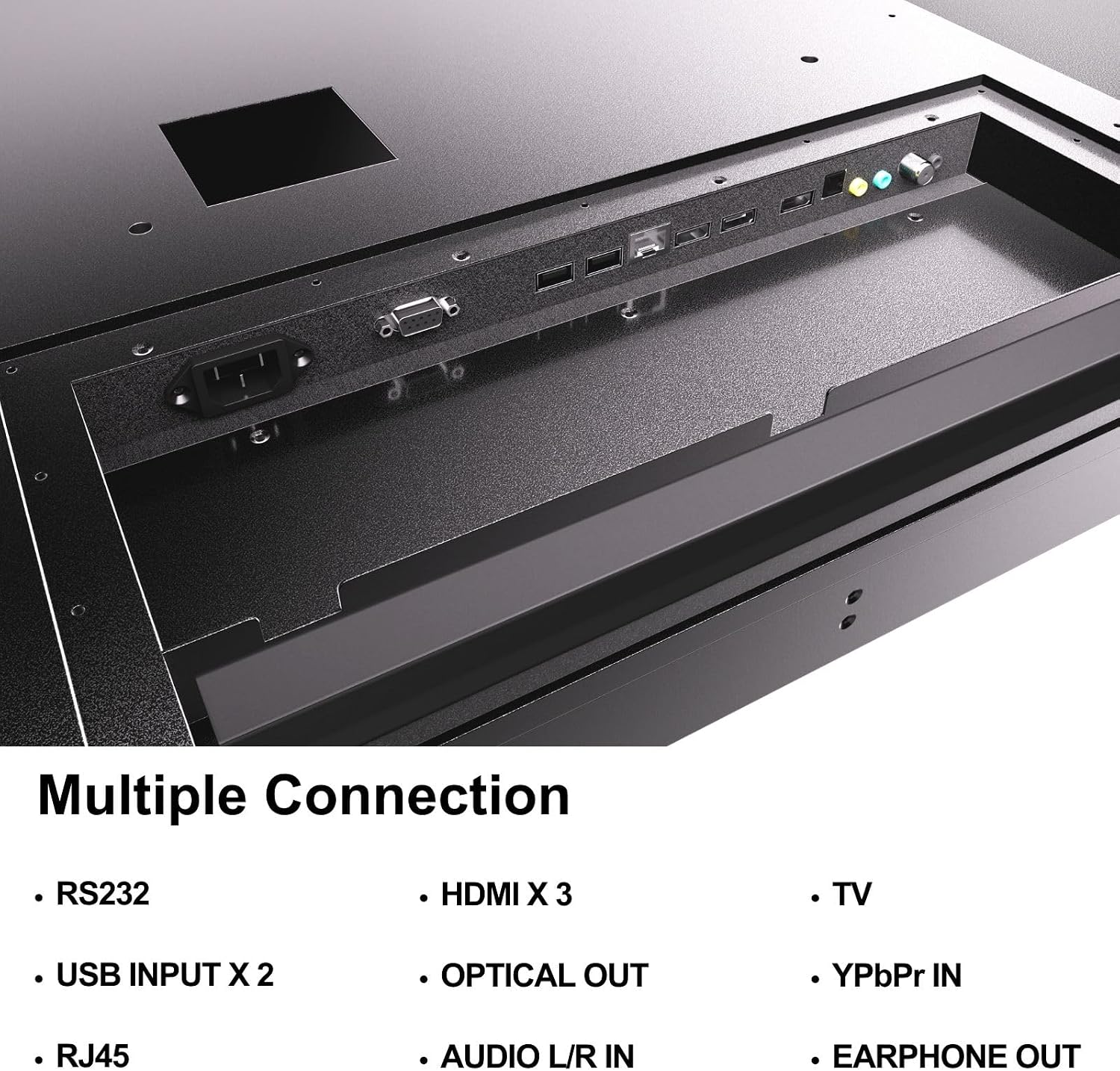
Figure 4.5: Rear panel connections of the SYLVOX Outdoor Signage TV.
5. התקנה
5.1 התקנת הטלוויזיה
The SYLVOX Outdoor Signage TV supports wall mounting. Ensure the mounting surface is sturdy enough to support the TV's weight and is suitable for outdoor conditions.
- בחר מיקום: Select a location that provides optimal viewing and protection from extreme weather, even with the TV's waterproof rating.
- התקן מתקן קיר: Attach a VESA-compatible wall mount (400 x 200 mm) to the desired location according to the mount manufacturer's instructions. Use the provided screws (BM8X14MM for full motion, BM8X28MM with gasket for fixed mount).
- Attach TV to Mount: Carefully lift the TV and secure it to the installed wall mount. Ensure all connections are tight and secure.
5.2 הפעלה ראשונית
- חבר חשמל: Plug the power cord into the TV's power input and then into a grounded outdoor-rated power outlet.
- הכנס סוללות: Open the remote control battery compartment and insert the two AAA batteries, observing polarity.
- הפעלה: לחץ על כפתור ההפעלה בשלט רחוק או בטלוויזיה.
- אשף ההגדרה הראשונית: Follow the on-screen instructions to select language, time zone, and perform initial channel scanning.
5.3 חיבור רשת
To access smart TV features and streaming applications, connect the TV to your network.
- חיבור Wi-Fi: Navigate to the TV's settings menu, select 'Network', then 'Wi-Fi'. Choose your network from the list and enter the password.
- חיבור Ethernet: חבר כבל Ethernet מהנתב שלך ליציאת RJ45 בטלוויזיה. הטלוויזיה תזהה אוטומטית את החיבור הקווי.
- בלוטות': For connecting audio devices, go to the Bluetooth settings, enable Bluetooth, and pair with your desired device.
6. הוראות הפעלה
6.1 פונקציות טלוויזיה בסיסיות
- כּוֹחַ: הקש על כּוֹחַ button on the remote to turn the TV on or off.
- מקור קלט: הקש על קֶלֶט button to cycle through available input sources (HDMI 1/2/3, TV, YPbPr, USB).
- כֶּרֶך: השתמש ב- נפח +/- כפתורים לכוונון רמת הקול.
- עָרוּץ: השתמש ב- ערוץ +/- buttons to change channels when using the built-in tuner.
- ניווט: השתמשו בחצי הכיוון ו OK כפתור כדי לנווט בתפריטים.
6.2 תכונות טלוויזיה חכמה
The TV runs on a Linux operating system and comes with several pre-installed applications:
- Access the home screen to view and launch applications like Netflix, Pandora, Facebook, YouTube, and Twitter.
- Use the remote control's dedicated app buttons (if available) for quick access.
- Note that the Signage 1.0 series does not support downloading additional applications.
6.3 Screencasting (Android Only)
The TV supports screencasting from Android mobile phones:
- Ensure your Android device and the TV are connected to the same Wi-Fi network.
- On your Android phone, enable the screen mirroring or screencasting feature (names may vary by device, e.g., 'Smart View', 'Cast', 'Wireless Display').
- Select your SYLVOX TV from the list of available devices.
6.4 Vertical/Horizontal Display
The TV can be installed and operated in both horizontal (landscape) and vertical (portrait) orientations. When using the screen vertically, the display direction is adjusted by the input device or content source.
7. תחזוקה
Proper maintenance ensures the longevity and performance of your outdoor TV:
- ניקוי המסך: נגבו בעדינות את המסך בעזרת מטלית רכה ונטולת סיבים. במקרה של סימנים עקשניים, נגבו קלותampen the cloth with water. Do not spray cleaners directly onto the screen.
- ניקוי ה-Casing: השתמש רך, דamp cloth to clean the metal casinז. הימנעו מחומרי ניקוי שוחקים או ממסים.
- כיסויי נמל: Regularly check that all unused port covers are securely sealed to maintain the IP55 waterproof rating.
- בדיקות סביבתיות: Periodically inspect the TV and mounting hardware for any signs of wear, corrosion, or damage, especially after severe weather conditions.
- עדכוני תוכנה: Check for available software updates through the TV's settings menu to ensure optimal performance and security.
8. פתרון תקלות
If you encounter issues with your SYLVOX Outdoor Signage TV, refer to the following common problems and solutions:
| בְּעָיָה | סיבה אפשרית | פִּתָרוֹן |
|---|---|---|
| אין כוח | Power cord disconnected; no power from outlet; remote batteries dead. | Check power cord connection; test outlet; replace remote batteries. |
| אין תמונה, אבל יש קול | נבחר מקור קלט שגוי; בעיה בהתקן חיצוני. | Press 'Input' button to select correct source; check external device connections. |
| אין קול, אבל יש תמונה | עוצמת הקול מושתקת או נמוכה מדי; בעיה בהתקן שמע חיצוני. | Unmute volume or increase level; check audio cables for external devices. |
| חיבור Wi-Fi לא יציב או מנותק | Router issue; TV too far from router; incorrect password. | Restart router; move TV closer or use a Wi-Fi extender; re-enter Wi-Fi password. |
| השלט רחוק לא עובד | סוללות מתות או לא הוכנסו בצורה שגויה; חסימה בין השלט לטלוויזיה. | החלף סוללות; ודא שקו ראייה ברור למקלט ה-IR של הטלוויזיה. |
אם הבעיה נמשכת לאחר ניסיון פתרונות אלה, אנא פנו לתמיכת הלקוחות של SYLVOX.
9. מפרטים
| שם הדגם | SS43A0KAGD |
| גודל מסך | 43 אינץ' |
| טכנולוגיית תצוגה | LED |
| הַחְלָטָה | 4K (3840x2160) |
| קצב רענון | 60 הרץ |
| Maximum Display Brightness | 1000 ניט |
| יחס ניגודיות | 3000:1 |
| זמן תגובה | 8 אלפיות שניות |
| דירוג עמיד למים | IP55 |
| מַעֲרֶכֶת הַפעָלָה | לינוקס |
| טכנולוגיית קישוריות | Wireless (Bluetooth, Wi-Fi), Wired (HDMI, USB, RJ45, RS232) |
| קלט שמע | HDMI, Optical, USB, Audio L/R In |
| פורמט אותות | ATSC, NTSC |
| Total Number of HDMI Ports | 3 |
| סך כל יציאות USB | 2 |
| מידות המוצר (D x W x H) | 3.4" D x 38.6" W x 22.4" H |
| תקן VESA להרכבה | 400 x 200 מ"מ |
| מהtage | 120 וואט-שעה |
| יַצרָן | Kontech Electronics Co., Ltd. |
| UPC | 810079224838 |
10. אחריות ותמיכה
10.1 מידע אחריות
SYLVOX provides a אחריות יצרן לשנה עבור מוצר זה. אחריות זו מכסה פגמים בחומרים ובביצוע בשימוש רגיל. אנא שמור את הוכחת הרכישה שלך לצורך תביעות אחריות.
10.2 תמיכת לקוחות
If you require assistance with installation, operation, troubleshooting, or warranty service, please contact SYLVOX customer support. We recommend checking the product upon receipt to ensure it is in good condition and functions normally.
For further support, please visit the official SYLVOX website or refer to the contact information provided on your warranty card.