
מָבוֹא
This user manual provides essential information for the proper installation, operation, and maintenance of your CPVAN 3-in-1 Carbon Monoxide Detector. This device is designed to detect carbon monoxide (CO) gas, and also displays ambient temperature and humidity. It features a 10-year electrochemical sensor and is powered by a 4-year replaceable battery, certified to EU standard EN50291. Please read this manual thoroughly before using the product to ensure safe and effective operation.

איור 1: חֲזִית view of the CPVAN 3-in-1 Carbon Monoxide Detector, showing the display and indicator light.
מידע בטיחות
חָשׁוּב: This device is a carbon monoxide (CO) detector, not a smoke detector or a carbon dioxide (CO2) detector. It is designed to detect carbon monoxide gas from sources such as faulty combustion appliances.
- Do not paint the detector. Paint may clog the openings and interfere with the sensor's ability to detect CO.
- Do not block the ventilation openings on the detector.
- Regularly test the detector as instructed in this manual.
- Do not install the detector in areas with high humidity, extreme temperatures, or excessive dust.
- In case of an alarm, evacuate the premises immediately and call emergency services. Do not re-enter until the area has been declared safe.
- The device cannot replace a smoke or gas alarm.
תוכן החבילה
אנא בדקו את תוכן החבילה בעת הפתיחה כדי לוודא שכל הפריטים נמצאים ולא ניזוקו.
- 1 × CPVAN Carbon Monoxide Detector (Model: COS-X3 plus)
- 2 × 1.5V AA Alkaline Batteries
- 2 × תקעי קיר
- 2 × ברגים
- 1 × מדריך למשתמש
המוצר נגמרview
The CPVAN 3-in-1 Carbon Monoxide Detector integrates CO detection with temperature and humidity monitoring.

איור 2: The detector's display indicates Carbon Monoxide (CO) levels, relative humidity (%RH), and temperature (°C). When CO concentration is below 25 ppm, only temperature and humidity are displayed.
מרכיבי מפתח:
- תצוגת LCD: Shows CO concentration (PPM), relative humidity (%RH), and temperature (°C).
- Test/Reset Button: Used to test the alarm function and reset the device.
- נורית חיווי: Displays device status (Green for normal, Yellow for fault, Red for alarm).
- זמזם אזעקה: Emits a loud sound during a CO alarm.
- תא סוללות: ממוקם מאחור עבור סוללות AA.

איור 3: Visual representation of the indicator light states: Green for normal operation, Yellow for fault, and Red for CO alarm.
הגדרה
1. התקנת סוללה
The detector requires two 1.5V AA alkaline batteries (included).
- Open the battery compartment cover on the back of the detector.
- Remove the plastic insulating strip from the pre-installed batteries.
- Insert the two AA batteries, ensuring correct polarity (+ and -).
- Close the battery compartment cover securely. The device will automatically power on.

איור 4: Illustration of the battery compartment on the back of the detector, showing where to insert the two AA alkaline batteries.
2. הרכבה ומיקום
Proper placement is crucial for effective CO detection. Install the detector in locations where CO may be produced. The closer it is to a potential CO source, the sooner the alarm will activate.
- מיקומים מומלצים: Near combustion appliances (furnaces, water heaters, fireplaces), in living areas, and bedrooms.
- לְהִמָנַע: Directly above heat sources, in direct sunlight, near windows or vents, in dusty or humid areas, or behind curtains/furniture that could obstruct the sensor.
- גובה התקנה: For optimal detection, install the detector at a height between your waist and head level, or as per local regulations.
- בחר מיקום מתאים על הקיר.
- Mark the positions for the two screws using the detector's mounting holes as a guide.
- Drill two holes and insert the wall plugs.
- Insert the screws, leaving a small gap from the wall.
- Align the detector's mounting slots with the screws and slide it down to secure it.
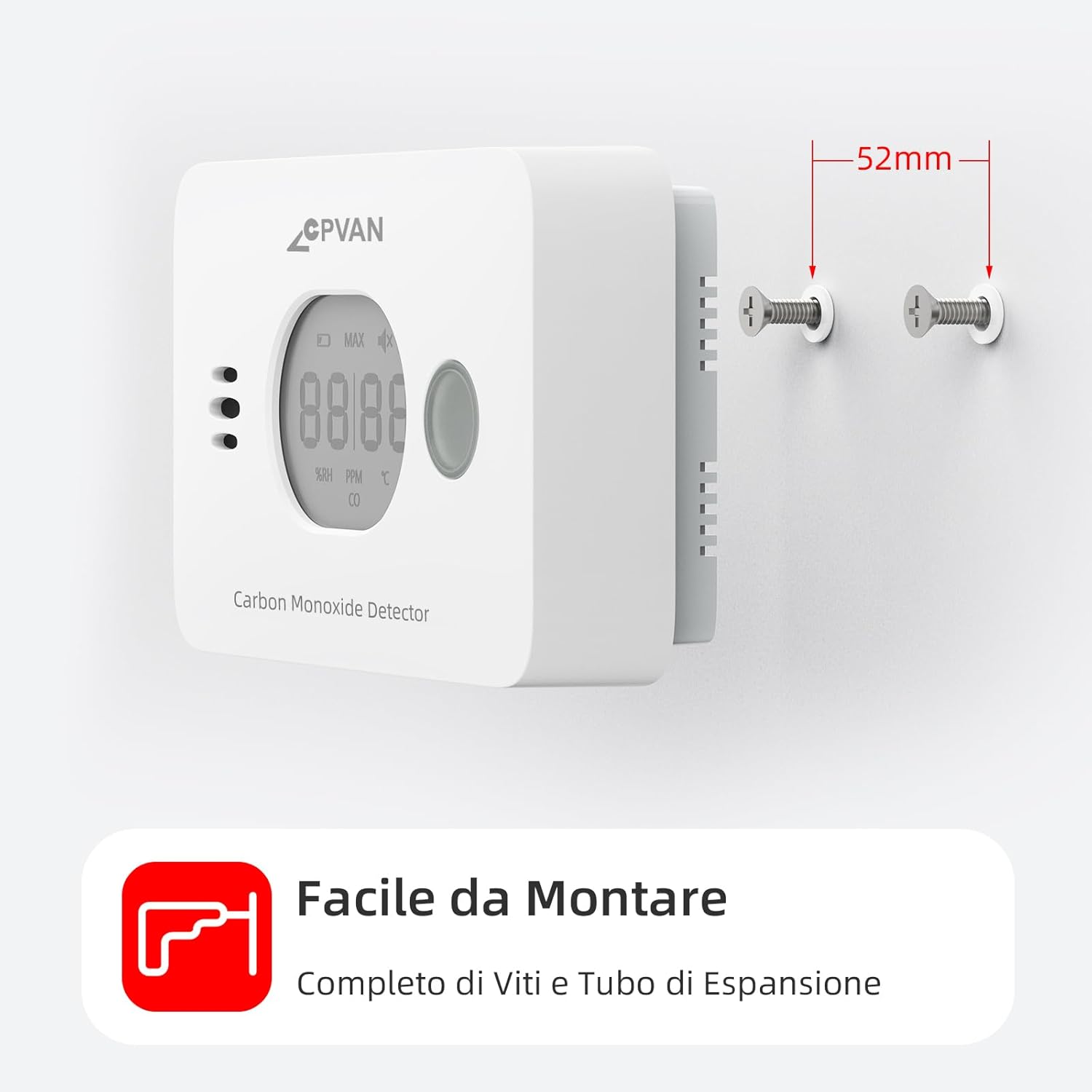
איור 5: The detector can be easily mounted on a wall using the provided screws and wall plugs.

איור 6: Example of optimal placement for CO detectors (red squares), heat alarms (green triangles), and smoke alarms (blue circles) within a typical home layout.
מִבצָע
1. הפעלה ראשונית
After battery installation, the device will perform a self-test. The display will show a brief sequence, and the green indicator light will flash. Once initialized, it will display temperature and humidity. The green light will flash approximately every 60 seconds in standby mode.
2. הצג מידע
צג ה-LCD מספק מידע בזמן אמת:
- טֶמפֶּרָטוּרָה: מוצג במעלות צלזיוס (°C).
- לַחוּת: Shown as relative humidity (%RH).
- ריכוז CO: Displayed in parts per million (PPM). If CO concentration is below 25 ppm, only temperature and humidity are shown. CO concentration is updated every 4 seconds.

איור 7: The real-time display shows current humidity and temperature. CO concentration is displayed when it exceeds 25 PPM, with different alarm cycles based on CO levels.
3. בדיקת האזעקה
It is recommended to test the detector weekly to ensure proper function.
- Press and hold the Test/Reset button on the front of the detector.
- The alarm will sound loudly, and the red indicator light will flash. The display will show a high CO reading (e.g., "MAX 58 PPM CO").
- שחררו את הכפתור כדי לעצור את הבדיקה.
Alternatively, you can test by holding the detector near burning materials like paper or cigarettes for 5-10 seconds. Incomplete combustion typically produces carbon monoxide. If the detector functions correctly, it will display CO concentration and sound an audible alarm.

איור 8: When CO is detected above the alarm threshold, the red light flashes and the alarm sounds.
4. Alarm Conditions and Behavior
The detector is certified to EN-50291 standards. Alarm thresholds are as follows:
| CO Concentration (PPM) | זמן אזעקה |
|---|---|
| 50 עמודים לדקה | 60-90 דקות |
| 100 עמודים לדקה | 10-40 דקות |
| 300 עמודים לדקה | 0-3 דקות |
When an alarm occurs, the red indicator light will flash rapidly, and the buzzer will emit a loud, continuous alarm sound. The display will show the detected CO concentration.
What to do if the alarm sounds:
- עברו מיד לאוויר צח בחוץ או פתחו את כל הדלתות והחלונות כדי לאוורר את האזור.
- בצעו ספירת ראש כדי לוודא שכל האנשים נכללו.
- אין להיכנס שוב למקום עד שהאזעקה תפסיק לפעול והאזור אוורר היטב.
- התקשרו לשירותי החירום או לטכנאי מוסמך כדי לחקור את מקור ה-CO.
תַחזוּקָה
1. החלפת סוללה
The detector is designed with a 4-year replaceable battery life. When the batteries are low, the device will indicate this with a specific warning (e.g., a chirp or a low battery icon on the display). Replace both AA alkaline batteries promptly when this occurs. Refer to the "Battery Installation" section for replacement steps.
2. ניקיון
Clean the detector regularly to prevent dust buildup from affecting its performance.
- השתמש רך, דamp cloth to wipe the exterior of the detector.
- Do not use cleaning sprays, solvents, or abrasive cleaners.
- אל תצבע את הגלאי.
3. בדיקות תקופתיות
Test the detector weekly using the Test/Reset button to ensure the alarm and sensor are functioning correctly.
פתרון בעיות
| בְּעָיָה | סיבה אפשרית | פִּתָרוֹן |
|---|---|---|
| Detector not powering on after battery installation. | Batteries incorrectly inserted or dead. Plastic insulating strip not removed. | Ensure batteries are inserted with correct polarity. Remove the plastic insulating strip. Try new batteries. |
| אזעקה נשמעת לעתים קרובות ללא מקור CO נראה לעין. | False alarm due to strong fumes (e.g., cleaning products, paint). Detector placed too close to a combustion source. | Ventilate the area. Relocate the detector if it's too close to a potential source or in an area with frequent fumes. |
| Detector chirps or shows low battery indicator. | סוללה חלשה. | Replace both AA alkaline batteries immediately. |
| Green light not flashing every 60 seconds. | Device fault or low battery. | Check battery level. Perform a test. If issue persists, contact customer support. |
| Display shows only temperature and humidity, not CO. | CO concentration is below 25 ppm, which is normal. | This is normal operation. The CO reading will appear if the concentration exceeds 25 ppm. |
מפרטים
| תכונה | פְּרָט |
|---|---|
| מספר דגם | COS-X3 plus |
| סוג חיישן | אלקטרוכימי |
| טווח גילוי CO | 0 עד 999 PPM |
| טווח טמפרטורה | -9°C עד 99°C (±1°C) |
| טווח לחות | 1% עד 99% RH (±3% RH) |
| מקור כוח | 2 x 1.5V AA Alkaline Batteries (included) |
| חיי סוללה | Up to 4 years (replaceable) |
| תוחלת חיים של חיישן | 10 שנים |
| עוצמת קול אזעקה | נִשׁמָע |
| הסמכה | EN 50291 |
| מידות | 11 x 6 x 3 ס"מ |
| מִשׁקָל | 200 גרם |
| חוֹמֶר | ABS |
| UPC | 765142658068 |
אחריות ותמיכה
For warranty information and customer support, please refer to the documentation provided with your purchase or contact CPVAN customer service directly.
Manufacturer: SafeBay
Contact information may be available on the product packaging or the official CPVAN webאֲתַר.
סרטוני מוצר רשמיים
No official product videos with "Seller" as creator type were found in the provided data.