
DonosHome DH300
מדריך למשתמש עבור סורק אבחון אוטומטי OBD2 DonosHome DH300
דגם: DH300
1. הקדמה
The DonosHome DH300 is an innovative, multi-function OBD2 code reader designed to be one of the most accurate and economical vehicle diagnostic tools available. It helps users easily determine the cause of the Check Engine Light (MIL) and provides comprehensive information on vehicle health and performance. This manual provides detailed instructions for the proper use and maintenance of your DH300 scanner.

Figure 1.1: DonosHome DH300 OBD2 Scanner and its retail packaging, highlighting key features.
2. אמצעי בטיחות
Please read this user manual carefully and follow the warnings and precautions below before use, to avoid the possibility of personal injury or damage to the vehicle and/or the device:
- Do not smoke, light matches, or cause sparks near the vehicle during operation.
- Do not come into contact with hot engine parts to avoid severe burns, especially when the engine is running.
- Do not use this tool while driving.
- Always wear appropriate eye protection when working on vehicles.
- Ensure the vehicle is in a well-ventilated area when running the engine.
3. תכולת החבילה
Upon opening the package, please verify that all items listed below are included and in good condition:
- 1 x DonosHome DH300 OBD2 Scanner
- מדריך למשתמש אחד (מסמך זה)
- 1 x קופסת אריזה

Figure 3.1: The package includes the OBD2 scanner, user manual, and package box.
4. תכונות מוצר
The DonosHome DH300 OBD2 scanner is equipped with a variety of features designed for comprehensive vehicle diagnostics:
- Check Engine Light (MIL) Management: Easily determine the cause, turn off the light, clear codes, and reset monitors.
- הגדרות DTC: Displays Diagnostic Trouble Code definitions directly on the screen.
- הקפאת נתוני מסגרת: View תמונת מצב של מצב הרכב כאשר נקבע קוד תקלה.
- סטטוס מוכנות I/M: Check monitor and I/M readiness status for emissions testing.
- קודים ממתינים: Identify codes that have not yet triggered the MIL.
- Real-time PCM Data Stream: Read live data from the Powertrain Control Module.
- נתוני בדיקת חיישן חמצן: Display real-time O2 sensor test results.
- Data Graphing: Visualize live data for easier analysis.
- השמעת נתונים: Read, store, and playback real-time sensor data, DTC data, and freeze frame data.
- Test Modules: Perform present test modules.
- אחזור מידע על הרכב: Retrieve VIN (Vehicle Identification Number), CIN (Calibration Identification Number), and CVN (Calibration Verification Number).
- תמיכה בפרוטוקול: תומך ב-CAN (רשת אזור בקר) ובכל פרוטוקולי OBD2 הנוכחיים האחרים.
- ספריית DTC מובנית: Integrated OBD2 DTC lookup library for quick reference.
- פונקציית מד מתח: בדיקת סוללה כרךtage ומערכת טעינה.
- Waveform Graphing: Starting waveform graph and real-time waveform graph.
- תמיכה רב לשונית: 10 built-in languages (English, German, Spanish, French, Italian, Dutch, Finnish, Polish, Portuguese, Russian).
- עיצוב ארגונומי: Color screen, plug-and-play operation, powered directly by the vehicle.
- מחווני תקלות: Red, yellow, and green LED indicators for quick fault status.

Figure 4.1: Key diagnostic functions of the DonosHome DH300.

Figure 4.2: Innovative design with LED indicators and multilingual support.

Figure 4.3: Multilingual interface and broad vehicle compatibility.
5. הגדרה וחיבור
The DH300 scanner is designed for simple plug-and-play operation. Follow these steps to connect the device to your vehicle:
- אתר את יציאת ה-OBD2: The OBD2 port is typically located under the dashboard on the driver's side, often near the steering column. Refer to your vehicle's owner's manual if you cannot find it.
- Connect the OBD2 Plug: Firmly insert the DH300's OBD2 connector into the vehicle's OBD2 port. The device will power on automatically.
- הפעל את המנוע: Turn the vehicle's ignition to the "ON" position or start the engine. The scanner will establish communication with the vehicle's ECU.
- Begin Diagnostics: Once connected and powered, the scanner is ready for use.
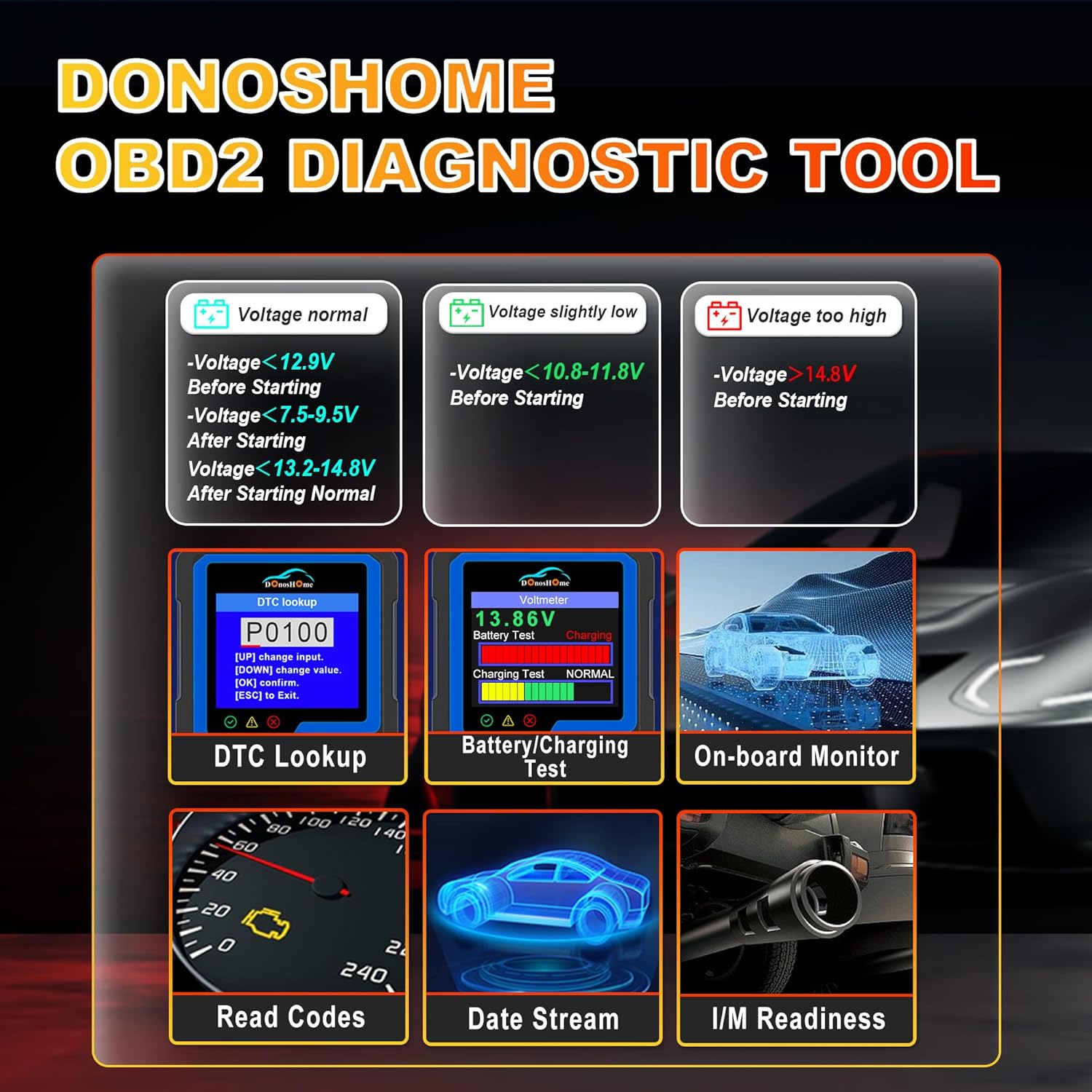
Figure 5.1: Simple plug-and-play connection process.
6. הוראות הפעלה
The DH300 features a user-friendly interface with a color screen and five buttons: Up, Down, OK, ESC, and I/M. Navigate through menus using the Up/Down buttons, confirm selections with OK, and go back with ESC. The I/M button provides quick access to readiness status.
6.1. Reading and Clearing Trouble Codes (DTCs)
To read and clear Diagnostic Trouble Codes:
- מהתפריט הראשי, בחר "אבחון" ולחץ על OK.
- Navigate to "Read Codes" and press OK. The scanner will display any stored, pending, or permanent codes.
- To clear codes, select "Erase Codes" from the diagnostic menu and press OK. Confirm the action when prompted. This will turn off the Check Engine Light.

Figure 6.1: DTC Lookup function and examples of error codes.
6.2. I/M Readiness Quick Start
The I/M Readiness function allows you to quickly check the status of emission-related monitors, which is crucial for smog tests.
- לחץ על הלחצן הייעודי I/M button on the scanner for a quick check.
- Alternatively, navigate to "I/M Readiness" from the main menu.
- The screen will display the status of various monitors (e.g., MIL, MIS, FUE, CCM, CAT, HCAT, O2S, EVAP, AIR, HRT, EGR) indicating whether they are "OK" (completed), "X" (not completed), or "N/A" (not applicable).

Figure 6.2: I/M Readiness Quick Start screen.
6.3. Voltmeter and Battery Test
The DH300 includes a voltmeter function to test your vehicle's battery and charging system.
- From the main menu, select "Voltmeter" and press OK.
- המסך יציג את עוצמת הסוללה הנוכחיתtage and charging status (e.g., Normal, Charging).
- Interpret the results based on the provided guidelines:
- כרך ידtage normal: >12.9V Before Starting, >13.2-14.8V After Starting.
- כרך ידtage slightly low: <12.9V Before Starting, <13.2V After Starting.
- כרך ידtage נמוך מדי: <10.8-11.8V Before Starting.
- כרך ידtage גבוה מדי: >14.8V After Starting.

Figure 6.3: Voltmeter and Battery Test interface.
6.4. זרם נתונים חי
View real-time sensor data from your vehicle's engine. This can help diagnose intermittent problems or verify repairs.
- From the main menu, select "Diagnose" and then "Live Data".
- The scanner will display various parameters such as engine RPM, vehicle speed, coolant temperature, O2 sensor readings, etc.
- Use the Up/Down buttons to scroll through the data. Some parameters can be graphed for better visualization.
6.5. Other Diagnostic Functions
The DH300 offers additional diagnostic capabilities:
- מבחן חיישן O2: Access results of the oxygen sensor monitor tests.
- בדיקת מערכת אידוי: התחל בדיקה של מערכת בקרת פליטות אידוי.
- בדיקת צג מובנה: View results of on-board diagnostic monitoring tests for specific components/systems.
- אחזור מספר VIN: Get vehicle information including VIN, CIN, and CVN.
- Review הִיסטוֹרִיָה: Access previously stored diagnostic data.
7. תחזוקה
To ensure the longevity and optimal performance of your DonosHome DH300 scanner:
- ניקוי: השתמשו במטלית רכה ויבשה לניקוי החלק החיצוני של הסורק. אין להשתמש בחומרי ניקוי שוחקים או ממסים.
- אִחסוּן: Store the device in a clean, dry environment, away from extreme temperatures and direct sunlight.
- טיפול בכבלים: Avoid bending or crimping the OBD2 cable excessively. Always grasp the connector, not the cable, when plugging or unplugging.
- עדכוני תוכנה: בדוק את זה של היצרן website periodically for any available software updates to ensure compatibility with newer vehicles and improved functionality.
8. פתרון תקלות
If you encounter issues while using your DH300 scanner, refer to the following common problems and solutions:
| בְּעָיָה | סיבה אפשרית | פִּתָרוֹן |
|---|---|---|
| הסורק לא נדלק. |
|
|
| הודעת "שגיאת קישור" או "שגיאת תקשורת". |
|
|
| לא ניתן לנקות קודים. |
|
|
9. מפרטים
| תְכוּנָה | פְּרָט |
|---|---|
| מותג | DonosHome |
| דֶגֶם | DH-300 |
| משקל פריט | 191 גרם |
| מידות המוצר (L x W x H) | 8 x 5 x 15 ס"מ |
| מקור כוח | Corded Electric (Vehicle OBD2 port) |
| גודל מסך | 3.2 אינץ' |
| רזולוציית תצוגה | 320x240 |
| פרוטוקולים נתמכים | CAN and all other current OBD2 protocols |
| שפות נתמכות | English, German, Spanish, French, Italian, Dutch, Finnish, Polish, Portuguese, Russian |
| תְאִימוּת | American vehicles after 1996, European vehicles after 2003, Asian vehicles after 2008 |
10. אחריות ותמיכה
DonosHome provides excellent after-sales service, including a אחריות לשנה and professional technical support for the DH300 OBD2 Auto Diagnostic Scanner.
For technical assistance, warranty claims, or any other inquiries, please contact DonosHome customer service. Refer to the contact information provided with your purchase or on the official DonosHome webאֲתַר.
Ask a question about this manual
Ask about setup, troubleshooting, compatibility, parts, safety, or missing instructions. Manuals+ will review the question and use this page’s manual context to help answer it.