
Zenwire A10
מדריך למשתמש למקרן נייד מיני Zenwire A10
דגם: A10
1. הקדמה
תודה על הרכישהasing the Zenwire A10 Mini Portable Projector. This device is designed to provide a versatile and convenient projection experience, allowing you to display content from various sources, including smartphones, tablets, and computers. Please read this manual carefully before using the projector to ensure proper operation and to maximize its lifespan.
2. הוראות בטיחות חשובות
- אל תסתכל ישירות לתוך עדשת המקרן כאשר ה-lamp פועל.
- ודאו אוורור נאות סביב המקרן כדי למנוע התחממות יתר. אין לחסום פתחי אוורור.
- השתמשו רק במתאם החשמל המצורף למקרן.
- הרחק את המקרן ממים, לחות וחומרים דליקים.
- אל תנסה לפרק או לתקן את המקרן בעצמך. פנה לאנשי שירות מוסמכים לקבלת סיוע.
- הנח את המקרן על משטח יציב וישר.
- נתק את המקרן מהחשמל במהלך סופות ברקים או כאשר אינו בשימוש למשך תקופות ארוכות.
3. תכולת החבילה
אנא בדקו את תוכן האריזה בעת פתיחת הקופסה. אם חסרים פריטים או פגומים, צרו קשר עם הקמעונאי שלכם.
- Zenwire A10 Mini Portable Projector
- שְׁלַט רָחוֹק
- מתאם מתח
- מדריך למשתמש
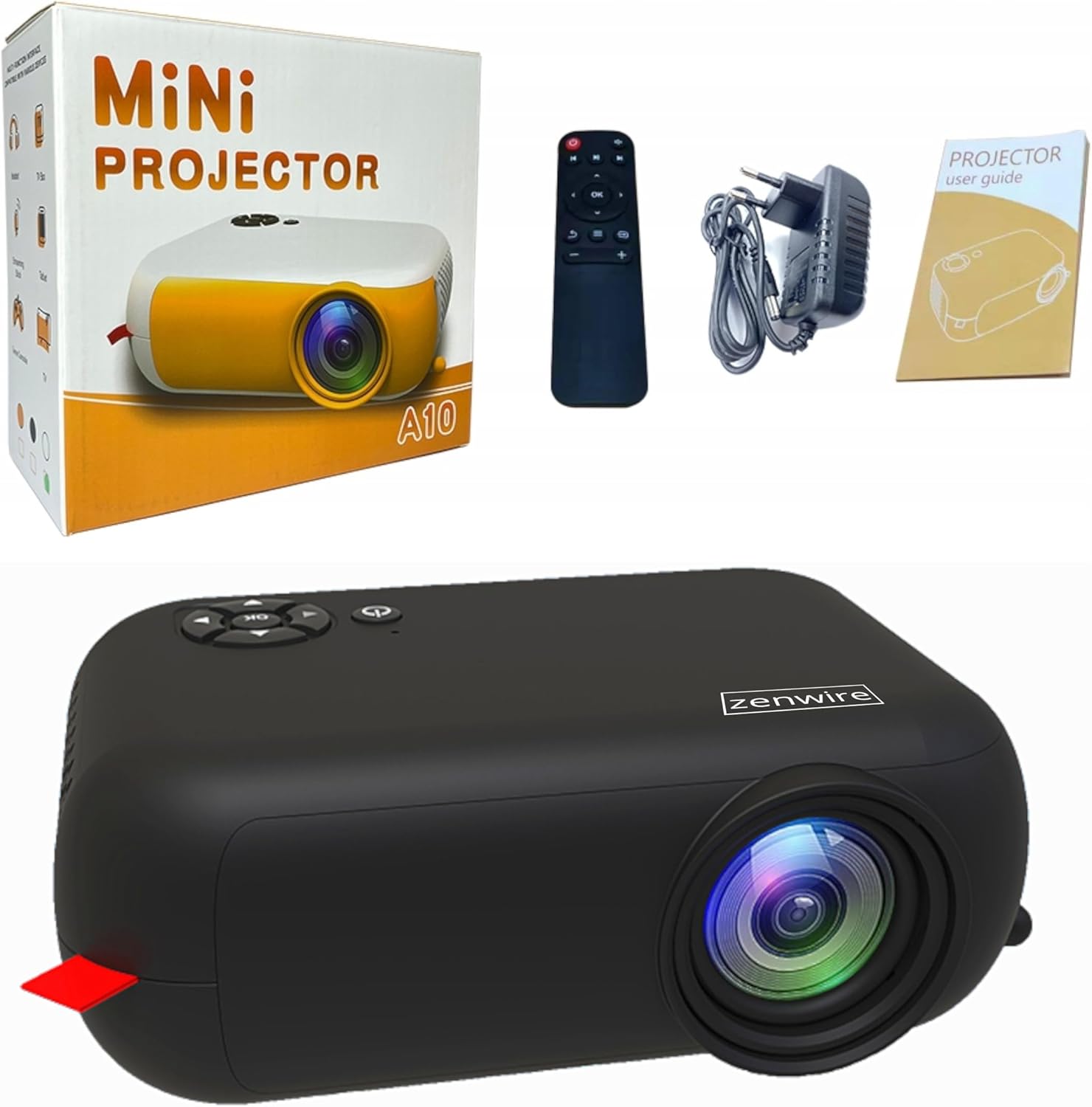
Image: Contents of the Zenwire A10 Mini Projector package, including the projector, remote control, power adapter, and user manual.
4. המוצר נגמרview
4.1 Projector Dimensions and Design
The Zenwire A10 is designed for portability, featuring a compact and lightweight form factor. Its dimensions are approximately 14cm x 10cm x 5.5cm, making it easy to carry and set up in various locations.

Image: The Zenwire A10 Mini Projector held in a hand, illustrating its compact size and portability.
4.2 יציאות ובקרות
The projector features a range of input and output ports for versatile connectivity, along with intuitive controls.

Image: Rear panel of the Zenwire A10 Mini Projector, showing the 5V-IN DC power input, IR receiver, USB port, 3.5mm audio jack, HDMI port, and SD card slot.
- 5V-IN DC: כניסת חשמל למקרן.
- IR: מקלט אינפרא אדום לשלט.
- USB: חבר התקני אחסון USB להפעלת מדיה.
- שקע אוזניות (3.5 מ"מ): חבר רמקולים חיצוניים או אוזניות.
- HDMI: Connect devices such as laptops, gaming consoles, or streaming sticks.
- SD: הכנס כרטיסי Micro SD להפעלת מדיה.
- גלגל פוקוס: Adjust image sharpness (located on the side).
- לוּחַ בַּקָרָה: Buttons on top for navigation and selection.
5. התקנה
5.1 חיבור מתח
- חבר את ספק הכוח המצורף ל 5V-IN DC יציאה במקרן.
- חבר את מתאם החשמל לשקע בקיר.
- לחץ על לחצן ההפעלה במקרן או בשלט רחוק כדי להפעיל אותו.
5.2 Placement and Focus Adjustment
- Place the projector on a stable surface or mount it according to your preference. Ensure the projector lens is facing the projection surface (wall or screen).
- Adjust the distance between the projector and the screen to achieve your desired image size. The projector supports screen sizes up to 100 inches.
- Rotate the focus wheel (typically located near the lens) until the projected image appears clear and sharp.

Image: Diagram illustrating the Zenwire A10 Mini Projector's capability to project various screen sizes, from 13 inches up to 100 inches, depending on the projection distance.
6. הפעלת המקרן
6.1 Wireless Connection (Miracast & Airplay)
The Zenwire A10 supports wireless screen mirroring via 2.4/5GHz WiFi, compatible with Android (Miracast) and iOS (Airplay) devices.
- ודא שהמקרן והמכשיר הנייד שלך מחוברים לאותה רשת Wi-Fi.
- On the projector's main menu, select the 'Screen Mirroring' or 'Wireless Display' option.
- עבור אנדרואיד: On your Android phone/tablet, enable 'Wireless Display', 'Screen Mirroring', 'Smart View', or similar function (names may vary by device). Select the projector from the list of available devices.
- עבור iOS: On your iPhone/iPad, open Control Center and tap 'Screen Mirroring'. Select the projector from the list of available devices.
- The content from your mobile device should now be mirrored on the projector screen.
6.2 חיבורים קוויים
The projector offers multiple wired input options for various devices.

Image: The Zenwire A10 Mini Projector connected to various devices such as smartphones, tablets, laptops, desktop computers, gaming consoles, and media players, highlighting its versatile connectivity.
- HDMI: Connect a laptop, PC, gaming console (e.g., Xbox, PlayStation), or streaming device (e.g., Amazon Fire TV Stick, Google Chromecast) using an HDMI cable. Select the HDMI input source on the projector.
- USB: Insert a USB flash drive or external hard drive into the USB port. The projector's media player will allow you to browse and play supported video, audio, and image files.
- מיקרו SD: Insert a Micro SD card into the SD card slot. Similar to USB, you can access media files through the projector's interface.
- יציאת שמע (שקע 3.5 מ"מ): Connect external speakers or headphones to enhance the audio experience.
6.3 ניווט בתפריט
Use the remote control or the buttons on the projector to navigate through the on-screen menu. Select input sources, adjust picture settings (brightness, contrast, color), sound settings, and other system preferences.
7. תחזוקה
- ניקוי עדשות: השתמשו במטלית רכה ונטולת סיבים המיועדת במיוחד לעדשות אופטיות כדי לנגב בעדינות את עדשת המקרן. הימנעו משימוש בחומרי ניקוי שוחקים או משימוש בכוח מופרז.
- הסרת אבק: Regularly clean the projector's exterior with a soft, dry cloth. Use a small brush or compressed air to clear dust from the ventilation openings to ensure proper airflow.
- אִחסוּן: כאשר המקרן אינו בשימוש, יש לאחסן אותו במקום קריר ויבש, הרחק מאור שמש ישיר וטמפרטורות קיצוניות. יש להשתמש באריזה המקורית או במארז מגן כדי למנוע הצטברות אבק ונזק.
8. פתרון תקלות
If you encounter issues with your Zenwire A10 projector, refer to the following common problems and solutions:
| בְּעָיָה | סיבה אפשרית | פִּתָרוֹן |
|---|---|---|
| אין תמונה על המסך | חשמל לא מחובר; מקור קלט שגוי; המכשיר אינו מחובר כראוי. | Check power cable; Select correct input source (HDMI, USB, etc.); Reconnect source device. |
| התמונה מטושטשת | המיקוד לא מותאם; המקרן קרוב/רחוק מדי מהמסך. | Adjust the focus wheel; Adjust projection distance. |
| אין קול | Volume too low; Muted; External audio device not connected/selected. | Increase volume; Unmute; Check external speaker connection or select internal speaker. |
| בעיות בחיבור אלחוטי | Not on same Wi-Fi network; Device not compatible; Interference. | Ensure both devices are on the same Wi-Fi; Verify device compatibility; Try moving closer to Wi-Fi router. |
9. מפרטים
| תכונה | פְּרָט |
|---|---|
| מותג | Zenwire |
| מספר דגם | A10 |
| סוג מוצר | Compact and Portable Projector |
| רזולוציה מקורית | 480 x 360p |
| רזולוציית תצוגה מקסימלית | 1920 x 1080 (Full HD) |
| בְּהִירוּת | 1800lm / 60 ANSI |
| יחס ניגודיות | 2000:1 |
| סוג תצוגה | LED |
| טכנולוגיית קישוריות | Wi-Fi (2.4/5GHz), HDMI, USB, Micro SD, 3.5mm Audio Jack |
| תכונות אלחוטיות | מיראקסט, איירפליי |
| מכשירים תואמים | Smartphones (Android, iOS), Tablets, Laptops, PCs, Gaming Consoles |
| שימושים מומלצים | קולנוע ביתי |
| מידות (בערך) | 14 ס"מ על 10 ס"מ על 5.5 ס"מ |
10. אחריות ותמיכה
The Zenwire A10 Mini Portable Projector comes with a standard manufacturer's warranty. For specific warranty terms and conditions, please refer to the documentation provided at the time of purchase or contact your retailer. For technical support or service inquiries, please reach out to Zenwire customer service through their official webאתר או פרטי הקשר שסופקו עם המוצר שלך.
Ask a question about this manual
Ask about setup, troubleshooting, compatibility, parts, safety, or missing instructions. Manuals+ will review the question and use this page’s manual context to help answer it.