
Asus A303 TG H1 GEN II MIKU
ASUS TUF Gaming H1 GEN II Hatsune Miku Edition Wired Gaming Headset User Manual
Model: A303 TG H1 GEN II MIKU
מָבוֹא
Thank you for choosing the ASUS TUF Gaming H1 GEN II Hatsune Miku Edition Wired Gaming Headset. This manual provides essential information for setting up, operating, maintaining, and troubleshooting your new headset. Please read it thoroughly to ensure optimal performance and longevity of your device.
המוצר נגמרview
The ASUS TUF Gaming H1 GEN II Hatsune Miku Edition headset is designed for immersive gaming audio and clear communication. It features 40mm ASUS Essence drivers, virtual 7.1 surround sound, and a TeamSpeak-certified unidirectional microphone. Its lightweight design and durable ear cushions ensure comfort during extended use.

Figure 1: ASUS TUF Gaming H1 GEN II Hatsune Miku Edition Headset with in-line controls.
תכונות עיקריות:
- עיצוב קל משקל וארגונומי: Weighing approximately 297 grams with a metal suspension headband for comfortable, extended gaming sessions.
- איכות שמע יוצאת דופן: Equipped with 40mm ASUS Essence drivers and virtual 7.1 surround sound for immersive in-game audio.
- תקשורת משופרת: Features a TeamSpeak-certified unidirectional microphone for clear voice chat.
- Durable Ear Cushions: Easy-to-remove and resistant to alcohol and hypochlorous acid for convenient daily cleaning.
- בקרות מקוונות: Convenient controls for volume adjustment, audio mute, virtual 7.1 surround sound activation, and lighting.
- Eye-catching Style: Incorporates Hatsune Miku’s signature teal color and lighting for a distinctive look.
- תאימות מרובת פלטפורמות: Connects via USB Type-A, compatible with PCs, PlayStation 4, and PlayStation 5.
תוכן החבילה
ודא שכל הפריטים נמצאים במצב תקין בעת פתיחת החבילה.
- ASUS TUF Gaming H1 GEN II Hatsune Miku Edition Gaming Headset
- מדריך למשתמש
- Additional accessories (refer to packaging for specific items like stickers or promotional materials)
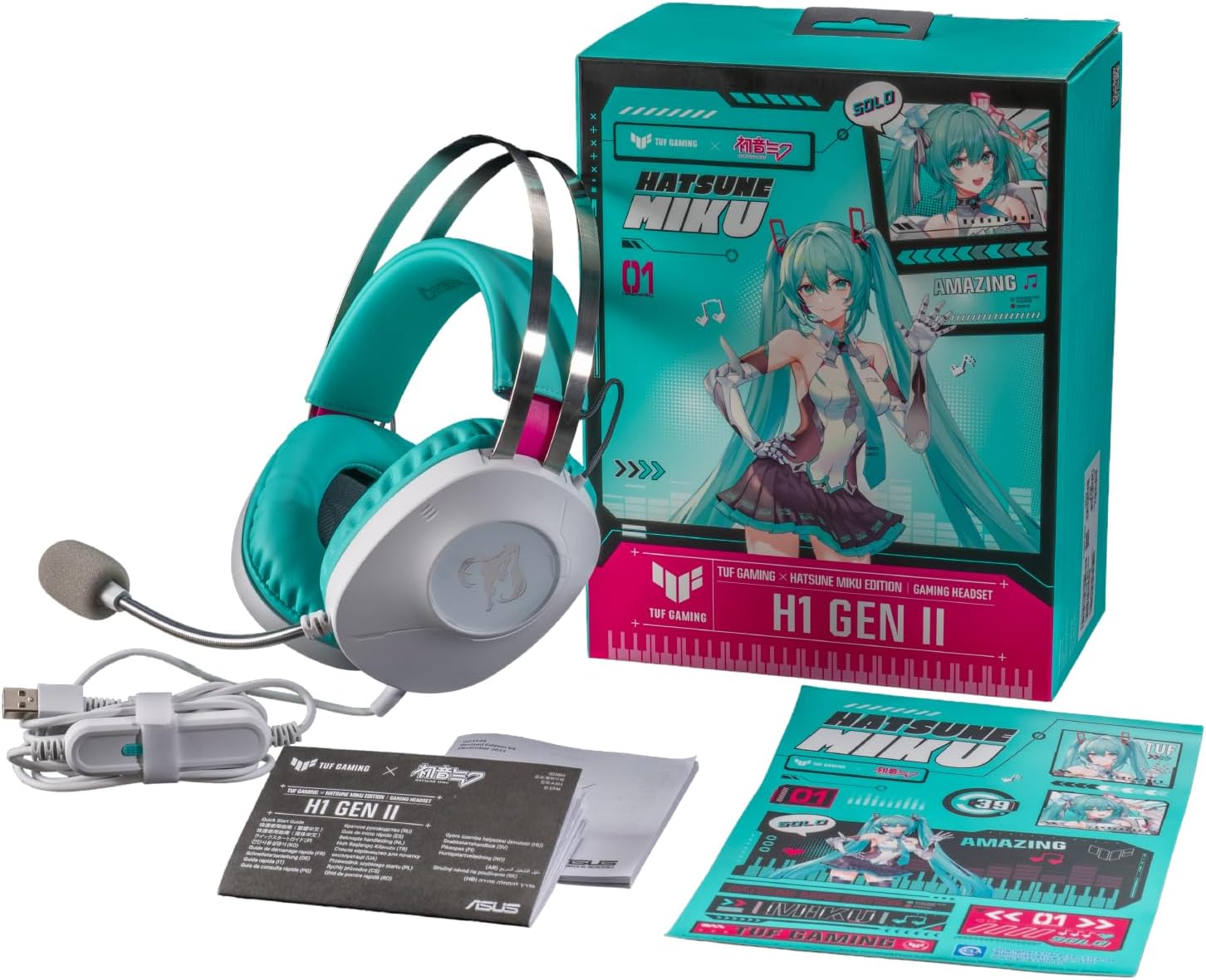
Figure 2: Contents of the headset package, including the headset, manual, and stickers.
הגדרה
חיבור האוזניות:
- Locate the USB Type-A connector on your headset cable.
- Plug the USB Type-A connector into an available USB port on your PC, PlayStation 4, or PlayStation 5.
- The headset should be automatically recognized by your device. You may need to select it as the default audio input/output device in your system settings.
כוונון מיקרופון:
- The unidirectional microphone is designed for clear voice pickup. Position the microphone boom arm close to your mouth for optimal clarity.
- Use the in-line controls to mute or unmute the microphone as needed.
הפעלת האוזנייה
בקרות מקוונות:
The headset features convenient in-line controls for quick adjustments during use.
- בקרת עוצמת הקול: Use the scroll wheel or buttons to adjust the audio volume.
- השתקת אודיו: Press the dedicated button to mute or unmute the headset audio.
- השתקת מיקרופון: Press the dedicated button to mute or unmute the microphone.
- סאונד סראונד 7.1 וירטואלי: Activate or deactivate virtual 7.1 surround sound for an immersive audio experience.
- בקרת תאורה: Adjust or toggle the headset's lighting effects.

Figure 3: Headset with visible in-line controls for volume, mute, and 7.1 surround sound.

Figure 4: Close-up of the headset earcup, emphasizing the 40mm ASUS Essence drivers for exceptional audio quality.

Figure 5: Headset with its TeamSpeak-certified unidirectional microphone for clear communication.
תַחזוּקָה
ניקוי האוזניות:
- השתמש במטלית רכה ויבשה כדי לנגב את החלק החיצוני של האוזניות.
- The ear cushions are designed to be easy to remove and are resistant to alcohol and hypochlorous acid. For thorough cleaning, gently remove the ear cushions and wipe them with a suitable cleaning solution. Ensure they are completely dry before reattaching.
- Avoid using abrasive cleaners or solvents that may damage the headset's finish.
אִחסוּן:
- יש לאחסן את האוזניות במקום קריר ויבש, הרחק מאור שמש ישיר וטמפרטורות קיצוניות.
- הימנעו מהנחת חפצים כבדים על האוזניות כדי למנוע נזק.
פתרון בעיות
| בְּעָיָה | סיבה אפשרית | פִּתָרוֹן |
|---|---|---|
| אין שמע מהאוזניות |
|
|
| המיקרופון לא עובד |
|
|
| Virtual 7.1 surround sound not working |
|
|
מפרטים
| תכונה | פְּרָט |
|---|---|
| דֶגֶם | A303 TG H1 GEN II MIKU |
| קישוריות | חוטי (USB סוג-A) |
| נהגים | 40mm ASUS Essence Drivers |
| עַכָּבָּה | 32 אוהם |
| תגובת תדר | 20 הרץ - 20 קילוהרץ |
| מִיקרוֹפוֹן | TeamSpeak-certified unidirectional microphone |
| צליל היקפי וירטואלי | סאונד סראונד וירטואלי 7.1 |
| מִשׁקָל | כ-297 גרם (0.7 ליברות) |
| כריות אוזניים | Durable, easy-to-remove, alcohol- and hypochlorous acid-resistant |
| בקרות | In-line: Volume, Audio Mute, Virtual 7.1 Surround Sound, Lighting |
| מכשירים תואמים | Desktops, Laptops, PlayStation 4, PlayStation 5 |
| חוֹמֶר | מתכת, פלסטיק |
| צֶבַע | White with Teal accents |
אחריות ותמיכה
For warranty information, please refer to the warranty card included in your product packaging or visit the official ASUS support website. You can find drivers, FAQs, and contact information for technical support there.
תמיכה של ASUS Webאֲתַר: www.asus.com/support/
Ask a question about this manual
Ask about setup, troubleshooting, compatibility, parts, safety, or missing instructions. Manuals+ will review the question and use this page’s manual context to help answer it.