
1. הקדמה
Thank you for choosing the OREiN 4500LM/30W Hardwired Motion Sensor LED Flood Light. This manual provides essential information for the safe installation, operation, and maintenance of your new flood light. Please read these instructions thoroughly before installation and retain them for future reference.
2. מידע בטיחות
אַזהָרָה: סכנת התחשמלות. נתק את החשמל מהנתיך או מפסק החשמל לפני התקנה או שירות.
- Installation must be performed by a qualified electrician or person familiar with the construction and operation of the product and the hazards involved.
- ודא את כרך האספקהtage נכון (120V AC).
- אין להתקין ליד חומרים דליקים.
- יש ללבוש משקפי מגן וכפפות במהלך ההתקנה.
- This fixture is designed for outdoor use and is IP65 waterproof rated.
3. תכולת החבילה
ודא שכל הרכיבים קיימים לפני תחילת ההתקנה:
- גוף תאורה (1)
- סוגר הרכבה (1)
- ברגים (בגדלים שונים)
- אגוזי תיל (3)
- מדריך הוראות (1)
4. המוצר נגמרview
The OREiN Flood Light features three adjustable LED heads and a motion sensor for comprehensive outdoor illumination and security.
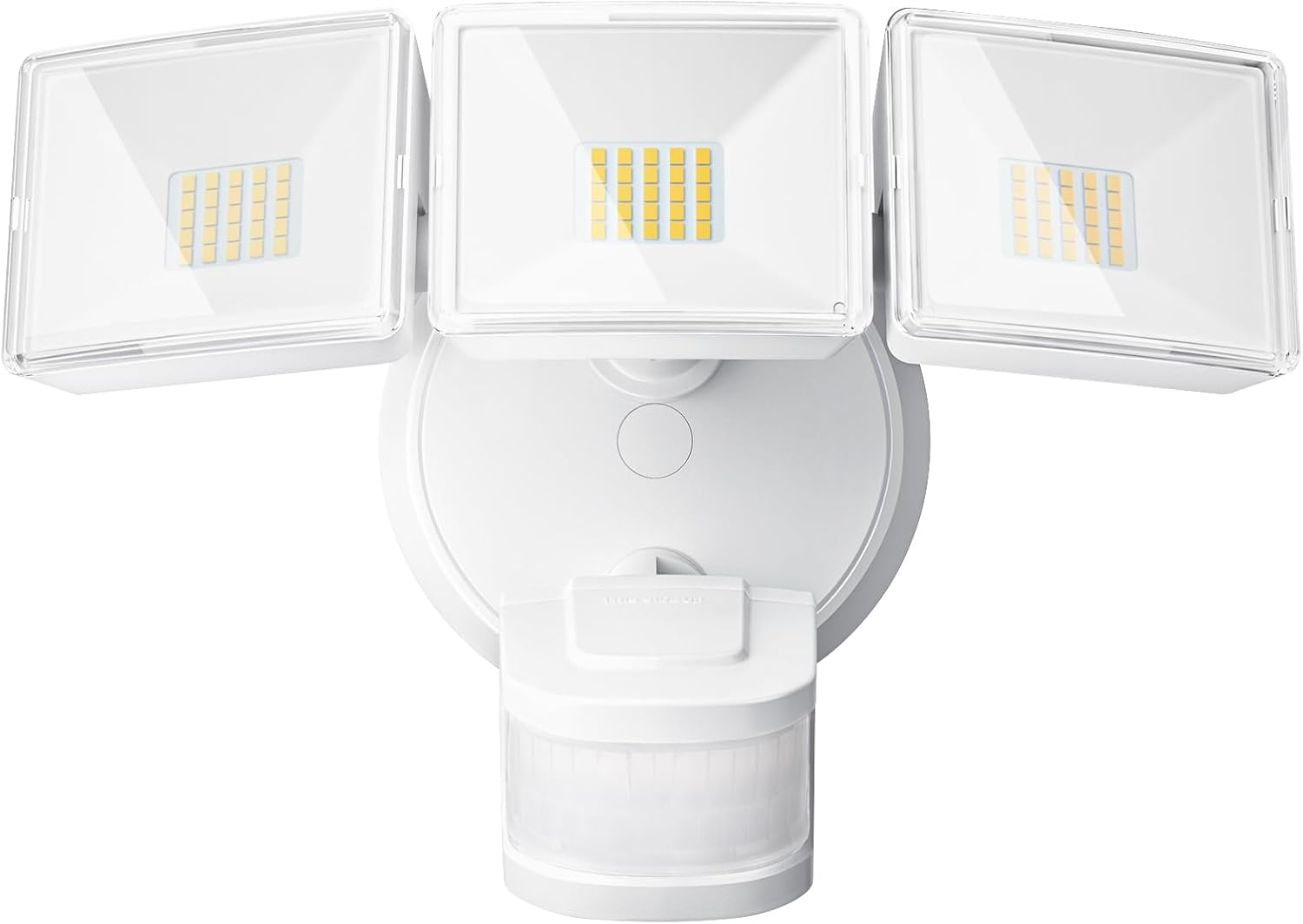
איור 1: חזית view of the OREiN 4500LM/30W Hardwired Motion Sensor LED Flood Light, showing the three adjustable light heads and the motion sensor below.

Figure 2: Diagram illustrating the flexible adjustment angles of the three light heads (340°) and the motion sensor (270° horizontally, 120° vertically).
5. התקנה
This flood light is designed for hardwired installation on a standard junction box (2.75” / 3.5”). It supports both wall and eave mounting.
שלבי התקנה:
- כבה את הכוח: Disconnect power at the circuit breaker before starting.
- תושבת הרכבה מאובטחת: Attach the metal mounting bracket to your existing junction box using the provided screws.
- חיבור חוטים: Connect the household wiring to the fixture wires using the provided wire nuts. Typically, black to black (live), white to white (neutral). This light belongs to secondary luminaires, so no extra ground wire connection is needed.
- אבטח את גוף התאורה: Align the light fixture with the mounting bracket and secure it with the appropriate screws.
- Insert Waterproof Plug: Ensure the waterproof plug is properly inserted to prevent moisture ingress.
- כוונון ראשי התאורה והחיישן: Position the three light heads and the motion sensor to cover the desired areas.
- החזר כוח: הפעל מחדש את החשמל במפסק החשמל.
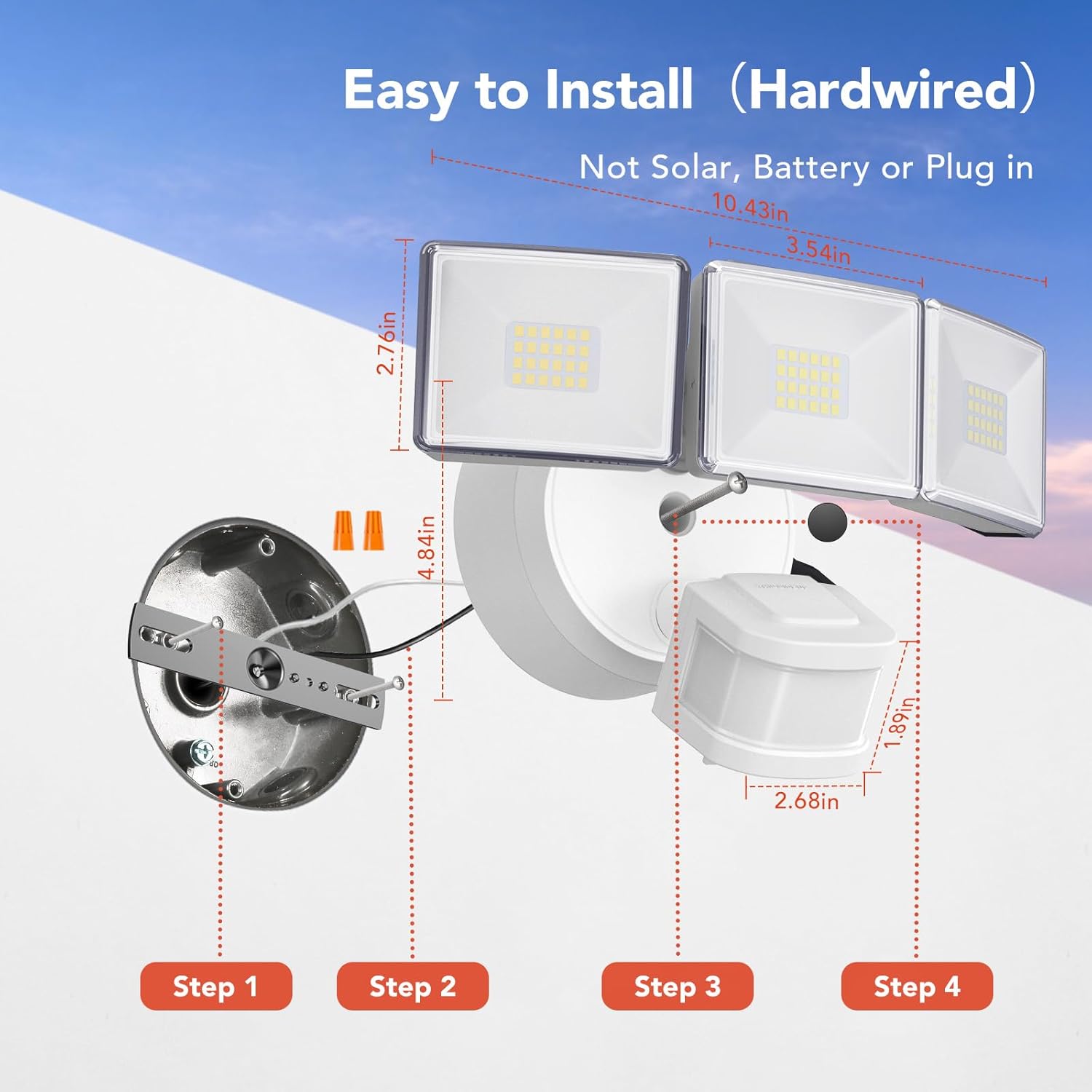
Figure 3: Step-by-step diagram for hardwired installation, showing mounting bracket, wire connections, and securing the fixture.

איור 4: דוגמהamples of wall-mounted and soffit-mounted installations for the flood light.
6. מצבי הפעלה
The OREiN Flood Light offers three operational modes, selectable via a switch on the motion sensor unit:
- מצב מבחן: The light turns on for 5 seconds when motion is detected, regardless of ambient light. Useful for testing sensor coverage during installation.
- מצב דמדומים עד שחר (D2D): The light automatically turns on at night and off during the day. In this mode, the motion sensing function is inactive.
- מצב אוטומטי: The light turns on only at night when motion is detected. The duration the light stays on (1, 5, or 10 minutes) can be adjusted.
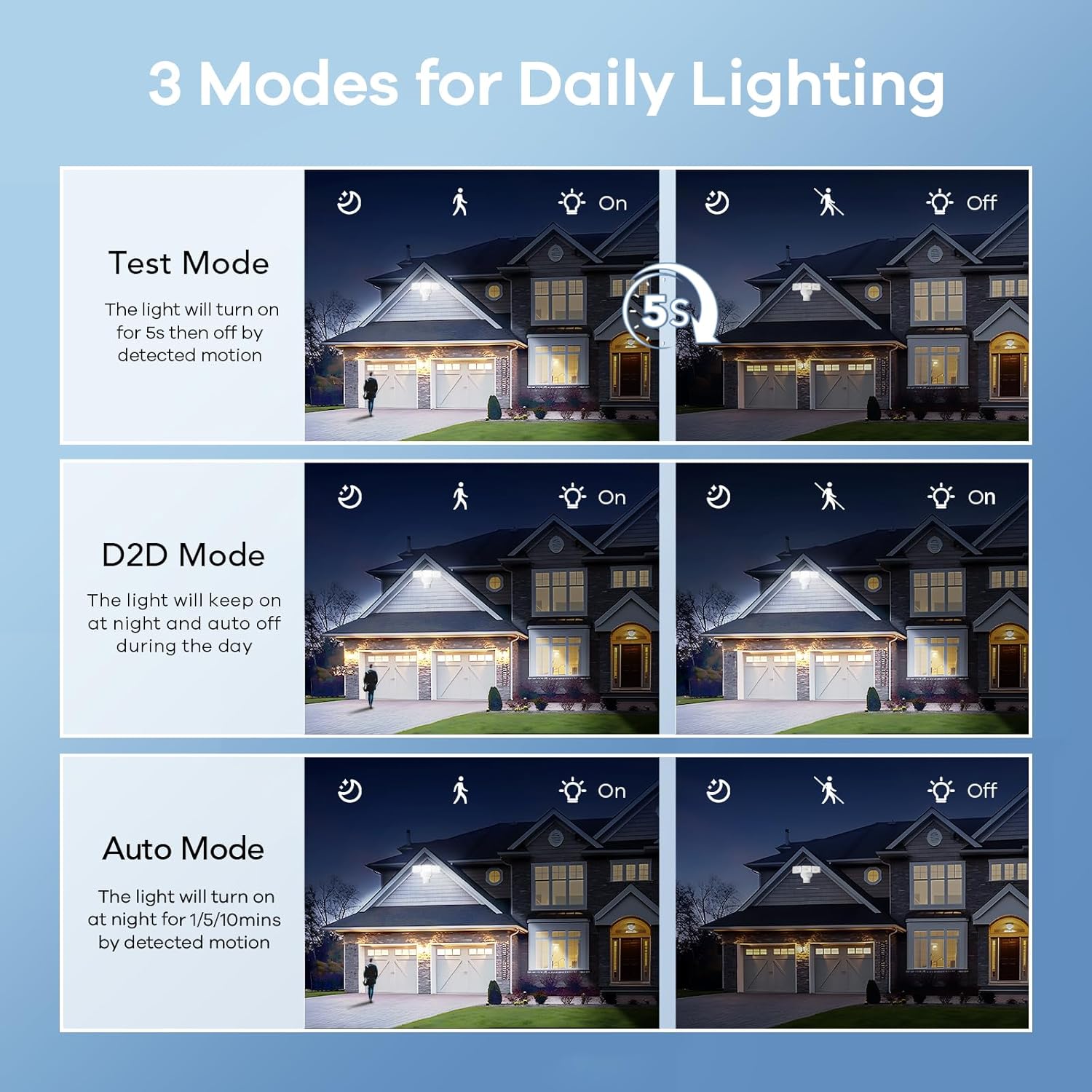
Figure 5: Visual representation of Test, Dusk to Dawn, and Auto modes in operation.

Figure 6: Illustration of the Dusk to Dawn mode, showing the light automatically activating when surroundings are dark and deactivating when bright.
7. התאמת הגדרות
The motion sensor unit includes dials for adjusting the light's duration and sensitivity:
- Time Adjustment (Timer Minutes): Set the duration the light stays on after motion detection in Auto Mode (1, 5, or 10 minutes).
- Sensitivity Adjustment (Sensitivity): Adjust the motion detection range (10ft, 20ft, 30ft, 40ft). Max setting provides up to 40ft detection.

Figure 7: Close-up of the motion sensor with dials for adjusting mode, timer minutes, and sensitivity.
Video 1: Official OREiN video demonstrating the motion sensor outdoor lights, including features like wide detection, adjustable sensing distance, heat dissipation, adjustable time/sensitivity, flexible adjustment, and easy installation.
8. תחזוקה
- ניקוי: נקה את המתקן עם רך, דamp בַּד. אין להשתמש בחומרי ניקוי שוחקים או ממסים.
- בְּדִיקָה: Periodically check for any damage to the wiring or housing.
- החלפת נורה: The LED bulbs are integrated and not user-replaceable. The fixture has a lifespan of up to 50,000 hours.

Figure 8: Illustration demonstrating the IP65 waterproof rating, showing the light functioning reliably under rain.

Figure 9: Diagram showing the heat dissipation design of the light heads, contributing to the product's longevity.
9. פתרון תקלות
| בְּעָיָה | סיבה אפשרית | פִּתָרוֹן |
|---|---|---|
| האור לא נדלק. | No power; incorrect wiring; sensor settings. | Check circuit breaker. Verify wiring connections. Adjust sensor mode/sensitivity. |
| האור נשאר דולק ברציפות. | Sensor in D2D mode; continuous motion detected; sensitivity too high. | Switch to Auto mode. Check for constant heat sources or movement in detection zone. Reduce sensitivity. |
| האור נדלק במהלך היום. | Sensor in Test mode; ambient light sensor blocked. | Switch to Auto or D2D mode. Ensure the ambient light sensor is not obstructed. |
| Motion detection range is too short/long. | Sensitivity setting incorrect. | Adjust the sensitivity dial on the motion sensor. |
10. מפרטים
| תכונה | פְּרָט |
|---|---|
| שם הדגם | OL3600354 |
| מותג | OREiN |
| בְּהִירוּת | 4500 לומן |
| מהtage | 30 וואט |
| טמפרטורת צבע | 5000 קלווין (אור יום) |
| כרך ידtage | 120 וולט |
| חוֹמֶר | אקרילוניטריל בוטאדיאן סטירן (ABS) |
| רמת עמידות במים | IP65 עמיד למים |
| זווית זיהוי תנועה | 240° |
| מרחק זיהוי תנועה | עד 40 רגל |
| כוונון ראש קל | כיסוי של 340° |
| אורך חיים משוער | 50,000 שעות |
| סוג התקנה | Hardwired (Wall Mount, Eave Mount) |
| מידות המוצר | אורך 7.6 אינץ', רוחב 8 אינץ', גובה 6 אינץ' |
| משקל פריט | 1.87 פאונד |
11. אחריות ותמיכה
OREiN offers an extended warranty for this product. For specific warranty details, please refer to the product packaging or contact OREiN customer support.
תמיכת לקוחות:
- For assistance, contact OREiN directly through Amazon or search for the brand name online.
- If you encounter any issues, it is recommended to contact customer support before initiating a return.

Figure 10: Image representing OREiN customer support, available for assistance.