
1. המוצר נגמרview
The Electro-Harmonix Pico Triboro Bridge is a versatile multi-mode drive pedal designed to provide a wide range of tonal possibilities. It features three distinct modes: Overdrive, Distortion, and Fuzz, allowing musicians to bridge any gap in their gain requirements. With its powerful EQ capabilities, input contouring, and compact pico-sized footprint, the Triboro Bridge can serve as a foundational element for your tone or offer a fresh alternative to your existing drive pedals.
תכונות עיקריות:
- Wide range of saturation with Overdrive, Distortion, and Fuzz modes.
- Treble control boosts or cuts high end in Overdrive and Distortion modes.
- Bass control boosts or cuts low end in Overdrive and Distortion modes.
- Fuzz mode features a dedicated Gate control and a Low Pass Filter.
- Includes a power adapter for immediate use.

תמונה: בזווית view of the Electro-Harmonix Pico Triboro Bridge pedal, highlighting its compact size and control knobs.
2. הגדרה וחיבורים
Follow these steps to connect your Pico Triboro Bridge pedal to your audio setup:
- חיבור חשמל: Connect the included 9V DC power adapter to the power jack on the top of the pedal. Ensure the power supply meets the pedal's specifications (9V DC, center-negative).
- חיבור קלט: חברו את כלי הנגינה שלכם (גיטרה, בס וכו') לשקע ה-INPUT בצד ימין של הדוושה באמצעות כבל כלי נגינה סטנדרטי בגודל 1/4 אינץ'.
- חיבור פלט: חבר את שקע ה-OUTPUT בצד שמאל של הדוושה לשקע שלך amplifier or the next pedal in your signal chain using a standard 1/4-inch instrument cable.
- הפעלה: Once all connections are secure, plug the power adapter into a wall outlet. The pedal's LED will illuminate when active.
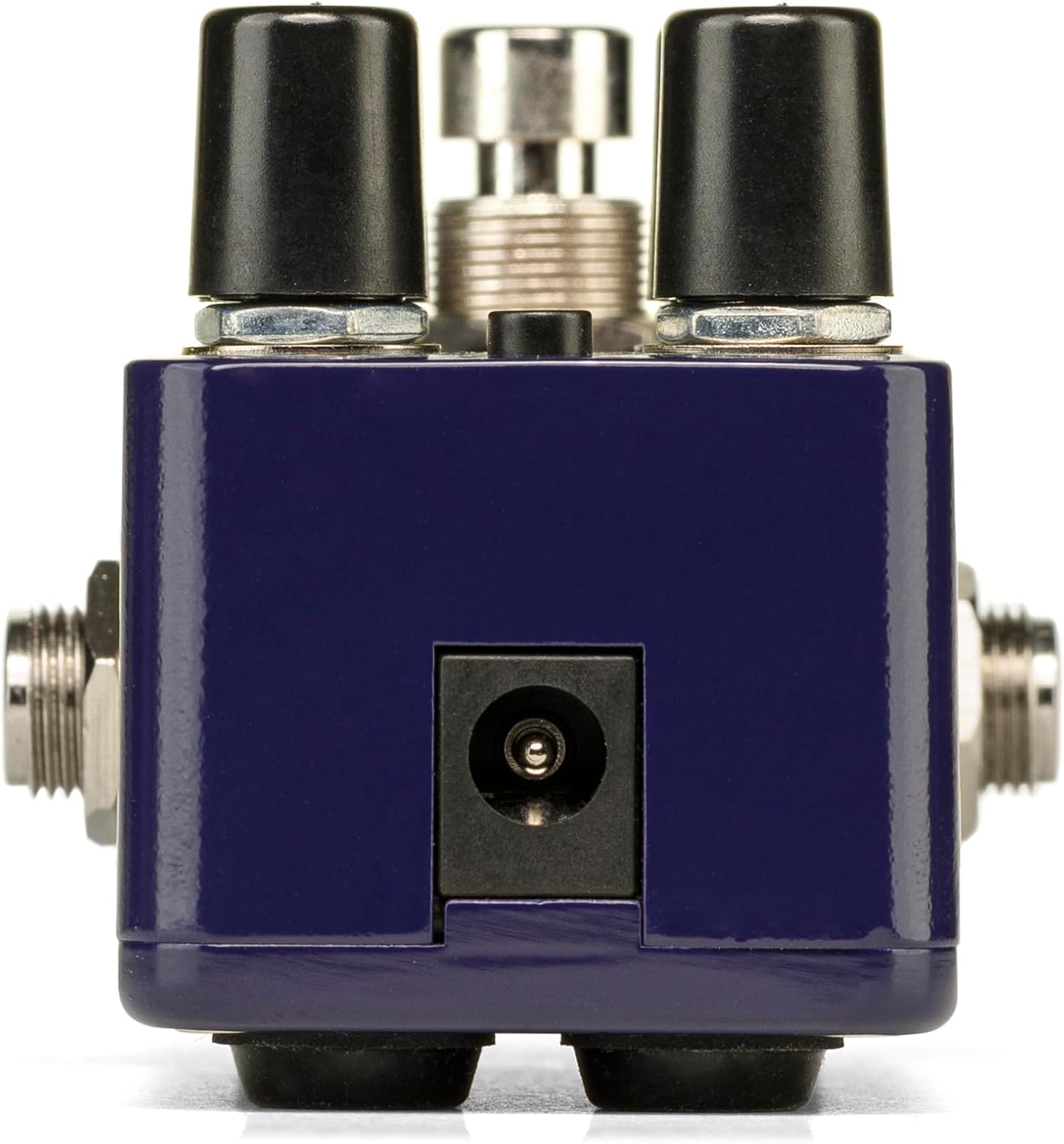
תמונה: אחורי view of the Pico Triboro Bridge pedal, showing the power input jack for connecting the power adapter.
3. בקרות ותפעול
The Pico Triboro Bridge features intuitive controls for shaping your desired drive tone. Understanding each knob and button is key to unlocking its full potential.
ידיות שליטה:
- VOL (עוצמת קול): Controls the overall output level of the pedal. Adjust this to balance the effect's volume with your bypassed signal or other effects.
- לְהַשִׂיג: Controls the intensity of the drive, distortion, or fuzz effect. Higher settings result in more saturation and sustain.
- BASS / GATE:
- In Overdrive and Distortion modes, this knob functions as a בס control, allowing you to boost or cut low frequencies.
- In Fuzz mode, this knob functions as a שַׁעַר control, adjusting the noise gate threshold to eliminate unwanted noise and feedback.
- TREBLE / TONE:
- In Overdrive and Distortion modes, this knob functions as a לְשַׁלֵשׁ control, allowing you to boost or cut high frequencies.
- In Fuzz mode, this knob functions as a טוֹן control, specifically a Low Pass Filter, for extreme tonal variations and shaping the fuzz character.
כפתור TYPE:
The small button labeled "TYPE" at the top of the pedal is used to select between the three primary drive modes and to engage the Input Contour Mode.
- בחירת מצב: Pressing the TYPE button cycles through the Overdrive (green LED), Distortion (orange LED), and Fuzz (red LED) modes.
- Input Contour Mode: Press and hold the TYPE button to enable or disable the Input Contouring EQ. When active, this mode applies a specific EQ to the input signal for a tighter, more modern character across all drive modes.

תמונה: למעלה view of the Pico Triboro Bridge pedal, illustrating the layout of the VOL, GAIN, BASS/GATE, TREBLE/TONE knobs, and the TYPE button.
4. Drive Modes Explained
The Pico Triboro Bridge offers three distinct drive modes, each with its unique sonic characteristics:
- Overdrive Mode (Green LED): This mode provides a gain spectrum ranging from low to mid-level saturation with an open voicing. It is ideal for use as a subtle "always-on" drive, adding warmth and grit, or as a solo boost to push your ampחיים יותר.
- Distortion Mode (Orange LED): Engaging this mode provides additional gain-staging, delivering tones from crunchy rhythms to fully saturated leads. It offers a more aggressive and compressed sound compared to the Overdrive mode.
- Fuzz Mode (Red LED): This mode transforms the pedal into a high-gain fuzz effect with over-the-top saturation. The BASS knob becomes a GATE control, and the TREBLE knob becomes a Low Pass Filter, allowing for unique and extreme tonal variations specific to fuzz.
Video: Official demonstration of the Electro-Harmonix Pico Triboro Bridge pedal, showcasing its Overdrive, Distortion, and Fuzz modes, along with an overview of its controls and input contouring feature. This video highlights the tonal versatility of the pedal for both guitar and bass.
5. מפרטים
| תכונה | מִפרָט |
|---|---|
| משקל פריט | 1.21 פאונד (0.55 קילוגרם) |
| מידות המוצר | מידות אורך 3.65 אינץ' x רוחב 2 אינץ' x גובה 2 אינץ' (3.65 x 2 x 2 אינץ') |
| מספר דגם של פריט | PICO TRIBORO |
| חומר גוף | פלסטיק, מתכת |
| צֶבַע | כְּחוֹל |
| סוג מחבר | Power Adapter (1/4-inch Audio Hardware Interface) |
| פורמט אותות | אנלוגי |
| מקור כוח | חשמלי עם כבלים |
| כרך ידtage | 9 וולט |
6. תחזוקה
To ensure the longevity and optimal performance of your Pico Triboro Bridge pedal, follow these maintenance guidelines:
- ניקוי: Use a soft, dry cloth to clean the pedal's exterior. Avoid abrasive cleaners, solvents, or excessive moisture, as these can damage the finish or internal components.
- אִחסוּן: Store the pedal in a cool, dry place away from direct sunlight, extreme temperatures, and high humidity when not in use.
- חיבורים: בדקו מעת לעת את כל חיבורי הכבלים לאיתור בלאי. ודאו שהשקעים נקיים מאבק ופסולת.
- ספק כוח: Always use the recommended 9V DC center-negative power adapter. Using an incorrect power supply can damage the unit and void the warranty.
7. פתרון תקלות
If you encounter issues with your Pico Triboro Bridge pedal, refer to the following common troubleshooting steps:
- אין צליל:
- בדוק את כל חיבורי הכבלים (מהמכשיר לקלט, מהפלט לפלט) amp).
- ודא שמתאם החשמל מחובר כראוי ופועל כראוי.
- ודא שהכלי שלך ו ampהמתקן פועל כהלכה.
- Check the pedal's bypass status; if it's true bypass, sound should pass even if the pedal is off.
- צליל חלש או מעוות (באופן בלתי צפוי):
- Check the GAIN and VOL knob settings.
- Ensure the correct drive mode (Overdrive, Distortion, Fuzz) is selected for your desired sound.
- If in Fuzz mode, adjust the GATE and TONE (Low Pass Filter) knobs, as extreme settings can significantly alter the sound.
- Test with different cables and power supplies to rule out faulty accessories.
- רעש/זמזום מוגזם:
- Ensure you are using a regulated, isolated power supply.
- If in Fuzz mode, adjust the GATE knob to reduce unwanted noise.
- בדוק אם יש לולאות הארקה במערכת שלך.
- הרחק את הדוושה משנאים או מקורות אחרים של הפרעות אלקטרומגנטיות.
8. אחריות ותמיכה
Electro-Harmonix products are designed for reliability and performance. For warranty information, product registration, or technical support, please refer to the official Electro-Harmonix webאתר או צרו קשר עם מחלקת שירות הלקוחות שלהם. שמרו את קבלת הרכישה כהוכחת קנייה לתביעות אחריות.
לסיוע נוסף, בקר בכתובת: www.ehx.com