
1. הקדמה
Welcome to the KRUPS Sensation C10 EA910A10 Superautomatic Coffee Machine user manual. This guide provides comprehensive instructions for the safe and efficient operation, maintenance, and troubleshooting of your new coffee machine. Please read this manual thoroughly before first use and keep it for future reference.
2. הוראות בטיחות חשובות
כדי להבטיח פעולה בטוחה, יש להקפיד תמיד על אמצעי הזהירות הבסיסיים הבאים:
- קרא את כל ההוראות לפני השימוש במכשיר.
- אין לטבול את המכשיר, כבל החשמל או התקע במים או בנוזלים אחרים.
- מכשיר זה מיועד לשימוש ביתי בלבד.
- ודא את הכרךtagעוצמת הקול המצוינת על המכשיר תואמת את עוצמת החשמל של החשמל שלך.tage.
- תמיד נתקו את המכשיר משקע החשמל לפני ניקויו או כאשר אינו בשימוש.
- אין להפעיל כל מכשיר עם כבל או תקע פגומים, או לאחר שהמכשיר פגום או ניזוק בכל דרך שהיא.
- הרחק ילדים מהמכשיר במהלך פעולתו.
- השתמש רק באביזרים המומלצים על ידי היצרן.
- Avoid contact with hot surfaces, such as the coffee spouts or steam nozzle.
3. רכיבי המוצר
Familiarize yourself with the main components of your KRUPS Sensation C10 EA910A10 coffee machine:
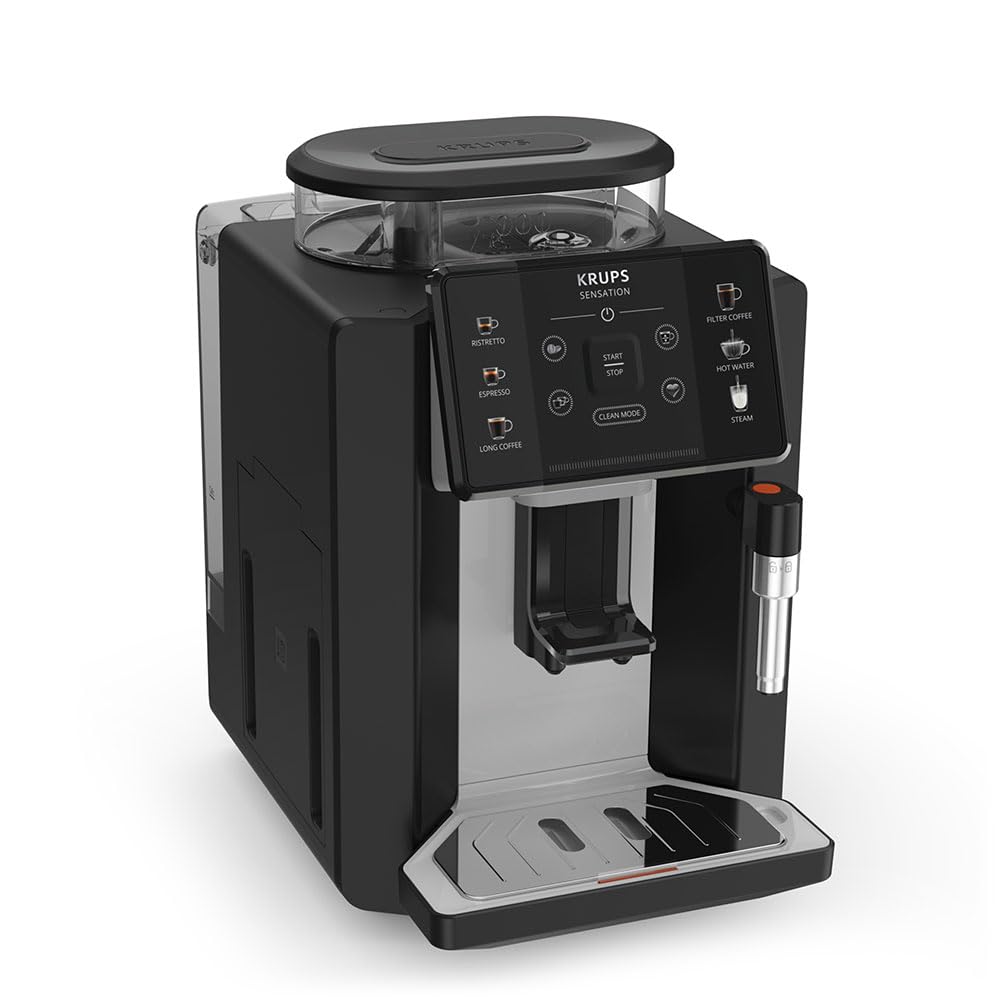
תמונה: קדמי-ימין view of the KRUPS Sensation C10 EA910A10 Superautomatic Coffee Machine, showing the bean hopper, control panel, coffee spouts, and drip tray. Two cups of coffee are being dispensed.
- מיכל שעועית עם מכסה
- מיכל מים
- Control Panel (Touchscreen)
- Coffee Spouts (Adjustable)
- מגש טפטוף עם רשת
- מיכל דרי קפה
- Steam Nozzle / Hot Water Spout
- חיבור כבל חשמל
4. הגדרה ראשונית
4.1. פורקים
- הוציאו בזהירות את מכונת הקפה מהאריזה שלה.
- הסירו את כל חומרי האריזה, כולל סרטי מגן ומדבקות.
- הניחו את המכונה על משטח יציב, שטוח ועמיד בחום, הרחק ממקורות מים וחום.
4.2. הכנה לשימוש ראשון
- שטפו את מיכל המים: Remove the water tank, rinse it thoroughly with fresh water, and fill it to the MAX level. Reinsert the tank securely.
- ממלאים את הופר שעועית: פתחו את מכסה מיכל הפולים ומלאו אותו בפולי קפה טריים. אין להשתמש בקפה טחון במיכל הפולים.
- חיבור חשמל: Plug the power cord into the machine and then into a grounded electrical outlet.
- מחזור שטיפה ראשוני: The machine will prompt you to perform an initial rinse cycle. Follow the instructions on the touchscreen. This primes the system and cleans internal components.
5. הוראות הפעלה
5.1. לוח הבקרה נגמרview

Image: A hand interacting with the intuitive touchscreen control panel of the KRUPS Sensation C10 EA910A10, highlighting its ease of use.
The KRUPS Sensation C10 EA910A10 features an intuitive touchscreen control panel for easy operation. Key functions include:
- ריסטרטו: For a very short, concentrated espresso.
- אספרסו: For a classic espresso shot.
- קפה ארוך: For a larger volume of coffee.
- קפה פילטר: For a milder, filter-style coffee.
- מים חמים: לתה או משקאות חמים אחרים.
- קִיטוֹר: להקצפת חלב.
- התחלה/עצירה: To begin or end a brewing cycle.
- מצב נקי: Initiates cleaning cycles.
- Coffee Strength/Volume Adjustment: Icons to customize your drink.
5.2. הכנת קפה
To brew a coffee beverage:
- ודאו שמיכל המים מלא ושמיכל הפולי פולי הקפה מכיל מספיק פולים.
- Place a cup under the coffee spouts. Adjust the spout height if necessary.
- Select your desired coffee type (e.g., Espresso, Long Coffee) from the touchscreen.
- Adjust coffee strength and volume using the on-screen options if desired.
- Press the "Start" button to begin brewing.
- המכונה תטחון את הפולים, תכין את הקפה ותמזוג אותו לספל שלך.
- The machine will automatically stop when the brewing is complete.

Image: A selection of coffee beverages, including espresso, long coffee, and a milk-based drink, demonstrating the versatility of the KRUPS Sensation C10 EA910A10.
5.3. פונקציית מים חמים
- מניחים כוס מתחת לפיית המים החמים.
- Select the "Hot Water" option on the touchscreen.
- Press "Start" to dispense hot water. Press "Stop" to cease dispensing.
5.4. Steam Function (for milk frothing)
- ממלאים קנקן בחלב קר.
- מקמו את פיית הקיטור בתוך החלב.
- Select the "Steam" option on the touchscreen.
- Press "Start" to activate the steam. Move the pitcher up and down to froth the milk.
- Press "Stop" when desired froth is achieved.
- חָשׁוּב: Clean the steam nozzle immediately after use to prevent milk residue buildup.
6. תחזוקה וניקיון
ניקוי ותחזוקה שוטפים מבטיחים ביצועים אופטימליים ואורך חיים של מכונת הקפה שלכם.
6.1. ניקיון יומי
- מגש טפטוף ומיכל שאריות קפה: רוקנו ושטפו את מגש הטפטוף ואת מיכל שאריות הקפה מדי יום או כאשר המכונה תתבקש לעשות זאת.
- פיות קפה: נגבו את פיות הקפה עם מודעהamp בַּד.
- מיכל מים: יש לשטוף את מיכל המים במים טריים מדי יום.
6.2. הסרת אבנית
The machine will indicate when descaling is required. Follow the on-screen instructions and use a KRUPS-approved descaling solution.

Image: A hand inserting a cleaning tablet into the designated slot of the KRUPS Sensation C10 EA910A10, illustrating the ease of the cleaning process.
6.3. החלפת מסנן מים
If your machine uses a water filter, replace it every 2-3 months or as indicated by the machine to ensure optimal water quality and prevent limescale buildup.
7. פתרון תקלות
עיין בטבלה שלהלן לקבלת בעיות נפוצות ופתרונותיהן.
| בְּעָיָה | סיבה / פתרון אפשרי |
|---|---|
| המכונה לא נדלקת. | Check if the power cord is securely plugged into the machine and the electrical outlet. Ensure the outlet is functional. |
| לא מוגש קפה. | Water tank empty: Fill the water tank. Bean hopper empty: Fill with coffee beans. Coffee grounds container full: Empty and clean. Descaling required: Perform descaling cycle. |
| קפה חלש מדי. | Adjust coffee strength settings on the control panel. Check if the bean hopper is sufficiently filled. Ensure fresh beans are used. |
| מים דולפים מהמכונה. | Check if the water tank is correctly inserted. Ensure the drip tray is properly positioned. If leakage persists, contact customer support. |
| "Clean Mode" alert persists. | Perform the indicated cleaning cycle (e.g., descaling, rinsing). Ensure all removable parts are clean and correctly reinserted. |
| Steam nozzle not frothing milk effectively. | Clean the steam nozzle thoroughly after each use to prevent blockages. Ensure cold milk is used. |
| Grinder is unusually loud or not grinding. | Check for foreign objects in the bean hopper. Ensure the bean hopper is not empty. Contact customer support if the issue persists. |
8. מפרט טכני
| תכונה | מִפרָט |
|---|---|
| מספר דגם | EA910A10 |
| מותג | KRUPS |
| כרך ידtage | 145 וולט |
| כּוֹחַ | 1450 וואט |
| חוֹמֶר | פְּלָדָה |
| משקל המוצר | 7.5 ק"ג |
| מִמְשָׁק | מסך מגע |

Image: The KRUPS Sensation C10 EA910A10 coffee machine with indicated dimensions: 24 cm width, 34.6 cm depth, and 36.4 cm height.
9. מידע על אחריות
Your KRUPS Sensation C10 EA910A10 Superautomatic Coffee Machine is covered by a manufacturer's warranty. Please refer to the warranty card included in your product packaging for specific terms, conditions, and duration. Keep your proof of purchase for warranty claims.
10. תמיכת לקוחות
For further assistance, technical support, or spare parts, please contact KRUPS customer service. Contact details can typically be found on the KRUPS official webבאתר או במסמכי האחריות המצורפים למכשיר שלך.