1. הקדמה
This manual provides comprehensive instructions for the installation, operation, and maintenance of your TEYES CC3 2K Car Radio Multimedia Video Player Navigation Stereo GPS Headunit. Please read this manual thoroughly before using the product to ensure proper functionality and safety.

תמונה: חזית view of the TEYES CC3 2K Headunit displaying its user interface.
2. מידע בטיחות
יש להקפיד תמיד על אמצעי הזהירות הבאים כדי למנוע פגיעה או נזק למכשיר:
- אל תנסה לפרק או לשנות את היחידה. פעולה זו עלולה לגרום נזק ולבטל את האחריות.
- ודא שכל חיבורי החיווט מאובטחים ומבודדים כראוי כדי למנוע קצר חשמלי.
- הימנעו מהפעלת המכשיר בטמפרטורות קיצוניות או בלחות גבוהה.
- אין לחסום פתחי אוורור ביחידה.
- התייעץ עם איש מקצוע להתקנה אם אינך בטוח לגבי שלב כלשהו.
3. תכולת החבילה
ודא שכל הפריטים המפורטים להלן נמצאים באריזה:
- 1x Head unit (TEYES CC3 2K)
- 1x כבל חשמל
- 1x כבל USB
- 1x GPS אנטנה
- 1x כבל AUX
- 1x 4G WiFi antenna
- 1x E-book (digital manual)
- 1x Frame (for BMW X5 E39 E53 1999-2006)
- 1x AHD 1080p rear camera
- 1x מטלית ניקוי
- 1x Wiring diagram

Image: Visual representation of the TEYES CC3 2K Headunit and its included accessories.
4. מדריך התקנה
This section outlines the general steps for installing the TEYES CC3 2K head unit in compatible BMW X5 E39/E53 models (1999-2006). Professional installation is recommended.
4.1 בדיקות טרום התקנה
- ודא שההצתה של הרכב כבויה והמצבר מנותק לפני התנעת הרכב.
- Verify compatibility with your specific BMW X5 model and year.
- Familiarize yourself with the vehicle's existing dashboard layout and wiring.

Image: Comparison of a BMW X5 dashboard before and after installation of the TEYES CC3 2K head unit.
4.2 Removal of Existing Unit
- Carefully remove the trim pieces surrounding the factory radio.
- Unscrew and pull out the existing head unit.
- Disconnect all wiring harnesses and antenna cables from the old unit.
4.3 Head Unit Installation
- Attach the provided frame to the TEYES CC3 2K head unit.
- Connect the power cable, USB cables, GPS antenna, 4G WiFi antenna, and AUX cable to the corresponding ports on the new head unit. Refer to the included wiring diagram for detailed connections.
- Route the GPS and 4G WiFi antennas to an optimal location for signal reception, typically on the dashboard or under the windshield.
- If installing the rear camera, route its cable from the rear of the vehicle to the head unit and connect it to the designated input.
- Carefully slide the TEYES CC3 2K head unit with the frame into the dashboard opening.
- Secure the unit using the appropriate screws.
- Reattach the dashboard trim pieces.

Image: The OEM panel designed for integrating the TEYES CC3 2K head unit into the vehicle's dashboard.
4.4 לאחר ההתקנה
- חבר מחדש את מצבר הרכב.
- הפעל את ההצתה והפעל את יחידת הראש.
- Perform initial setup, including language, time, and network settings.
- Test all functions: radio, navigation, Bluetooth, USB, and rear camera.
5. הוראות הפעלה
The TEYES CC3 2K operates on an Android system, offering a user-friendly interface. Navigate using the touchscreen and physical buttons (if applicable).
5.1 פעולה בסיסית
- הפעלה/כיבוי: לחץ והחזק את לחצן ההפעלה.
- בקרת עוצמת הקול: כוונן באמצעות הפקדים שעל המסך או כפתורי גלגל ההגה.
- מסך הבית: Tap the home icon to return to the main interface.
- מגירת אפליקציות: החלק למעלה או הקש על סמל האפליקציה כדי לגשת לכל האפליקציות המותקנות.

Image: Illustration of the head unit's compatibility with vehicle steering wheel controls for convenient operation.
5.2 ניווט
- Access the pre-installed navigation application from the home screen or app drawer.
- הזן את היעד שלך באמצעות המקלדת שעל המסך או פקודה קולית.
- The system supports various map types, including North America.
5.3 השמעת מולטימדיה
- רָדִיוֹ: Select the "Radio" application to tune into FM/AM stations. Supports RDS.
- השמעת USB: Connect USB devices to the available USB ports for audio and video playback. The unit features 3 USB outputs for data transfer.
- שמע Bluetooth: Pair your smartphone via Bluetooth to stream music.
- הפעלת סרטון: Supports various video formats.

Image: Screenshot of the premium local radio interface on the TEYES CC3 2K head unit.
5.4 קישוריות
- Wi-Fi/נקודה חמה: Connect to a Wi-Fi network or use your phone's hotspot for internet access.
- 4G Internet: The unit supports 4G internet connectivity.
- בלוטות': For hands-free calling and audio streaming, featuring an upgraded QCC3031QFN Qualcomm module.
- CarPlay אלחוטי ואנדרואיד אוטו: תמיכה מובנית לשילוב חלק עם סמארטפון.

Image: Close-up of the three USB output ports provided for data transfer and device connectivity.
5.5 תכונות מתקדמות
- מצב מסך מפוצל: Utilize the "Freestyle Combination Split Screen Mode" to run two applications simultaneously.
- DSP Audio Processing: Features 2*DSP ADAU1701 + ROHM32107 for enhanced audio quality, including a 27-segment EQ, sound filtering, and optical/coaxial digital audio output.
- אֲחוֹרִי View מַצלֵמָה: בזמן אמת viewing of the vehicle's rear view and support for video recording with the included AHD 1080p rear camera.
- TEYES Vision & TEYES Yahu: Explore creative 3D software applications.
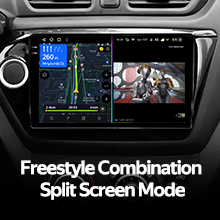
Image: The head unit displaying two applications simultaneously in split-screen mode.

Image: User interface for the DSP audio processing, highlighting the dual DSP chips.
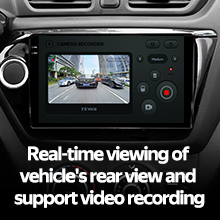
Image: Display showing real-time rear view camera feed with video recording functionality.
6. תחזוקה
Proper maintenance ensures the longevity and optimal performance of your TEYES CC3 2K head unit.
- ניקוי: Use the provided cleaning cloth or a soft, dry cloth to wipe the screen and unit exterior. Avoid abrasive cleaners or solvents.
- עדכוני תוכנה: Periodically check for and install software updates to ensure the latest features and bug fixes.
- טֶמפֶּרָטוּרָה: Avoid exposing the unit to direct sunlight for prolonged periods or extreme temperatures.
7. פתרון תקלות
עיין בסעיף זה לקבלת מידע על בעיות נפוצות ופתרונותיהן. אם הבעיה נמשכת, פנה לתמיכת הלקוחות.
| בְּעָיָה | סיבה אפשרית | פִּתָרוֹן |
|---|---|---|
| היחידה לא נדלקת. | חיבור חשמל רופף, נתיך שרוף, מצבר הרכב מנותק. | Check power cable connections. Inspect vehicle fuses. Ensure battery is connected. |
| אין פלט קול. | Volume too low, audio cables disconnected, incorrect audio source selected. | Increase volume. Verify speaker wire connections. Select correct audio source (e.g., Radio, USB, Bluetooth). |
| אות GPS חלש או אבוד. | אנטנת ה-GPS אינה ממוקמת כראוי או מנותקת. | Ensure GPS antenna is securely connected and placed in an unobstructed location. |
| בעיות בחיבור בלוטות'. | המכשיר לא משויך, בלוטות' כבוי בטלפון/יחידה, הפרעות. | ודא ש-Bluetooth מופעל בשני המכשירים. התאם מחדש את המכשיר. התקרב ליחידה. |

Image: An icon representing the Frequently Asked Questions (FAQ) section, indicating support resources.
8. מפרטים
| תכונה | פְּרָט |
|---|---|
| מספר דגם | CC3 2K |
| גודל תצוגה | 9.5 אינץ' |
| טכנולוגיית תצוגה | 2K In-cell Display, Gamut Coverage 157% |
| מַעֲרֶכֶת הַפעָלָה | אנדרואיד 10 |
| מעבד | 8 ליבות 2.0GHz |
| אַיִל | 6GB |
| ROM | 128GB |
| קישוריות | Bluetooth (QCC3031QFN Qualcomm), USB, Wi-Fi, Hotspot, 4G Internet |
| מצב פלט שמע | סטריאו |
| DSP | 2*DSP ADAU1701 + ROHM32107 |
| פלט אודיו | Optical and coaxial digital audio output |
| תכונות מיוחדות | Touchscreen, Built-in wireless CARPLAY and ANDROID AUTO, RDS support, TEYES Vision & TEYES Yahu software, Real-time rear view with recording. |
| Included Rear Camera | AHD 1080p |
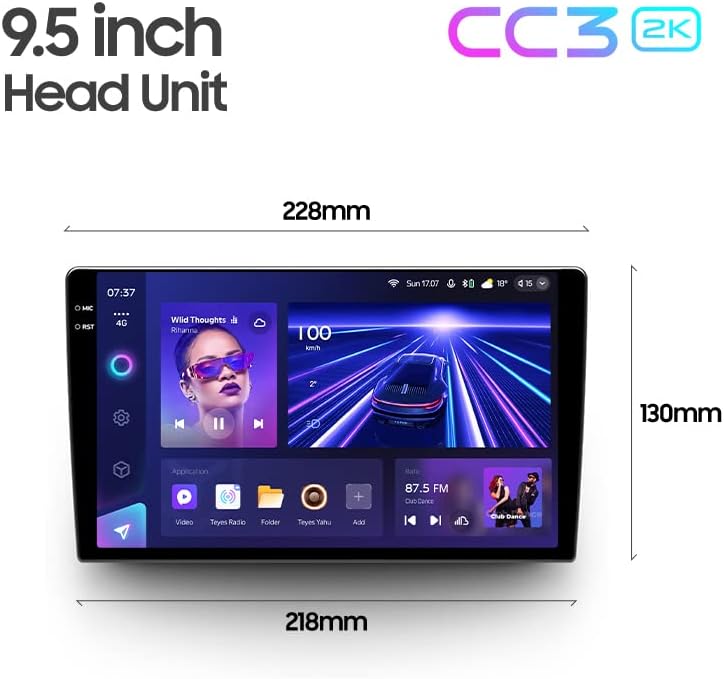
Image: Diagram showing the dimensions of the TEYES CC3 2K Headunit.
9. אחריות ותמיכה
The TEYES CC3 2K Headunit comes with a אחריות לשנה מתאריך הרכישה.
For technical support, warranty claims, or further assistance, please contact TEYES customer service through their official webהאתר או הקמעונאי בו נרכש המוצר. שמור את הוכחת הרכישה שלך לצורך אימות האחריות.
Manufacturer: Shenzhen TEYES High tech Co., Ltd.