
LS VISION LS-MS2
LS VISION 4K 180-Degree Ultra-Wide Angle 4G Solar-Powered Outdoor Security Camera
Model: LS-MS2
מותג: LS VISION
1. הקדמה
This user manual provides detailed instructions for the installation, operation, and maintenance of your LS VISION 4K 180-Degree Ultra-Wide Angle 4G Solar-Powered Outdoor Security Camera. Please read this manual thoroughly before using the product to ensure proper functionality and safety.
2. המוצר נגמרview
2.1 תכונות עיקריות
- 4K/8MP Resolution for clear video capture.
- 180-Degree Ultra-Wide Angle Dual Lens for comprehensive coverage without distortion.
- Integrated 4G Module for connectivity without Wi-Fi, ideal for remote locations.
- Solar-Powered with 6W solar panel and built-in 18000 mAh batteries for continuous operation. Supports integrated and separate solar panel installation.
- Two-Way Audio for real-time communication.
- Cloud Storage and local TF card storage (up to 128GB, TF card not included).
- מְרוּחָק Viewing and Playback via Niview app (Android/iOS).
- PIR + Human Detection with automatic human tracking, wake-up video recording, and push notifications.
- Multiple Recording Modes: 24-hour continuous recording, 24-hour + trigger recording, and three trigger recording modes.
- Dual Light Source Design: Full-color night vision up to 20 meters and infrared night vision up to 40 meters.
- IP66 Waterproof Rating for outdoor durability.
2.2 תרשים מוצר
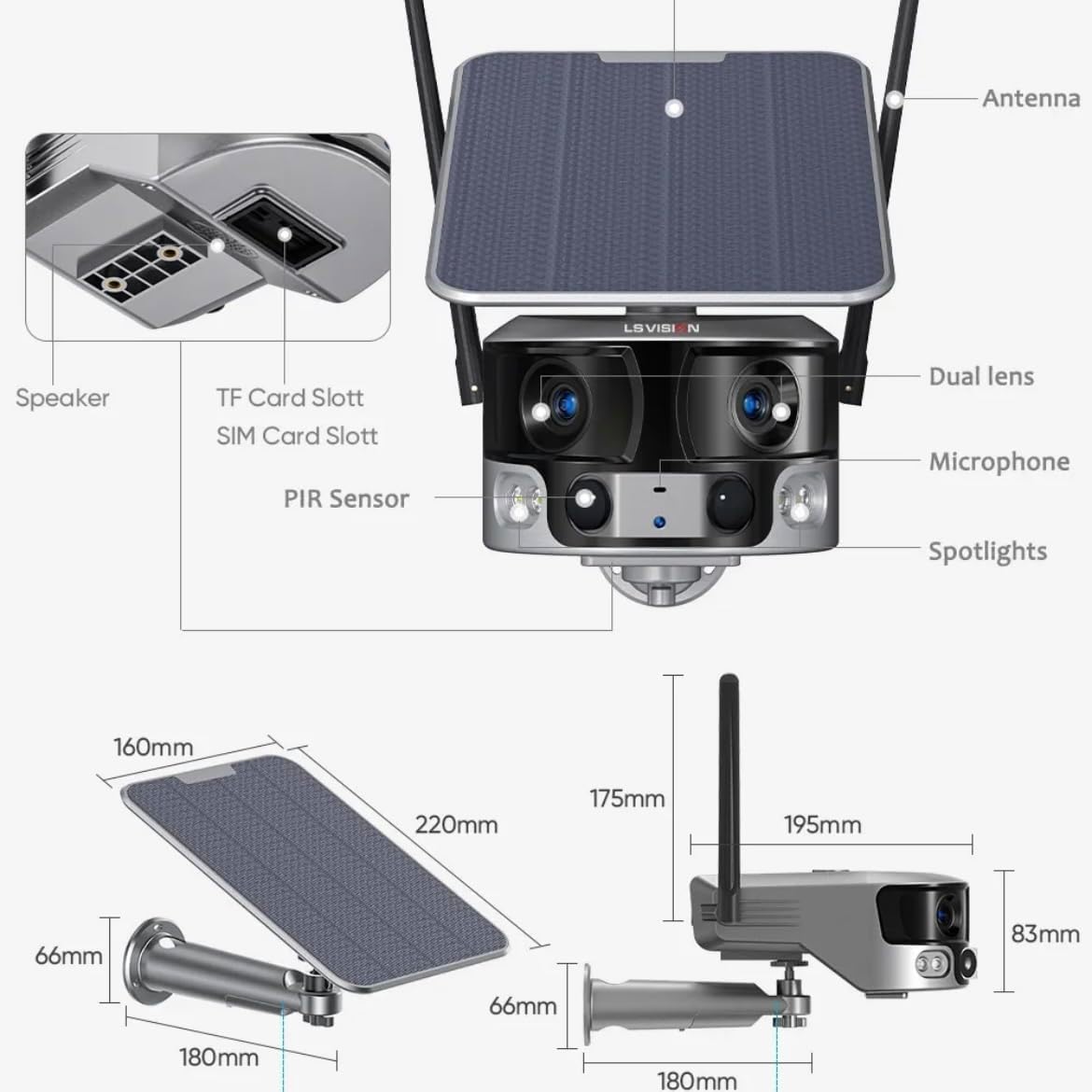
Figure 2.1: Product components and dimensions. Key parts include the solar panel, antennas, dual lens, microphone, spotlights, PIR sensor, speaker, TF card slot, and SIM card slot.
3. תכולת החבילה
אנא בדקו את תוכן החבילה בעת הפתיחה כדי לוודא שכל הפריטים נמצאים ולא ניזוקו:
- 1 x LS VISION 4K 180-Degree Ultra-Wide Angle 4G Solar-Powered Outdoor Security Camera
- 1 x פאנל סולארי (6W)
- 1 x סט של סוגריים להרכבה
- 1 x אנטנה 4G
- 1 x Set of Screws and Wall Plugs
- 1 x 2-meter Extension Cable for Solar Panel
4. מדריך התקנה
4.1 טעינה ראשונית
Although the camera is solar-powered, it is recommended to fully charge the built-in batteries before the first use. Connect the camera to a 5V/2A USB power adapter (not included) using a standard USB cable for initial charging. The charging indicator will show the status.
4.2 התקנת כרטיס SIM וכרטיס TF
Locate the SIM card slot and TF card slot on the camera (refer to Figure 2.1). Ensure the camera is powered off before inserting or removing cards.
- Open the protective cover of the card slots.
- Insert a standard 4G SIM card into the SIM card slot with the gold contacts facing down. Ensure it clicks into place.
- Insert a TF (microSD) card (up to 128GB, not included) into the TF card slot with the gold contacts facing down. Ensure it clicks into place.
- Close the protective cover firmly to maintain the IP66 waterproof rating.
4.3 הרכבת המצלמה
The camera is designed for wall mounting and outdoor use. Consider the following for optimal placement:
- בחר מיקום עם ampאור שמש ישיר עבור פאנל סולארי.
- ודא שלמצלמה יש ברור view של האזור שאתה רוצה לנטר.
- Mount the camera at a height that provides good coverage and deters tampארינג.

Figure 4.1: The LS VISION camera shown with its solar panel and mounting bracket, ready for outdoor installation.

Figure 4.2: The camera operates on a 4G network, eliminating the need for a Wi-Fi router, making it suitable for locations without existing Wi-Fi infrastructure.
The solar panel can be installed integrated with the camera or separately using the 2-meter extension cable for optimal sun exposure.
4.4 התקנת אפליקציה וחיבור
To access and control your camera, download the Niview האפליקציה מחנות האפליקציות של הסמארטפון שלך (זמינה עבור אנדרואיד ו-iOS).
- חפש "Niview" in the App Store or Google Play Store and install it.
- פתח חשבון חדש או התחבר אם כבר יש לך אחד.
- פעל לפי ההוראות שבאפליקציה כדי להוסיף את המצלמה שלך. פעולה זו בדרך כלל כוללת סריקת קוד QR במצלמה או הזנה ידנית של המזהה שלה.
- לאחר חיבור, אתה יכול view פו חיtage, access recordings, and configure settings.
5. הוראות הפעלה
5.1 בשידור חי View &השמעה
Access the Niview app on your smartphone or tablet to view live video streams from your camera anytime, anywhere. The app also allows you to review foo מוקלטtage.

Figure 5.1: The Niview app interface demonstrating real-time monitoring and timeline playback, ensuring no moment is missed.
5.2 זיהוי תנועה והתראות
The camera features advanced PIR and human detection capabilities. When motion or a human figure is detected, the camera will:
- Automatically begin recording a wake-up video.
- Send instant push notifications to your connected smartphone.
- Initiate automatic human tracking to follow the detected subject.

Figure 5.2: The camera's human tracking feature automatically follows detected individuals, ensuring continuous monitoring of their movement.
5.3 ראיית לילה
The camera is equipped with a dual light source design for enhanced night vision:
- ראיית לילה בצבע מלא: Provides clear, colored images up to 20 meters in low-light conditions when spotlights are activated.
- ראיית לילה אינפרא אדום (IR): Offers black and white vision up to 40 meters using infrared LEDs.
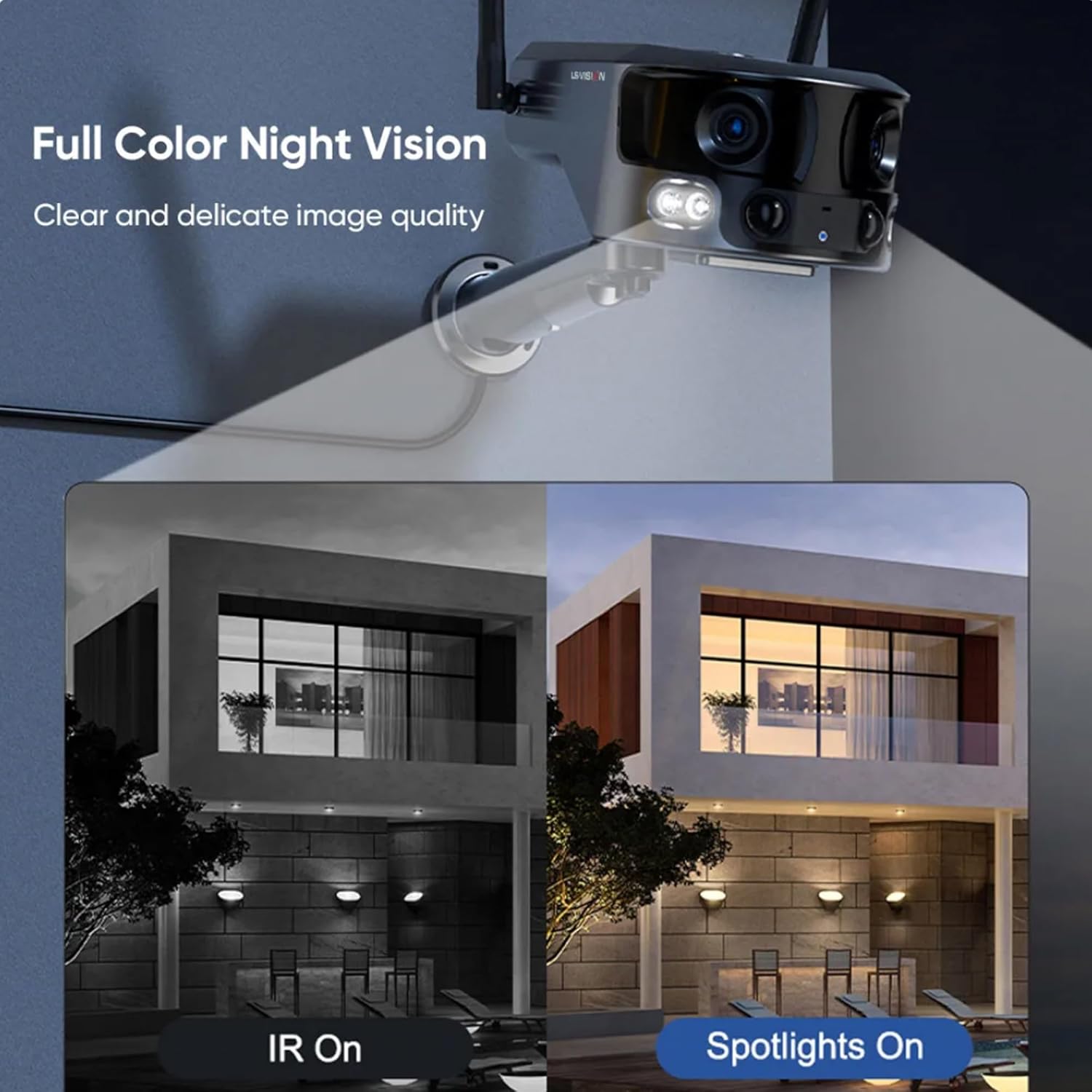
Figure 5.3: Comparison illustrating the difference between standard IR night vision and full-color night vision when the camera's spotlights are active.
5.4 שמע דו-כיווני
Utilize the built-in microphone and speaker for two-way audio communication through the Niview app. This allows you to listen in on the camera's surroundings and speak through the camera.
5.5 מצבי הקלטה
The camera supports various recording modes to suit your needs:
- הקלטה רציפה של 24 שעות: Records continuously throughout the day.
- Trigger Recording: Records only when motion or human detection is triggered. This mode has three sub-options for customization.
6. תחזוקה
תחזוקה שוטפת מבטיחה ביצועים אופטימליים ואורך חיים של המצלמה שלך:
- ניקוי: נגבו מעת לעת את עדשת המצלמה ואת פאנל הסולארי בעזרת מטלית רכהamp מטלית להסרת אבק ופסולת. אין להשתמש בכימיקלים חזקים.
- טיפול בסוללה: Ensure the solar panel is exposed to sufficient sunlight to keep the built-in batteries charged. In prolonged periods of low sunlight, consider manually charging the camera.
- עדכוני קושחה: Check the Niview app regularly for firmware updates. Keeping the firmware updated ensures the latest features and security patches.
- הגנת הסביבה: While IP66 rated, avoid exposing the camera to extreme weather conditions beyond its specified operating range if possible.

Figure 6.1: The camera's IP66 industrial-grade waterproof design ensures reliable operation even in adverse outdoor weather conditions like rain.
7. פתרון תקלות
אם נתקלת בבעיות עם המצלמה שלך, עיין בבעיות הנפוצות ובפתרונות הבאים:
| בְּעָיָה | סיבה אפשרית | פִּתָרוֹן |
|---|---|---|
| מצלמה במצב לא מקוון | No 4G signal; Low battery; SIM card issue. | Check 4G signal strength; Recharge battery; Reinsert SIM card or try a different one. |
| איכות תמונה ירודה | Dirty lens; Insufficient light; Network bandwidth. | Clean the lens; Ensure adequate lighting or enable night vision; Check 4G network speed. |
| זיהוי תנועה לא עובד | Detection sensitivity too low; Incorrect settings; Obstructions. | Adjust sensitivity in app; Verify detection zone settings; Clear any obstructions. |
| סוללה לא נטענת | Insufficient sunlight; Dirty solar panel; Faulty connection. | Relocate solar panel to direct sunlight; Clean solar panel; Check cable connections. |
אם הבעיה נמשכת, אנא פנו לתמיכת הלקוחות.
8. מפרטים
| תכונה | מִפרָט |
|---|---|
| שם הדגם | LS-MS2 |
| רזולוציית לכידת וידאו | 4K |
| Viewזווית | 180 Degrees (Ultra-Wide) |
| טכנולוגיית קישוריות | 4G Cellular Network (also supports Wi-Fi) |
| מקור כוח | Solar Powered (6W Solar Panel) |
| קיבולת סוללה | 18000 mAh (מובנה) |
| טווח ראיית לילה (צבעוני) | עד 20 מטר |
| טווח ראיית לילה (IR) | עד 40 מטר |
| אִחסוּן | Cloud Storage, TF Card (Max 128GB, not included) |
| דירוג עמיד למים | IP66 |
| חוֹמֶר | Acrylonitrile Butadiene Styrene (ABS) and Metal |
| סוג התקנה | מתקן קיר |
| מכשירים תואמים | Tablet, Smartphone (Android/iOS) |
| מידות המוצר | 18 x 18 x 15 ס"מ |
| משקל פריט | 1.25 קילוגרם |
9. מידע על אחריות
This product comes with a standard manufacturer's warranty. For specific warranty terms, duration, and claim procedures, please refer to the warranty card included in your product packaging or contact the retailer/manufacturer directly. Keep your purchase receipt as proof of purchase.
10. תמיכת לקוחות
For technical assistance, product inquiries, or troubleshooting beyond this manual, please contact LS VISION customer support. Contact details can typically be found on the product packaging, the manufacturer's official webבאתר, או דרך נקודת הרכישה שלך.
Ask a question about this manual
Ask about setup, troubleshooting, compatibility, parts, safety, or missing instructions. Manuals+ will review the question and use this page’s manual context to help answer it.