
KiriNavi For Ford Expedition Interceptor 2018-2023
KiriNavi Car Radio User Manual
Model: For Ford Expedition Interceptor 2018-2023
מָבוֹא
This manual provides detailed instructions for the installation, operation, and maintenance of your KiriNavi Qualcomm Android 11 Car Radio. Please read this manual thoroughly before using the product to ensure proper functionality and safety.
This head unit is designed as a stereo replacement for Ford Expedition Limited models from 2018 to 2023, specifically compatible with the SYNC3 system. It features a 14.4-inch display, built-in Wireless Carplay, and Wired Android Auto, powered by a Qualcomm Octa-Core CPU with 8GB RAM and 128GB ROM for high performance and stability.
תוכן החבילה
ודא שכל הרכיבים נמצאים בחבילה:
- KiriNavi Car Radio Head Unit (14.4 Inch)
- כבלי חשמל
- מדריך למשתמש (מסמך זה)
- Additional necessary installation accessories (if applicable, not specified in input)
התקנה והתקנה
The KiriNavi Car Radio is designed for factory OEM fit, requiring no modification for installation in compatible Ford Expedition models (2018-2023) with SYNC3. Professional installation is recommended.
רשימת בדיקה לפני התקנה:
- ודא שההצתה של הרכב כבויה והמצבר מנותק לפני תחילת ההתקנה.
- Gather all necessary tools (e.g., trim removal tools, screwdrivers, wire strippers).
- Familiarize yourself with the vehicle's existing dashboard layout and wiring.
שלבי התקנה:
- Carefully remove the existing head unit and dashboard trim. Refer to your vehicle's service manual for specific instructions.
- Connect the provided power cables and other necessary wiring harnesses to the new KiriNavi head unit. Ensure all connections are secure.
- Integrate the new head unit with the vehicle's existing systems. This unit is designed to retain original features such as Sirius XM radio, Microsoft SYNC System, Heated Steering Wheel Control, Massage Seat Control, Physical Climate Control, 360 Cameras and Reverse Camera, Sound System, and Steering Wheel Control.
- Carefully mount the new 14.4-inch display into the dashboard opening.
- חבר מחדש את מצבר הרכב ובדוק את תפקוד היחידה לפני הרכבה מלאה של לוח המחוונים.
- Reassemble the dashboard trim.

איור 1: Comparison showing the vehicle's dashboard before and after the installation of the KiriNavi 14.4-inch head unit. The new unit seamlessly integrates into the existing console, replacing the original display and controls.
הוראות הפעלה
פעולה בסיסית:
The unit operates on Android 11, providing a familiar smartphone-like interface. Navigate using the 14.4-inch QHD 2K 2560 x 1440 IPS Touch Screen.
קישוריות:
- CarPlay אלחוטי ואנדרואיד אוטו קווי: Connect your compatible smartphone for seamless integration of navigation, music, and communication apps.
- Bluetooth 5.0: Pair your phone for hands-free calling and audio streaming. The Bluetooth connection is designed for stability.
- Wi-Fi & 4G Network: Connect to a Wi-Fi hotspot or insert a 4G SIM card (if supported by the specific model) to access online content, navigation, and app downloads (e.g., YouTube, Netflix, Facebook).

איור 2: The KiriNavi head unit displaying the user interface for Wireless CarPlay and Android Auto, demonstrating voice command integration for tasks like playing music or finding a restaurant.

איור 3: The KiriNavi head unit's screen showing the Bluetooth phone interface for making calls and a separate image illustrating internet browsing via Wi-Fi, with various app icons.
ניווט:
The unit features built-in GPS + GLONASS for high-precision navigation. It supports both online and offline maps, including popular applications like Apple Maps, Google Maps, and Waze. Ensure the GPS antenna is properly installed for optimal signal reception.
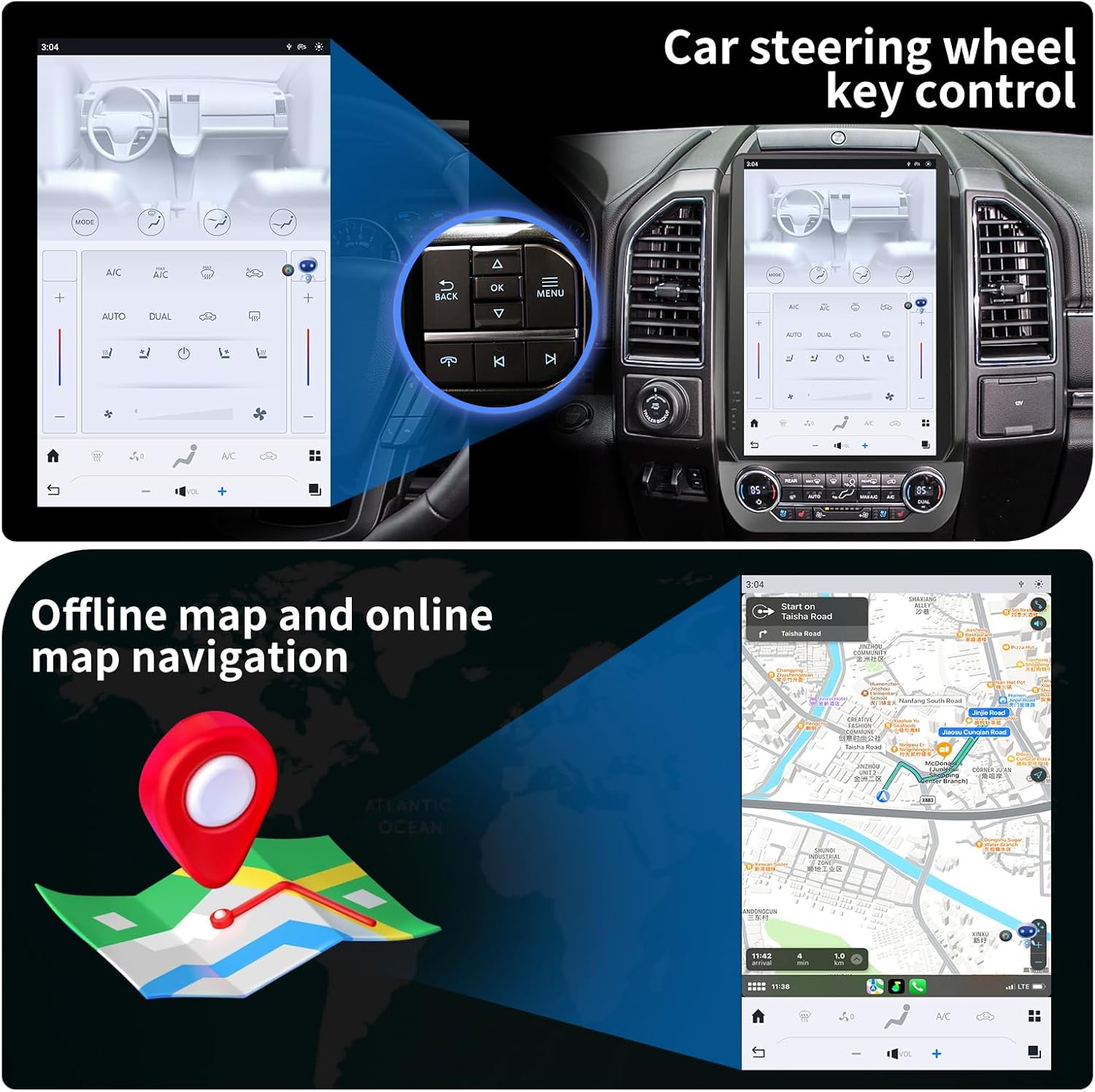
איור 4: The KiriNavi head unit showing a navigation map on the screen, alongside an inset image highlighting the vehicle's steering wheel controls, which can be configured to operate the head unit.
השמעת מולטימדיה:
Enjoy music and videos via USB, AUX IN, or streaming services. The unit supports various audio and video formats. You can save your favorite FM radio stations for easy access.
בקרת הגה:
The unit supports learning original steering wheel buttons, allowing for convenient remote control of functions such as volume, track changes, and hands-free calling.
פונקציונליות מסך מפוצל:
The 14.4-inch display supports split-screen mode, enabling you to run two applications simultaneously, such as navigation and video playback.

איור 5: The KiriNavi head unit demonstrating its split-screen capability, showing a navigation map on one side and a video playing on the other, allowing for simultaneous use of two applications.
תַחזוּקָה
- ניקוי: השתמשו במטלית רכה ויבשה לניקוי המסך והחלק החיצוני. הימנעו מחומרי ניקוי שוחקים או ממסים.
- עדכוני תוכנה: Periodically check for software updates to ensure optimal performance and access to new features. Updates can typically be performed via Wi-Fi.
- תנאים סביבתיים: הימנעו מחשיפת היחידה לטמפרטורות קיצוניות, לאור שמש ישיר למשך תקופות ממושכות או לחות מוגזמת.
פתרון בעיות
| בְּעָיָה | סיבה אפשרית | פִּתָרוֹן |
|---|---|---|
| היחידה לא נדלקת. | חיבור חשמל רופף; נתיך שרוף; בעיה במצבר של הרכב. | בדוק את כל חיבורי כבלי החשמל. בדוק את נתיכי הרכב. ודא שסוללת הרכב טעונה. |
| אין קול. | עוצמת קול נמוכה מדי; השתקה מופעלת; בעיה בחיווט הרמקול; מקור שמע שגוי. | Increase volume. Check if mute is active. Verify speaker connections. Select correct audio input. |
| אות GPS חלש או לא מדויק. | GPS antenna not properly installed or obstructed; Poor satellite reception area. | ודא שאנטנת ה-GPS מחוברת היטב ושיש לה גישה ברורה view של השמיים. עבור לאזור פתוח. |
| בעיות בחיבור בלוטות'. | המכשיר אינו במצב צימוד; הפרעה; מחוץ לטווח. | Ensure Bluetooth is enabled on both devices and in pairing mode. Reduce distance between devices. Restart both devices. |
| מסך מגע לא מגיב. | תקלת תוכנה; נזק למסך. | בצע איפוס רך (עיין בהגדרות המכשיר עבור אפשרות האיפוס). אם הבעיה נמשכת, פנה לתמיכה. |
מפרטים
| תכונה | פְּרָט |
|---|---|
| שם הדגם | For Ford Expedition Interceptor 2018-2023 |
| מַעֲרֶכֶת הַפעָלָה | אנדרואיד 11 |
| מעבד | Qualcomm Octa Core |
| אַיִל | 8GB |
| ROM | 128GB |
| גודל תצוגה | 14.4 אינץ' |
| רזולוציית תצוגה | QHD 2K 2560 x 1440 IPS Touch Screen |
| קישוריות | Bluetooth 5.0, Wi-Fi, 4G LTE (SIM card support), USB |
| ניווט | GPS + GLONASS, Supports Apple Maps, Google Maps, Waze |
| שילוב רכב | Wireless CarPlay, Wired Android Auto, Retains SYNC3, Sirius XM, Heated Steering Wheel, Massage Seat, Climate Control, 360/Reverse Cameras, Sound System, Steering Wheel Control |
| רכיבים כלולים | Car Radio Head Unit, Power Cables |
| משקל פריט | 9.61 פאונד |
| מידות חבילה | 17.87 x 12.56 x 7.87 אינץ' |
מידע על אחריות
This KiriNavi Car Radio comes with a אחריות לשנה from the date of purchase. This warranty covers manufacturing defects and malfunctions under normal use. It does not cover damage caused by improper installation, accident, misuse, abuse, neglect, or unauthorized modification.
אנא שמור את הוכחת הרכישה שלך עבור תביעות אחריות.
תמיכת לקוחות
For technical assistance, troubleshooting, or warranty inquiries, please contact KiriNavi customer support. Refer to the contact information provided with your product packaging or visit the official KiriNavi webאֲתַר.
When contacting support, please have your product model number (For Ford Expedition Interceptor 2018-2023) and purchase details ready.