
מָבוֹא
This manual provides detailed instructions for the installation, operation, and maintenance of your Daytech Freezer Door Alarm, Model USR-1. This device is designed to alert you when a refrigerator or freezer door is left open, helping to preserve food and save energy. Please read this manual thoroughly before using the product to ensure proper function and safety.
המוצר נגמרview
The Daytech Freezer Door Alarm consists of a main unit and a magnetic sensor. When the magnetic sensor is separated from the main unit (indicating an open door), the alarm will activate after a set delay. The device features adjustable volume and multiple delay modes.

Figure 1: Main Unit Components and Dimensions
- זמזם: Emits the alarm or chime sound.
- מחוון LED: Provides visual feedback for status and mode selection.
- Chime/Alarm/OFF Switch: Selects between chime mode, alarm mode, or turns the device off.
- בקרת עוצמת הקול: מתאים את רמת הקול.
- Work Mode Set Key: Selects the delay duration before the alarm activates.
תוכן החבילה
ודא שכל הפריטים נמצאים בחבילה שלך:
- קופסת אריזת המוצר
- Refrigerator Door Alarm (Main Unit and Magnet)
- מדריך למשתמש
- AAA batteries (quantity depends on the set purchased)
- Screws (quantity depends on the set purchased)
Video 1: Product Unboxing and Package Contents. This video demonstrates the items included in the package, such as the alarm units, user manual, and batteries.
הַתקָנָה
The alarm can be installed on various types of refrigerators and freezers. Ensure the installation surface is clean and dry.
שלבי התקנה:
- Clean the desired installation area on your refrigerator or freezer door frame.
- Peel off the protective film from the double-sided adhesive tape on the back of the main unit and the magnet.
- Attach the main unit to the door frame and the magnet to the door, ensuring the triangular markings on both parts are aligned. The gap between the main unit and the magnet should be less than 0.98 inches (2.5 cm) when the door is closed.
- Press firmly for a few seconds to secure.

איור 2: תהליך ההתקנה
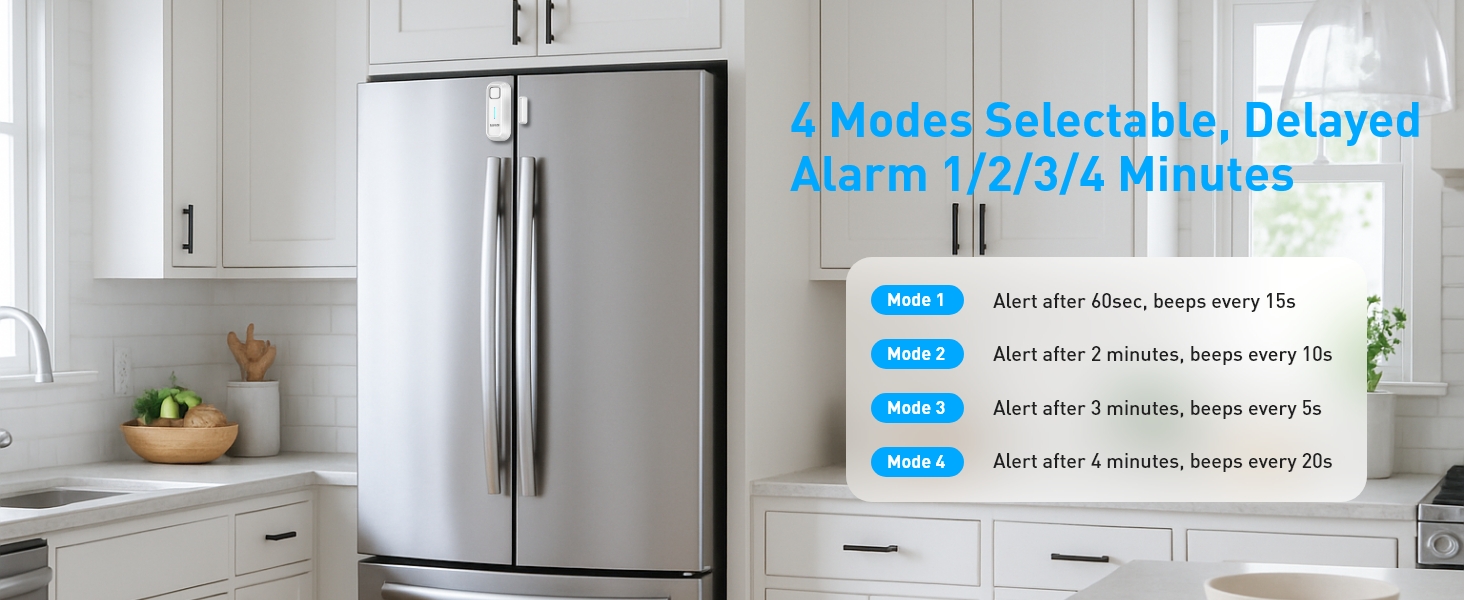
Figure 3: Recommended Installation Positions and Gap Requirements
הוראות הפעלה
1. Ringtone and Mode Selection:
Use the 'Chime/Alarm/OFF' switch on the side of the main unit to select the desired sound mode:
- מצב צלצול: A gentle reminder sound.
- מצב אזעקה: A loud alert sound.
- OFF Turns the device off, no sound will be made.
2. התאמת עוצמת הקול:
The alarm features 5 adjustable volume levels (0-120dB). Use the 'Volume' button on the side to cycle through the volume settings until you reach your preferred level.

Figure 4: Adjustable Volume Levels
3. Delay Mode Selection:
The alarm offers four delay modes, allowing you to choose how long the door can remain open before the alert sounds. Press the 'SET Key' button to cycle through the modes.
Video 2: Functional Adjustment Demonstration. This video illustrates how to switch between chime and alarm modes, adjust volume, and select different delay modes.
מצבי עבודה
The Daytech Freezer Door Alarm offers four distinct working modes, each with a different delay duration and alert pattern:
| מצב | משך זמן עיכוב | Alert Pattern |
|---|---|---|
| מצב 1 | 1 minute (60 seconds) | Alarm/Chime sounds for 5 seconds every 15 seconds. |
| מצב 2 | 2 דקות (120 שניות) | Alarm/Chime sounds for 10 seconds every 10 seconds. |
| מצב 3 | 3 דקות (180 שניות) | Alarm/Chime sounds for 15 seconds every 5 seconds. |
| מצב 4 | 4 דקות (240 שניות) | Alarm/Chime sounds for 20 seconds every 15 seconds. |

איור 5: מעלview of Working Modes
החלפת סוללה
The Daytech Freezer Door Alarm requires 2 AAA batteries. When the batteries are low, the alarm's performance may be affected. Replace batteries as follows:
- Slide the battery cover on the back of the main unit downwards to open.
- הוציאו את סוללות ה-AAA הישנות.
- הכניסו שתי סוללות AAA חדשות, תוך הקפדה על קוטביות נכונה (+/-).
- החלק את מכסה הסוללה בחזרה למקומו עד שיינעל היטב.

איור 6: שלבי החלפת סוללה
פתרון בעיות
If you encounter issues with your Daytech Freezer Door Alarm, refer to the following troubleshooting guide:
| בְּעָיָה | סיבה אפשרית | פִּתָרוֹן |
|---|---|---|
| Alarm does not sound when door is open. | 1. Device is OFF. 2. הסוללות חלשות או שהן מותקנות בצורה שגויה. 3. Magnet and main unit are too far apart. | 1. Ensure the 'Chime/Alarm/OFF' switch is set to Chime or Alarm mode. 2. החליפו את הסוללות ובדקו את הקוטביות. 3. Re-position the main unit and magnet to ensure the gap is less than 0.98 inches (2.5 cm) when the door is closed. |
| Alarm sounds too frequently or falsely triggers. | 1. Magnet and main unit are too close or misaligned. 2. Delay mode is set too short. | 1. Adjust the position of the magnet and main unit to ensure proper alignment and a slight gap when the door is closed. 2. Select a longer delay mode using the 'SET Key'. |
| עוצמת הקול נמוכה מדי או גבוהה מדי. | הגדרת עוצמת הקול אינה אופטימלית. | Adjust the volume using the 'Volume' button on the side of the main unit. |
מפרטים
| תכונה | פְּרָט |
|---|---|
| מספר דגם | USR-1 |
| מידות | 3.9 x 1.6 x 0.86 אינץ' (100 x 40 x 22 מ"מ) |
| משקל פריט | 3.34 אונקיות |
| מקור כוח | מופעל על סוללה |
| סוללות נדרשות | 2 סוללות AAA (כלולות) |
| סוג סוללה | בְּסִיסִי |
| רמת רעש | עד 120 דציבלים |
| סוג הרכבה | הר דלת |
| טכנולוגיית חיישנים | צור קשר עם חיישן |
| מכשירים תואמים | Home Security System (general) |
| צֶבַע | לָבָן |
אחריות ותמיכה
Daytech products are manufactured to high-quality standards. For warranty information or technical support, please refer to the contact details provided with your purchase or visit the official Daytech webאתר. שמור את קבלת הרכישה כהוכחת קנייה.