
1. המוצר נגמרview
The CPVAN Remote Control (2nd Generation), model CP10 Pro, is designed for wireless operation of compatible CPVAN home security systems. This remote provides convenient control over your alarm system's functions from a distance.
תְאִימוּת: This remote control is compatible with CPVAN CP2, CP2 Pro, CP7R, CP8, and CP9 Home Security Systems.

תמונה 1: חזית view of the CPVAN remote control.
2. תכונות עיקריות
- הפעלה אלחוטית: Provides convenient control of your alarm system without physical interaction with the main unit.
- תאימות רחבה: Works with CPVAN CP2, CP2 Pro, CP7R, CP8, and CP9 alarm systems.
- בקרת מרחקים ארוכים: Enables control of the motion sensor detector alarm from a significant range.
- מוכן לשימוש: Comes with a pre-installed battery for immediate functionality.
- עיצוב ארגונומי: Features a comfortable and user-friendly form factor.
3. תכולת החבילה
- CPVAN Remote Control (2nd Generation)
- סוללת CR2 אחת (מותקנת מראש)
4. הגדרה וצימוד
התאמה עם שלט רחוק חדש
To integrate your new remote control with a CPVAN PIR motion sensor alarm, follow these steps:
- Ensure the PIR motion sensor alarm is powered ON.
- On the PIR motion sensor alarm, long press the Pairing button (often indicated by a signal icon) to enter pairing mode. The detector light will illuminate continuously.
- Press any button on your remote control. You will hear two beeps from the alarm to confirm successful pairing.
- Short press the Pairing button on the alarm again to exit pairing mode. Your remote has now been paired.

Image 2: Pairing process of the remote control with a motion sensor alarm.
5. תפעול
פונקציות שלט רחוק
The CPVAN remote control features four distinct buttons for managing your alarm system:
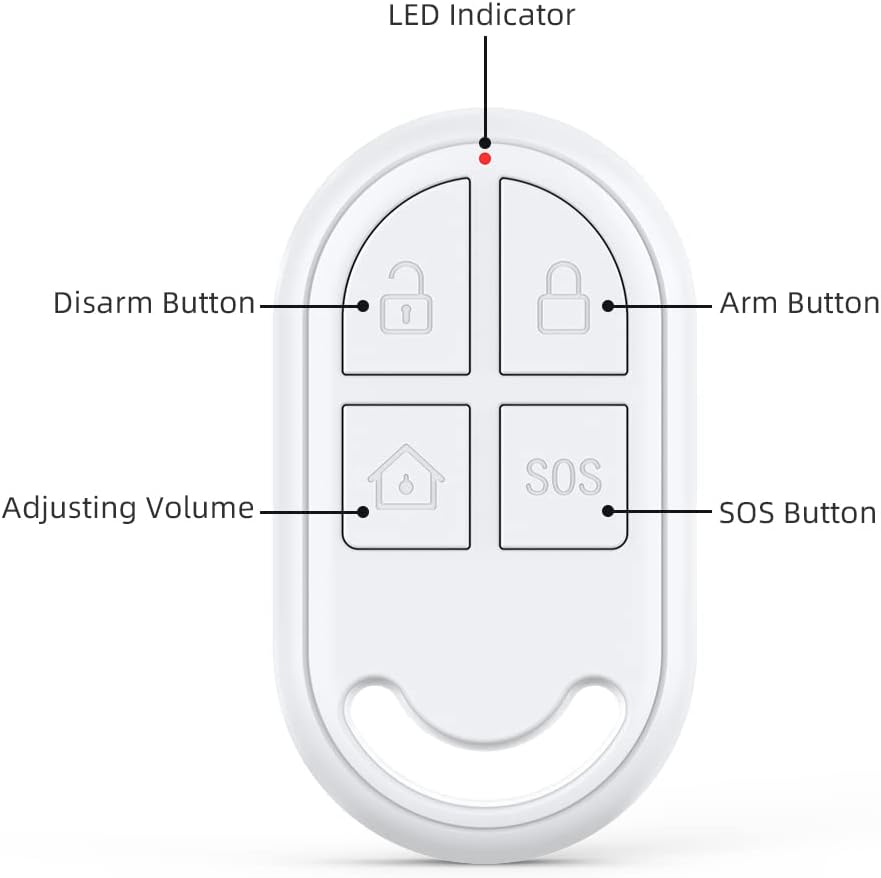
Image 3: Labeled buttons on the CPVAN remote control.
- Arm Button (Locked Padlock Icon): Activates the alarm system, placing it in armed mode.
- Disarm Button (Unlocked Padlock Icon): Deactivates the alarm system, turning off armed mode.
- Adjusting Volume Button (House Icon): Typically used to switch between different alarm modes or adjust volume settings on the connected alarm unit. Refer to your main alarm system manual for specific functions.
- SOS Button (SOS Text): Triggers an immediate emergency alarm. Use in situations requiring urgent attention.
- מחוון LED: A small light that illuminates to indicate button presses and operational status.
6. תחזוקה
החלפת סוללה
The remote control is powered by one CR2 battery. When the remote's performance degrades or the LED indicator fails to light up upon button press, it may be time to replace the battery.
- אתר את תא הסוללות בשלט הרחוק. הוא נמצא בדרך כלל בגב או בצד, ומאובטח באמצעות בורג קטן או קליפס.
- פתחו בזהירות את התא.
- הסר את סוללת CR2 הישנה.
- הכנס סוללת CR2 חדשה, תוך הקפדה על קוטביות נכונה (+ ו-).
- סגור היטב את תא הסוללות.
סוג סוללה: 1 x CR2 (3 Volts, Lithium Manganese Dioxide)
7. פתרון תקלות
- השלט לא מגיב: Check the battery. Replace if necessary. Ensure the remote is within the operating range of the alarm system.
- כשל בהתאמה: Ensure the alarm system is in pairing mode. Repeat the pairing steps carefully. Check if the remote's battery is charged.
- הפעלה מקרית: The remote keys can be sensitive. Avoid placing the remote in pockets or areas where buttons might be pressed inadvertently.
8. מפרט טכני
| מותג | CPVAN |
| מספר דגם | CP10 Pro |
| צֶבַע | לָבָן |
| מקור כוח | מופעל על סוללה |
| מכשירים תואמים | CPVAN CP2, CP2 Pro, CP7R, CP8, CP9 Home Security Systems |
| מידות (L x W x H) | 2.46 x 0.43 x 1.38 אינץ' |
| טכנולוגיית קישוריות | אַלחוּט |
| משקל פריט | 0.01 קילוגרם (0.317 אונקיות) |
| כרך ידtage | 3 וולט |
| סוג סוללה | 1 x CR2 (ליתיום מנגן דיאוקסיד) |
| טווח מקסימלי | 100 מטר |
| תכונות מיוחדות | ארגונומי |

Image 4: Dimensions of the CPVAN remote control.
9. תמיכת לקוחות
For further assistance, technical support, or warranty inquiries, please refer to the main manual of your CPVAN Home Alarm System or visit the official CPVAN website. You can also contact CPVAN customer service through the retailer where the product was purchased.
יַצרָן: CPVAN
מספר חלק: CP2-RC