
1. הקדמה
This manual provides essential information for the safe and efficient installation, operation, and maintenance of your KOLINK Regulator Series 850W Power Supply Unit (PSU). Please read this manual thoroughly before installation and retain it for future reference. This PSU is designed to provide stable and reliable power to your computer system, adhering to ATX 3.0 and PCIe 5.0 standards.
מידע בטיחות
- יש לנתק תמיד את כבל החשמל משקע הקיר לפני התקנה, הסרה או ניקוי של ספק הכוח.
- אל תפתח את ספק הכוח casinז. נפח גבוהtagנמצאים בפנים חומרים שעלולים לגרום להתחשמלות.
- Ensure the PSU is installed in a well-ventilated area.
- Use only the modular cables provided with this PSU. Using incompatible cables may damage your system.
- מוצר זה מיועד לשימוש פנימי בלבד.
2. תכולת החבילה
ודא שכל הפריטים המפורטים להלן נמצאים באריזת המוצר שלך:
- KOLINK Regulator Series 850W Power Supply Unit
- Modular Cable Set (including 24-pin ATX, 4+4 pin CPU, 6+2 pin PCIe, 12VHPWR, SATA, and Peripheral cables)
- כבל מתח AC
- ברגי הרכבה
- מדריך למשתמש (מסמך זה)
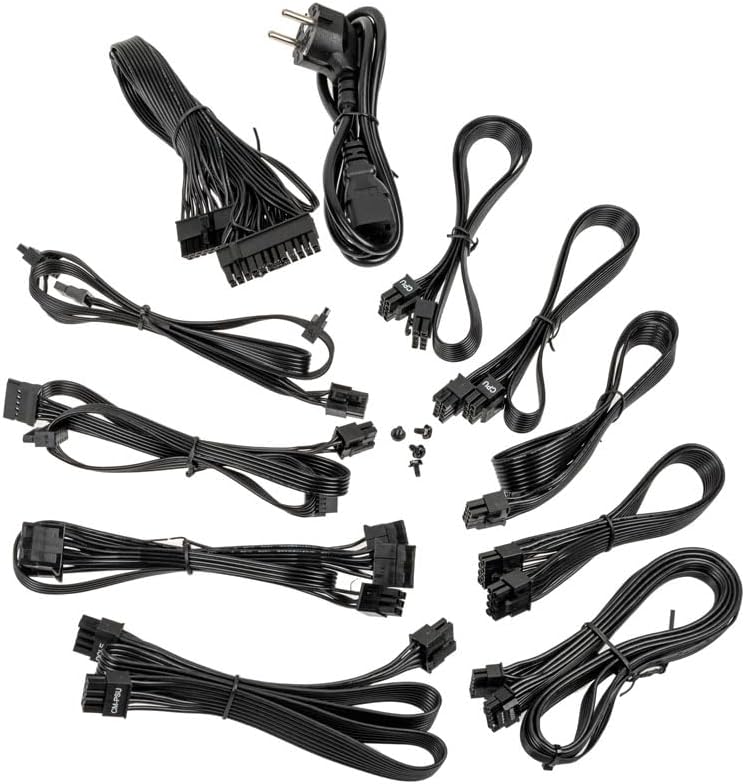
Image: A collection of all modular cables supplied with the Kolink Regulator PSU, including 24-pin ATX, CPU, PCIe, 12VHPWR, and SATA power cables.
3. תכונות עיקריות
The KOLINK Regulator Series 850W PSU incorporates advanced features for optimal performance and reliability:
- מוכן ל-ATX 3.0 ו-PCIe 5.0: Designed to meet the latest ATX 3.0 standard with native PCIe 5.0 support, including a 12VHPWR 600W cable for modern graphics cards.
- מוסמך 80 פלוס זהב: Achieves up to 90% efficiency at half load, reducing energy consumption and heat generation.
- עיצוב מודולרי לחלוטין: Allows for custom cable management by connecting only the necessary cables, improving airflow and aesthetics.
- קבלים יפניים 100%: Utilizes high-quality Japanese capacitors for enhanced durability, stability, and long-term reliability.
- Switchable Semi-Fanless Mode: Features a 120mm Fluid Dynamic Bearing (FDB) fan that can operate in a semi-fanless mode, reducing fan speeds or stopping the fan entirely at lower loads for quieter operation.
- Multi-Protection Circuitry: Integrated safeguards protect your components from over-voltagה, תחת כרךtage, over-power, short-circuit, and over-temperature conditions.
- גורם צורה קומפקטי: Designed to fit a wide range of PC cases with its optimized dimensions.

Image: A close-up of the fully modular cable connection ports on the Kolink Regulator PSU, labeled for Motherboard, SATA, CPU/PCIe, and 12VHPWR.

תמונה: מפורט view of the 120mm Fluid Dynamic Bearing fan within the Kolink Regulator PSU, highlighting its switchable semi-fanless operation for quieter performance at low loads.

Image: An internal perspective of the Kolink Regulator PSU, emphasizing the high-quality 100% Japanese capacitors used for enhanced reliability and performance.

Image: The Kolink Regulator PSU, illustrating its robust multi-protection circuitry designed to safeguard connected components.
4. התקנה והתקנה
רשימת טרום התקנה
- ודא שמארז המחשב שלך תואם לספקי ספקי כוח ATX.
- Verify that your motherboard and other components require 850W or less power.
- Gather necessary tools: screwdriver, zip ties (for cable management).
שלבי התקנה
- הכן את המערכת שלך: Disconnect the computer from the power outlet. Open your computer case to access the PSU mounting area. If replacing an old PSU, remove it first.
- התקן את ספק הכוח: Carefully slide the KOLINK Regulator PSU into the designated PSU bay in your computer case. Ensure the fan is oriented correctly (typically facing downwards or inwards, depending on case design). Secure the PSU with the provided mounting screws from the rear of the case.
- חיבור כבלים מודולריים: Identify the necessary cables for your components. Connect the modular cables to the corresponding ports on the PSU first, then route them to your components. Refer to the labels on the PSU for correct port identification.
- כוח לוח האם: חבר את כבל ה-ATX בעל 24 פינים ללוח האם שלך.
- כוח מעבד: Connect the 4+4 pin CPU cable(s) to your motherboard's CPU power connector(s).
- כוח PCIe: For graphics cards, use the 6+2 pin PCIe cables. For modern GPUs requiring 12VHPWR, use the dedicated 12VHPWR 600W cable. Ensure all connectors are fully seated.
- כוח SATA: חבר כבלי חשמל SATA לכונני SSD, כונני HDD וכוננים אופטיים שלך.
- כוח היקפי: Use peripheral (Molex) cables for any other components requiring them.
- ניהול כבלים: Route cables neatly to improve airflow and aesthetics. Use zip ties or cable straps to secure them.
- סגירת מקרה: Once all connections are secure and verified, close your computer case.

תמונה: זווית view of the Kolink Regulator 850W Power Supply Unit, showcasinזה שחור גasing and fan grille, ready for installation.
5. הוראות הפעלה
- חבר מתח AC: Plug the provided AC power cord into the PSU's power inlet and then into a wall outlet or surge protector.
- Power On PSU: Locate the power switch on the rear of the PSU (next to the AC inlet) and flip it to the 'I' (On) position.
- הפעלת המחשב: לחץ על כפתור ההפעלה במארז המחשב כדי להפעיל את המערכת.
Semi-Fanless Mode Operation
The KOLINK Regulator PSU features a semi-fanless mode. This means the 120mm FDB fan will remain off or spin at very low RPMs during low system loads to minimize noise. As the system load increases and the internal temperature rises, the fan will automatically activate and adjust its speed to maintain optimal cooling. This operation is normal and contributes to a quieter computing experience.
6. תחזוקה
Proper maintenance ensures the longevity and optimal performance of your PSU.
- שמור על פתחי אוורור נקיים: Ensure that the PSU's intake and exhaust vents are not obstructed by dust, cables, or other objects. Good airflow is crucial for cooling.
- ניקוי אבק: Periodically clean dust from the PSU's exterior and fan grille using compressed air. אל תפתח את ספק הכוח casing.
- תנאים סביבתיים: Operate the PSU within recommended temperature and humidity ranges. Avoid extreme conditions.
7. פתרון תקלות
If you encounter issues with your KOLINK Regulator PSU, refer to the following common problems and solutions:
| בְּעָיָה | סיבה אפשרית | פִּתָרוֹן |
|---|---|---|
| המערכת לא נדלקת. | PSU power switch off, AC cable loose, faulty wall outlet. | Ensure PSU switch is 'On'. Check AC power cable connection. Test wall outlet with another device. Verify all modular cables are securely connected. |
| System powers on but shuts down unexpectedly. | Overload, overheating, loose connections, component fault. | ודא את כל רמת האנרגיה של המערכתtage does not exceed 850W. Check for proper airflow. Verify all modular cables are fully seated. If problem persists, test components individually. |
| מאוורר ה-PSU לא מסתובב. | Semi-fanless mode active, low system load. | This is normal operation in semi-fanless mode. The fan will activate under higher loads. If the fan never spins even under heavy load, contact support. |
| רעש חריג מהספק. | Loose screws, fan obstruction, coil whine. | Check PSU mounting screws. Ensure no cables or debris are obstructing the fan. Minor coil whine can be normal; if excessive, contact support. |
If troubleshooting steps do not resolve the issue, please contact KOLINK customer support.
8. מפרטים
Detailed technical specifications for the KOLINK Regulator Series 850W PSU:
| תכונה | מִפרָט |
|---|---|
| מספר דגם | KL-R850FG |
| פלט וואטtage | 850 וואט |
| דירוג יעילות | 80 פלוס זהב |
| גורם צורה | ATX |
| עיצוב ספק כוח | מודולרי לחלוטין |
| שיטת קירור | Air (120mm FDB fan with semi-fanless mode) |
| קבלים | 100% קבלים יפניים |
| סוג מחבר | 12VHPWR, 24-pin ATX, 4+4 pin CPU, 6+2 pin PCIe, SATA, Peripheral |
| מידות המוצר (L x W x H) | 11.61 x 8.46 x 4.33 אינץ' |
| משקל פריט | 5.5 פאונד |
| מכשירים תואמים | Gaming PC with ATX motherboard and high-end graphics card |

Image: The rear panel of the Kolink Regulator PSU, displaying the electrical specifications label, power input, and on/off switch.
9. אחריות ותמיכה
מידע על אחריות
KOLINK products are manufactured to the highest quality standards. This PSU is covered by a manufacturer's warranty against defects in materials and workmanship. The specific warranty period may vary by region and retailer. Please retain your proof of purchase for warranty claims.
תמיכת לקוחות
For technical assistance, warranty inquiries, or further information, please visit the official KOLINK website or contact your local retailer. You can often find support resources, FAQs, and contact details on the manufacturer's webאֲתַר: www.kolink.eu