
מָבוֹא
This manual provides instructions for the safe and effective use of your REPTITRIP Reptile Heating Pad with PID Thermostat. This device is designed to provide a controlled heat source for reptile terrariums, helping to maintain a stable and appropriate temperature for your pets. Please read all instructions carefully before installation and operation.
מידע בטיחות חשוב
אי ציות להוראות בטיחות אלה עלול לגרום לשריפה, התחשמלות, פציעה או נזק למוצר או לרכוש.
- This product is intended for household use only, specifically for heating reptile terrariums.
- Do not immerse the heating pad or thermostat controller in water. The heating pad is waterproof (IP67 rated) but not designed for submersion.
- Do not use the heating pad if it is folded or creased. Ensure it lies flat.
- Do not use the heating pad directly on a metal tank, as this can lead to inefficient heating or damage.
- Prolonged application at high temperature settings can cause skin burns to animals. Always monitor the temperature carefully.
- Discontinue use immediately if the heating pad shows any signs of deterioration, such as cracking, blistering, or melting.
- The heating pad features a built-in temperature sensor that will stop heating if the internal temperature reaches 122°F (50°C) to prevent overheating.
- Keep out of reach of children and pets not intended for its use.
המוצר נגמרview
The REPTITRIP Reptile Heating Pad system includes a heating mat and an intelligent PID thermostat controller. It is designed to provide precise and stable temperature control for reptile habitats.
תכונות עיקריות:
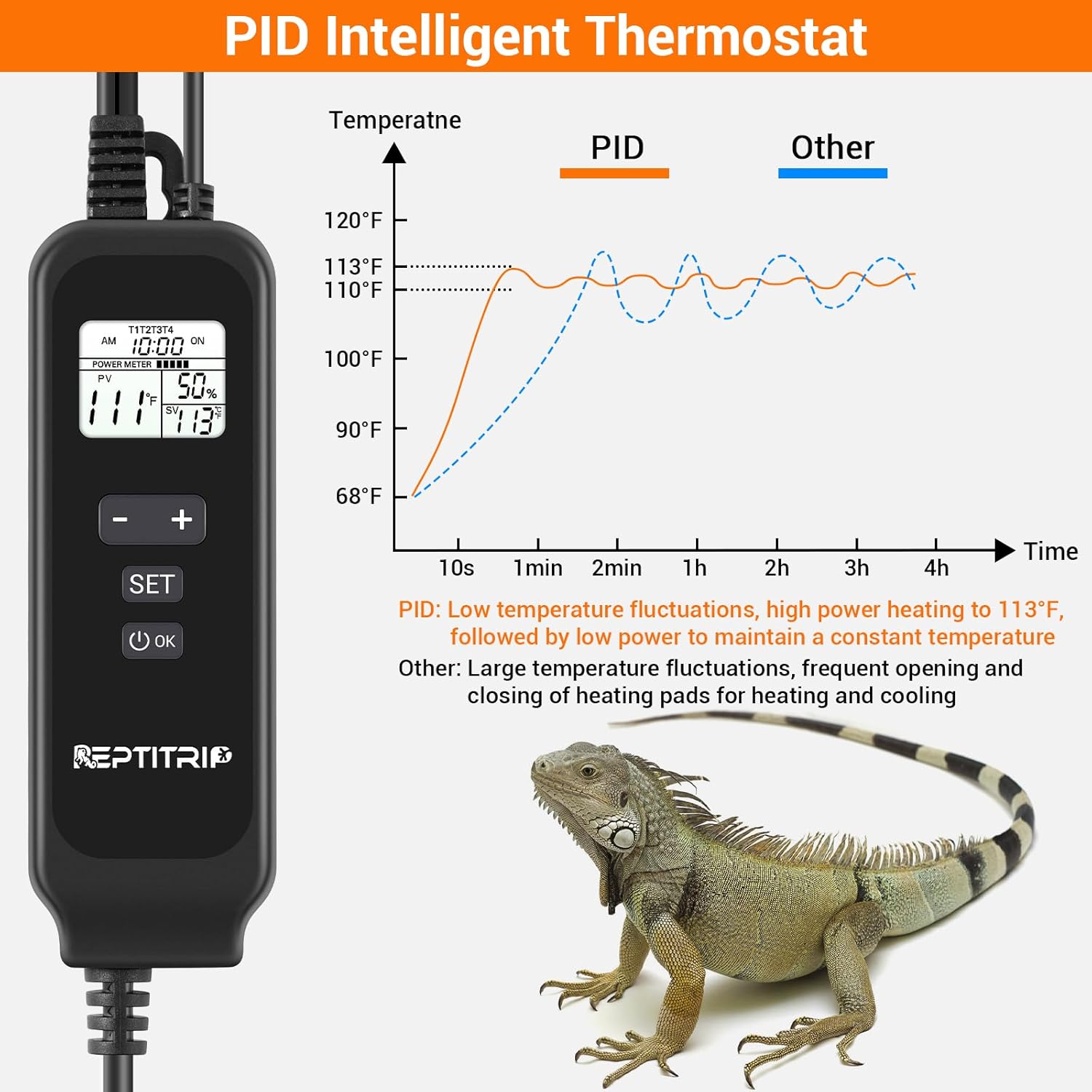
- PID Intelligent Thermostat: Accurately controls heating temperature for efficiency and stability.
- חימום מהיר: 24W power heats to 113°F (45°C) in approximately 1 minute.
- הגנה בטמפרטורה גבוהה: Automatically stops heating at 122°F (50°C).
- זיהוי טמפרטורה: Built-in sensor and external probe for real-time temperature monitoring.
- בנייה עמידה: 5-layer design including PVC material, lagging, and heating layer.
- Waterproof עיצוב: IP67 rated heating pad (do not immerse).
- גיבוי דבק: Equipped with 3M adhesive for secure mounting.

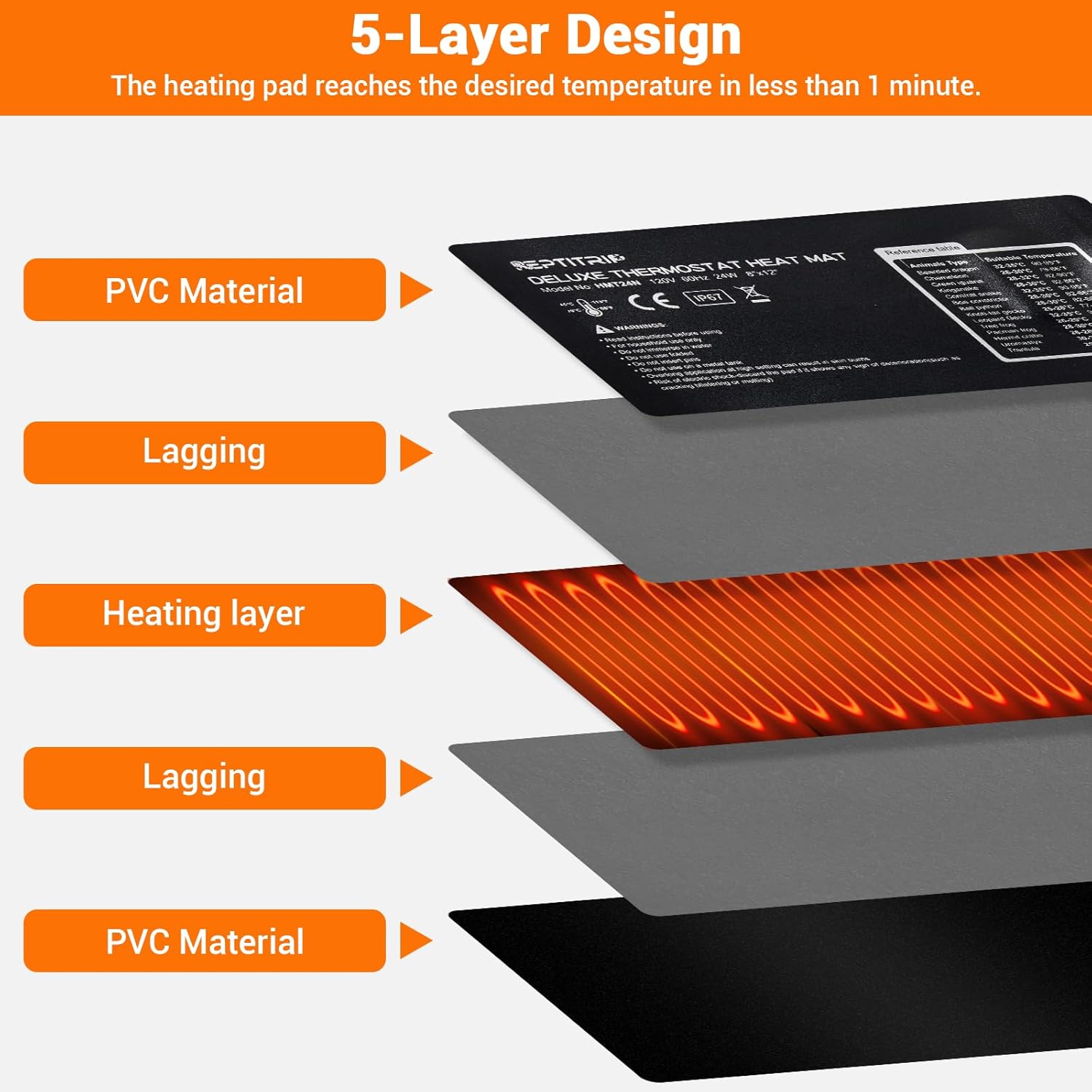
הוראות התקנה
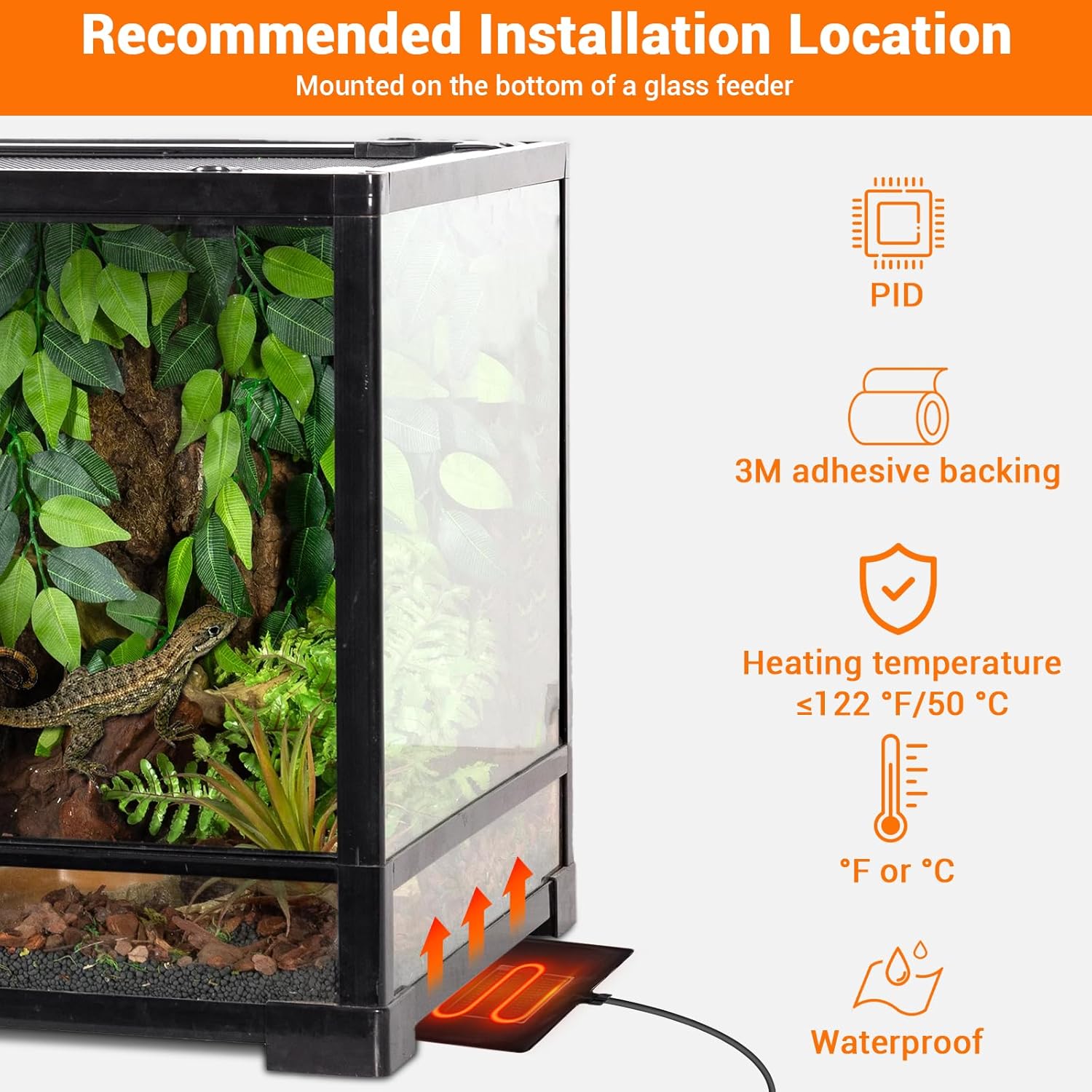
- בחר מיקום: Select a suitable location for the heating pad, typically on the bottom or side of a glass terrarium. Ensure the surface is clean and dry.
- החלת כרית חימום: Remove the protective film from the 3M adhesive backing on the heating pad. Carefully press the pad firmly onto the chosen surface of the terrarium. Ensure there are no air bubbles or wrinkles.
- גשש טמפרטורה מיקום: Place the external temperature probe inside the terrarium, near the area where the heat is needed most, but away from direct contact with the heating pad to ensure accurate ambient temperature readings. Secure it to prevent movement.
- חיבור תרמוסטט: Plug the heating pad into the thermostat controller. Then, plug the thermostat controller into a standard electrical outlet.


הוראות הפעלה
The PID thermostat controller allows for precise temperature management. The controllable temperature range is 68°F to 113°F (20°C to 45°C).
פונקציות הבקר:

- תצוגת LCD: Shows current time, sensor temperature, set temperature, and power percentage.
- לחצן הפעלה/כיבוי: לחץ והחזק כדי להפעיל או לכבות את היחידה.
- לחצן SET: Press to enter temperature setting mode.
- כפתור '+': Increases the set temperature or navigates menu options.
- כפתור '-': Decreases the set temperature or navigates menu options.
- לחצן אישור: מאשר בחירות.
הגדרת הטמפרטורה:
- הקש על מַעֲרֶכֶת button. The set temperature display will begin to flash.
- השתמש ב- + or - כפתורים לכוונון הטמפרטורה הרצויה.
- הקש על OK button to confirm your setting. The display will stop flashing.
Switching Between °F and °C:
To switch the temperature display between Fahrenheit (°F) and Celsius (°C), long press the מַעֲרֶכֶת כפתור ואת + כפתור בו זמנית.
תַחזוּקָה
- ניקוי: Disconnect the power before cleaning. Wipe the heating pad and controller with a damp בַּד. אין להשתמש בחומרי ניקוי שוחקים או לטבול במים.
- בְּדִיקָה: Regularly inspect the heating pad and power cords for any signs of damage, wear, or deterioration. If any damage is observed, discontinue use and replace the unit.
- אִחסוּן: When not in use, store the heating pad and controller in a dry, cool place, away from direct sunlight and extreme temperatures.
פתרון בעיות
- No Power/Heating:
- ודא שכבל החשמל מחובר היטב לשקע חשמלי תקין.
- Check if the thermostat controller is powered on (press and hold the ON/OFF button).
- Verify that the heating pad is correctly plugged into the thermostat controller.
- קריאת טמפרטורה שגויה:
- Ensure the external temperature probe is properly positioned within the terrarium and not directly touching the heating pad or other heat sources.
- Check for any obstructions around the probe that might affect its reading.
- תנודות טמפרטורה:
- The PID system is designed for stable control, but significant external temperature changes or drafts can affect stability.
- Ensure the terrarium is adequately insulated and placed in a stable environment.
- Heating Pad Overheating (reaching 122°F/50°C):
- The built-in protection will temporarily stop heating. This is a safety feature.
- Check if the set temperature is too high for the environment or if the pad is covered by insulating material that traps excessive heat.
מפרטים
| תכונה | פְּרָט |
|---|---|
| מספר דגם | HMT24N |
| מידות כרית חימום | 8 x 12 אינץ' (20.3 x 30.5 ס"מ) |
| פלט כוח | 24 וואט |
| כרך ידtage | 120V, 60Hz |
| טווח בקרת טמפרטורה | 68°F עד 113°F (20°C עד 45°C) |
| הגנה בטמפרטורה גבוהה | 122°F (50°C) |
| דירוג עמיד למים | IP67 (Heating Pad) |
| אורך כבל חשמל | 70 אינץ' (כ-178 ס"מ) |
| אורך כבל בדיקה | 60 אינץ' (כ-152 ס"מ) |
| גודל מיכל מומלץ | 30-40 ליטר |
| יַצרָן | REPTITRIP |
אחריות ותמיכת לקוחות
For warranty information, technical assistance, or customer support, please refer to the contact information provided with your purchase or visit the official REPTITRIP webאתר. שמור את קבלת הרכישה כהוכחת קנייה.