
1. הקדמה
Thank you for choosing the OFNEX X19 Wireless Earbuds. This manual provides detailed instructions for setting up, operating, and maintaining your earbuds to ensure optimal performance and longevity. Please read this manual thoroughly before use.
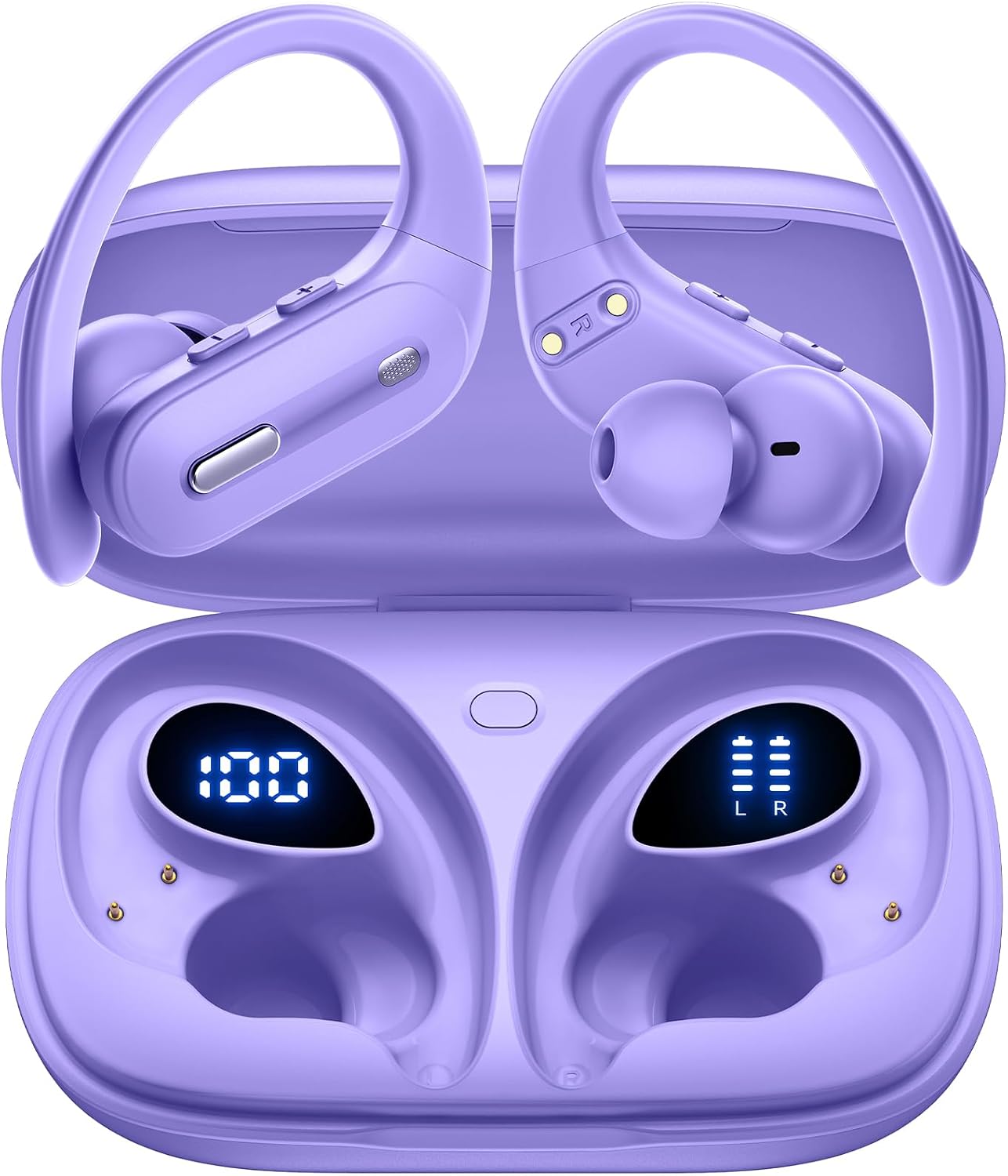
Image: OFNEX X19 Wireless Earbuds in their charging case, displaying battery levels.
2. המוצר נגמרview
2.1 תכולת החבילה
- אוזניות אלחוטיות OFNEX X19 (שמאל וימין)
- נרתיק טעינה אלחוטי
- כבל טעינה USB-C
- כריות אוזניים (מותקנות מראש)
- אוזניים (מידות XS, S, M, L)
- מדריך למשתמש
2.2 תכונות עיקריות
- זמן משחק מורחב: עד 9 שעות בטעינה אחת, עם סה"כ 90 שעות שימוש במארז הטעינה.
- אפשרויות טעינה כפולות: Recharge via USB-C cable or wirelessly with a Qi-certified charging pad (not included).
- תצוגת כוח דיגיטלית: Built-in dual LED display shows battery status for both the case and individual earbuds.
- אודיו באיכות גבוהה: Equipped with 14.2mm dual-chamber speaker drivers for crisp, balanced sound and deep bass.
- שיחות ברורות: Two built-in microphones enhance call quality, ideal for meetings and online classes.
- התאמה בטוחה ונוחה: Ergonomic design with flexible, secure-fit ear hooks and four sizes of rubber ear tips (XS, S, M, L).
- IPX7 Waterproof: Provides protection against water droplets and sweat, suitable for workouts and outdoor activities.
- קישוריות מתקדמת: Bluetooth 5.3 technology ensures faster transfer speeds, stable connection, and wide compatibility.
- בקרות אינטואיטיביות: Independent multi-function and volume buttons on each earbud for music, calls, and voice assistant activation.
- One-Key Reset: Convenient reset button on the charging case to restore factory settings.

תמונה: מעלview of the OFNEX X19 True Wireless Sports Headphones highlighting key features like 90H Playtime, One-key Reset, Dual Digital Display, Dual Volume Control, Wireless Charging, and Secure Earhooks.
3. התקנה
3.1 טעינה ראשונית
Before first use, remove any protective films from the earbuds and fully charge the charging case and earbuds. Ensure the charging points are clean and dry before placing them into the charging case.
- הכנס את שני האוזניות לתוך מארז הטעינה.
- Connect the USB-C charging cable to the charging port on the case and a power source, or place the case on a Qi-certified wireless charging pad.
- The dual LED power display on the case will show the charging status. A full charge typically takes approximately 2 hours.

Image: The OFNEX X19 charging case demonstrating both wireless and USB-C charging capabilities.

Image: The OFNEX X19 charging case with earbuds inside, showing the digital display for case capacity and individual earbud power.
3.2 צימוד עם המכשיר שלך
- פתחו את מארז הטעינה. האוזניות יידלקו אוטומטית ויכנסו למצב צימוד.
- במכשיר שלך (סמארטפון, טאבלט וכו'), הפעל את Bluetooth וחפש מכשירים זמינים.
- בחר "X19" מרשימת ההתקנים לחיבור.
- Once connected, the earbuds will automatically pair with your device for future use when taken out of the case.

Image: The OFNEX X19 earbuds and case surrounded by various compatible devices, illustrating one-step pairing and wide compatibility.
3.3 התאמת האוזניות
- Choose the correct size ear tips (XS, S, M, L) for a comfortable and secure fit.
- Place the earbud in your ear and adjust the flexible ear hook over your ear for stability.

Image: A person wearing the OFNEX X19 earbuds during a workout, highlighting the secure earhooks and the availability of four different eartip sizes (L, M, S, XS).
4. הוראות הפעלה
4.1 בקרות בסיסיות
Each earbud features independent multi-function and volume buttons for easy control.
| פְּעוּלָה | אוזניה שמאלית | Earbud נכון |
|---|---|---|
| הפעל/השהה | 1x Press Multi-function Button | 1x Press Multi-function Button |
| המסלול הבא | 2x Press Multi-function Button | 2x Press Multi-function Button |
| המסלול הקודם | 3x Press Multi-function Button | 3x Press Multi-function Button |
| הגברת עוצמת הקול | 1x Press Volume + Button | 1x Press Volume + Button |
| הורדת עוצמת הקול | 1x Press Volume - Button | 1x Press Volume - Button |
| מענה/סיום שיחה | 1x Press Multi-function Button | 1x Press Multi-function Button |
| דחה שיחה | Press and Hold Multi-function Button | Press and Hold Multi-function Button |
| הפעל את Assistant Assistant (Siri, Google Assistant) | Press and Hold Multi-function Button (2 seconds) | Press and Hold Multi-function Button (2 seconds) |

Image: A detailed diagram illustrating the physical buttons on the OFNEX X19 earbuds for dual audio control, including play/pause, track skipping, volume adjustment, and call management.

Image: A woman using the OFNEX X19 earbud to activate a voice assistant, with icons for Siri, Google Assistant, and another assistant displayed.
4.2 Single and Dual Earbud Use
The OFNEX X19 earbuds support both single and dual earbud use. You can use either earbud independently or both together for a stereo experience.

Image: An illustration showing a man and woman wearing OFNEX X19 earbuds, demonstrating the flexibility to switch between single and dual earbud use.
5. תחזוקה
5.1 ניקוי
Regularly clean the earbuds and charging points to ensure proper function and charging. Use a soft, dry cloth. Do not use harsh chemicals or abrasive materials.
זְהִירוּת: After using the earphones, please clean and dry the charging points before putting them into the charging case.
5.2 עמידות במים
The earbuds are IPX7 waterproof, meaning they are protected against temporary immersion in water (up to 1 meter for 30 minutes). However, the charging case is not waterproof. Ensure earbuds are completely dry before placing them back in the charging case.

Image: An OFNEX X19 earbud with water droplets, visually representing its IPX7 water resistance rating.
6. פתרון תקלות
6.1 איפוס האוזניות
If you experience pairing issues or other malfunctions, you can perform a one-key reset:
- החזירו את שתי האוזניות למארז הטעינה.
- Press and hold the reset button located on the charging case for approximately 10 seconds until the LED indicators flash.
- The earbuds will reset to factory settings. Re-pair them with your device as described in Section 3.2.

Image: The OFNEX X19 charging case with a clear indication of the one-key reset button for easy operation.
6.2 בעיות נפוצות
- אוזניות לא מתחברות: Ensure both earbuds are charged, Bluetooth is enabled on your device, and they are within range. Try resetting the earbuds.
- אין צליל מאוזניה אחת: Check battery levels for both earbuds. Try placing them back in the case and taking them out again. If issues persist, perform a reset.
- איכות סאונד ירודה: Ensure ear tips are properly sealed in your ear. Check for obstructions in the earbud speaker mesh.
7. מפרטים
| תכונה | פְּרָט |
|---|---|
| שם הדגם | X19 |
| טכנולוגיית קישוריות | אלחוטי (בלוטות' 5.3) |
| גרסת בלוטות' | 5.3 |
| טווח בלוטות' | 10 מטר |
| חיי סוללה (אוזניות) | עד 9 שעות |
| זמן משחק כולל (עם נרתיק) | עד 90 שעות |
| זמן טעינה | כ. 2 שעות |
| גודל מנהל התקן שמע | 14.2 מילימטרים |
| רמת עמידות במים | IPX7 (אוזניות בלבד) |
| צורת אפרכסת | אוזניות מעל האוזן (עם ווים לאוזניים) |
| שיטת בקרה | כפתורים פיזיים |
| חוֹמֶר | פּלָסטִי |
| משקל פריט | 0.039 אונקיות (לכל אוזניה) |
| מידות המוצר | 3.94 x 2.41 x 1.38 אינץ' (מארז טעינה) |
8. אחריות ותמיכה
OFNEX offers a comprehensive warranty and customer support for your X19 Wireless Earbuds.
- אחריות לכל החיים: The product includes a lifetime warranty. Please refer to the warranty card included in your package or scan the QR code for activation.
- 365 יום החזרה חינם: If you are not satisfied with your purchase, contact OFNEX's after-sale team for assistance with a replacement or a full refund.
- צור קשר עם התמיכה: For any questions or issues, please contact our customer service team. Refer to the contact information provided in your product packaging or on the official OFNEX webאֲתַר.

Image: OFNEX customer service representatives ready to assist with product inquiries.
9. מידע בטיחות
- Do not expose earbuds or charging case to extreme temperatures.
- הימנע מנפילה או הפעלת כוח מופרז על המוצר.
- הרחק מהישג ידם של ילדים וחיות מחמד.
- אל תנסה לפרק או לשנות את המוצר.
- Use only the provided charging cable or a Qi-certified wireless charger.
- Prolonged exposure to loud volume may cause hearing damage.
10. סרטוני מוצר רשמיים
OFNEX X19 Earbuds Overview
Video: An official product video from OFNEX Direct showcasing the features and design of the X19 Wireless Earbuds, including their Bluetooth 5.3 connectivity and 90 hours of playtime.
OFNEX X19 Sports Earbuds Features
Video: An official product video from OFNEX Direct demonstrating the OFNEX X19 Earbuds, highlighting their suitability for sports and Bluetooth 5.3 capabilities.