
1. נגמרview
המוקי MAMP1 is a compact yet powerful 2.0 channel Bluetooth audio stereo amplifier receiver designed for various home audio applications. It delivers 400 watts of maximum power output, providing a high-quality audio experience for karaoke, home theater, acoustic sound systems, and monitor headphones. Featuring multiple input and output modes, EQ controls, Bluetooth 5.0 connectivity, and an HD LED screen, the MAMP1 offers versatile and user-friendly operation.
2. מידע בטיחות חשוב
- Read and heed all instructions.
- אין להשתמש במוצר זה ליד מים.
- נקה רק עם מטלית יבשה.
- ודא את הכרךtage of your local mains supply matches the product's requirements.
- אין לחסום פתחי אוורור. יש להתקין בהתאם להוראות היצרן.
- אין להתקין ליד מקורות חום כלשהם כגון רדיאטורים, אוגרי חום, תנורים או מכשירים אחרים (כולל ampמחצבים) המייצרים חום.
- השתמש רק בתוספות/אביזרים שצוינו על ידי היצרן.
- נתק את המוצר מהחשמל במהלך סופות ברקים או כאשר אינו בשימוש לתקופות ארוכות.
- הפנה כל טיפול לצוות שירות מוסמך.
3. תכולת החבילה
- מוקי מAMP1 Audio Stereo Ampחיים יותר
- שְׁלַט רָחוֹק
- אנטנת FM
- כבל חשמל
- מדריך למשתמש
4. תכונות מוצר
- הספק מקסימלי של 400 וואט: Compact yet powerful 2.0 Channel Bluetooth Audio Stereo Amplifier Receiver, ideal for karaoke, home theater, acoustic sound systems, and monitor headphones.
- Multiple Input and Output Modes: Supports 2 pairs of RCA audio inputs (for CD/DVD players), 2 x 1/4 inch (6.35mm) microphone inputs, USB (Max 64G), SD card (Max 32G), 3.5mm AUX IN, and FM radio. Features RCA Line Out and banana plug speaker outputs. Includes a 1/4 inch (6.35mm) headphone connection.
- בקרות EQ: Features clear, responsive buttons and knobs for microphone echo/volume, balance, bass, treble, master volume, input source, and unique folder/track control.
- קישוריות Bluetooth 5.0: Professional indoor stereo receiver with Bluetooth music streaming up to 40 feet / 10 meters or more. Easily pairs with smartphones, tablets, iPads, iPhones, and computers.
- HD LED Screen: Integrated FM radio with built-in LED display and front panel audio control center. FM Antenna and Remote Control included for distant audio adjustments.
5. בקרות הלוח הקדמי
The front panel provides access to all essential controls for operating your Moukey MAMP1 ampחיים יותר.
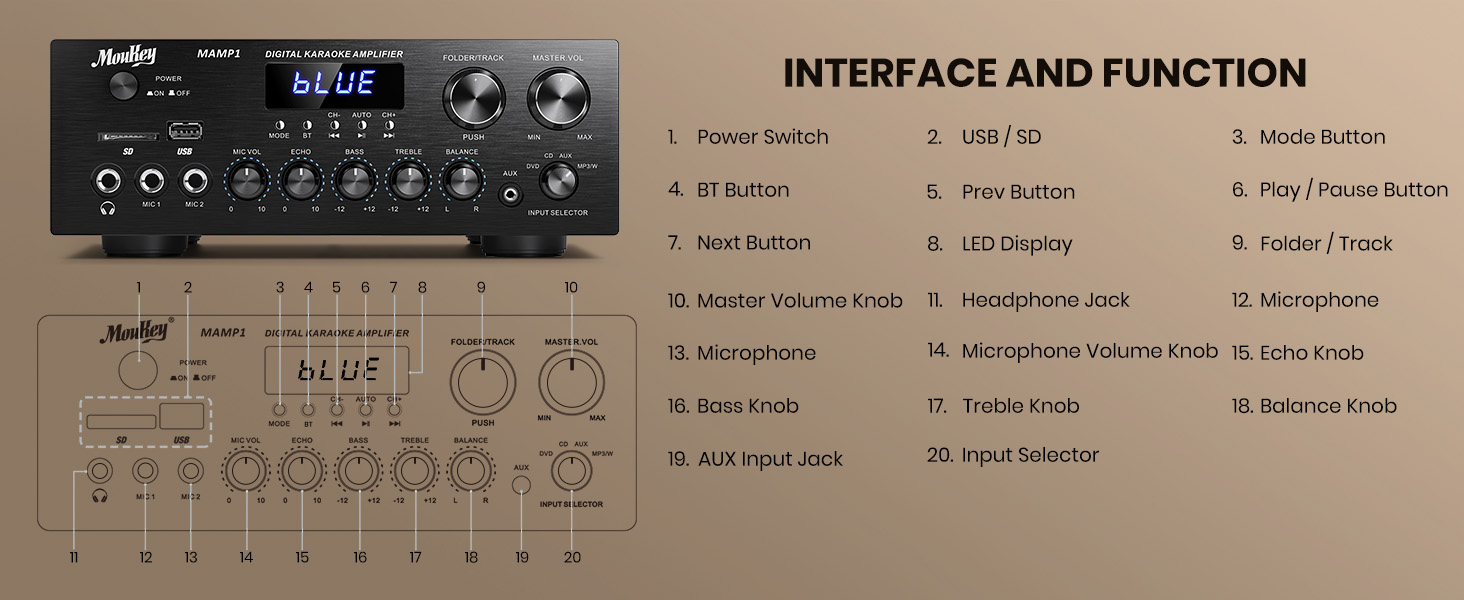
Figure 1: Moukey MAMP1 פריסת הפאנל הקדמי
- מתג הפעלה: לחץ כדי להפעיל או לכבות את היחידה.
- USB / SD Card Slot: Insert USB flash drives (max 64GB) or SD cards (max 32G) for MP3 playback.
- לחצן מצב: Press to cycle through input sources (USB/SD, Bluetooth, FM, AUX, CD, DVD).
- כפתור BT: לחץ כדי לבחור מצב בלוטות'.
- כפתורי הקודם/הבא: Navigate tracks in USB/SD/Bluetooth mode or stations in FM mode.
- לחצן הפעלה/השהה: הפעל או השהה את השמעת האודיו.
- תצוגת לד: מציג את המצב הנוכחי, פרטי הרצועה או תדר FM.
- Folder/Track Knob: Select folders or tracks.
- כפתור עוצמת הקול הראשי: מכוונן את עוצמת הפלט הכוללת.
- שקע אוזניות (6.35 מ"מ): חבר אוזניות להאזנה פרטית.
- Microphone Inputs (MIC1, MIC2 - 6.35mm): Connect up to two microphones for karaoke or public address.
- כפתור עוצמת המיקרופון: כוונון עוצמת הקול של המיקרופונים המחוברים.
- ידית הד: כוונון אפקט ההד עבור מיקרופונים.
- כפתור בס: מכוונן את פלט התדרים הנמוכים.
- כפתור טרבל: מכוונן את פלט התדר הגבוה.
- ידית איזון: כוונון איזון הערוץ הימני/שמאלי.
- כפתור בורר קלט: Manually select input sources (CD, AUX, DVD, MP3/BT).
6. חיבורי לוח אחורי
The rear panel provides all necessary ports for connecting your audio sources and speakers.

Figure 2: Moukey MAMP1 פריסת לוח אחורי
- FM Antenna Jack: חבר את אנטנת ה-FM המצורפת לקליטת רדיו.
- Audio Input (DVD/CD - RCA): Connect external audio sources like DVD or CD players using RCA cables.
- Line Out (RCA): התחבר לאחר ampמכשיר חי או הקלטה.
- Speaker Output (Banana Plugs): חברו את הרמקולים הפסיביים שלכם. ודאו קוטביות נכונה (+ ל-+ ו-- ל--).
- קלט כוח: Connect the power cable to a standard AC outlet.
7. התקנה
7.1 חיבור רמקולים
To connect your passive speakers to the Moukey MAMP1 ampliifier, בצע את השלבים הבאים:

איור 3: תרשים חיבור רמקולים
- להבטיח את ampהמכשיר כבוי ומנותק משקע החשמל.
- זהה את הדקים החיוביים (+) והשליליים (-) הן ברמקולים שלך והן ב- ampחיים יותר.
- For bare wire connections: Rotate and loosen the speaker knob on the amplifier. Insert the bare wire (remove approximately 10mm insulation). Tighten the knobs to secure the wires.
- Connect the positive (+) terminal of your speaker to the positive (+) terminal of the ampחיים יותר.
- Connect the negative (-) terminal of your speaker to the negative (-) terminal of the ampחיים יותר.
- חזור על הפעולה עבור כל הרמקולים. ודא שכל החיבורים מאובטחים כדי למנוע קצר חשמלי.
7.2 חיבור מקורות שמע
- RCA Devices (CD/DVD Player): Use RCA cables to connect the audio output of your CD or DVD player to the corresponding RCA input jacks on the ampהפאנל האחורי של המפיץ.
- AUX Devices: Connect devices with a 3.5mm audio output (e.g., smartphone, tablet) to the 3.5mm AUX IN jack on the front panel.
- מיקרופונים: Plug 1/4 inch (6.35mm) microphones into the MIC1 or MIC2 jacks on the front panel.
- אנטנת FM: Connect the included FM antenna to the FM ANT jack on the rear panel for radio reception.
7.3 חיבור מתח
- Ensure all audio and speaker connections are made.
- Connect the power cable to the AC POWER INPUT on the rear panel of the ampחיים יותר.
- חבר את הקצה השני של כבל החשמל לשקע חשמל AC מתאים.
8. הוראות הפעלה
8.1 הפעלה/כיבוי
הקש על כּוֹחַ מתג בלוח הקדמי כדי להפעיל את amplifier ON or OFF. The LED display will illuminate when powered on.
8.2 בחירת מקור קלט
השתמש ב- MODE כפתור או ה בורר קלט knob on the front panel to choose your desired audio source (Bluetooth, USB, SD, AUX, FM, CD, DVD).
8.3 בקרת עוצמה וצליל
- נפח מאסטר: סובב את ה מאסטר כרך כפתור לכוונון עוצמת הצליל הכוללת.
- עוצמת הקול של המיקרופון: השתמש ב- MIC VOL knob to adjust microphone volume independently.
- הֵד: Adjust the microphone echo effect with the הֵד כַּפתוֹר.
- בס/טרבל: Fine-tune the low and high frequencies using the בס ו לְשַׁלֵשׁ ידיות.
- לְאַזֵן: Adjust the left/right channel balance with the לְאַזֵן כַּפתוֹר.
8.4 זיווג בלוטות '
- הקש על MODE כפתור או BT button to select Bluetooth mode. The LED display will show "BLUE".
- במכשיר הנייד שלך, הפעל את Bluetooth וחפש מכשירים זמינים.
- Select "MAMP1" from the list to pair. A confirmation tone will sound upon successful connection.
8.5 השמעת USB/SD
- Insert a USB flash drive or SD card into the respective slot on the front panel.
- ה amplifier will automatically switch to USB/SD mode and begin playback. If not, press the MODE לחצן כדי לבחור בו.
- השתמש ב- הקודם הבא × כפתורים לדילוג על רצועות ו- PLAY/PAUSE כפתור לשליטה בנגינה.
פעולת רדיו FM 8.6
- ודא שאנטנת ה-FM מחוברת לפאנל האחורי.
- הקש על MODE button to select FM radio mode. The LED display will show the frequency.
- הקש על AUTO כפתור כדי לסרוק ולשמור באופן אוטומטי תחנות FM זמינות.
- השתמש ב- CH- ו CH+ לחצנים כדי לנווט בתחנות שמורות.
9. תחזוקה
- שמור את היחידה נקייה על ידי ניגוב שלה עם מטלית רכה ויבשה.
- הימנע משימוש בכימיקלים קשים או בחומרי ניקוי שוחקים.
- Ensure proper ventilation by keeping the vents clear of obstructions.
- אחסן את ampיש לאחסן את המכשיר במקום קריר ויבש, הרחק מאור שמש ישיר וטמפרטורות קיצוניות.
10. פתרון תקלות
| בְּעָיָה | סיבה אפשרית | פִּתָרוֹן |
|---|---|---|
| אין כוח | כבל חשמל לא מחובר; מתג ההפעלה כבוי; תקלה בשקע | Check power cable connection; Turn power switch ON; Test outlet with another device. |
| אין פלט קול | Incorrect input source; Volume too low; Speaker connections loose/incorrect; Faulty audio cable | Select correct input source; Increase master volume; Check speaker wiring; Replace audio cables. |
| בלוטות' לא מתחבר | Not in Bluetooth mode; Device too far; Device already connected to another unit | Switch to Bluetooth mode; Move device closer; Disconnect from other devices and try again. |
| קליטת FM גרועה | Antenna not connected; Weak signal | Connect FM antenna; Adjust antenna position for better reception. |
11. מפרטים
| תכונה | מִפרָט |
|---|---|
| מותג | מוקי |
| דֶגֶם | MAMP1 |
| כוח פלט | 400 וואט מקס |
| ערוצים | 2.0 ערוצים |
| גרסת בלוטות' | 5.0 |
| טווח בלוטות' | עד 40 מטר / 10 מטר |
| ממשקי קלט | 2x RCA (CD/DVD), 2x 1/4" (6.35mm) MIC, USB, SD, 3.5mm AUX IN, FM Antenna |
| ממשקי פלט | RCA Line Out, Banana Plug Speaker Outputs, 1/4" (6.35mm) Headphone |
| USB/SD Max Capacity | USB: 64G, SD: 32G |
| תגובת תדר | 20Hz-20kHz |
| טכנולוגיית טיונר | FM |
| מידות המוצר | 81.28 x 78.74 x 43.18 ס"מ; 3.19 ק"ג |
12. אחריות ותמיכה
Moukey products are designed and manufactured to the highest quality standards. For detailed warranty information and customer support, please refer to the warranty card included in your package or visit the official Moukey website. If you encounter any issues or have questions regarding your MAMP1 amplifier, please contact Moukey customer service for assistance.