
1. הקדמה
The SHX SHXA700 Infrared Heating Panel is designed to provide efficient and comfortable heating for your living spaces. Featuring a modern, frameless design with a white carbon crystal surface, it seamlessly integrates into any room. This 700W panel offers WiFi connectivity, remote control operation, and a programmable thermostat for optimal energy saving and comfort. This manual provides essential information for the safe and effective use of your heating panel.

Figure 1: SHX SHXA700 700W WiFi Infrared Heating Panel, front view. A clean, white rectangular infrared heating panel, showcasinהעיצוב המינימליסטי שלו.
2. הוראות בטיחות
אנא קרא בעיון את כל הוראות הבטיחות לפני ההתקנה והשימוש. אי הקפדה על הוראות אלה עלולה לגרום להתחשמלות, שריפה או פגיעה גופנית.
- ודא את אספקת החשמל כרךtage תואם לתווית הדירוג שעל המכשיר.
- Do not operate the heater with a damaged cord or plug. If the cord is damaged, it must be replaced by the manufacturer, its service agent, or similarly qualified persons to avoid a hazard.
- Do not cover the heater. Covering the heater can cause overheating.
- Maintain a minimum distance of 100 cm from the front of the heater to any objects, and 20 cm from the sides and top to walls or other surfaces.
- This appliance is rated IP44, making it suitable for use in bathrooms. However, it must not be installed directly above a bath, shower, or swimming pool.
- אין להכניס חפצים לפתחי גוף החימום.
- The heater is equipped with overheating protection. If the heater overheats, it will automatically shut off. Unplug the heater and allow it to cool down before restarting.
- הרחיקו ילדים וחיות מחמד מהתנור במהלך הפעולה.
- Always unplug the heater before cleaning or maintenance.
3. תכולת החבילה
פרקו בזהירות את הקופסה וודאו שכל הפריטים נמצאים ולא ניזוקו. אם חסרים או ניזוקו פריטים כלשהם, צרו קשר עם הספק שלכם.
- לוח חימום אינפרא אדום
- מדריך למשתמש
- שְׁלַט רָחוֹק
- ברגים ודובלים להתקנה על הקיר
- Optional Feet for freestanding placement
4. תכונות מוצר
The SHX SHXA700 Infrared Heating Panel offers a range of features designed for convenience and efficiency:
- תפוקה עוצמתית של 700W: Provides effective heating for rooms up to 14 m².
- Integrated WiFi Functionality: שלטו בתנור שלכם מרחוק באמצעות אפליקציה בסמארטפון.
- שְׁלַט רָחוֹק: Convenient operation with the included remote.
- טיימר 24 שעות: Program specific operating times for energy saving.
- תרמוסטט מתכוונן: Maintain your desired room temperature.
- הגנה מפני התחממות יתר: תכונת בטיחות משופרת.
- דירוג IP44: מתאים לשימוש בדamp סביבות כמו חדרי אמבטיה.
- עיצוב מודרני: Frameless white carbon crystal surface for aesthetic integration.
- תצוגת LCD: תצוגה ברורה להגדרות וסטטוס.

Figure 2: SHX Infrared Heating Panel features. An infographic highlighting the main features of the SHX SHXA700 infrared heating panel, including WiFi connectivity, remote control, 24-hour timer, adjustable thermostat, and overheating protection. It also indicates suitability for up to 14m² rooms.
5. התקנה והתקנה
The SHX SHXA700 heating panel can be installed either wall-mounted or freestanding using the optional feet.
5.1 הרכבה על הקיר
- Choose a suitable location on a wall, ensuring sufficient clearance from other objects (refer to Safety Instructions).
- Mark the drilling points on the wall using the provided template or by measuring the panel's mounting holes.
- קדחו חורים והכניסו את הדיבלים המצורפים.
- אבטחו את תושבות ההרכבה לקיר באמצעות הברגים המצורפים.
- Carefully hang the heating panel onto the mounting brackets, ensuring it is securely seated.
- חבר את כבל החשמל לשקע חשמל מתאים.
5.2 Freestanding Placement
- Attach the optional feet to the bottom of the heating panel using the provided screws.
- Place the panel on a stable, level surface, ensuring it is not easily tipped over.
- Ensure sufficient clearance from other objects (refer to Safety Instructions).
- חבר את כבל החשמל לשקע חשמל מתאים.

Figure 3: SHX Infrared Heating Panel in various room settings. A collage of four images demonstrating the SHX infrared heating panel's versatile placement options in different rooms: a living room, a bedroom, a bathroom, and an office, illustrating its modern design integration.

Figure 4: SHX SHXA700 Infrared Heating Panel dimensions. A diagram illustrating the physical dimensions of the SHX SHXA700 infrared heating panel, showing its width (1200mm), height (500mm), and depth (45mm), along with its weight (2.9 kg).
6. הוראות הפעלה
The heating panel can be operated using the integrated control panel on the back or the included remote control.
6.1 לוח הבקרה נגמרview
The control panel is located on the back of the unit and includes buttons for power, WiFi, temperature adjustment, timer, and an LCD display.
6.2 פעולה בסיסית
- הפעלה/כיבוי: Press the power button on the control panel or remote control to turn the heater on or off.
- התאמת טמפרטורה: Use the '+' and '-' buttons to set your desired temperature. The LCD display will show the current and target temperatures.
- פונקציית טיימר: Press the timer button to activate and set the 24-hour timer. Follow the on-screen prompts to program the desired operating duration.

Figure 5: SHX Infrared Heating Panel control panel and remote control. A close-up view of the heating panel's integrated control unit on the side, featuring power, WiFi, LCD display, 24-hour timer, and indicator light buttons, alongside the included remote control for easy operation.
7. WiFi Connectivity & App Control
The SHX SHXA700 heating panel features integrated WiFi, allowing for smart control via your smartphone.
- הורד את האפליקציה: Download the "Tuya Smart" app from your smartphone's app store (available for iOS and Android).
- הרשמה/התחברות: צור חשבון או התחבר לחשבון Tuya Smart הקיים שלך.
- הוסף מכשיר: Follow the in-app instructions to add your SHX heating panel. This typically involves putting the heater into pairing mode (refer to the app's guide for specific steps, usually by holding the WiFi button on the control panel).
- התחבר ל-WiFi: Select your home WiFi network and enter the password.
- לִשְׁלוֹט: Once connected, you can control the heater's power, temperature, timer, and other settings directly from the app.
- שילוב בית חכם: The Tuya Smart app supports integration with voice assistants like Amazon Alexa and Google Home, allowing for voice control of your heating panel.

Figure 6: SHX Infrared Heating Panel WiFi and integrated timer features. An image showing the heating panel's WiFi symbol and a smartphone displaying the "Tuya Smart" app interface, along with logos for Alexa and Google Home, indicating smart home compatibility and a 24-hour timer function.
8. תחזוקה
Regular cleaning and maintenance will ensure the longevity and optimal performance of your heating panel.
- ניקוי: Always unplug the heater and allow it to cool completely before cleaning. Wipe the surface with a soft, damp מטלית. אין להשתמש בחומרי ניקוי שוחקים, ממסים או כימיקלים חזקים, מכיוון שאלה עלולים לפגוע במשטח.
- אִחסוּן: אם מאחסנים את התנור לתקופה ממושכת, ודאו שהוא נקי ויבש. יש לאחסן אותו במקום קריר ויבש, רצוי באריזתו המקורית.
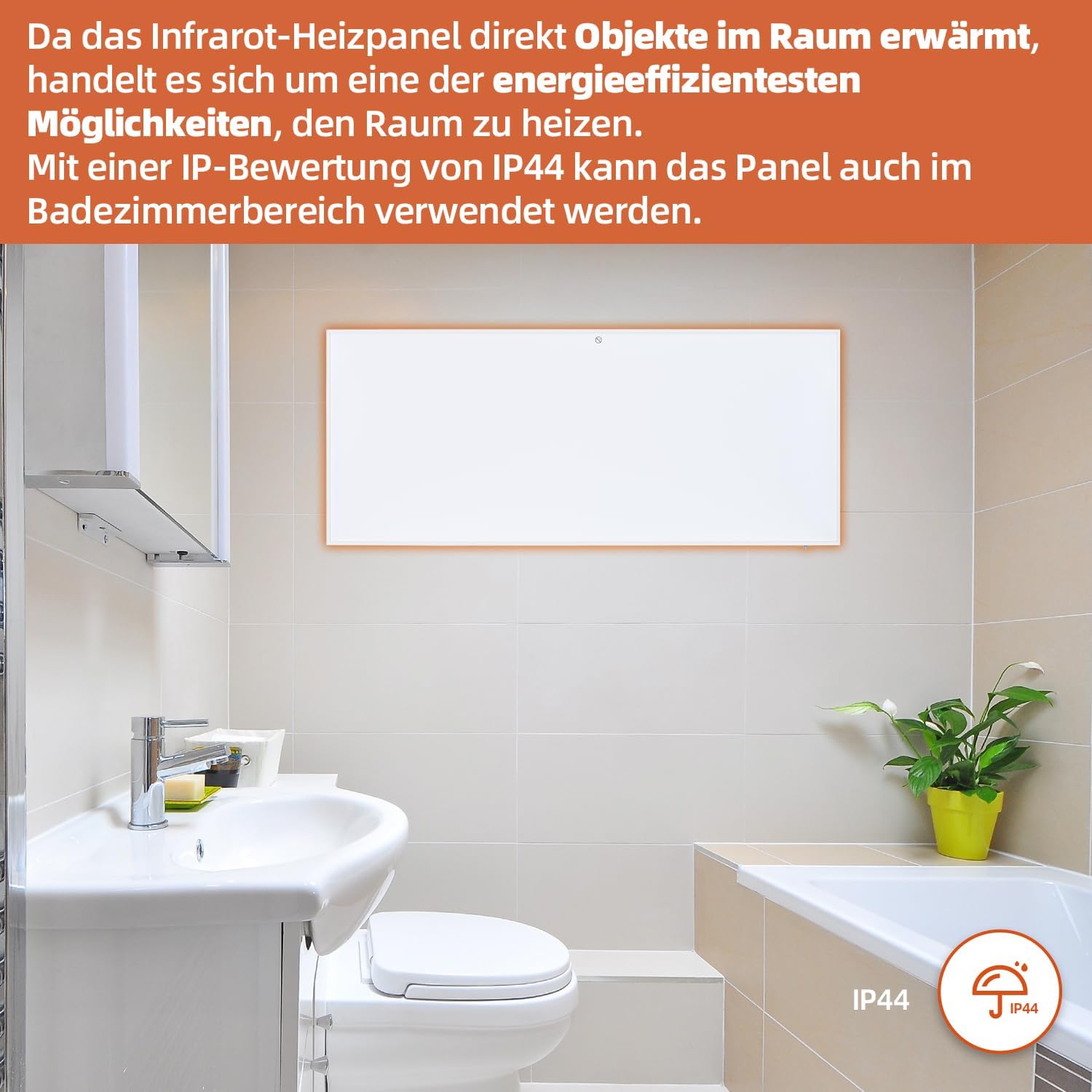
Figure 7: SHX Infrared Heating Panel with IP44 rating. The infrared heating panel mounted in a modern bathroom setting, emphasizing its IP44 water resistance rating, making it safe for use in damp סביבות.
9. פתרון תקלות
If you encounter any issues with your SHX heating panel, refer to the following common problems and solutions:
| בְּעָיָה | סיבה אפשרית | פִּתָרוֹן |
|---|---|---|
| המחמם לא נדלק. | No power supply. Overheating protection activated. | Check if the power cord is securely plugged in and the outlet is functional. Unplug the heater, allow it to cool for 30 minutes, then plug it back in. |
| חיבור ה-WiFi נכשל. | Incorrect WiFi password. Heater not in pairing mode. Router issues. | Ensure correct WiFi password. Put the heater into WiFi pairing mode (refer to app instructions). Restart your WiFi router. Ensure the heater is within WiFi range. |
| השלט רחוק לא עובד. | הסוללות מתות או לא הוכנסו בצורה שגויה. חסימה בין השלט לגוף החימום. | Replace the batteries in the remote control (requires 2 AAA batteries). Ensure there is a clear line of sight between the remote and the heater's receiver. |
| גוף החימום לא מחמם ביעילות. | Temperature setting too low. Room size exceeds heater capacity. Drafts. | Increase the target temperature. Ensure the room size is within the recommended range (up to 14 m²). Seal any drafts in the room. |
10. מפרטים
| מִפרָט | עֵרֶך |
|---|---|
| מותג | SHX |
| מספר דגם | SHXA700-WiFi |
| צֶבַע | לָבָן |
| מידות המוצר (L x W x H) | 120 x 50 x 4.5 ס"מ |
| מִשׁקָל | 2.9 קילוגרם |
| כּוֹחַ | 700 וואט |
| כרך ידtage | 220 וולט (AC) |
| שיעור יעילות אנרגטית | א' עד ג' |
| רמת רעש | 1 דציבלים |
| תכונות מיוחדות | WiFi Compatible, Overheating Protection, Programmable Thermostat, Remote Control, Energy Efficient |
| מקור כוח | חשמלי עם כבלים |
| שיטת חימום | קוֹרֵן |
| שימוש מומלץ | פנים, בית |
| סוג הרכבה | Wall Mount, Floor Mount (with optional feet) |
| סוללות נדרשות עבור שלט | 2 סוללות AAA |
| ארץ מוצא | סִין |
11. אחריות ותמיכה
The SHX SHXA700 Infrared Heating Panel comes with a אחריות לשנה מתאריך הרכישה. אנא שמור את הוכחת הרכישה שלך לצורך תביעות אחריות.
For technical support, warranty claims, or any questions regarding your product, please contact your retailer or the manufacturer's customer service. Contact information can typically be found on the product packaging or the manufacturer's official webאֲתַר.