
1. הקדמה
The BOTSLAB W302 Outdoor Dual-Lens Security Camera is designed to provide comprehensive surveillance for your home or business. Featuring advanced dual-lens technology, it offers a 170° super-wide viewing angle and crystal-clear 4MP resolution. This manual provides detailed instructions for setting up, operating, and maintaining your security camera to ensure optimal performance.
2. תכולת החבילה
אנא ודא שכל הפריטים המפורטים להלן כלולים בחבילה שלך. אם פריטים חסרים או פגומים, אנא פנה לתמיכת הלקוחות.
- יחידת מצלמה x 1
- סוגר x 1
- מדבקת מיקום x 1
- Warning sticker x 1
- מדריך להתחלה מהירה x 1
- מתאם מתח x 1
- חבילת בורג x 1

Figure 2.1: All components included in the BOTSLAB W302 camera package.
3. תכונות מוצר
- Dual-Lens Vision: Captures a wide 170° super-wide viewing angle with 4MP (2MP+2MP) resolution for seamless panoramic images without blind spots.
- ראיית לילה צבעונית: Provides continuous color views 24/7, even in low light, thanks to automatic light adaptation (ColorGuard) and up to 100ft night vision range.
- Smart Security & Precise Alerts: Detects people and vehicles with motion detection, sending precise alerts. Features a customizable siren and light alarm for enhanced security.
- AI-Powered Tracking: Intelligently focuses on humans, offering close-up views and dual live views (wide panorama and close-up) simultaneously via the Botslab app.
- קישוריות חלקה: Supports faster and more stable dual-band Wi-Fi (2.4GHz/5GHz).
- שמע דו כיווני: Stay connected and communicate with visitors or deter intruders.
- עיצוב עמיד בפני מזג אוויר: IP66 rated, ensuring reliable performance in temperatures from -20°C to 60°C.
- שילוב בית חכם: Seamlessly integrates with Amazon Alexa and Google Assistant for voice control.

Figure 3.1: Dual-Lens Vision with 170° Super-Wide Angle.

Figure 3.2: Non-Stop Color Night Vision.

Figure 3.3: Smart Security with Person, Vehicle, and Motion Detection.
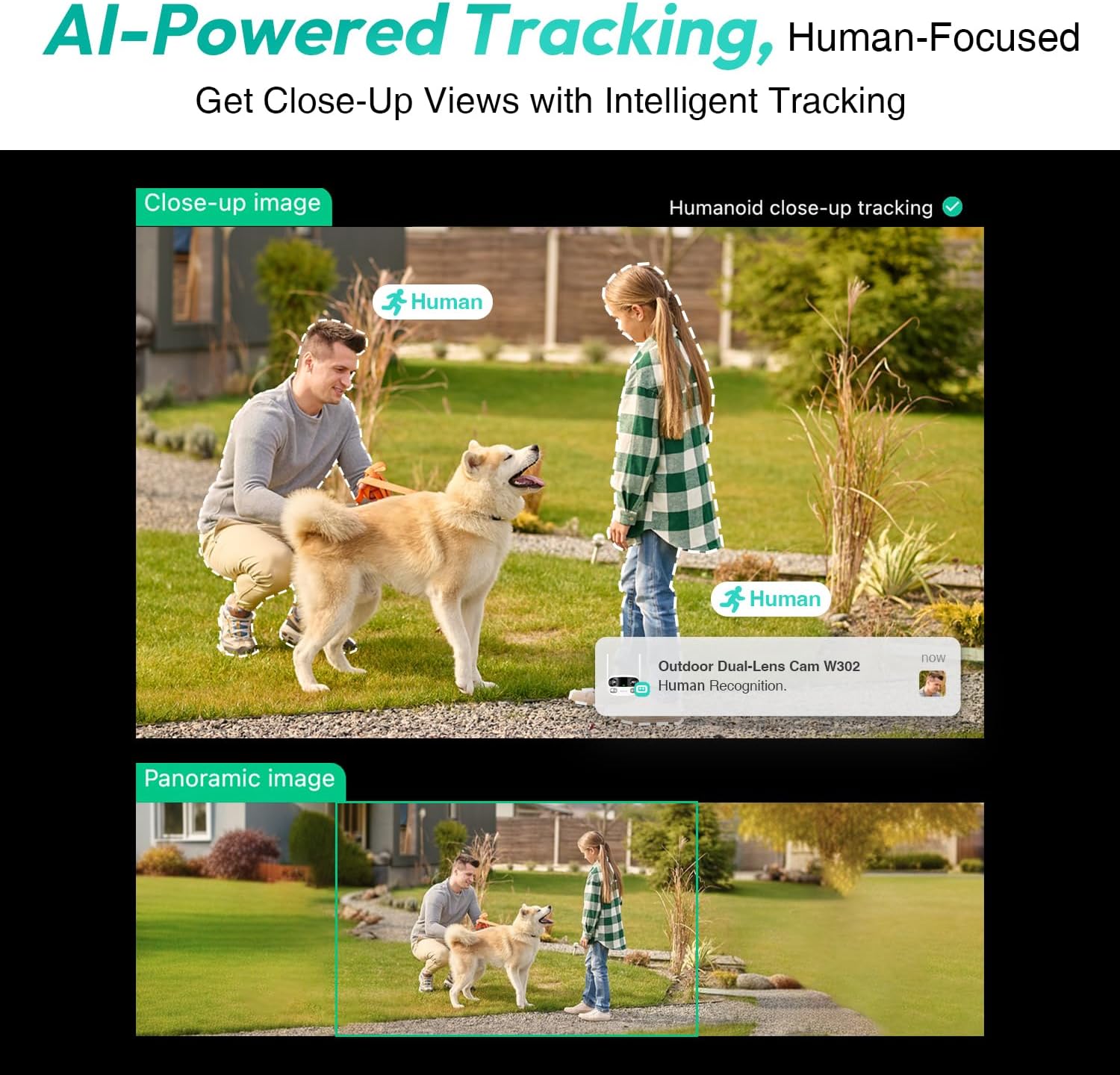
Figure 3.4: AI-Powered Human Tracking with Dual Live Views.
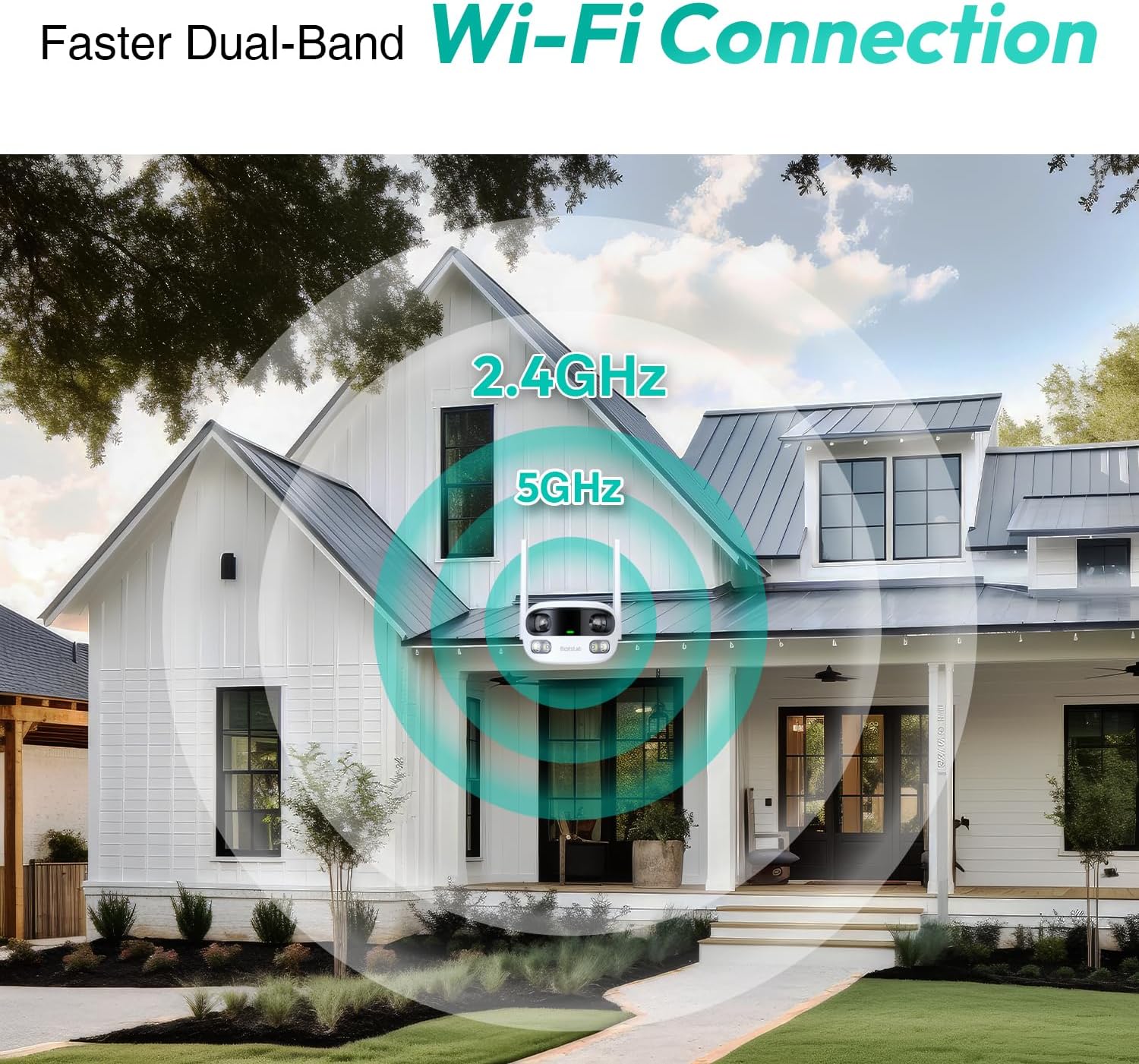
Figure 3.5: Faster Dual-Band Wi-Fi Connection.

איור 3.6: תקשורת שמע דו-כיוונית.

Figure 3.7: IP66 Weatherproof Design.

Figure 3.8: Alexa & Google Assistant Integration.
4. התקנה והתקנה
Follow these steps to properly install your BOTSLAB W302 camera.
- בחר מיקום: בחר מיקום חיצוני עם שטח ברור view of the area you wish to monitor. Ensure it's within Wi-Fi range and near a power outlet.
- הרכב את התושבת: Use the provided positioning sticker to mark drill holes on the wall or ceiling. Drill the holes, insert expansion tubes, and securely fasten the bracket with screws.
- צרף את המצלמה: Rotate the camera body and screw it onto the bracket. Adjust the camera's position and tighten the bracket.
- חבר חשמל: Plug the power adapter into the camera and then into a power outlet. The indicator light will turn green and start flashing when ready for pairing.

Figure 4.1: Versatile Installation Options (Wall and Ceiling).
סרטון 4.1: אוברview of the Botslab Security Camera Outdoor, including its features and installation process. This video is provided by Botslab Security.
5. הגדרת אפליקציה
The Botslab app is essential for controlling and monitoring your camera. Download and install the app on your smartphone (available on App Store and Google Play).
- הרשמה/התחברות: Open the Botslab app and register a new account or log in with an existing one.
- הוסף מכשיר: Tap 'Add Device' or the '+' icon in the app.
- סרוק קוד QR: סרוק את קוד ה- QR הממוקם בתחתית המצלמה שלך.
- התחבר ל-Wi-Fi: Follow the in-app instructions to connect the camera to your 2.4GHz or 5GHz Wi-Fi network. Ensure your phone is near the camera during this process.
- כריכת מכשיר: The app will bind the device to your account. Once connected, the indicator light on the camera will turn solid blue.
סרטון 5.1: סקירה מפורטתview of the Botslab W302 Outdoor Dual Lens Security Camera, including app setup and features. This video is provided by Galaxy Tech Review.
6. הוראות הפעלה
Once configured, you can access and control your camera through the Botslab app.
- לִחיוֹת View: Access the live feed from both lenses. You can switch between close-up and panoramic views, or use the left/right mode for individual lens feeds.
- פאן/זום: In panoramic mode, slide the bottom image to pan left or right. Pinch to zoom on the close-up image.
- שמע דו כיווני: Tap the phone icon to speak through the camera's speaker. Tap the mute icon to silence audio from the camera's microphone.
- Siren & Light Alarm: Activate the siren and floodlights manually from the app to deter intruders.
- Motion/Vehicle/Person Detection: Enable these features in the app settings to receive precise alerts.
- אזורי פרטיות: הגדר אזורים ספציפיים בתוך המצלמה view that will not be monitored for privacy.
- ראיית לילה: The camera automatically adapts to low light. You can choose between full-color night vision (using floodlights) or infrared night vision.

Figure 6.1: Dual Live Views on the Botslab App.

Figure 6.2: Siren & Light Alarm for Instant Deterrence.

Figure 6.3: Configuring Privacy Zones.

Figure 6.4: Smart Security with Precise Alerts.
7. אפשרויות אחסון
The BOTSLAB W302 offers flexible storage solutions for your recorded footage.
- Botslab Cloud Storage: Includes a one-year trial with 7-day storage for motion-detected clips at 5-minute intervals.
- אחסון מקומי: Supports up to 256GB MicroSD cards (not included). The MicroSD card slot is located under a protective cover at the bottom of the camera.

Figure 7.1: Cloud and Local Storage Options.
8. מפרטים
| תכונה | מִפרָט |
|---|---|
| רזולוציית לכידת וידאו | 4 מגה פיקסל |
| Viewזווית | 170 מעלות |
| טכנולוגיית קישוריות | 2.4GHz/5GHz Wi-Fi |
| דירוג הגנה בינלאומי | IP66 |
| טמפרטורת הפעלה | -20 מעלות צלזיוס עד 60 מעלות צלזיוס |
| תאימות לבית חכם | Amazon Alexa, Google Assistant |
| אחסון מקומי | Up to 256GB MicroSD (Not Included) |
| מקור כוח | Wired (AC power cord included) |
| צֶבַע | White Pro |
| משקל פריט | 1.63 פאונד |
9. תחזוקה
- ניקוי: נגבו באופן קבוע את עדשת המצלמה וגוף המצלמה בעזרת מטלית רכהamp מטלית להסרת אבק ולכלוך. אין להשתמש בכימיקלים חזקים.
- עדכוני קושחה: Check the Botslab app periodically for firmware updates to ensure optimal performance and security.
- ספק כוח: Ensure the camera is connected to a stable power source. Avoid using unofficial power adapters.
- ניהול כרטיסי SD: If using local storage, regularly back up important footage and format the MicroSD card to maintain performance.
10. פתרון תקלות
- מצלמה במצב לא מקוון: Check Wi-Fi connection and power supply. Try restarting the camera and your router.
- איכות וידאו ירודה: Ensure the lens is clean. Check your Wi-Fi signal strength. Adjust camera placement if necessary.
- בעיות בזיהוי תנועה: Verify detection zones are correctly set in the app. Adjust sensitivity settings.
- בעיות שמע דו-כיווני: בדוק את הגדרות המיקרופון והרמקול באפליקציה. ודא שרמות העוצמה מתאימות.
- כרטיס SD לא מקליט: Ensure the MicroSD card is inserted correctly and is not full. Format the card if issues persist.
11. אחריות ותמיכה
BOTSLAB is committed to providing high-quality products and excellent customer service.
- הבטחת איכות: Enjoy a 365-day quality guarantee.
- עזרה טכנית: תמיכה טכנית לכל החיים זמינה.
- החזרות: 30-day free returns.
- Fast Support: Expect support within 48 hours.
לסיוע נוסף, אנא בקר global.botslab.com או ליצור קשר service@botslab.com.