
Star Micronics MCL32CBI
מדריך למשתמש למדפסת תרמית ישירה Star Micronics mC-Label3 MCL32CBI
Model: MCL32CBI
מָבוֹא
This manual provides essential information for the setup, operation, maintenance, and troubleshooting of your Star Micronics mC-Label3 MCL32CBI Direct Thermal Printer. Please read this manual thoroughly before using the printer to ensure proper and safe operation.
תוכן החבילה
ודא שכל הפריטים המפורטים להלן כלולים בחבילה שלך:
- mC-Label3 Multifunctional Printer
- מתאם AC
- כבל חשמל
- USB Cables (C-C 1.0m and C-A 1.8m)
- כבל LAN (1 מ')
- Simple Setup Sheet Safety Guide

תמונה: חזית view of the Star Micronics mC-Label3 printer, showcasing its compact design and label output slot.
הגדרה
1. חיבור המדפסת
The mC-Label3 MCL32CBI printer offers multiple connectivity options:
- USB-C: Connect the printer directly to your PC, Android, or iOS device using the provided USB-C to USB-C or USB-C to USB-A cables.
- Ethernet (LAN): For network connectivity, connect the printer to your router or network switch using the supplied LAN cable.
- בלוטות': The MCL32CBI model supports Bluetooth connectivity for iOS and Android devices. Ensure Bluetooth is enabled on your device and pair with the printer.

תמונה: אחורי view of the mC-Label3 printer, highlighting the LAN, USB, and power ports for various connection types.
2. טעינת מדיה
The printer supports various media types, including linerless labels, die-cut labels, continuous labels, and thermal receipt paper.
- Open the top cover of the printer by lifting the latch.
- Place the media roll into the media compartment, ensuring the leading edge feeds out from the top.
- Pull a small amount of media past the print head and close the top cover securely.
- Ensure the media is properly aligned within the guides.

תמונה: מלמעלה למטה view of the mC-Label3 printer with its cover open, illustrating the internal mechanism for loading thermal paper or label rolls.
הוראות הפעלה
1. הפעלה / כיבוי
Connect the power cable to the printer and a power outlet. Press the power button located on the front of the printer to turn it on. The status indicator light will illuminate.
2. Printing Labels and Receipts
The mC-Label3 MCL32CBI printer is designed for efficient label and receipt printing. It supports various applications and cloud services.
- תאימות תוכנה: Works seamlessly with PC, Android, and iOS applications.
- שירותי ענן: Utilize Star Micronics Cloud Services to design and manage labels.
- One Touch Label: This feature allows storing pre-made receipts and labels for quick and easy printing directly from the printer.
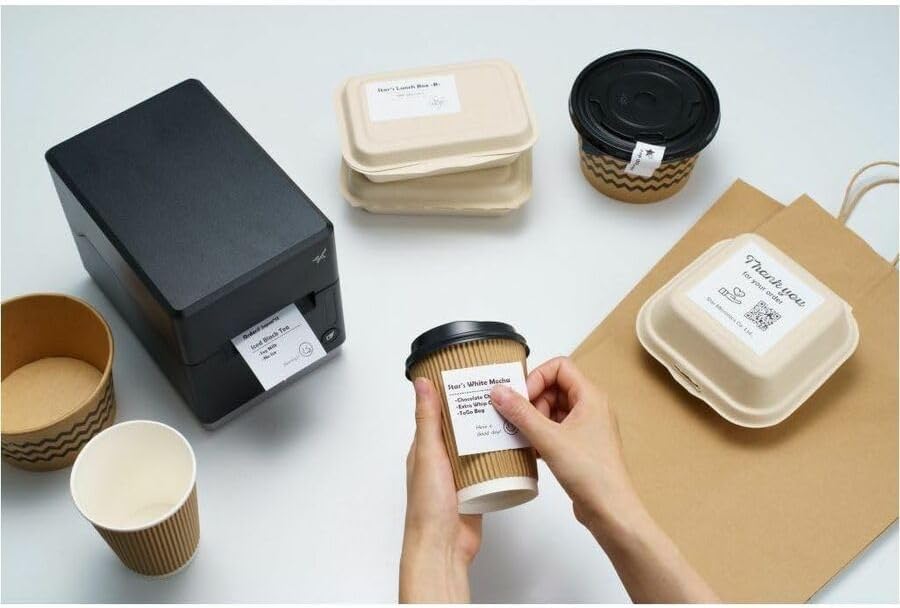
Image: A hand pressing the feed button on the mC-Label3 printer, demonstrating the printing of a 'Thank you' label.

Image: The mC-Label3 printer shown in a practical setting, printing labels for food containers and coffee cups, illustrating its versatility.
תַחזוּקָה
1. ניקוי המדפסת
Regular cleaning ensures optimal performance and extends the life of your printer.
- השתמש במטלית רכה נטולת מוך דampened with isopropyl alcohol to clean the print head.
- נגבו את החלק החיצוני של המדפסת בעזרת מטלית רכה ויבשה.
- הימנע משימוש בחומרי ניקוי שוחקים או ממסים.
2. Replacing Media
When the media roll is depleted, follow the media loading instructions in the Setup section to replace it.
3. Effortless Repairs
The mC-Label3 is designed for effortless, no-tools-required repairs with minimal upkeep, simplifying any necessary component replacements.
פתרון בעיות
סעיף זה מספק פתרונות לבעיות נפוצות שאתה עשוי להיתקל בהן.
| בְּעָיָה | סיבה אפשרית | פִּתָרוֹן |
|---|---|---|
| המדפסת לא נדלקת | כבל החשמל לא מחובר; בעיה בשקע החשמל | ודא שכבל החשמל מחובר היטב; נסה שקע חשמל אחר. |
| אין פלט הדפסה | Out of media; Media loaded incorrectly; Driver issue | Load new media; Re-load media correctly; Reinstall printer drivers. |
| איכות הדפסה ירודה | Dirty print head; Low quality media | Clean the print head; Use recommended thermal media. |
| בעיות קישוריות | Incorrect cable connection; Bluetooth not paired; Network configuration | Check USB/Ethernet cables; Re-pair Bluetooth; Verify network settings. |
מפרטים
| תכונה | פְּרָט |
|---|---|
| שם הדגם | mC-Label3 |
| מספר דגם של פריט | MCL32CBI |
| טכנולוגיית הדפסה | תרמית ישירה |
| פלט מדפסת | מונוכרום |
| מהירות הדפסה מקסימלית מונוכרום | 23 עמודים לדקה |
| רזולוציית הדפסה מרבית בשחור לבן | 203 DPI (203 x 203 DPI) |
| מדיה מודפסת | Labels (Linerless, Die-Cut, Continuous), Thermal Receipt |
| טכנולוגיית קישוריות | Bluetooth, Wired (USB, Ethernet) |
| ממשק חומרה | USB, אתרנט |
| מכשירים תואמים | PC, Android, iOS |
| סוג בקר | iOS, אנדרואיד |
| מידות המוצר | מידות: 17.0 x 14.2 x 21.1 ס"מ (עומק 6.7 אינץ' x רוחב 5.6 אינץ' x גובה 8.3 אינץ') |
| משקל פריט | 7.2 פאונד (3.27 ק"ג) |
| קיבולת אחסון זיכרון | 64 מגה-בייט |
| צֶבַע | שָׁחוֹר |
| יַצרָן | STAR MICRONICS |
| ארץ מוצא | סִין |
מידע על אחריות
The Star Micronics mC-Label3 MCL32CBI printer comes with a manufacturer's warranty. For specific terms and conditions, please refer to the warranty card included in your package or visit the official Star Micronics webאֲתַר.
סוג אחריות: יַצרָן
תְמִיכָה
For further assistance, technical support, or to download the latest drivers and firmware, please visit the official Star Micronics support webלאתר או לפנות לשירות הלקוחות שלהם.
Star Micronics Official Webאֲתַר: www.starmicronics.com
קישור תמיכה: www.starmicronics.com/support
Ask a question about this manual
Ask about setup, troubleshooting, compatibility, parts, safety, or missing instructions. Manuals+ will review the question and use this page’s manual context to help answer it.