
1. המוצר נגמרview
This FINTIE Keyboard Case is designed to enhance your tablet experience by providing both protection and functionality. It features a magnetically detachable wireless Bluetooth keyboard, multiple viewing angles, and durable construction, transforming your tablet into a versatile laptop-like device.
2. תאימות
כיסוי מקלדת זה תוכנן במיוחד עבור דגמי Samsung Galaxy Tab הבאים:
- Samsung Galaxy Tab A11+ / A11 Plus 11 Inch Model (SM-X230/X236/X238) 2025 Release
- Samsung Galaxy Tab A9+ / A9 Plus 11 Inch Model (SM-X210/X216/X218) 2023 Release
It is not compatible with any other tablet models. To verify your tablet model, navigate to Settings > About tablet > Model name במכשיר שלך.

Figure 2.1: Compatible tablet models and instructions for finding your tablet's model name.
3. תכולת החבילה
החבילה כוללת:
- 1 x FINTIE Keyboard Case
- 1 x מקלדת Bluetooth אלחוטית
- 1 x כבל טעינה מיקרו USB
- 1 x מדריך למשתמש
4. התקנה והתקנה
4.1 Inserting Your Tablet into the Case
- Align your Samsung Galaxy Tab with the hard shell back cover of the case.
- Gently press the tablet into the case, ensuring all corners and edges are securely fitted.
- Confirm that all ports, buttons, and cameras are accessible and unobstructed.
4.2 Attaching and Detaching the Keyboard
The keyboard is magnetically detachable, allowing for flexible use.
- כדי לצרף: Place the keyboard onto the magnetic strip inside the case. It will snap into place.
- כדי לנתק: Gently pull the keyboard away from the magnetic strip.

Figure 4.1: Magnetic attachment of the keyboard to the case.
4.3 Bluetooth Pairing Instructions
- Ensure the keyboard is charged (refer to Section 5).
- Slide the keyboard's הפעלה/כיבוי לעבור ל- ON position. The power indicator light will illuminate briefly.
- הקש על 'לְחַבֵּר' button on the keyboard. The Bluetooth indicator light will start blinking, indicating it's in pairing mode.
- בטאבלט Samsung Galaxy שלך, עבור אל הגדרות > מכשירים מחוברים > בלוטות' והפעל את בלוטות' ON.
- Your tablet will search for available devices. Select 'FINTIE Keyboard' (או שם דומה) מהרשימה.
- Follow any on-screen prompts to complete the pairing process. Once paired, the Bluetooth indicator light on the keyboard will stop blinking.
Video 4.1: A demonstration of the FINTIE Keyboard Case, including tablet insertion, keyboard attachment, and Bluetooth pairing. This video is provided by the seller.
5. הוראות טעינה
The keyboard features a built-in rechargeable battery.
- Connect the provided Micro USB charging cable to the keyboard's charging port.
- חבר את הקצה השני של הכבל לספק כוח USB (לא כלול) או ליציאת USB של מחשב.
- The 'Charge' indicator light on the keyboard will illuminate during charging.
- A full charge typically takes approximately 2 hours. The 'Charge' indicator light will turn off or change color when charging is complete.
The keyboard automatically enters an energy-saving mode after 10 minutes of inactivity to extend battery life.
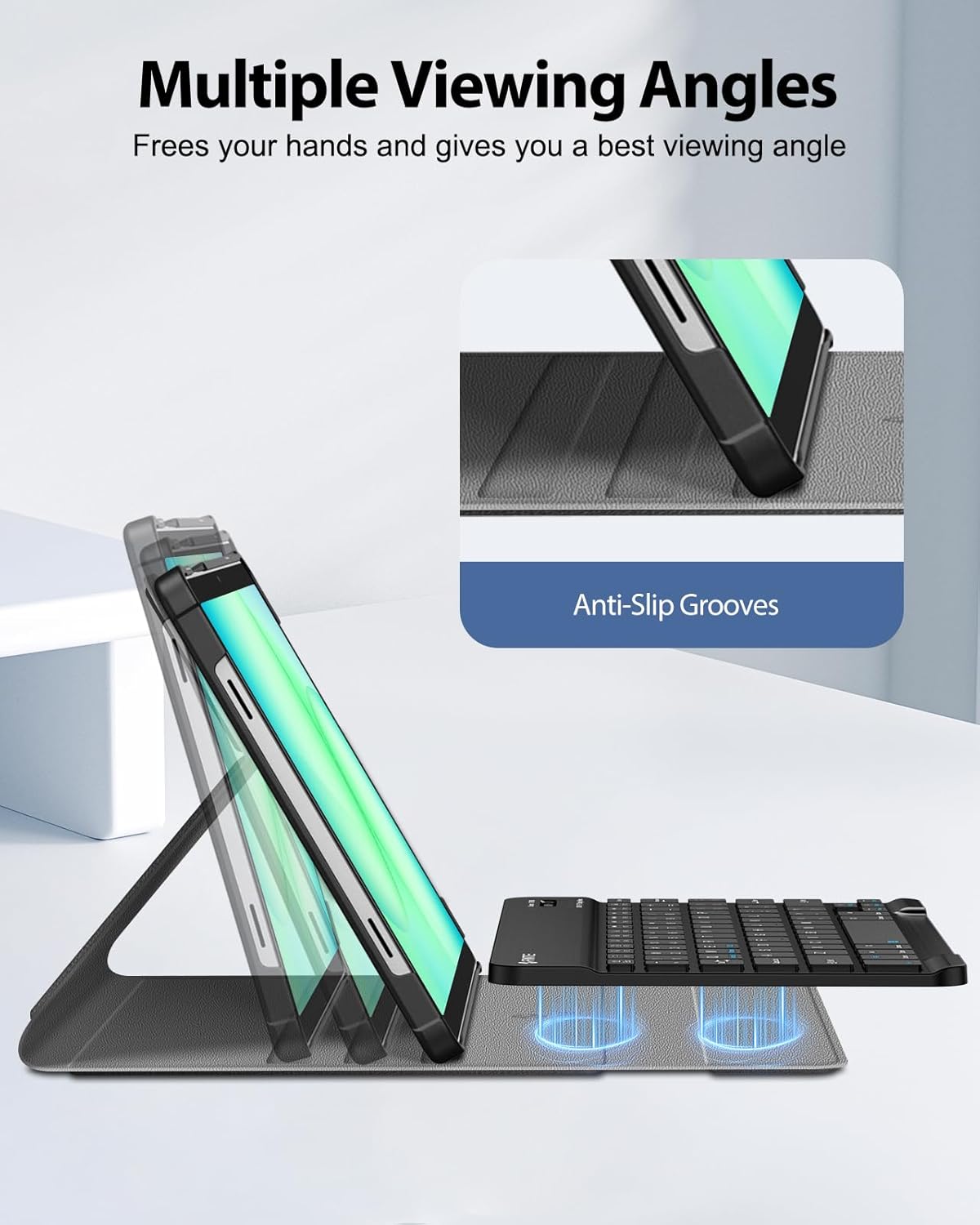
Figure 5.1: Keyboard charging port and indicator lights.
6. הוראות הפעלה
6.1 שימוש במקלדת
Once paired, the keyboard functions like a standard computer keyboard. It is compatible with both iOS and Android operating systems, allowing for seamless switching between devices if needed.

Figure 6.1: User typing on the FINTIE keyboard case.
6.2 התאמה Viewזוויות
The case offers multiple viewing angles for comfortable use. The removable keyboard can be positioned to support the tablet. Adjust the keyboard's position along the case cover to achieve your preferred viewing angle. Built-in anti-slip grooves help secure the tablet in place.

איור 6.2: מרובה viewing angles supported by the case.
7. תכונות עיקריות
- Magnetically Detachable Keyboard: The super slim 7mm lightweight Bluetooth keyboard can be easily attached or detached, offering flexibility for typing or tablet-only use. It has a 10-meter operating range.
- Ergonomic Scissor-Switch Keys: Designed for a smoother, quieter typing experience with tactile feedback, reducing noise and providing comfort during extended use.
- הגנה כפולה: Constructed with a durable PU leather cover, anti-slip rubber-lined interior, and a premium polycarbonate shell. This design provides comprehensive protection against drops and bumps while maintaining a slim profile. The case supports auto sleep/wake function when the keyboard is detached.

Figure 7.1: Scissor-switch keyboard mechanism.

Figure 7.2: Case material and craftsmanship for dual protection.
8. מפרטים
| מותג | FINTIE |
| מספר דגם | CSBJ002 |
| מכשירים תואמים | Samsung Galaxy Tab A11 Plus 11'' 2025 (SM-X230/X236/X238), Samsung Galaxy Tab A9 Plus 11'' 2023 (SM-X210/X216/X218) |
| טכנולוגיית קישוריות | בלוטות' |
| תיאור מקלדת | מקלדת ארגונומית |
| תכונה מיוחדת | Magnetically Removable Keyboard, Multiple Viewזוויות |
| צֶבַע | שָׁחוֹר |
| מידות המוצר | אורך 11.42 אינץ', רוחב 8.07 אינץ', גובה 1.57 אינץ' |
| חוֹמֶר | PU Leather, Anti-Slip Rubber, Polycarbonate |
| מספר הסוללות הנדרשות | 1 |
| מקור כוח | מופעל על סוללה |
| פריסת מקלדת | QWERTY |
| מספר מפתחות | 78 |
| גרסת מערכת הפעלה מינימלית נדרשת | אנדרואיד 13.0 |
| UPC | 840173964354 |
9. תחזוקה
To ensure the longevity and optimal performance of your FINTIE Keyboard Case, follow these maintenance guidelines:
- ניקוי המארז: נגבו את החלק החיצוני של המארז בעזרת מטלית רכהamp מטלית. הימנעו מכימיקלים חזקים או חומרי ניקוי שוחקים.
- ניקוי המקלדת: Use a soft, dry cloth to clean the keyboard. For dust between keys, use compressed air. Do not immerse the keyboard in water or any liquids.
- אִחסוּן: When not in use for extended periods, store the keyboard case in a cool, dry place. Ensure the keyboard is turned off to preserve battery life.
- הימנע מטמפרטורות קיצוניות: Do not expose the product to extreme heat or cold, as this can damage the battery and electronic components.
10. פתרון תקלות
If you encounter issues with your FINTIE Keyboard Case, please refer to the following common solutions:
- המקלדת לא מתחברת:
- Ensure the keyboard is turned ON וטעון במלואו.
- Verify that Bluetooth is enabled on your tablet.
- Make sure the keyboard is in pairing mode (Bluetooth indicator blinking).
- Forget the device from your tablet's Bluetooth settings and attempt to re-pair.
- הפעל מחדש את הטאבלט ואת המקלדת.
- מקשים לא מגיבים:
- בדוק אם המקלדת מחוברת דרך בלוטות'.
- Ensure the keyboard battery is not depleted.
- If specific keys are not working, try cleaning around them.
- Tablet Not Entering Sleep/Wake Mode:
- Ensure the case cover is properly aligned and closed.
- Note that the auto sleep/wake function typically works in 'CASE ONLY' mode, meaning the keyboard might need to be detached or positioned correctly for optimal function.
11. אחריות ותמיכה
FINTIE stands behind its products. This product is covered by a 90-day warranty from the initial purchase date. For any questions or support regarding your purchase, please contact FINTIE customer service.
For more information, you may visit the official FINTIE store: FINTIE Store on Amazon