
MEGATEK CP27BR
מדריך למשתמש של נגן תקליטורים נייד MEGATEK
Model: CP27BR
מָבוֹא
Thank you for choosing the MEGATEK Portable CD Player. This device is designed to provide a versatile and high-quality audio experience, supporting various media formats and offering multiple connectivity options. Please read this manual carefully to ensure proper use and maintenance of your new CD player.

Image: The MEGATEK Portable CD Player, showcasing its compact design, integrated speakers, control buttons, and included accessories like headphones and USB-C charging cables.
מידע בטיחות
כדי להבטיח פעולה בטוחה ולמנוע נזק, אנא הקפידו על אמצעי הזהירות הבאים:
- אין לחשוף את המכשיר לטמפרטורות קיצוניות, ללחות או לאור שמש ישיר.
- הימנע מנפילה או הכפיפה של המכשיר למכות חזקות.
- אין לפרק או לנסות לתקן את המכשיר בעצמך. יש לפנות לכל טיפול וטיפול באנשי מקצוע מוסמכים.
- השתמשו רק בכבל הטעינה המצורף ובמתאם חשמל תואם.
- הרחק את המכשיר ממים ומנוזלים אחרים.
- נקו את המכשיר בעזרת מטלית רכה ויבשה. אין להשתמש בחומרי ניקוי שוחקים או ממסים.
- האזנה ממושכת בעוצמות שמע גבוהות עלולה לגרום נזק לשמיעה. כוונן את עוצמת הקול לרמה בטוחה.
תוכן החבילה
ודא שכל הפריטים נמצאים בחבילה:
- MEGATEK Portable CD Player - Black
- אוזניות חוטיות
- כבל טעינה USB-C
- מדריך למשתמש

Image: A visual representation of the package contents, including the CD player, headphones, USB-C cable, and user manual.
המוצר נגמרview
Familiarize yourself with the various parts and controls of your MEGATEK Portable CD Player.
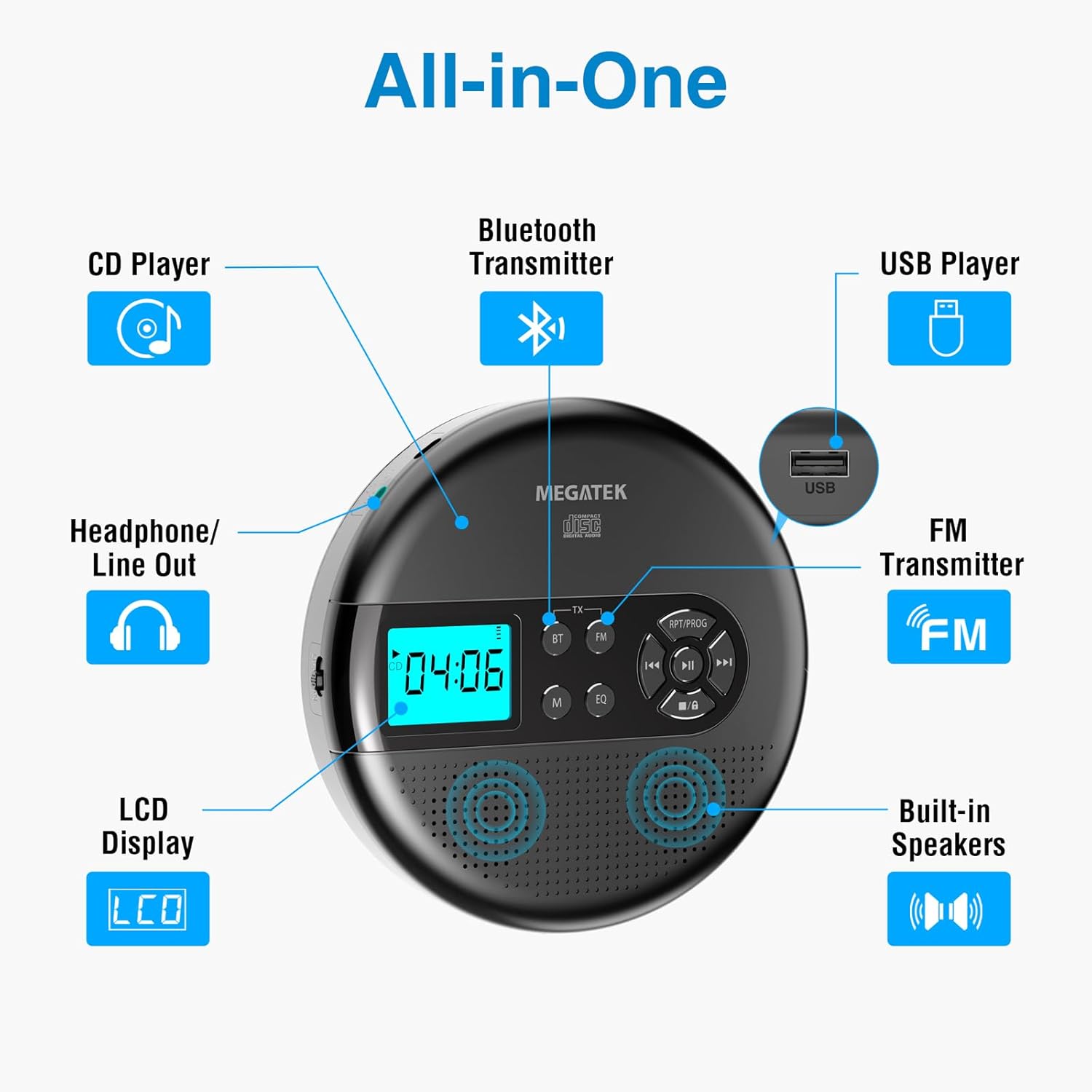
Image: An "All-in-One" diagram highlighting key features such as the CD Player, Bluetooth Transmitter, USB Player, FM Transmitter, Built-in Speakers, LCD Display, and Headphone/Line Out port.
בקרות ויציאות:
- תצוגת LCD: מציג מספר רצועה, זמן, מצב ומצב סוללה.
- לחצן הפעלה/השהה: מתחיל או מושהה את ההפעלה.
- כפתורי הקודם/הבא: דילוג על רצועות או הרצה קדימה/אחורה.
- לחצן עצור: מפסיק את ההשמעה.
- RPT/PROG Button: Controls repeat modes and programming tracks.
- כפתור BT: Activates Bluetooth transmission mode.
- לחצן FM: Activates FM transmission mode.
- לחצן M (מצב): Switches between CD, USB, Bluetooth, and FM modes.
- לחצן EQ: מחזור בין הגדרות אקולייזר קבועות מראש.
- בקרת עוצמת הקול: מכוונן את רמת פלט השמע.
- יציאת USB: להשמעת אודיו files מכונן USB.
- יציאת טעינה מסוג C: לטעינת הסוללה הפנימית.
- 3.5mm Audio Out Jack: לחיבור אוזניות או רמקולים חיצוניים.
- רמקולי סטריאו מובנים: להשמעת אודיו ישירה.
הגדרה
טעינת הסוללה:
The device is equipped with a built-in 2000mAh rechargeable Li-ion battery. Before first use, fully charge the player.
- Connect the provided USB-C charging cable to the Type-C charging port on the player.
- חבר את הקצה השני של כבל ה-USB-C לספק כוח USB (לא כלול) או ליציאת USB של מחשב.
- The battery indicator on the LCD display will show charging status. A full charge provides up to 15 hours of playtime at medium volume.

Image: The portable CD player connected to a power source via its USB-C cable, resting on a nightstand next to a bed.
הכנסת תקליטור:
- Locate the CD compartment latch/button on the side of the player and slide/press it to open the lid.
- Carefully place the CD onto the center spindle with the label side facing up.
- לחץ בעדינות את התקליטור כלפי מטה עד שייכנס למקומו בנקישה.
- סגור את מכסה תא התקליטורים בחוזקה עד שיינעל.

Image: The portable CD player with its lid open, showing a blue CD disc inserted into the compartment, ready for playback.
הוראות הפעלה
השמעת CD:
- הכנס תקליטור כמתואר בסעיף ההתקנה.
- הקש על הפעל/השהה לחצן כדי להתחיל את ההשמעה.
- השתמש ב- הקודם/הבא buttons to navigate between tracks. Hold to fast-forward or rewind.
- הקש על RPT/PROG button to cycle through repeat modes (repeat one, repeat all, random) or to program a custom playback order.
- הקש על לְהַפְסִיק כפתור כדי לסיים את ההפעלה.
- Adjust volume using the dedicated volume control.
השמעת USB:
The player supports MP3, WMA, and WAV audio files מכונן USB.
- הכנס כונן הבזק מסוג USB ליציאת ה-USB.
- הקש על M (מצב) לחצן כדי לעבור למצב USB.
- השתמש ב- הפעל/השהה, הקודם/הבא, ו RPT/PROG כפתורים כפי שהייתם עושים להשמעת תקליטורים.
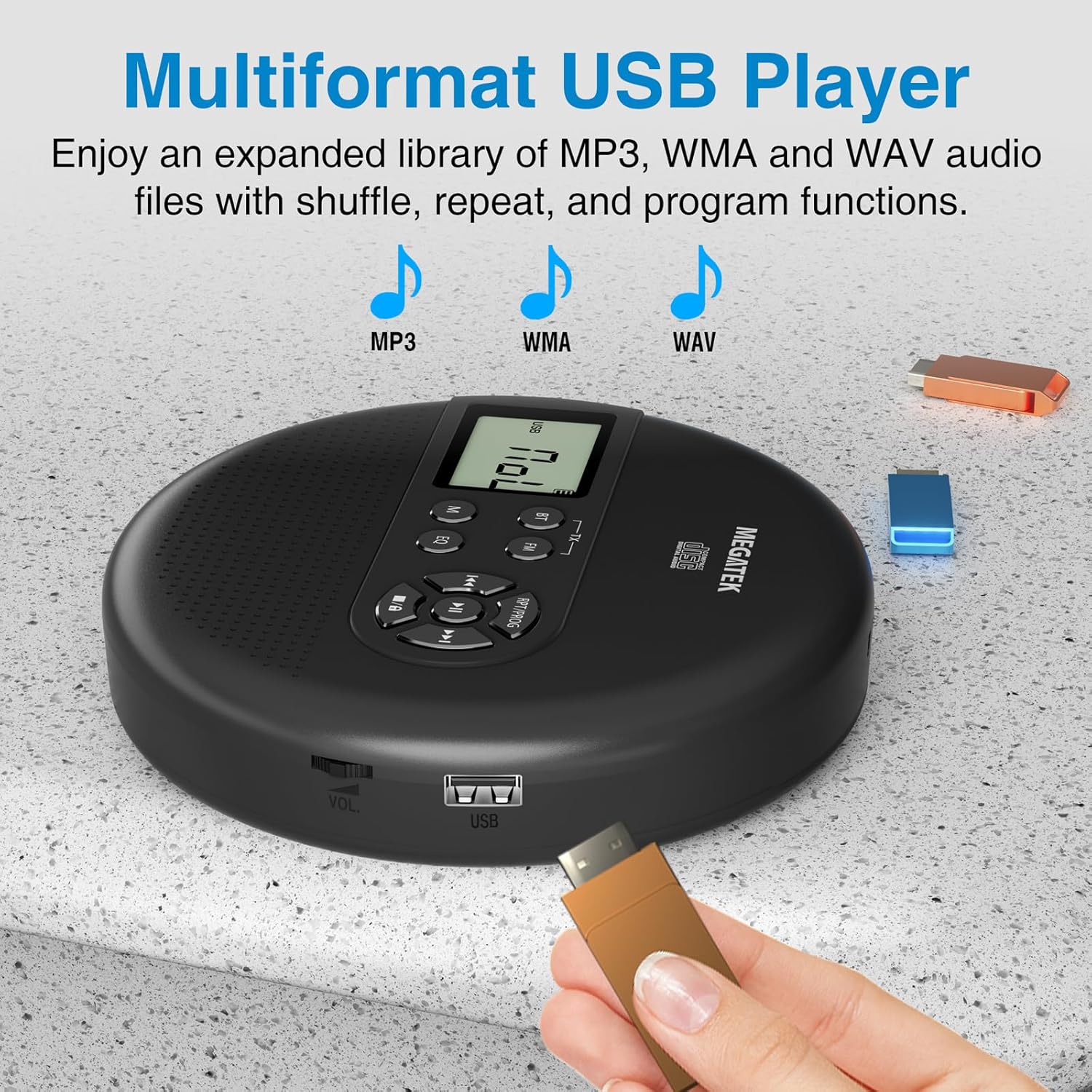
Image: The portable CD player with a USB flash drive inserted into its side port, illustrating its multi-format USB playback capability.
העברת Bluetooth:
Stream audio wirelessly to Bluetooth-enabled headphones or speakers. Note: This feature does not support connections to car stereo systems.
- ודא שאוזניות או רמקול ה-Bluetooth שלך נמצאים במצב צימוד.
- On the CD player, press the BT button. The Bluetooth indicator on the display will flash.
- The player will automatically search for and connect to nearby Bluetooth devices. Once connected, the indicator will stop flashing.

Image: The portable CD player wirelessly transmitting audio to two external Bluetooth speakers, demonstrating its Bluetooth transmission capability.
שידור FM:
Transmit audio signals to nearby FM radios, including car FM stereos and home stereo systems.
- הקש על FM button on the CD player. The display will show an FM frequency.
- Tune your FM radio (car stereo, home stereo) to the same frequency displayed on the CD player.
- Adjust the frequency on the CD player using the הקודם/הבא buttons if interference occurs or to find a clearer channel.

Image: The portable CD player placed on a car dashboard, transmitting audio to the car's FM stereo system, indicated by an FM frequency on the car's display.
Using Headphones/External Speakers:
For private listening or connecting to wired audio systems:
- Plug the included wired headphones into the 3.5mm audio out jack.
- Alternatively, connect an audio cable (not included) from the 3.5mm audio out jack to the AUX input of external speakers or an audio system.
- The built-in speakers will automatically mute when headphones or external speakers are connected.

Image: A close-up of the portable CD player, visually representing sound waves emitting from its dual stereo speakers, emphasizing the built-in audio capability.
תַחזוּקָה
- ניקוי: Use a soft, dry, lint-free cloth to clean the exterior of the player. For the CD lens, use a specialized CD lens cleaner. Do not use liquids or aerosol cleaners directly on the device.
- אִחסוּן: When not in use for extended periods, store the player in a cool, dry place, away from direct sunlight and extreme temperatures.
- טיפול בסוללה: כדי להאריך את חיי הסוללה, הימנעו מפריקה מלאה של הסוללה לעתים קרובות. טען את המכשיר באופן קבוע, גם אם אינו בשימוש פעיל.
פתרון בעיות
| בְּעָיָה | סיבה אפשרית | פִּתָרוֹן |
|---|---|---|
| הנגן לא נדלק. | הסוללה התרוקנה. | Charge the player using the USB-C cable. |
| אין קול מהרמקולים/אוזניות. | Volume is too low; headphones not fully plugged in; incorrect mode selected. | Increase volume; ensure headphones are securely connected; press the M (מצב) כפתור כדי לבחור את המקור הנכון. |
| דילוג על תקליטור או אי הפעלה. | CD is dirty, scratched, or inserted incorrectly; anti-skip function overwhelmed. | Clean the CD; ensure CD is properly seated; avoid strong vibrations. |
| בעיות בחיבור בלוטות'. | Device not in pairing mode; too far from player; interference. | Ensure receiving device is in pairing mode; move closer to the player; restart both devices. |
| FM transmission static/poor quality. | Interference; incorrect frequency. | Adjust the FM frequency on the player and receiver to find a clear channel. |
מפרטים
| תכונה | פְּרָט |
|---|---|
| מספר דגם | CP27BR |
| מידות המוצר | 5.91 x 5.91 x 1.32 אינץ' |
| משקל פריט | 10.9 אונקיות |
| סוֹלְלָה | סוללת ליתיום-יון 2000mAh (נטענת) |
| זמן משחק | עד 15 שעות (בנפח בינוני) |
| פורמטי תקליטורים נתמכים | CD, CD-R/RW, MP3 CD, Audio Book CD |
| פורמטי USB נתמכים | MP3, WMA, WAV |
| הגנה נגד דילוגים | 60 שניות |
| קישוריות | USB, Bluetooth Transmitter, FM Transmitter, 3.5mm Audio Out |
| תכונות מיוחדות | Built-in Stereo Speakers, Resume Play, Shuffle, Repeat, Program Functions, 5 EQ Options |
אחריות ותמיכה
MEGATEK offers comprehensive support for its products:
- החלפה תוך 12 חודשים: In case of product defects or issues within 12 months of purchase.
- תמיכה טכנית לכל החיים: Assistance with product usage, troubleshooting, and general inquiries.
- שירות לקוחות 24/7: Available through Amazon buyer-seller messaging.
For any questions or problems, please contact MEGATEK customer service via the Amazon platform or refer to the contact information provided in the product packaging.
Image: A graphic detailing MEGATEK's customer support, including 12-month replacement, lifetime technical support, and 24/7 Amazon buyer-seller messaging, alongside an image of customer service representatives.
Ask a question about this manual
Ask about setup, troubleshooting, compatibility, parts, safety, or missing instructions. Manuals+ will review the question and use this page’s manual context to help answer it.