
1. הקדמה
Thank you for choosing the FLEXISPOT L-Shaped Electric Standing Desk. This manual provides essential information for the safe assembly, operation, and maintenance of your new desk. Please read these instructions carefully before use and retain them for future reference. This desk is designed to provide a versatile and ergonomic workspace, allowing seamless transitions between sitting and standing positions.
2. הוראות בטיחות
כדי להבטיח הפעלה בטוחה ולמנוע פגיעה או נזק, אנא הקפידו על הנחיות הבטיחות הבאות:
- ודא שכל הרכיבים מהודקים היטב לפני השימוש.
- הרחק ילדים וחיות מחמד מהשולחן במהלך הפעולה.
- Do not place hands or other body parts near moving parts of the desk frame.
- Avoid overloading the desk. The maximum load capacity is 80 kg.
- אין לשבת או לעמוד על השולחן.
- Only use the desk indoors in a dry environment.
- נתק את החשמל לפני ניקוי או תחזוקה.
- If any parts are damaged or missing, contact customer support immediately. Do not attempt to repair the desk yourself.
3. תכולת החבילה
Please verify that all parts are present and undamaged before beginning assembly. Refer to the assembly diagram for a complete list of components.
- L-Shaped Desktop (2 parts)
- 4-Leg Frame (Dual Motor Mechanism)
- לוח בקרה חכם
- מתאם מתח וכבלים
- חומרת הרכבה (ברגים, כלים וכו')
- מדריך למשתמש
4. התקנה והרכבה
הרכבה דורשת בדרך כלל שני אנשים. יש לבצע את השלבים הבאים בקפידה:
- פרק רכיבים: הוציאו בזהירות את כל החלקים מהאריזה והניחו אותם על משטח רך ונקי כדי למנוע שריטות.
- Assemble the 4-Leg Frame: Connect the frame components according to the included diagram. Ensure all bolts are tightened securely. The 4-leg design provides enhanced stability.
- Install Dual Motor Mechanism: The dual motor system is integrated into the frame. Ensure all motor connections are secure. This mechanism allows for smooth and precise height adjustments.
- חיבור לוחות שולחן עבודה: Carefully place the two desktop panels onto the assembled frame. Align the pre-drilled holes and secure the desktop to the frame using the provided screws. The L-shaped design offers ampסביבת העבודה
- לוח בקרה מותקן: Attach the intelligent control panel to the underside of the desktop in an easily accessible location. Connect the control panel cable to the main control box.
- חבר חשמל: Plug the power adapter into the control box, then plug the power cord into a standard electrical outlet.
- איפוס ראשוני: After connecting power, perform an initial reset. Press and hold the 'Reset' button (usually marked with a circular arrow) until the desk reaches its lowest position and then slightly rises. This calibrates the desk.
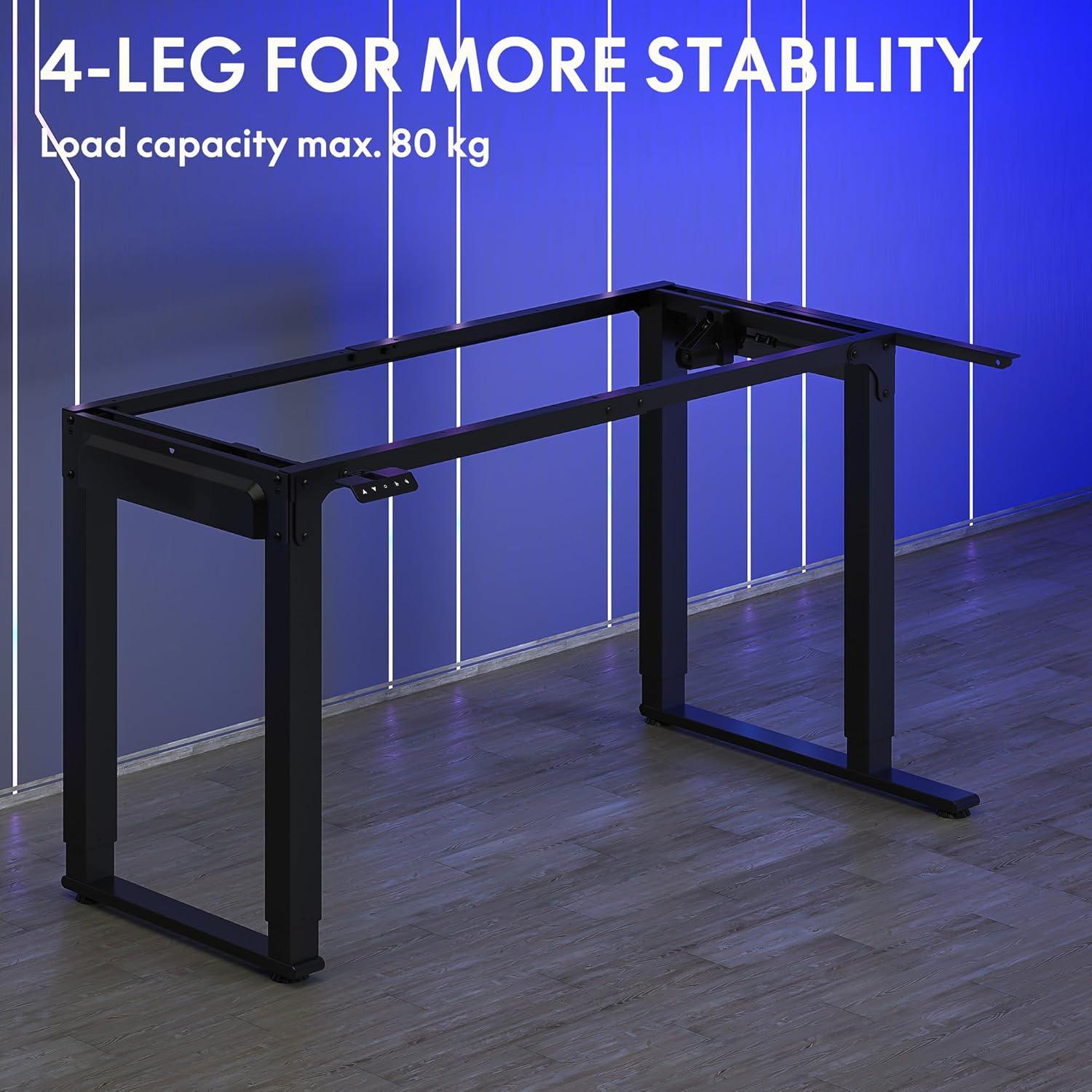
Image: The robust 4-leg frame provides superior stability for the L-shaped standing desk.

Image: Detail of the dual-motor mechanism, ensuring accurate and smooth height positioning.
5. הוראות הפעלה
Your FLEXISPOT L-Shaped Electric Standing Desk features an intelligent control panel for easy height adjustment and memory presets.
5.1 פונקציות לוח הבקרה

Image: The intelligent control panel with clearly labeled buttons for desk operation.
- כפתורי למעלה/למטה (▲ / ▼): Press and hold to continuously adjust the desk height up or down. Release to stop at the desired height.
- Reset Button (↺): Used for initial calibration or to reset the desk if an error occurs. Press and hold until the desk moves to its lowest point and slightly rises.
- Sitting Preset Button (👭): Press to automatically move the desk to your programmed sitting height.
- Standing Preset Button (👭 with upward arrow): Press to automatically move the desk to your programmed standing height.
5.2 הגדרת הגדרות זיכרון קבועות מראש
To save your preferred sitting or standing height:
- כוונן את שולחן העבודה לגובה הרצוי באמצעות כפתורי למעלה/למטה.
- Press and hold the desired preset button (Sitting or Standing) for approximately 3-5 seconds until you hear a beep or see the display flash. This indicates the height has been saved.

Image: The desk can be adjusted from a minimum height of 72cm to a maximum of 117cm.

Image: The spacious L-shaped desktop (180cm x 110cm) provides ample room for multiple computers and accessories.
6. תחזוקה
תחזוקה שוטפת מבטיחה את אורך חייו וביצועיו האופטימליים של שולחן העבודה שלכם.
- ניקוי: נגבו את שולחן העבודה והמסגרת בעזרת מטלית רכהamp מטלית. הימנעו מכימיקלים חזקים או חומרי ניקוי שוחקים.
- בְּדִיקָה: בדקו מעת לעת את כל הברגים והחיבורים כדי לוודא שהם מהודקים היטב. הדקו מחדש במידת הצורך.
- ניהול כבלים: Ensure power cables and other device cables are properly managed to prevent entanglement or damage during height adjustments.
- טיפול מוטורי: The dual motors are designed for durability. Avoid obstructing the desk's movement or exceeding the weight limit to prevent strain on the motors.

Image: The desk features safe and stylish rounded corners.
7. פתרון תקלות
אם אתם נתקלים בבעיות עם שולחן העבודה שלכם, עיינו בבעיות הנפוצות ובפתרונות הבאים:
| בְּעָיָה | סיבה אפשרית | פִּתָרוֹן |
|---|---|---|
| שולחן הכתיבה לא זז. | Power cable disconnected; Control panel cable loose; Overload protection activated. | Check power connections; Ensure control panel cable is secure; Reduce weight on desk and perform a reset. |
| השולחן זז לא אחיד או משמיע רעש חריג. | Unbalanced load; Loose connections; Obstruction. | Distribute weight evenly; Check and tighten all frame connections; Remove any obstructions. Perform a reset. |
| Height presets are not working. | הגדרות קבועות מראש לא נשמרו כהלכה. | Re-save the desired height by holding the preset button until confirmation. |
| Desk stops mid-movement. | Overload protection; Overheating protection. | Reduce weight on the desk. Allow the desk to cool down for 20-30 minutes if it has been used continuously. |
If the problem persists after attempting these solutions, please contact FLEXISPOT customer support.
8. מפרטים
| תכונה | פְּרָט |
|---|---|
| מספר דגם | QS2LB-1811 |
| מותג | FLEXISPOT |
| סוג שולחן | שולחן עומד חשמלי בצורת L |
| סוג מנוע | מנוע כפול |
| סוג מסגרת | 4-Leg Frame |
| טווח כוונון גובה | 72 ס"מ עד 117 ס"מ |
| מידות שולחן עבודה (אורך x רוחב) | 180 ס"מ על 110 ס"מ |
| קיבולת עומס מקסימלית | 80 ק"ג |
| רמת רעש | < 50 dB |
| חוֹמֶר | סגסוגת פלדה (מסגרת) |
| צֶבַע | שָׁחוֹר |
| משקל פריט | 30 קילוגרם |
9. אחריות ותמיכה
FLEXISPOT products are designed for quality and durability. For specific warranty information, please refer to the warranty card included with your purchase or visit the official FLEXISPOT website. If you require technical assistance, have questions about assembly, or need to report a missing/damaged part, please contact FLEXISPOT customer support directly. Ensure you have your model number (QS2LB-1811) and purchase details available when contacting support.
מידע ליצירת קשר: Please refer to the contact details provided on the FLEXISPOT official webבאתר או במסמכי הרכישה שלך לקבלת ערוצי התמיכה העדכניים ביותר.