
מָבוֹא
This manual provides detailed instructions for the installation, operation, and maintenance of your Cooler Master MasterLiquid Atmos 360 Black CPU Liquid Cooler. This all-in-one (AIO) water cooling system is designed to deliver efficient thermal performance for your CPU, featuring a dual-chamber pump, pre-installed SickleFlow 120 Edge fans, and Addressable Gen 2 RGB lighting.
The MasterLiquid Atmos 360 is compatible with a wide range of Intel LGA (1700/1200/1151/1150/1155/1156) and AMD (AM5/AM4) sockets.

Image: The Cooler Master MasterLiquid Atmos 360 Black CPU Liquid Cooler, showcasing its radiator, three RGB fans, and illuminated pump head.
תוכן החבילה
לפני תחילת ההתקנה, אנא ודא שכל הרכיבים נמצאים באריזה:
- 360mm Radiator with pre-installed SickleFlow 120 Edge Fans
- CPU Water Block/Pump Unit
- Mounting Hardware for Intel LGA 1700/1200/115x sockets
- Mounting Hardware for AMD AM5/AM4 sockets
- משחה תרמית
- ARGB Gen 2 Controller (if included)
- Various Cables (PWM fan cables, ARGB cables)
- מדריך למשתמש

תמונה: סקירה מקיפה view of all included components for the MasterLiquid Atmos 360, including the radiator, fans, pump, mounting brackets, and accessories.
התקנה והתקנה
Follow these steps carefully to install your liquid cooler. Refer to your motherboard and PC case manuals for specific guidance on component placement and cable routing.
1. הכנת שקע המעבד
- זהה את סוג שקע המעבד שלך (Intel LGA או AMD AM).
- Install the appropriate backplate (for Intel) or retention clips (for AMD) as per the included hardware guide.
- Clean the CPU surface with isopropyl alcohol to remove any residue.
2. מרחו משחה תרמית
- Apply a small, pea-sized amount of the included thermal paste to the center of your CPU's integrated heat spreader (IHS).
- Do not spread the paste manually; the pressure from the cold plate will distribute it evenly.
3. התקנת הרדיאטור והמאווררים
- קבע את מיקום ההרכבה האופטימלי עבור רדיאטור 360 מ"מ במארז המחשב שלך (בדרך כלל למעלה או מלפנים).
- Secure the radiator to the case using the provided screws. The SickleFlow Edge fans are pre-installed on the radiator for convenience.
4. הרכב את המשאבה/לוח הקירור
- Attach the correct mounting brackets to the pump unit for your CPU socket.
- הנח בזהירות את מכלול המשאבה/לוח הקירור על גבי המעבד, תוך יישור חורי ההרכבה.
- Secure the pump unit with the appropriate screws, tightening them in a diagonal pattern until snug. Do not overtighten.
5. חבר כבלים
- חבר את כבל החשמל בעל 3 הפינים של המשאבה לראש CPU_FAN או AIO_PUMP זמין בלוח האם שלך.
- Connect the PWM fan cables from the SickleFlow Edge fans to the CPU_FAN or other available fan headers on your motherboard. It is recommended to connect them to a single header using a splitter if necessary, to ensure synchronized fan speed control.
- Connect the ARGB cables from the pump and fans to an Addressable Gen 2 RGB header on your motherboard (5V-D-G) or to the included ARGB controller.

Image: The assembled MasterLiquid Atmos 360, showing the radiator, fans, and pump unit connected by tubing.
הוראות הפעלה
הפעלה ראשונית
After installation, power on your system. The pump and fans should begin operating. Monitor your CPU temperatures using system monitoring software to ensure proper function.
בקרת תאורה RGB
The MasterLiquid Atmos 360 features Addressable Gen 2 RGB lighting on both the pump and fans. You can control the lighting effects through several methods:
- סנכרון לוח אם: If connected to a compatible ARGB motherboard header, use your motherboard's RGB software (e.g., ASUS Aura Sync, MSI Mystic Light, Gigabyte RGB Fusion, ASRock Polychrome Sync) to customize lighting.
- בקר ARGB כלול: If an ARGB controller is included, use its physical buttons to cycle through pre-set lighting modes and colors.
- Cooler Master MasterCTRL/MasterPlus Software: Download and install Cooler Master's MasterCTRL or MasterPlus software for advanced customization of lighting effects and device performance.
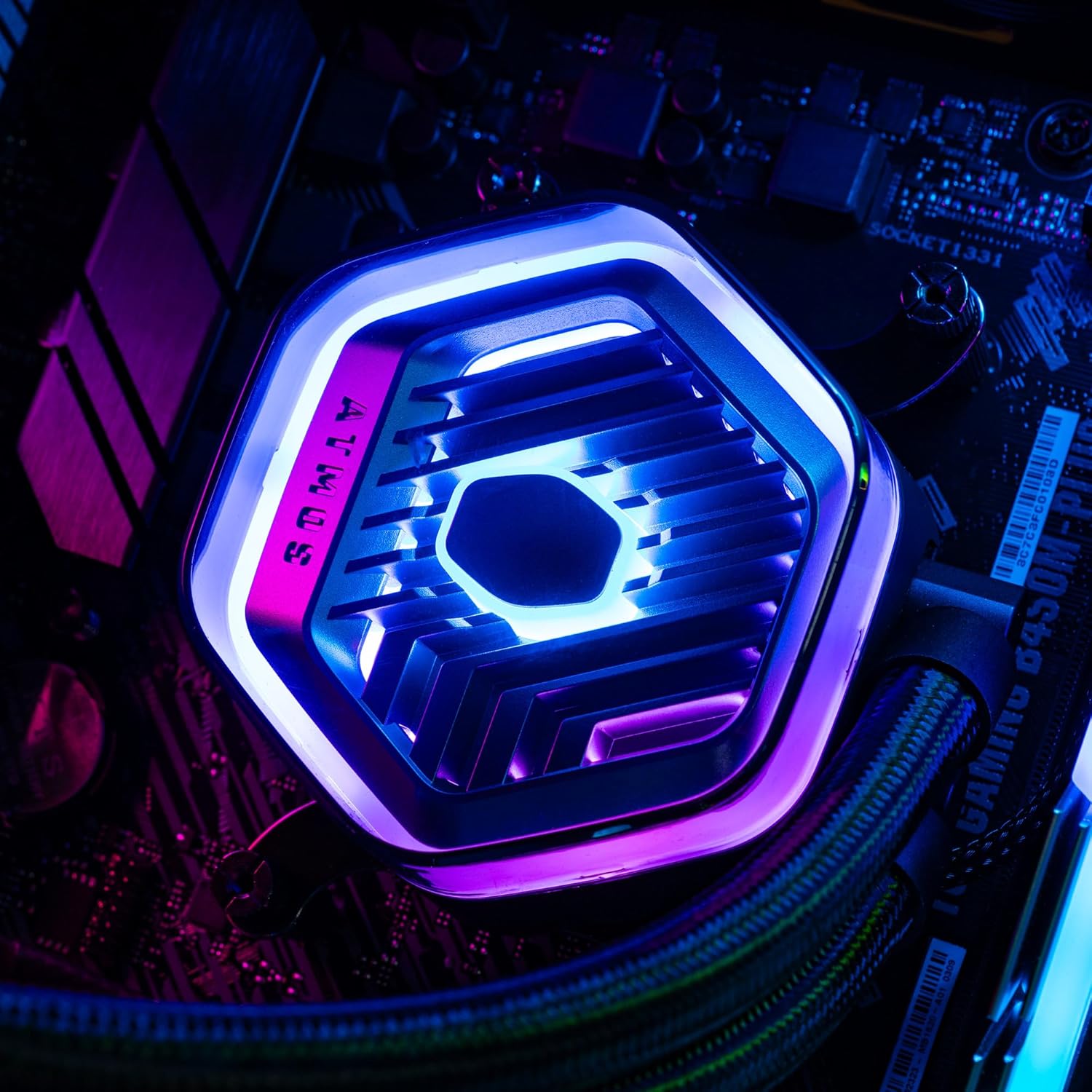
תמונה: מפורט view of the MasterLiquid Atmos pump head, showcasing its unique design and customizable RGB illumination.
בקרת מהירות מאוורר
The SickleFlow Edge fans are PWM (Pulse Width Modulation) controlled. Their speed can be managed via your motherboard's BIOS/UEFI settings or through motherboard-specific software. Adjust fan curves to balance cooling performance and noise levels according to your preferences.
תַחזוּקָה
תחזוקה שוטפת מסייעת להבטיח ביצועים אופטימליים ואורך חיים של מצנן הנוזלים שלך.
- ניקוי אבק: יש לנקות מעת לעת אבק מצנפות הרדיאטור ולהבי המאוורר באמצעות אוויר דחוס או מברשת רכה. יש לוודא שהמערכת כבויה לפני הניקוי.
- בדיקה חזותית: בדקו מדי פעם את הצינורות והחיבורים לאיתור סימנים של דליפות או נזק. בעוד שמקררי AIO הם מערכות אטומות, בדיקה ויזואלית מהירה יכולה למנוע בעיות פוטנציאליות.
- עדכוני תוכנה: Keep your Cooler Master MasterCTRL/MasterPlus software and motherboard BIOS/UEFI updated to ensure compatibility and access to the latest features and performance optimizations.
פתרון בעיות
If you encounter issues with your MasterLiquid Atmos 360, refer to the following common troubleshooting steps:
טמפרטורות מעבד גבוהות
- בדיקת חיבור המשאבה: ודא שכבל החשמל של המשאבה מחובר היטב לראש לוח האם הנכון (CPU_FAN או AIO_PUMP) ומקבל חשמל.
- אמת את פעולת המאוורר: Confirm that all radiator fans are spinning. Check their connections to the motherboard or fan controller.
- משחה תרמית: Ensure thermal paste was applied correctly and the cold plate has good contact with the CPU. Re-apply if necessary.
- זרימת אוויר: Check your PC case's overall airflow. Ensure radiator fans are oriented correctly for intake or exhaust as desired.
תאורת RGB לא עובדת
- חיבור ARGB: Verify that the ARGB cables are correctly connected to a 5V-D-G header on your motherboard or the ARGB controller. Ensure it is not connected to a 12V RGB header, which can damage the LEDs.
- תוֹכנָה: Check your motherboard's RGB software or Cooler Master's MasterCTRL/MasterPlus software for lighting settings. Ensure the lighting is enabled and configured.
- כוח הבקר: If using an external ARGB controller, ensure it is receiving power (usually via SATA power connector).
Unusual Pump Noise
- בועות אוויר: New AIOs may have some air bubbles that can cause gurgling noises initially. These usually dissipate within a few hours of operation. Gently tilt your PC case to help move air bubbles to the radiator.
- הַרכָּבָה: ודא שהמשאבה מותקנת היטב ואינה רועדת כנגד רכיבים אחרים.
If problems persist, please contact Cooler Master customer support.
מפרטים
| תכונה | מִפרָט |
|---|---|
| מספר דגם | MLX-D36M-A25PZ-R1 |
| מידות המוצר (L x W x H) | 15.51 אינץ' x 4.71 אינץ' x 1.07 אינץ' (394 x 119.6 x 27.2 מ"מ) |
| שיטת קירור | נוזלי (הכל באחד) |
| מכשירים תואמים | שולחן עבודה, שרת |
| שקעים תואמים | Intel LGA 1700/1200/1151/1150/1155/1156, AMD AM5/AM4 |
| רמת רעש | 27.2 Decibels (Fan) |
| Maximum Rotational Speed (Fan) | 2500 סל"ד |
| Air Flow Capacity (Fan) | 70.7 CFM |
| חוֹמֶר | אלומיניום (רדיאטור) |
| סוג מחבר חשמל | 3 פינים (משאבה), 4 פינים PWM (מאווררים) |
| כרך ידtage | 12 וולט |
| מהtage | 3.6 וואט |
| משקל פריט | 1.42 קילוגרם |
מידע על אחריות
The Cooler Master MasterLiquid Atmos 360 Black CPU Liquid Cooler comes with a אחריות לשנה מתאריך הרכישה. אחריות זו מכסה פגמים בחומרים ובעבודה בשימוש רגיל.
For warranty claims or detailed terms and conditions, please retain your proof of purchase and visit the official Cooler Master webאתר או צור קשר עם תמיכת הלקוחות שלהם.
תְמִיכָה
For further assistance, technical support, or to download the latest software and drivers, please visit the official Cooler Master webאֲתַר:
You may also find helpful resources, FAQs, and community forums on their support pages.