
Auronic AU3129 12L
Auronic Electric Air Dehumidifier
Model: AU3129 12L
מָבוֹא
Thank you for choosing the Auronic Electric Air Dehumidifier. This appliance is designed to effectively remove excess moisture from the air, creating a more comfortable and healthier indoor environment. It is ideal for use in various spaces such as bathrooms, basements, and living areas, helping to prevent issues like mold, mildew, and dampness. Please read this manual thoroughly before operation to ensure proper use, maintenance, and safety.

Figure 1: Auronic Electric Air Dehumidifier (Model AU3129 12L)
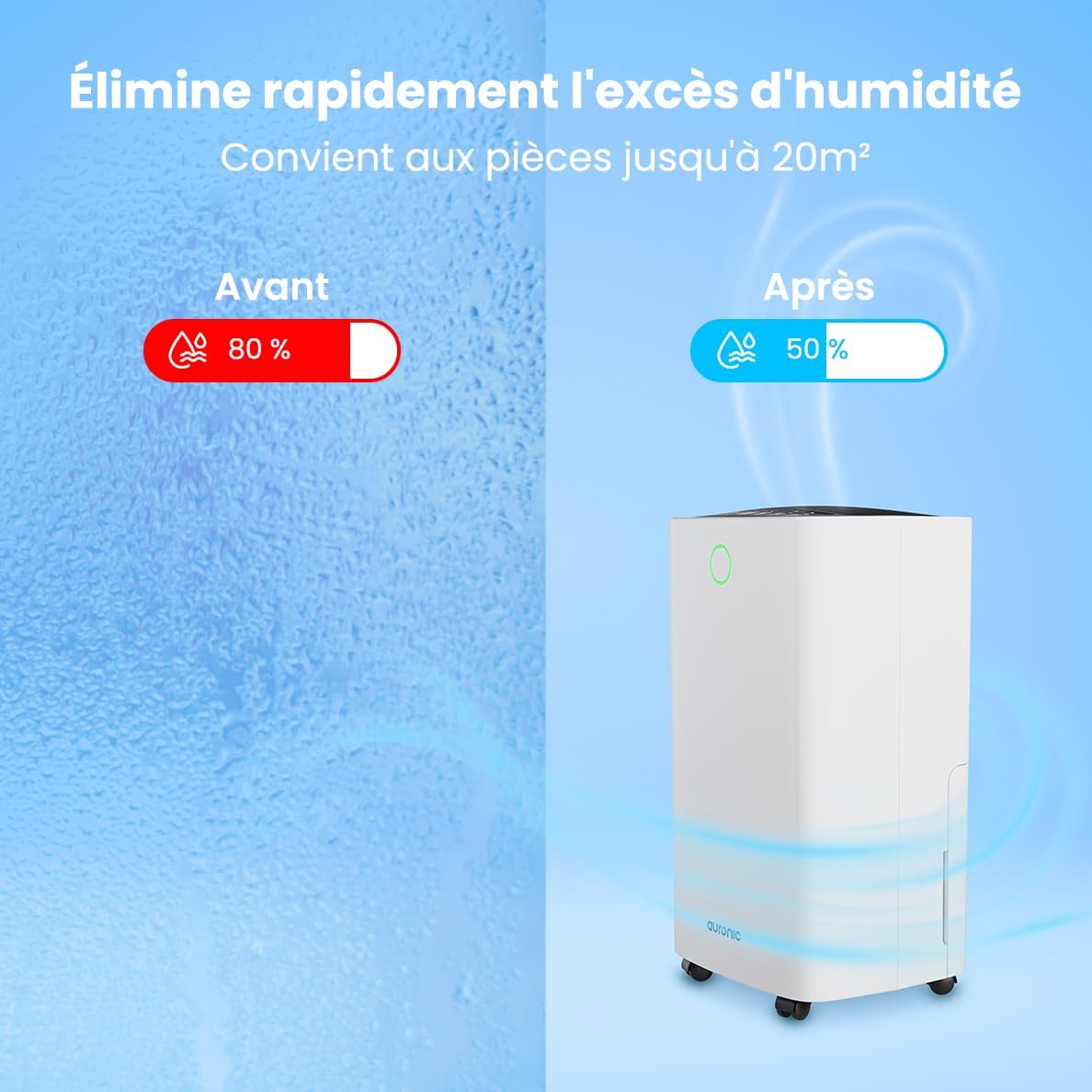
Figure 2: Humidity Reduction Effectiveness
מידע בטיחות
כדי להפחית את הסיכון לשריפה, התחשמלות או פציעה, יש להקפיד תמיד על אמצעי הזהירות הבסיסיים הבאים:
- קרא את כל ההוראות לפני השימוש במכשיר.
- ודא שספק הכוח מתאים לנפחtage המצוין בתווית הדירוג.
- אין להפעיל את מסיר הלחות אם כבל החשמל או התקע פגומים.
- יש להניח את היחידה תמיד על משטח יציב ומאוזן.
- Keep the appliance at least 20 cm away from walls or other objects to ensure proper airflow.
- אין להכניס אצבעות או חפצים זרים לכניסת האוויר או ליציאת האוויר.
- נתקו את מסיר הלחות מהחשמל לפני ניקוי, הזזה או ביצוע כל תחזוקה.
- אין להשתמש במכשיר במצב רטוב או דamp סביבות בהן מים עלולים להתיז.
- הרחק מהישג ידם של ילדים.
- If the unit has been tilted, allow it to stand upright for at least 24 hours before plugging it in.
המוצר נגמרview
Familiarize yourself with the components of your Auronic Dehumidifier.

Figure 3: Dehumidifier Dimensions and Included Accessories

איור 4: ניידות קלה עם גלגלים וידית
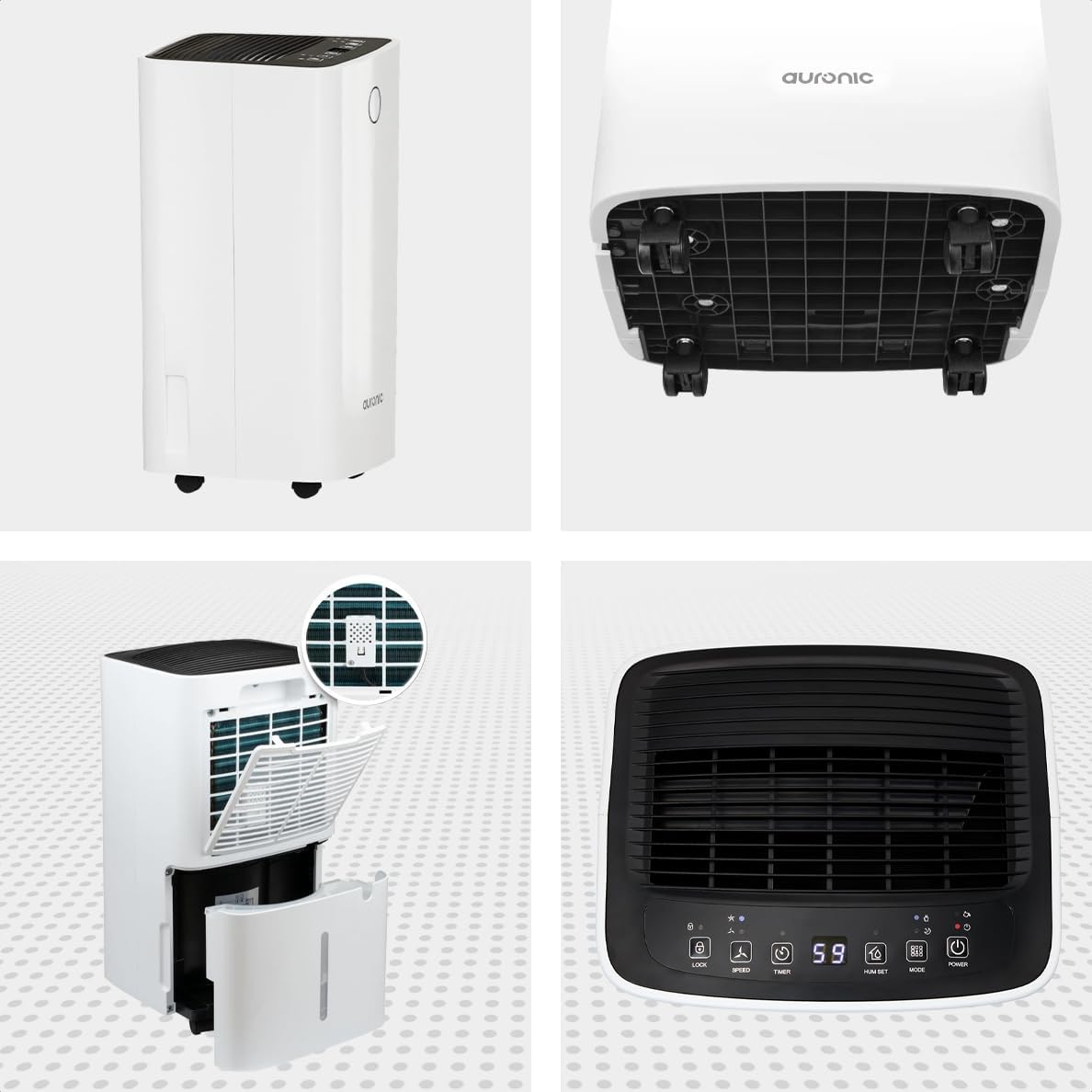
איור 5: זווית מרובה View of the Dehumidifier

איור 6: לוח הבקרה מעלview
מרכיבי מפתח:
- לוּחַ בַּקָרָה: Intuitive interface for setting modes, humidity levels, and timer.
- כניסת אוויר/יציאת אוויר: Where air enters and exits the unit. Ensure these are not obstructed.
- מיכל מים: Removable 2-liter tank for collecting condensed water.
- מוצא ניקוז רציף: Port for attaching a hose for continuous drainage.
- גלגלים וידית: לניידות קלה.
- מסנן אוויר: Located at the back, helps filter dust from the air.
הגדרה
- פריקת אריזה: הוצא בזהירות את מסיר הלחות מאריזתו. שמור את האריזה לאחסון או הובלה עתידיים.
- מיקום: Place the unit upright on a firm, level surface in the desired location. Ensure there is at least 20 cm of clear space around all sides for proper air circulation.
- המתנה ראשונית: If the unit was tilted during transport, let it stand upright for a minimum of 24 hours before plugging it in. This allows the refrigerant to settle.
- חיבור חשמל: חבר את כבל החשמל לשקע חשמל מוארק.
- מיכל מים: Ensure the water tank is correctly inserted into the unit. The dehumidifier will not operate if the tank is full or improperly seated.
הוראות הפעלה
פונקציות לוח הבקרה:
| לחצן/מחוון | פוּנקצִיָה |
|---|---|
| כפתור הפעלה | מפעיל או מכבה את היחידה. |
| כפתור מצב | Cycles through operating modes (e.g., Dehumidify, Laundry Drying, Sleep). |
| Hum Set Button | מתאים את רמת הלחות הרצויה (למשל, 40% - 80% RH). |
| כפתור טיימר | מגדיר את טיימר ההפעלה או הכיבוי האוטומטי (עד 12 שעות). |
| כפתור מהירות | Adjusts fan speed (e.g., High, Low). |
| כפתור נעילה | נועל את לוח הבקרה כדי למנוע שינויים מקריים. |
| Humidity Indicator LED | Changes color based on current humidity level (e.g., Blue: <45%, Green: 45-65%, Red: >65%). Figure 7: Humidity Indicator LED Explained |
תפעול כללי:
- לְהַפְעִיל: הקש על כּוֹחַ button. The display will show the current room humidity.
- הגדר את הלחות הרצויה: הקש על Hum Set button repeatedly to select your desired humidity level. The unit will operate until this level is reached, then cycle on and off to maintain it.
- בחר מצב: הקש על מצב button to choose between different operating modes.
- מצב הסרת לחות: פעולה סטנדרטית להפחתת לחות הסביבה.
- מצב ייבוש כביסה: Increases fan speed and continuous operation to assist in drying clothes.

Figure 8: Using the Dehumidifier for Laundry Drying
- מצב שינה: Operates at a lower fan speed and reduced noise level for quiet nighttime use.

Figure 9: Silent Operation for Nighttime Use
- הגדר טיימר: הקש על שָׁעוֹן עֶצֶר button to set an auto-off time (when the unit is on) or an auto-on time (when the unit is off).

Figure 10: Integrated Timer Function
- מהירות מאוורר: השתמש ב- מְהִירוּת button to adjust the fan speed as desired.
- מנעול ילדים: לחץ והחזק את לִנְעוֹל button for 3 seconds to activate/deactivate the child lock function.
ניקוז רציף:
For continuous operation without emptying the water tank, you can connect the included drain hose to the continuous drain outlet. Ensure the hose is sloped downwards to allow gravity drainage into a suitable receptacle or drain.

Figure 11: Continuous Drainage Setup
תַחזוּקָה
תחזוקה שוטפת מבטיחה ביצועים אופטימליים ומאריכה את תוחלת החיים של מסיר הלחות שלכם.
ריקון מיכל המים:
When the water tank is full, the unit will automatically stop operating and an indicator light will illuminate. Carefully remove the tank, empty the collected water, and reinsert it firmly until it clicks into place.

Figure 12: Removing the 2-Liter Water Tank
ניקוי מסנן האוויר:
יש לנקות את מסנן האוויר כל שבועיים או בתדירות גבוהה יותר, בהתאם לשימוש ואיכות האוויר.
- כבה ונתק את מסיר הלחות.
- אתר והסר את מסנן האוויר מגב היחידה.
- Clean the filter with warm, soapy water or use a vacuum cleaner to remove dust.
- יש לשטוף היטב ולאפשר למסנן להתייבש לחלוטין באוויר לפני הכנסתו מחדש.
ניקוי החלק החיצוני של היחידה:
נגב את החלק החיצוני של מסיר הלחות בחומר רך, דamp בַּד. אין להשתמש בכימיקלים קשים או בחומרי ניקוי שוחקים.
פתרון בעיות
לפני פנייה לתמיכת הלקוחות, אנא עיינו בבעיות הנפוצות ובפתרונות הבאות:
| בְּעָיָה | סיבה אפשרית | פִּתָרוֹן |
|---|---|---|
| מסיר הלחות לא נדלק. | אין חשמל, כבל חשמל רופף, מיכל מים מלא או לא מחובר כראוי. | Check power connection, empty and reinsert water tank correctly. |
| לא נאספו מים. | Room humidity too low, temperature too low, air filter clogged, continuous drain hose connected. | Check room humidity/temperature, clean air filter, ensure continuous drain hose is not connected if tank collection is desired. |
| היחידה רועשת. | Unit not on a level surface, air filter clogged, internal component issue. | Place on a level surface, clean air filter. If noise persists, contact support. |
| Dehumidification is slow or ineffective. | Room size too large, doors/windows open, air inlets/outlets blocked, air filter dirty. | Ensure room is sealed, clear obstructions, clean air filter. |
מפרטים
| תכונה | פְּרָט |
|---|---|
| מותג | אורוני |
| שם הדגם | Auronic Silent Low Consumption Dehumidifier |
| מידות המוצר (L x W x H) | 21.5 x 47 x 25.5 ס"מ |
| משקל פריט | 11 קילוגרם |
| קיבולת (ייבוש לחות) | 12 ליטר ליום |
| נפח מיכל מים | 2 ליטר |
| כּוֹחַ | 185 וואט |
| צֶבַע | לָבָן |
| תכונות מיוחדות | Easy to use, Laundry Drying function, Prevents and effectively eliminates humidity, 2-liter tank, Automatic shut-off. |
| שימוש מומלץ | בֵּיתִי |
אחריות ותמיכה
Auronic products are manufactured to the highest quality standards. For warranty information, technical support, or service inquiries, please refer to the contact details provided on your purchase receipt or visit the official Auronic website. Please have your model number (AU3129 12L) and purchase date ready when contacting support.
Ask a question about this manual
Ask about setup, troubleshooting, compatibility, parts, safety, or missing instructions. Manuals+ will review the question and use this page’s manual context to help answer it.