
1. הקדמה
This manual provides detailed instructions for the operation and maintenance of your Smile S666 Multimedia Speaker. Please read this manual thoroughly before using the product to ensure proper functionality and to prevent damage.
2. מידע בטיחות
To ensure safe operation and prolong the lifespan of your speaker, please observe the following precautions:
- Do not expose the speaker to water or excessive moisture. This product is לֹא עמיד במים.
- הימנעו מהצבת הרמקול באור שמש ישיר או בקרבת מקורות חום.
- אין לפרק או לנסות לתקן את הרמקול בעצמך. יש לפנות לכל טיפול וטיפול באנשי מקצוע מוסמכים.
- השתמשו רק במתאם החשמל ובכבלים שסופקו או מומלצים על ידי היצרן.
- הרחק מהישג ידם של ילדים.
3. תכולת החבילה
אנא בדקו את החבילה עבור הפריטים הבאים:
- Smile S666 Multimedia Speaker
- כבל חשמל USB
- כבל אודיו (שקע 3.5 מ"מ)
- מדריך למשתמש

Figure 3.1: The Smile S666 Multimedia Speaker as packaged in its retail box.
4. המוצר נגמרview
The Smile S666 is a compact multimedia speaker designed for desktop use, offering clear audio output for your computer or other compatible devices.
4.1 רכיבים
- יחידת רמקול ראשית: Houses the audio drivers and control circuitry.
- ידית עוצמת הקול: Located on the top surface, used to adjust audio output level.
- יציאת חשמל USB: For connecting the speaker to a power source.
- Audio Input Port (3.5mm): For connecting to audio sources like computers, phones, etc.

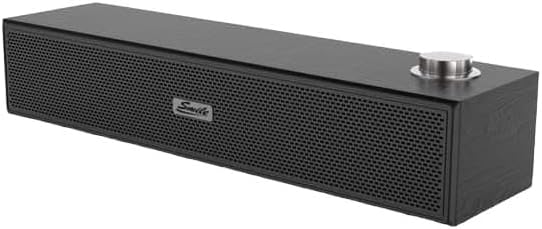
איור 4.1: חזית וחלק עליון view of the Smile S666 Multimedia Speaker, showing the speaker grille and volume knob. The speaker is available in different finishes, including wood grain and black.
5. התקנה
Follow these steps to set up your Smile S666 Multimedia Speaker:
- מיקום: Place the speaker on a stable, flat surface near your computer or audio source. Ensure there is adequate ventilation around the speaker.
- חבר חשמל: Insert the USB power cable into the speaker's USB power port. Connect the other end of the USB cable to a powered USB port on your computer or a USB wall adapter (5V/1A recommended).
- חבר אודיו: Insert one end of the 3.5mm audio cable into the audio input port on the speaker. Connect the other end of the 3.5mm audio cable to the headphone jack or audio output port of your computer, laptop, or other audio device.
- הפעלה: The speaker will typically power on automatically once connected to a power source. Some models may have a power switch integrated with the volume knob; turn the knob clockwise until you hear a click to power on.
6. הוראות הפעלה
6.1 כוונון עוצמת הקול
Rotate the volume knob on the top of the speaker clockwise to increase the volume and counter-clockwise to decrease it. You can also adjust the volume from your connected device.
6.2 השמעת אודיו
Once connected, play audio from your computer or device. The sound will be output through the Smile S666 speaker.
7. תחזוקה
כדי לשמור על הרמקול במצב אופטימלי:
- ניקוי: Use a soft, dry cloth to wipe the exterior of the speaker. Do not use liquid cleaners or abrasive chemicals.
- אִחסוּן: כאשר הרמקול אינו בשימוש למשך תקופות ממושכות, יש לאחסן אותו במקום קריר ויבש, הרחק מאור שמש ישיר וטמפרטורות קיצוניות.
- טיפול בכבלים: Avoid bending or crimping the power and audio cables excessively.
8. פתרון תקלות
| בְּעָיָה | סיבה אפשרית | פִּתָרוֹן |
|---|---|---|
| אין קול | Speaker not powered on; Cables not connected properly; Volume too low; Incorrect audio output selected on device. | Ensure speaker is powered on; Check all cable connections; Increase speaker and device volume; Select the correct audio output on your computer/device. |
| צליל מעוות | Volume too high; Poor audio source quality; Damaged cable. | Lower the volume; Try a different audio source; Replace the audio cable. |
| הרמקול לא מזוהה על ידי המחשב | Driver issue (rare for plug-and-play speakers); USB port issue. | Try a different USB port; Restart your computer. |
9. מפרטים
| תכונה | פְּרָט |
|---|---|
| מידות המוצר | 40 x 5 x 5 ס"מ |
| תאריך זמין ראשון | 7 באוגוסט 2023 |
| יַצרָן | smail |
| ASIN | B0CDZBFRQ5 |
| Brand Name (as listed) | כְּלָלִי |
| טכנולוגיית קישוריות | Wired (3.5mm Audio Jack), Bluetooth |
| סוג הרכבה | מתקן לשולחן |
| שם הדגם | S666 |
| סוג רמקול | מולטימדיה |
| מכשירים תואמים | מחשב אישי |
| קוטר סאב וופר | 12 אינץ' |
| צֶבַע | צבע תוסס |
| עמידות במים | לֹא |
10. אחריות ותמיכה
This product comes with a standard manufacturer's warranty. For specific warranty terms and conditions, please refer to the warranty card included in the package or contact your point of purchase. For technical support or service inquiries, please contact the retailer or manufacturer directly.
לסיוע נוסף, ניתן לבקר באתר היצרן webאתר או צרו קשר עם מחלקת שירות הלקוחות שלהם. שמרו את קבלת הרכישה כהוכחת קנייה לתביעות אחריות.