
1. הקדמה
This manual provides essential information for the safe and efficient use of your FLEXISPOT 42-inch Sit-to-Stand Desk Riser. This height-adjustable computer workstation is designed to promote a healthy balance between sitting and standing throughout your workday. Please read these instructions thoroughly before assembly and operation.
2. מידע בטיחות
- ודא שכל הרכיבים מהודקים היטב לפני השימוש.
- Do not exceed the maximum weight capacity of 33 lbs for the desktop and 4.4 lbs for the keyboard tray.
- יש להרחיק ידיים ואצבעות מחלקים נעים במהלך כוונון הגובה כדי למנוע פציעה.
- Place the desk riser on a stable, level surface.
- Distribute weight evenly on the desktop to maintain stability.
- הרחיקו ילדים וחיות מחמד מהיחידה במהלך הפעולה.
3. תכולת החבילה
ודא שכל החלקים קיימים לפני תחילת ההרכבה. אם חסרים או פגומים חלקים כלשהם, פנה לתמיכת הלקוחות.
- Main Desk Riser Unit
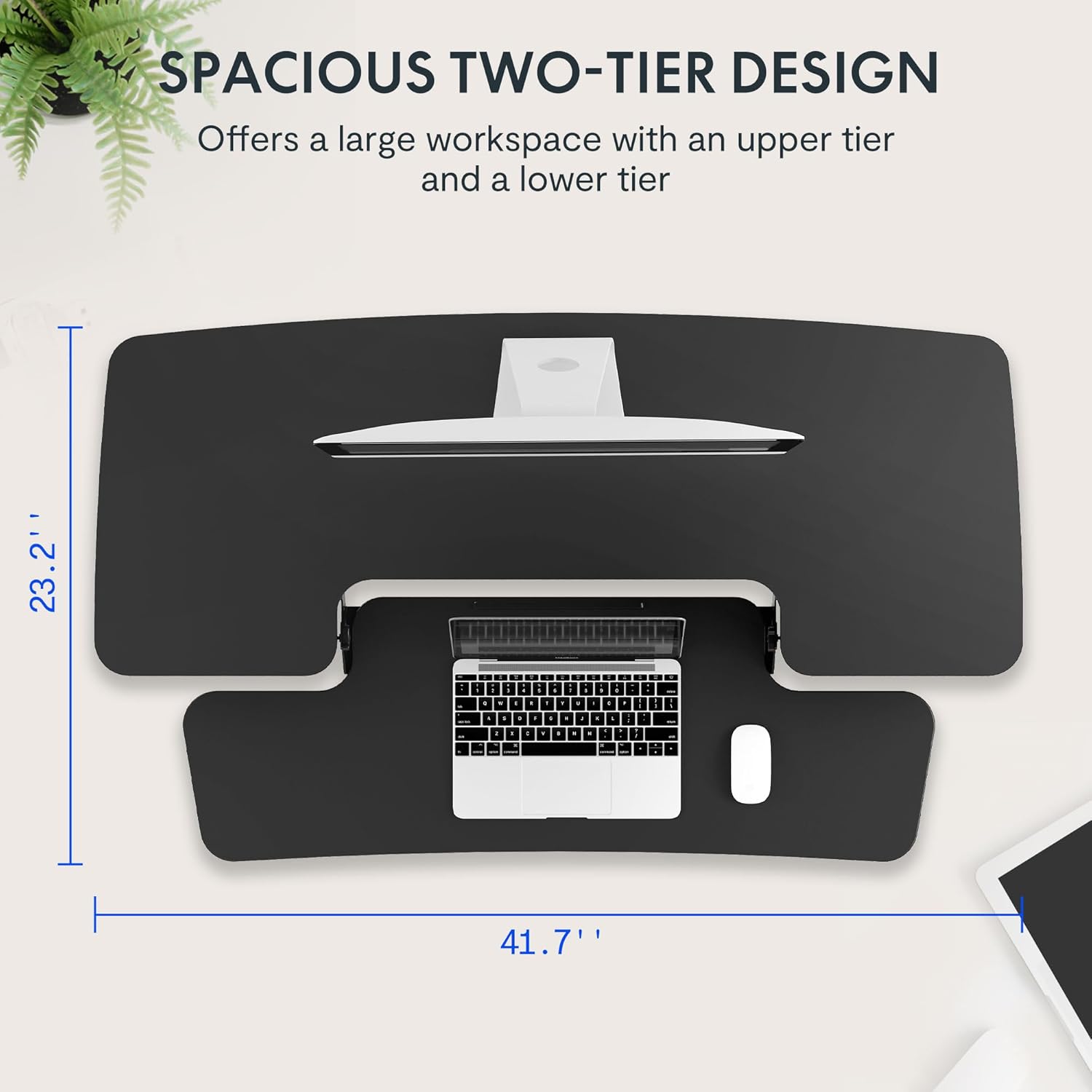
- Removable Keyboard Tray
- Assembly Hardware (screws for keyboard tray)
- מדריך הוראות
4. הוראות התקנה
The FLEXISPOT Sit-to-Stand Desk Riser is designed for quick and straightforward assembly. Two people are recommended for easier setup.
- פרק את היחידה: הסר בזהירות את כל הרכיבים מהאריזה.
- מיקום היחידה הראשית: Place the main desk riser unit on your existing desk or workstation. Ensure it is centered and stable.
- חבר את מגש המקלדת: Align the removable keyboard tray with the designated slots on the underside of the main unit. Slide the tray into place until it clicks securely. Use a Phillips screwdriver (not included) to fasten any provided screws for additional stability.
- ארגון כבלים: Utilize the included cable management loops to organize your monitor, keyboard, and mouse cables. Ensure cables have enough slack to accommodate the full range of height adjustment.


5. הוראות הפעלה
The desk riser features a spring-assisted lifting mechanism for smooth and effortless height adjustments.
- התאמת גובה: To raise or lower the desk, locate the lever on the right side of the main unit. Squeeze the lever firmly.
- Raising the Desk: While squeezing the lever, gently lift the desktop to your desired standing height. The spring-assisted mechanism will help elevate the unit. Release the lever to lock the desk in place.
- Lowering the Desk: While squeezing the lever, gently push down on the desktop to lower it to your desired sitting height. Release the lever to lock the desk in place.
- תנועה אנכית: The desk riser moves straight up and down within its own footprint, requiring no additional spatial accommodations. The height can be adjusted between 4.7 inches (minimum) and 19.7 inches (maximum).


6. תחזוקה
Regular maintenance ensures the longevity and optimal performance of your desk riser.
- ניקוי: נגב משטחים עם רך, דamp בַּד. הימנע מחומרי ניקוי שוחקים או כימיקלים קשים שעלולים לפגוע בגימור.
- בְּדִיקָה: בדקו מעת לעת את כל הברגים והחיבורים כדי לוודא שהם נשארים מהודקים היטב. הדקו במידת הצורך.
- חלקים נעים: The lifting mechanism is designed to be maintenance-free. Do not attempt to lubricate or disassemble it.
7. פתרון תקלות
If you encounter any issues with your desk riser, refer to the following common solutions:
- Desk is difficult to adjust: Ensure no objects are obstructing the lifting mechanism. Verify that the weight on the desktop does not exceed the maximum capacity.
- Desk feels unstable: Check that the unit is placed on a flat, stable surface. Ensure all components, especially the keyboard tray, are securely attached. Redistribute weight evenly on the desktop.
- Keyboard tray is loose: Re-check the connection points of the keyboard tray and ensure any fastening screws are tightened.
If problems persist, please contact FLEXISPOT customer support for assistance.
8. מפרטים
| תכונה | מִפרָט |
|---|---|
| מותג | FLEXISPOT |
| דֶגֶם | B0CDWSPYKQ |
| מידות המוצר (D x W x H) | 24" D x 42" W x 19.7" H |
| צֶבַע | שָׁחוֹר |
| סוג החומר העליון | עץ מהונדס |
| משקל פריט | 52 פאונד |
| גובה מינימלי | 4.7 אינץ' |
| גובה מקסימלי | 19.7 אינץ' |
| קיבולת טעינה לשולחן העבודה | 33 פאונד |
| Keyboard Tray Load Capacity | 4.4 פאונד |
| הרכבה נדרשת | Yes (Keyboard Tray) |
| מספר אנשים מומלץ להרכבה | 2 |

9. אחריות ותמיכה
Your FLEXISPOT Sit-to-Stand Desk Riser comes with a limited warranty. For specific details regarding warranty coverage, please refer to the warranty documentation included with your purchase or visit the official FLEXISPOT webאֲתַר.
For technical support, troubleshooting assistance, or warranty claims, please contact FLEXISPOT customer service. You can typically find contact information on the manufacturer's webבאתר או דרך פלטפורמת הרכישה שלך.
תמיכה מקוונת: בקר ב FLEXISPOT Store on Amazon לקבלת מידע על המוצר ומשאבי תמיכה.