מָבוֹא
This user manual provides essential information for the safe and efficient operation of your T-Mobile TMOHS1 4G LTE Portable WiFi Hotspot Device. This device allows you to create a portable Wi-Fi hotspot, connecting up to 10 devices with dual-band Wi-Fi access. Its slim, portable, and lightweight design makes it ideal for on-the-go internet access.
מה כלול
Upon unboxing your T-Mobile TMOHS1 Hotspot, please ensure all the following items are present:
- T-Mobile TMOHS1 Hotspot Device
- סוללה נטענת (3000mAh)
- כבל טעינה מסוג USB מסוג C
- מדריך למשתמש (מסמך זה)
- Instructions on how to set up
- Empty T-Mobile SIM Card (included inside device)
תכונות המוצר
- קישוריות 4G LTE: Provides high-speed internet access via T-Mobile's 4G LTE network.
- חיבור למכשירים מרובים: תומך בחיבור של עד 10 מכשירים בו זמנית.
- Wi-Fi עם פס כפול: Offers both 2.4GHz and 5GHz Wi-Fi frequencies for versatile connectivity.
- סוללה עמידה לאורך זמן: מצויד בסוללה של 3000mAh לשימוש ממושך.
- עיצוב נייד: Slim, lightweight, and compact for easy transport.
- טעינת USB Type-C: שקע טעינה מודרני ונוח.
- תמיכה ב-WPS: Simplifies Wi-Fi connection setup.
מדריך התקנה
1. המכשיר נגמרview
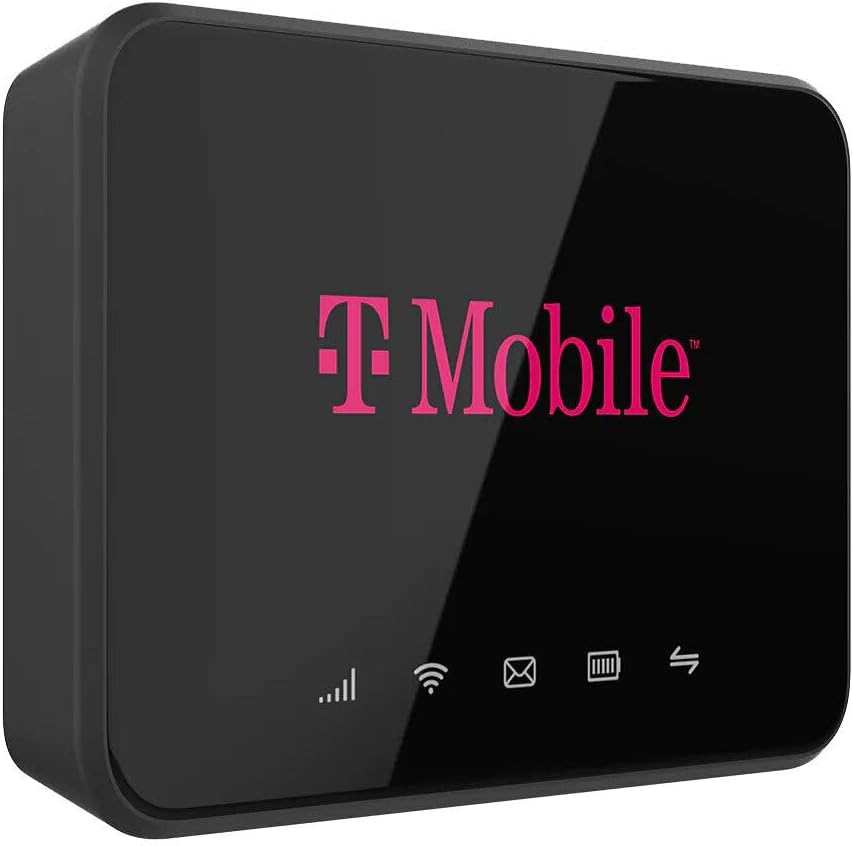
Familiarize yourself with the key components of your T-Mobile TMOHS1 Hotspot.

תמונה: חזית view of the T-Mobile TMOHS1 Hotspot with labels indicating the WPS button, LCD Home Screen, USB Type-C Charging Port, and Power Button.
2. התקנת סוללה וכרטיס SIM
The T-Mobile TMOHS1 Hotspot requires a T-Mobile SIM card for cellular data connectivity. An empty T-Mobile SIM card is included inside the device. T-Mobile Internet service must be purchased separately and activated for the device to function.
- אתר את מכסה תא הסוללה בגב המכשיר.
- Gently remove the cover to access the battery slot and SIM card slot.
- If not already present, insert the T-Mobile SIM card into the designated SIM card slot. Ensure it is correctly oriented as indicated by the diagram near the slot.
- Insert the 3000mAh Lithium Ion Polymer Battery into the battery compartment, aligning the contacts properly.
- החזר את מכסה תא הסוללה למקומו בנקישה.

תמונה: אחורי view of the T-Mobile TMOHS1 Hotspot's removable battery cover.
3. טעינת ההתקן
Before initial use, fully charge the device's battery. The device can also power on automatically when connected to power, provided the battery is installed.
- Connect the supplied USB Type-C charging cable to the USB Type-C port on the side of the hotspot.
- חבר את הקצה השני של הכבל לספק כוח USB תואם (לא כלול) או ליציאת USB של מחשב.
- The battery indicator light on the LCD screen will blink to indicate charging. It will become solid when fully charged.
תמונה: צד view of the T-Mobile TMOHS1 Hotspot showing the USB Type-C charging port with a cable inserted.
4. הפעלה / כיבוי
- כדי להפעיל: Press and hold the Power Button (located on the side) for approximately 3 seconds until the T-Mobile logo appears on the screen. Alternatively, if the battery is installed, simply plug the device into a power source via the USB Type-C cable, and it will automatically power on.
- כדי לכבות: Press and hold the Power Button for approximately 3 seconds. A power-off prompt may appear on the screen; confirm to shut down.
הוראות הפעלה
1. Understanding Status Indicators
The LCD Home Screen displays various icons to provide real-time status information:
- חוזק אות: Bars indicate the strength of the 4G LTE cellular signal. More bars mean better signal.
- סטטוס Wi-Fi: מציין אם ה-Wi-Fi פעיל ואם התקנים מחוברים.
- הודעת SMS: An envelope icon indicates new SMS messages received on the hotspot's number.
- מצב סוללה: מציג את רמת הסוללה הנוכחית ואת מצב הטעינה.
- תקשורת נתונים: Arrows indicate active data upload and download.

תמונה: חזית view of the T-Mobile TMOHS1 Hotspot's display, showing active status indicators.
2. חיבור מכשירים לנקודה החמה
To connect your Wi-Fi enabled devices (smartphones, tablets, laptops, etc.) to the T-Mobile TMOHS1 Hotspot:
- Ensure the hotspot is powered on and has an active T-Mobile data plan.
- On your device, go to the Wi-Fi settings.
- חפש available Wi-Fi networks. The hotspot's network name (SSID) and password are typically found on a sticker inside the battery compartment or on the device's packaging.
- Select the hotspot's SSID from the list.
- הזן את סיסמת ה- Wi-Fi כאשר תתבקש.
- כעת המכשיר שלך אמור להיות מחובר לאינטרנט דרך נקודה חמה.
Note: The hotspot supports both 2.4GHz and 5GHz Wi-Fi bands. Your devices will automatically connect to the most suitable band. Signal strength can vary depending on user location due to T-Mobile Towers.
3. גישה ל Web ממשק משתמש (Webממשק משתמש)
For advanced settings and management, you can access the hotspot's Webממשק משתמש:
- Connect your computer or mobile device to the hotspot's Wi-Fi network.
- פתח א web דפדפן (למשל, כרום, פיירפוקס, ספארי).
- Enter the default IP address for the hotspot (usually found on a sticker inside the battery compartment or in the quick start guide) into the browser's address bar and press Enter.
- Log in using the default username and password (also found on the sticker).
- מה WebUI, you can manage settings such as Wi-Fi name (SSID), password, connected devices, data usage, and more.
תַחזוּקָה
- ניקוי: השתמשו במטלית רכה ויבשה לניקוי החלק החיצוני של המכשיר. הימנעו משימוש בחומרי ניקוי נוזליים או תרסיסים.
- טיפול בסוללה: To prolong battery life, avoid exposing the device to extreme temperatures. If the device will not be used for an extended period, store it with a partial charge (around 50%) and recharge it every few months.
- אִחסוּן: אחסן את המכשיר במקום קריר ויבש הרחק מאור שמש ישיר ולחות.
פתרון בעיות
| בְּעָיָה | סיבה אפשרית | פִּתָרוֹן |
|---|---|---|
| המכשיר לא נדלק. | Battery not installed or drained. | Ensure the battery is correctly installed and charged. This device requires the battery to be installed to power on, even when connected to USB power. |
| אין חיבור לאינטרנט. | No active T-Mobile data plan; poor cellular signal; incorrect SIM card installation. | Verify you have an active T-Mobile data plan. Check cellular signal strength on the device's display. Reinstall the SIM card. Move to an area with better signal coverage. |
| Cannot connect devices to Wi-Fi. | Incorrect Wi-Fi password; Wi-Fi disabled on hotspot. | Double-check the Wi-Fi password. Ensure Wi-Fi is enabled on the hotspot. Restart both the hotspot and the connecting device. |
| מהירות אינטרנט איטית. | Weak cellular signal; too many connected devices; network congestion. | Move to an area with stronger signal. Disconnect unnecessary devices. Try connecting to the 5GHz band if available and your device supports it. |
מפרטים
| תכונה | פְּרָט |
|---|---|
| שם הדגם | T-Mobile TMOHS1 4G LTE Portable WiFi Hotspot Device |
| מספר דגם של פריט | TMOHS1 |
| מותג | T-Mobile |
| טכנולוגיית קישוריות | LTE |
| תקן תקשורת אלחוטית | 802.11א |
| מחלקה להקת תדרים | דו-פס (2.4GHz ו-5GHz) |
| סוג סוללה | 1 Lithium Ion Polymer Battery (3000mAh) |
| מקסימום התקנים מחוברים | עד 10 |
| תכונה מיוחדת | WPS |
| צֶבַע | וָרוֹד |
| משקל פריט | 9.5 אונקיות |
| מידות חבילה | 5.63 x 3.5 x 2.01 אינץ' |
| שימושים מומלצים | עסקים, משחקים, בית |
אחריות ותמיכה
For warranty information and technical support, please refer to the official T-Mobile website or contact T-Mobile customer service directly. Keep your purchase receipt for warranty claims.
Note: T-Mobile Internet service must be purchased separately. This device is designed to work exclusively with T-Mobile carriers and will not function with other carriers.