
1. הוראות בטיחות חשובות
אנא קראו בעיון את כל ההוראות לפני השימוש במכשיר זה. שמרו מדריך זה לעיון עתידי.
- אין להשתמש בשואב האבק בחוץ או על משטחים רטובים.
- אין לאפשר לילדים להפעיל את שואב האבק. יש צורך בפיקוח צמוד בעת שימוש בקרבת ילדים.
- אין לאסוף נוזלים דליקים או דליקים, כגון בנזין, או להשתמש באזורים שבהם הם עשויים להיות נוכחים.
- אין להרים שום דבר בוער או מעשן, כגון סיגריות, גפרורים או אפר חם.
- אין להשתמש ללא כוס האבק והמסנן במקומם.
- Turn off the appliance before connecting or disconnecting the battery pack, attachments, or performing any maintenance.
- יש להשתמש אך ורק כמתואר במדריך זה. יש להשתמש אך ורק באביזרים המומלצים על ידי היצרן.
- אם המכשיר אינו פועל כראוי, נפל, ניזוק, הושאר בחוץ או נפל למים, החזירו אותו למוקד שירות.
2. תכולת החבילה
ודא שכל הפריטים כלולים בחבילה שלך:
- HiKiNS Cordless Vacuum Cleaner Main Unit
- שרביט הארכה
- Floor Brush Head with LED Light
- כלי סדק
- כלי מברשת 2 ב-1
- תושבת לקיר
- מתאם מתח/מטען
- Washable HEPA Filter (2 included, one pre-installed)
- מדריך למשתמש

Image: All components of the HiKiNS Cordless Stick Vacuum Cleaner, including the main unit, various attachments, and charging cable.
3. המוצר נגמרview
The HiKiNS Cordless Stick Vacuum Cleaner is designed for versatile cleaning across various surfaces. It features a powerful motor, multi-layered filtration, and a user-friendly LED display.
3.1 תכונות עיקריות
- 12Kpa Strong Suction: Efficiently picks up pet hair, crumbs, and debris.
- 160W Powerful Motor: Provides robust cleaning performance.
- סוללה נטענת: Offers up to 45 minutes of runtime on a single charge.
- תצוגת לד: Shows battery status and suction mode.
- Multi-Layered Filtration: Includes washable HEPA filter for improved air quality.
- מברשת רצפה גמישה: Features LED lights and 180°/90° rotation for easy maneuverability.

Image: The vacuum cleaner head effectively picking up various types of debris from a floor surface, highlighting its 12000Pa suction power.

Image: An illustration showing the internal components of the vacuum's filtration system, detailing the washable HEPA filter, multi-cyclone separation, stainless steel filter, and the 0.8L dust bin.
4. התקנה והרכבה
4.1 טעינת הסוללה
Before first use, fully charge the vacuum cleaner. The battery can be charged while attached to the main unit or separately.
- Connect the power adapter to the charging port on the main unit or directly to the battery if removable.
- חבר את המתאם לשקע בקיר.
- צג ה-LED יציין את מצב הטעינה. טעינה מלאה אורכת בדרך כלל 4-5 שעות.

Image: A close-up of the vacuum's main unit, displaying battery charge level and indicating a charging time of approximately 4-5 hours for up to 40 minutes of runtime.
4.2 הרכבת שואב האבק
The vacuum can be assembled in various configurations for different cleaning needs.
- תצורת כף יד: Attach desired cleaning tool (crevice tool or 2-in-1 brush) directly to the main unit.
- תצורת ואקום מקל:
- הכנס את מוט ההארכה ליחידה הראשית עד שייכנס למקומו בנקישה.
- Attach the floor brush head to the other end of the extension wand until it clicks.
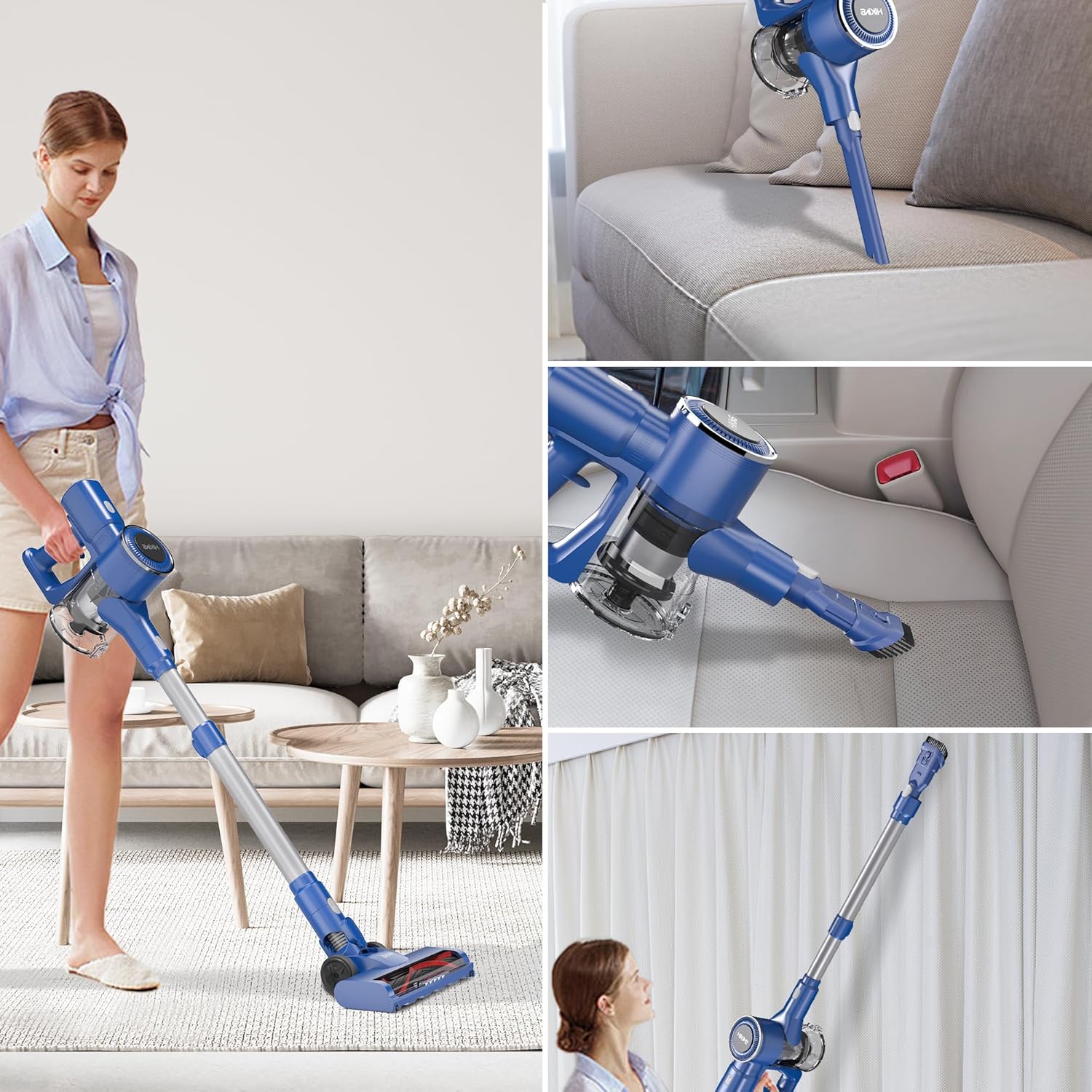
Image: A collage showing the vacuum in different configurations: as a stick vacuum for floors, a handheld vacuum for upholstery, and with an extended wand for high-reach areas like curtains.
5. הוראות הפעלה
5.1 מצבי הפעלה/כיבוי ומצבי יניקה
The vacuum features a smart touchscreen display for easy control.
- Press the ON/OFF button on the handle to power on the vacuum.
- The LED display will show the current battery level and suction mode.
- Press the 'MAX' button on the display to switch between standard and MAX suction modes.
- Press the ON/OFF button again to turn off the vacuum.

תמונה: מפורט view of the vacuum's smart touchscreen display, indicating the digital power display and the ON/OFF button for operation.
5.2 Using the Floor Brush Head
The flexible floor brush head is ideal for both hard floors and carpets.
- The integrated LED lights illuminate dust and debris in dark areas.
- The brush head can rotate 180 degrees horizontally and 90 degrees vertically for easy navigation around furniture and into tight spaces.

Image: The flexible floor brush head with its integrated LED light, illustrating its ability to rotate 180 degrees horizontally and 90 degrees vertically for enhanced maneuverability.
6. תחזוקה
תחזוקה שוטפת מבטיחה ביצועים אופטימליים ומאריכה את חיי שואב האבק שלכם.
6.1 ריקון מיכל האבק
Empty the 0.8L dust bin regularly to maintain suction power.
- ודא שהשואב כבוי.
- Press the dust bin release button (usually located near the dust bin).
- Carefully remove the dust bin from the main unit.
- Position the dust bin over a trash receptacle and press the bottom release button to open the flap and empty contents.
- Reattach the dust bin to the main unit until it clicks securely.

Image: A hand demonstrating the one-click release mechanism to empty the 0.8L large capacity dust bin into a waste container.
6.2 ניקוי המסננים
The washable HEPA filter should be cleaned regularly (e.g., monthly) and replaced every 3-6 months depending on usage.
- הסר את מיכל האבק כפי שתואר לעיל.
- Twist and pull out the HEPA filter assembly from the dust bin.
- הקישו בעדינות על המסנן כדי להסיר אבק רופף.
- Rinse the filter under running water until the water runs clear. Do not use detergent.
- Allow the filter to air dry completely for at least 24 hours before re-installing. Ensure it is completely dry to prevent damage to the motor.
- Re-install the dry filter and dust bin.
6.3 ניקוי ראש המברשת
Periodically check the floor brush head for tangled hair or debris.
- כבה ונתק את הוואקום.
- Detach the floor brush head from the extension wand.
- השתמשו במספריים או במברשת כדי להסיר כל שיער או סיבים סבוכים מגליל המברשת.
- נגב את ראש המברשת עם מודעהamp בד במידת הצורך.
7. פתרון תקלות
אם נתקלת בבעיות כלשהן, עיין בבעיות הנפוצות ובפתרונות הבאות:
| בְּעָיָה | סיבה אפשרית | פִּתָרוֹן |
|---|---|---|
| ואקום לא נדלק | הסוללה אינה טעונה או אינה מותקנת כראוי. | ודא שהסוללה טעונה במלואה ומוכנסת כהלכה. |
| עוצמת שאיבה נמוכה | Dust bin is full, filter is clogged, or an attachment is blocked. | Empty dust bin, clean/replace filter, check for blockages in attachments/hose. |
| גליל מברשת לא מסתובב | Hair or debris tangled in brush roll, or brush head is not properly attached. | Clean brush roll, ensure brush head is securely attached. |
| סוללה לא נטענת | מתאם החשמל אינו מחובר כראוי או פגום. | Check power adapter connection to vacuum and wall outlet. Try a different outlet. |
8. מפרטים
| תכונה | פְּרָט |
|---|---|
| מותג | HiKiNS |
| שם הדגם | שואב אבק אלחוטי |
| מספר דגם של פריט | 749085052220 |
| תכונה מיוחדת | קל משקל, נייד |
| סוג מסנן | Cartridge (Washable HEPA) |
| רכיבים כלולים | Brush, Crevice Tool, Extension Wand, Floor Brush Head |
| האם אלחוטי? | כֵּן |
| מהtage | 160 וואט |
| שימושים מומלצים | Carpet, Hardwood |
| גורם צורה | ידני, מקל |
| צֶבַע | כְּחוֹל |
| תיאור הסוללה | ליתיום-יון |
| רמת רעש | 70 דציבלים |
| חיי סוללה | עד 45 דקות |
| קיבולת פח אבק | 0.8 ליטר |
| משקל פריט | 6 פאונד |
| מידות חבילה | 17.24 x 10.87 x 7.72 אינץ' |
9. אחריות ותמיכה
This HiKiNS product comes with a standard manufacturer's warranty. For specific warranty details, please refer to the warranty card included in your package or contact HiKiNS customer support.
If you require technical assistance, have questions about product operation, or need to order replacement parts, please contact HiKiNS customer support through the following channels:
- Webאֲתַר: Visit the official HiKiNS webאתר לשאלות נפוצות ופרטי יצירת קשר עם התמיכה.
- אֶלֶקטרוֹנִי: Refer to your product packaging or warranty card for customer service email address.
- טֵלֵפוֹן: עיין באריזת המוצר או בכרטיס האחריות לקבלת מספר הטלפון של שירות הלקוחות.
אנא ודאו כי מספר הדגם (749085052220) ותאריך הרכישה שלכם מוכנים בעת פנייה לתמיכה.