
1. הקדמה
The ZOYI ZT-702S is a versatile 2-in-1 handheld device combining the functionalities of a digital oscilloscope and a multimeter. It features a 2.8-inch IPS display, 10 MHz bandwidth, and a 48 MSa/s real-time sampling rate. This manual provides essential information for the safe and efficient operation, maintenance, and troubleshooting of your ZT-702S device.
2. המוצר נגמרview
תכונות עיקריות:
- פונקציונליות 2 ב-1: Single-channel handheld oscilloscope and multimeter.
- לְהַצִיג: 2.8-inch IPS display with 320*240 resolution, adjustable brightness.
- מפרט אוסצילוסקופ: רוחב פס של 10 מגה-הרץ, 48 מיליאמפר/שנייה בזמן אמתampling rate, ±400 V input capability, 64Kb recording depth.
- Multimeter Specifications: 9999 counts, AC/DC Voltage, AC/DC Current, Resistance, Capacitance, Frequency, Temperature, Diode, Continuity Measurement.
- לְעַצֵב: Double injection molded ABS and TPE reinforced construction for durability.
- ניהול נתונים: Waveform storage and viewing, USB Type-C connectivity for data transfer.
- כיול אוטומטי: Features auto calibration for ease of use.
רכיבים כלולים:
- ZOYI ZT-702S Device
- 1x Oscilloscope Probe
- חוטי בדיקה למולטימטר
- בדיקת טמפרטורה

איור 2.1: חזית view of the ZOYI ZT-702S Digital Oscilloscope Multimeter.

Figure 2.2: ZOYI ZT-702S highlighting 2-in-1 functionality, bandwidth, counts, and display.
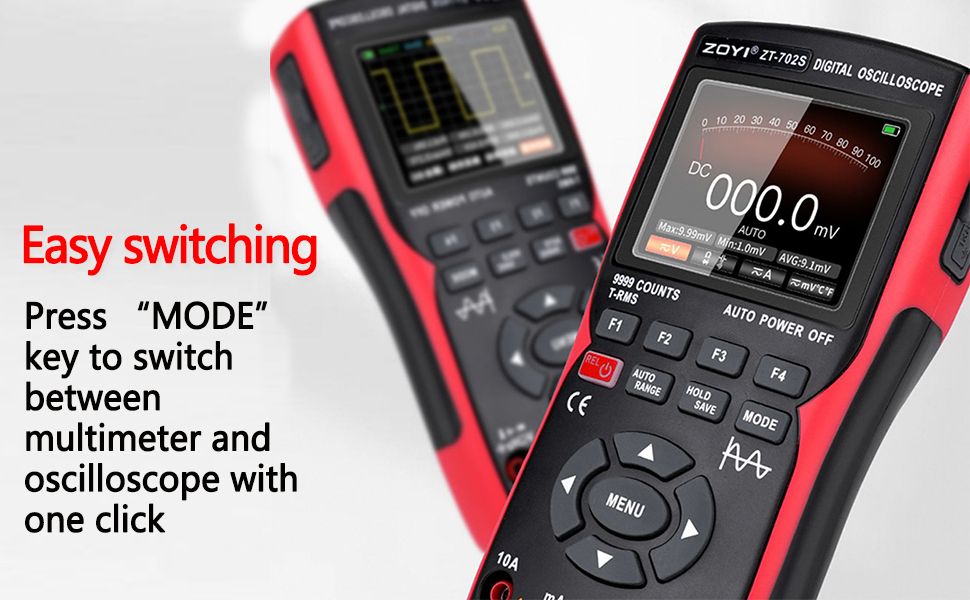
Figure 2.3: ZOYI ZT-702S demonstrating the mode switch button for easy operation.
3. התקנה
3.1 טעינה ראשונית
Before first use, ensure the device is fully charged. Connect the ZT-702S to a power source using the provided Type-C cable. The charging indicator will show the charging status.
3.2 חיבור גלאים
- Oscilloscope Probe: Connect the oscilloscope probe to the BNC connector labeled 'CH1' on the top of the device. Ensure a secure connection.
- Multimeter Test Leads: Insert the red test lead into the 'VΩHz+' jack and the black test lead into the 'COM' jack for voltage, resistance, frequency, and other measurements. For current measurements, refer to the operating instructions.
- חיישן טמפרטורה: Connect the temperature probe to the appropriate jacks as indicated for temperature measurements.

Figure 3.1: ZOYI ZT-702S showing Type-C charging port and probe connections.
4. הוראות הפעלה
4.1 הפעלה/כיבוי
Press and hold the power button (usually marked with ⑁) to turn the device on or off.
4.2 החלפת מצבים
The ZT-702S allows switching between Oscilloscope and Multimeter modes. Press the MODE button to toggle between the two functionalities. The display will indicate the active mode.

Figure 4.1: ZOYI ZT-702S showing both oscilloscope and multimeter displays.
4.3 Oscilloscope Mode Operation
In Oscilloscope mode, the device displays waveforms. Key controls include:
- VOL/TIME: Adjusts vertical sensitivity (Volts/Div) and horizontal time base (Time/Div).
- מַהֲלָך: Shifts the waveform horizontally or vertically.
- לְהַפְעִיל: Sets the trigger level and mode (Auto, Normal, Single) to stabilize the waveform.
- AC/DC Coupling: Selects AC or DC coupling for the input signal.
- כיול אוטומטי: Use the auto calibration function for quick setup and optimal display of the waveform.
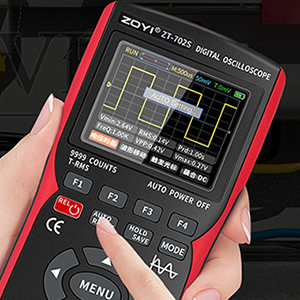
Figure 4.2: ZOYI ZT-702S demonstrating one-button automatic waveform acquisition.
4.4 Multimeter Mode Operation
In Multimeter mode, the device functions as a digital multimeter. Use the טווח כפתור או טווח אוטומטי feature to select the appropriate measurement range. The device supports:
- AC/DC כרךtage: Connect test leads to measure voltage.
- זרם AC/DC: Connect test leads to the appropriate current jacks (10A or mA) and select the current function.
- התנגדות (Ω): Measure resistance by connecting leads across the component.
- קיבול: מדידת קיבול של קבלים.
- תדר (הרץ): Measure signal frequency.
- Temperature (℃/℉): Use the temperature probe for measurements.
- בדיקת דיודה: דיודות בדיקה עבור עוצמת קול קדימהtagטיפה e.
- הֶמשֵׁכִיוּת: Check for circuit continuity with an audible beep.
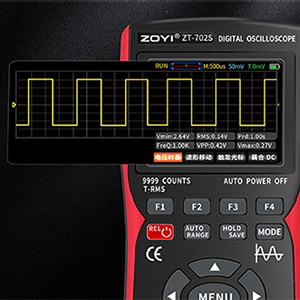
Figure 4.3: ZOYI ZT-702S multimeter display showing 9999 counts for precise measurements.
4.5 Waveform Storage and Data Transfer
The oscilloscope automatically stores measured waveform data. To access or download waveforms:
- Connect the ZT-702S to a computer using a Type-C USB cable.
- The device will appear as a USB flash drive.
- Open the image folder to access stored waveform images.
- You can then transfer these files to your computer for backup and analysis.
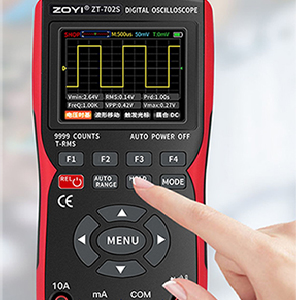
Figure 4.4: ZOYI ZT-702S showing data capture and storage capabilities.
5. תחזוקה
5.1 ניקוי
נגב את המכשיר עם רך, דamp cloth. Do not use abrasive cleaners or solvents. Ensure the device is powered off and disconnected from all probes and power sources before cleaning.
5.2 אחסון
Store the ZT-702S in a cool, dry place away from direct sunlight and extreme temperatures. Disconnect all probes and cables before storage. If storing for extended periods, ensure the battery is partially charged (around 50%) to prolong its lifespan.
5.3 טיפול בסוללה
The device is powered by a rechargeable battery. Avoid fully discharging the battery frequently. Recharge the battery when the low battery indicator appears. Do not attempt to replace the internal battery yourself; contact qualified service personnel if battery issues arise.
6. פתרון תקלות
- המכשיר לא נדלק: ודא שהסוללה טעונה. חבר למקור חשמל ונסה שוב.
- לא מוצגת צורת גל במצב אוסצילוסקופ: Check probe connections. Verify trigger settings. Ensure the input signal is within the device's measurement range.
- קריאות שגויות של רב-מודד: Check test lead connections. Ensure the correct measurement function and range are selected. Perform auto calibration if available.
- בעיות תצוגה: Adjust screen brightness. If the display remains problematic, contact support.
- בעיות בהעברת נתונים: Ensure the Type-C cable is properly connected to both the device and the computer. Try a different USB port or cable.
עבור בעיות שלא מכוסות כאן, אנא פנו לתמיכת הלקוחות.
7. מפרטים
| תכונה | מִפרָט |
|---|---|
| מותג | ZOYI |
| מספר דגם | ZT-702S |
| מקור כוח | מופעל על סוללה |
| משקל פריט | 0.6 קילוגרם |
| מידות פריט (L x W x H) | 8 x 4 x 3 סנטימטרים |
| כרך הפעלה מינימליtage | 0.1 וולט |
| רוחב פס של אוסילוסקופ | 10 מגה-הרץ |
| Sampשיעור ling | 48 MSa/s |
| מקסימום קלט כרךtage | ±400 V (DC+AC) |
| ערוצים | 1 |
| התנגדות קלט | 1 MΩ, @16pF |
| ספירות רב-מטר | 9999 ספירות |
| AC כרךtagטווח | 0-750 וולט |
| DC כרךtagטווח | 0-999.9 וולט |
| טווח זרם DC/AC | 0-9.999 |
| טווח התנגדות | 0-99.99 MΩ |
| טווח קיבול | 0-99.99 mF |
| טווח תדרים | 0-99.99 kHz |
| טווח טמפרטורה | 20- מעלות צלזיוס - 1000 מעלות צלזיוס |
| לְהַצִיג | 2.8-inch IPS color screen, 320*240 resolution |
| ארץ מוצא | סִין |
8. אחריות ותמיכה
8.1 מידע אחריות
Please refer to the warranty card included with your product for detailed warranty terms and conditions. Typically, ZOYI products come with a manufacturer's warranty covering defects in materials and workmanship.
8.2 תמיכת לקוחות
For technical assistance, troubleshooting, or service inquiries, please contact the manufacturer or your local distributor. In India, support is provided by Skyking Instruments.
יַצרָן: ZOYI & ZOTEK Instruments
יבואן (הודו): Skyking Instruments, Mumbai, India