
1. המוצר נגמרview
The GOLOZA LA-C337 is a versatile digital alarm clock featuring a 180° rotatable projection, a large curved LED display, and a convenient USB charging port. It is designed for clear time display and easy operation.

Image 1.1: The GOLOZA Digital Projection Alarm Clock, showcasing its curved display and compact design, placed on a nightstand.
2. תכולת החבילה
אנא בדקו את החבילה עבור הפריטים הבאים:
- GOLOZA Digital Projection Alarm Clock (LA-C337)
- כבל מיקרו USB
- מתאם מתח
- מדריך למשתמש
3. תכונות מוצר
- Curved LED Display: Large, clear digital time display with adjustable brightness.
- 180° Projection: Projects time onto a wall or ceiling with adjustable brightness and rotation.
- אזעקות כפולות: Set two independent alarms with progressive volume.
- פונקצית נודניק: Allows for extra sleep time after the alarm sounds.
- יציאת טעינה מסוג USB: טען את המכשירים הניידים שלך בנוחות.
- סוללת זיכרון: Built-in button battery maintains time settings during power outages.
תמונה 3.1: תקריב view of the GOLOZA Digital Projection Alarm Clock's clear, blue LED display, showing the time.
4. הגדרה ראשונית
4.1 חיבור מתח
- Connect the Micro USB cable to the power input port on the back of the alarm clock.
- חבר את הקצה השני של כבל ה-USB למתאם החשמל המצורף.
- Insert the power adapter into a standard electrical outlet. The clock display will light up.
פֶּתֶק: The built-in button battery serves as a backup for time and alarm settings during a power interruption. It does not power the main display or projection.
4.2 הגדרת שעה ותאריך
Specific button names are not provided, but typically these clocks have 'TIME SET', 'MODE', or similar buttons. Refer to the physical unit for exact button labels.
- לחץ והחזק את זמן מוגדר כפתור (או דומה) כדי להיכנס למצב הגדרת זמן. ספרות השעות יהבהבו.
- השתמש ב- +/- or למעלה/למטה כפתורים לכוונון השעה.
- הקש על זמן מוגדר לחץ שוב על הכפתור כדי לאשר את השעה ולעבור להגדרת הדקות. ספרות הדקות יהבהבו.
- השתמש ב- +/- or למעלה/למטה כפתורים לכוונון הדקות.
- הקש על זמן מוגדר button again to confirm minutes and exit time setting mode.
- Follow similar steps to set the date if your model supports it (usually by pressing the Time Set button multiple times to cycle through year, month, day).
5. הוראות הפעלה
5.1 הגדרת אזעקות
השעון תומך בשני אזעקות עצמאיות (אזעקה 1 ואזעקה 2).
- לחץ והחזק את אזעקה 1 button (or similar) to enter Alarm 1 setting mode. The alarm hour digits will flash.
- השתמש ב- +/- or למעלה/למטה לחצנים לכוונון שעת האזעקה.
- הקש על אזעקה 1 לחץ שוב על הכפתור כדי לאשר את השעה ולעבור להגדרת הדקות. ספרות הדקות של האזעקה יהבהבו.
- השתמש ב- +/- or למעלה/למטה כפתורים כדי לכוונן את דקות השעון המעורר.
- הקש על אזעקה 1 button again to confirm minutes and select the alarm sound (e.g., Beep, Chord, Bird Song).
- הקש על אזעקה 1 button one more time to activate/deactivate Alarm 1 and exit setting mode. An alarm icon will appear on the display when active.
- חזור על התהליך עבור אזעקה 2 באמצעות הכפתור המתאים.
5.2 כוונון בהירות התצוגה
The main LED display typically has multiple brightness levels.
- הקש על בְּהִירוּת button (or a dedicated dimmer button) repeatedly to cycle through the available brightness levels (e.g., High, Medium, Low, Off).
5.3 Using Projection Feature
תכונת ההקרנה מאפשרת לך view the time on a wall or ceiling.
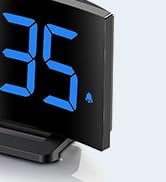
Image 5.1: The GOLOZA Digital Projection Alarm Clock actively projecting the time onto a surface, demonstrating its projection capability.
- הפעלה/ביטול של הקרנה: הקש על מַקרֵן button (or similar) to turn the projection on or off.
- כוונון בהירות ההקרנה: While the projector is on, press the בהירות המקרן button (or the same Projector button repeatedly) to cycle through brightness levels (e.g., High, Medium, Low).
- הקרנה מסתובבת: The projector lens can be physically rotated 180° to adjust the projection angle. Some models may also have a button to flip the projected image.
5.4 שימוש ביציאת טעינה USB
The integrated USB port allows you to charge external devices.
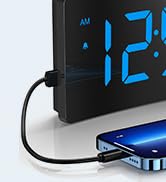
Image 5.2: The GOLOZA Digital Projection Alarm Clock with a smartphone connected to its USB charging port, illustrating its charging capability.
- Connect your device's USB charging cable to the USB output port on the alarm clock.
- ודא שהשעון המעורר דולק.
- The clock's USB port provides power to charge your device.
5.5 פונקציית נודניק
כאשר נשמעת אזעקה, לחצו על נִמנוּם button (often a large button on top) to temporarily silence the alarm. The alarm will sound again after a preset interval (e.g., 9 minutes).
5.6 כוונון עוצמת הקול של האזעקה
The alarm volume is progressive, meaning it starts soft and gradually increases. Some models may offer adjustable volume levels.
- אם זמין, לחץ על כֶּרֶך button (or a dedicated switch) to adjust the alarm volume to your preferred level.
6. תחזוקה
- ניקוי: נגבו את השעון במטלית רכה ויבשה. אין להשתמש בחומרי ניקוי שוחקים או ממסים.
- מיקום: Place the clock on a stable, flat surface away from direct sunlight, heat sources, and moisture.
- סוֹלְלָה: The internal button battery is for memory backup. If the clock consistently loses settings after a power outage, the battery may need replacement by a qualified technician.
7. פתרון תקלות
| בְּעָיָה | סיבה אפשרית | פִּתָרוֹן |
|---|---|---|
| תצוגת השעון כבויה. | אין חיבור לחשמל. | ודא שמתאם החשמל מחובר היטב לשעון ולשקע חשמלי תקין. |
| ההקרנה עמומה או לא ברורה. | Incorrect brightness setting; dirty lens; too much ambient light. | Adjust projection brightness. Clean the projector lens with a soft cloth. Reduce ambient light in the room. |
| האזעקה לא נשמעת. | האזעקה לא מופעלת; עוצמת האזעקה נמוכה מדי. | Ensure the alarm icon is visible on the display. Check and adjust alarm volume. |
| Time settings are lost after power outage. | Internal backup battery is depleted or faulty. | The internal button battery may need replacement. Contact customer support. |
| טעינת USB לא עובדת. | Clock not powered; faulty USB cable; device not compatible. | Ensure the clock is powered. Try a different USB cable. Check device compatibility. |
8. מפרטים
| תכונה | פְּרָט |
|---|---|
| מספר דגם | LA-C337 |
| מידות (L x W x H) | 17.7 x 3.81 x 7.8 ס"מ |
| מִשׁקָל | 310 גרם |
| מותג | GOLOZA |
| צֶבַע | כְּחוֹל |
| סִגְנוֹן | Modern/Elegant/Minimalist |
| תכונות מיוחדות | Integrated Design, Built-in Button Battery (for memory), USB Charging Port, Super Clear Projection, Progressive Volume, Curved Display |
| מקור כוח | Electrical (USB Powered) |
| צוּרָה | Rectangular, Curved Screen |
| סוללות כלולות | No (Internal button battery for memory backup is pre-installed but not user-replaceable) |
| UPC/GTIN | 647697054284 |
9. אחריות ותמיכה
GOLOZA is committed to providing quality products and customer satisfaction.
- מדיניות החזרות: 6 Months Return period.
- אַחֲרָיוּת: 24 חודשי אחריות מיום הרכישה.
- תְמִיכָה: Lifetime Support is provided for this product.
For any questions, technical assistance, or warranty claims, please contact GOLOZA customer service through your purchase platform or the official GOLOZA webאֲתַר.