
docooler V8 Finder 2
docooler V8 Finder 2 TV Signal Finder Meter User Manual
Model: V8 Finder 2
1. הקדמה
The docooler V8 Finder 2 is a professional digital satellite signal finder meter designed for efficient and accurate installation and adjustment of satellite dishes. It features a high-definition LCD display, supports various DVB standards, and includes advanced functions like spectrum analysis and automatic angle calculation. This manual provides comprehensive instructions for operating and maintaining your device.
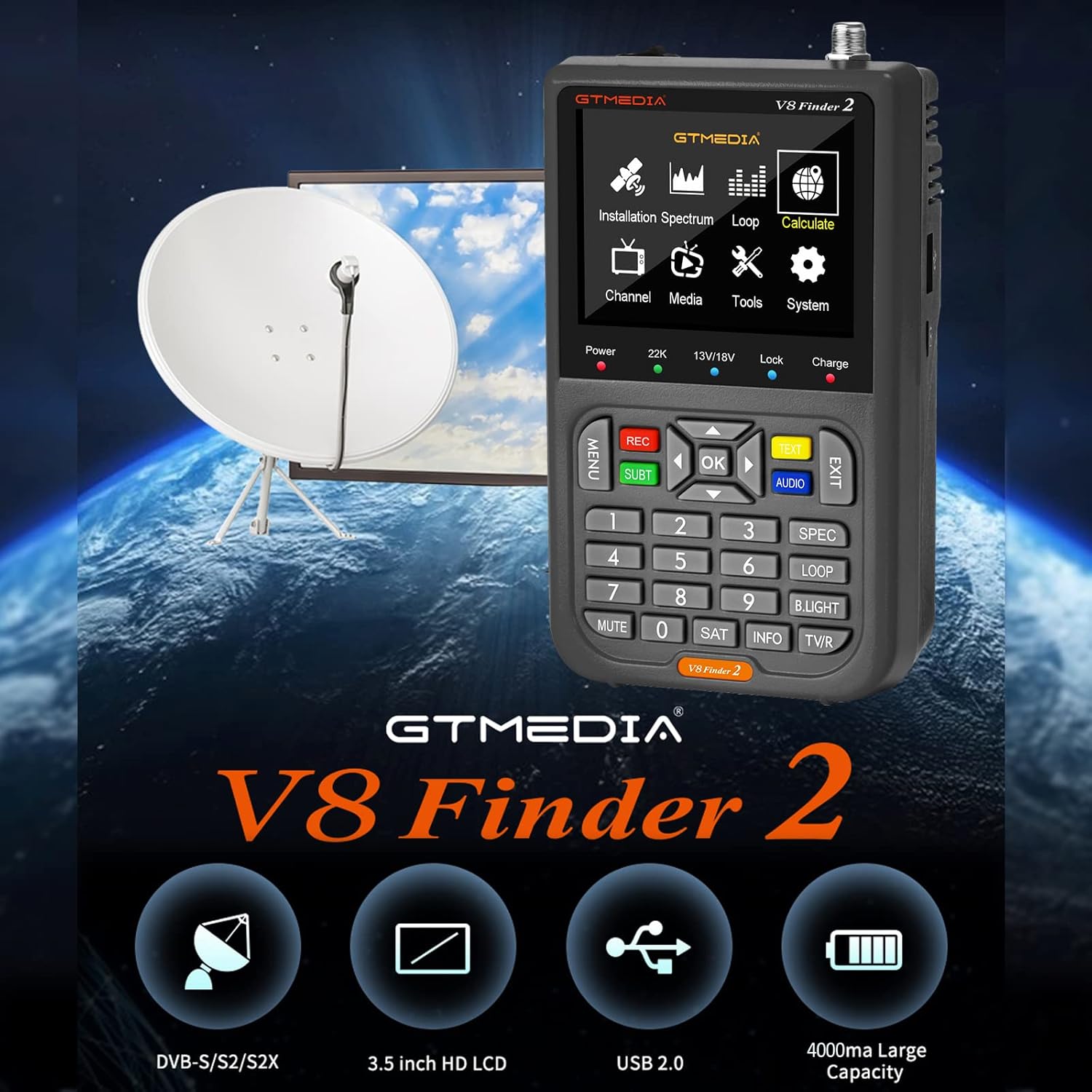
Figure 1: docooler V8 Finder 2 in use with a satellite dish, highlighting its core function.
2. מידע בטיחות
אנא קרא בעיון את כל אזהרות הבטיחות וההוראות לפני השימוש במוצר זה כדי להבטיח פעולה בטוחה ולמנוע נזק.
- אין לחשוף את המכשיר לגשם או לחות.
- Avoid extreme temperatures. Operate the device within recommended environmental conditions.
- אין לפרק או לנסות לתקן את המכשיר בעצמך. יש לפנות לכל טיפול וטיפול באנשי מקצוע מוסמכים.
- השתמש רק באביזרי הטעינה המסופקים או המומלצים.
- יש לוודא אוורור נאות בעת הפעלת המכשיר.
- הרחק את המכשיר משדות מגנטיים חזקים.
3. המוצר נגמרview
The V8 Finder 2 is a compact and powerful tool for satellite signal detection. Familiarize yourself with its components and features.
3.1 פריסת מכשיר

איור 2: חזית view of the V8 Finder 2, showing the LCD display and control panel.
The front panel features a 3.5-inch high-definition LCD screen for displaying signal information, menus, and media. Below the screen are navigation buttons, numeric keypad, and function keys for various operations.
3.2 יציאות וחיבורים
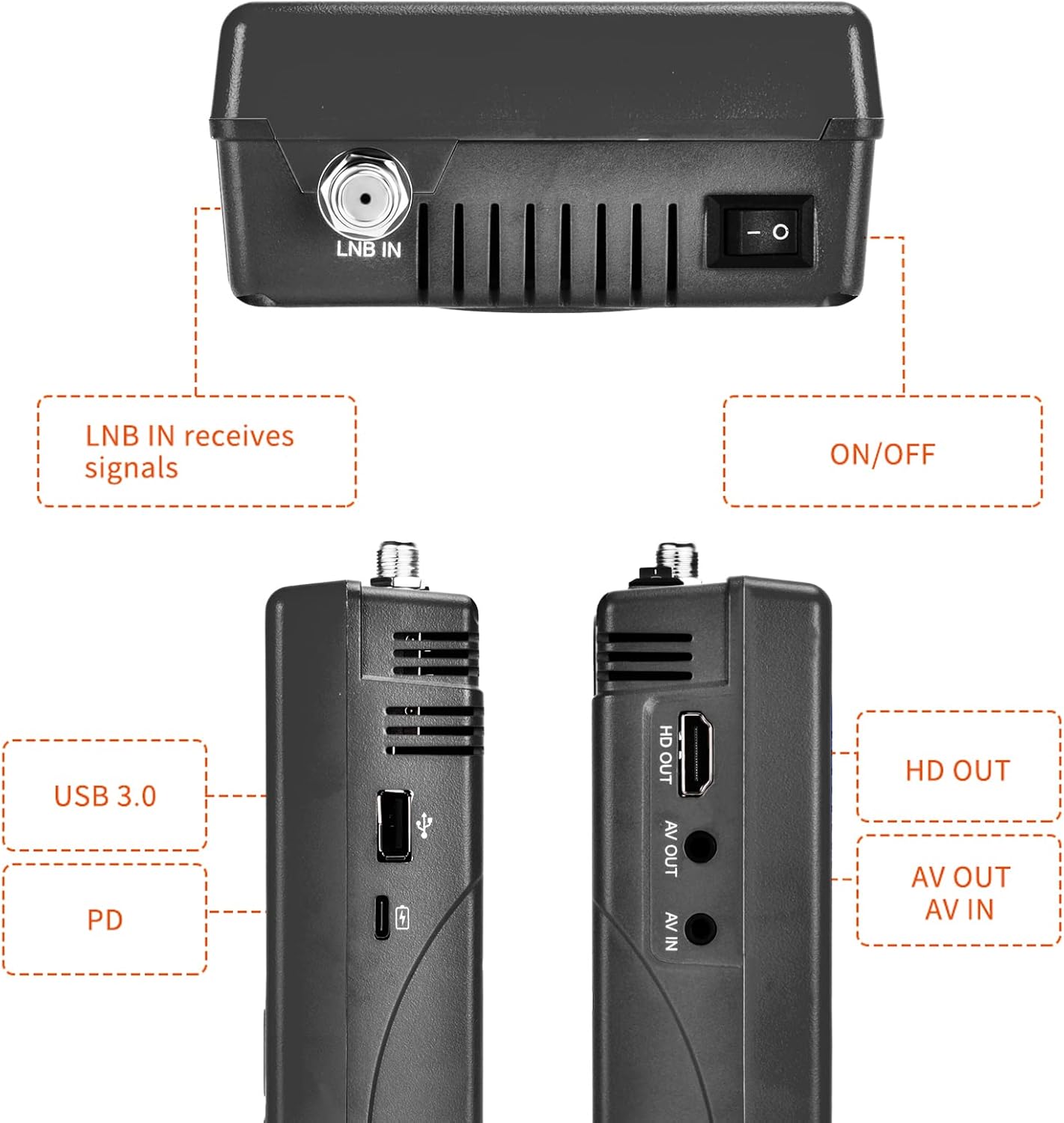
איור 3: צד וחלק עליון views illustrating the various input and output ports.
- LNB IN: Connects to the LNB of your satellite dish for signal reception.
- מתג הדלק / כבה: מדליק או מכבה את המכשיר.
- יציאת USB (USB 3.0): For software updates and connecting a 2.4G USB Wi-Fi dongle for YouTube functionality.
- PD (Power Delivery) / Type-C Charging Port: For charging the device and supports reverse charging.
- HD OUT: High-Definition Multimedia Interface output for connecting to an external display.
- AV OUT: Analog Video output for connecting to older displays.
- AV IN: Analog Video input for connecting external video sources.
3.3 תכונות עיקריות
- 3.5-inch High-Definition LCD Display.
- Full compatibility with DVB-S2X/S2/S, MPEG-2/MPEG-4.
- H.264 (8-bit) hardware decoding support.
- Digital measurement for signal strength and quality.
- Spectrum Analyzer and Loop Search functions.
- Supports Auto, Blind, Manual, or NIT scanning.
- Audible tone for signal lock.
- Automatic calculation of AZ, EL angles.
- DISEQC 1.0/1.1/1.2, Unicable, 0/22kHz tone support.
- רמקול מובנה.
- 7.4V/4000mAh Li-ion battery with Type-C fast charging and reverse charging.
- Software upgrade via USB port.

Figure 4: Visual representation of the V8 Finder 2's main features.
4. התקנה
Before first use, ensure the device is fully charged and familiarize yourself with the package contents.
4.1 תכולת החבילה

Figure 5: Items included in the V8 Finder 2 product package.
ודא שכל הפריטים נמצאים:
- docooler V8 Finder 2 Device
- מדריך למשתמש
- כבל USB (סוג C)
- Power Adapter (if included, not explicitly listed in JSON but implied by charging)
- F-connector adapter (if included)
4.2 טעינת המכשיר
The device is equipped with a 7.4V/4000mAh Li-ion battery. For optimal performance, fully charge the device before first use.
- Connect the provided USB Type-C cable to the PD/Type-C charging port on the device.
- Connect the other end of the USB cable to a compatible USB power adapter (not explicitly listed as included, but standard for Type-C charging) or a powered USB port.
- The charging indicator on the device will illuminate. Charging is complete when the indicator changes color or turns off (refer to device screen for battery status).
The device supports multi-protocol fast charging and Type-C reverse charging, allowing it to act as a power bank for other devices.
5. הוראות הפעלה
This section details the steps for using the V8 Finder 2 to locate and optimize satellite signals.
5.1 הפעלה/כיבוי
- To power on, slide the ON/OFF switch located on the top of the device to the 'ON' position.
- כדי לכבות, הסט את מתג ההפעלה/כיבוי למצב 'כבוי'.
5.2 חיבור לצלחת לוויין
- Ensure the V8 Finder 2 is powered off.
- Connect the coaxial cable from your satellite dish's LNB (Low Noise Block) to the LNB IN port on the V8 Finder 2.
- If connecting to a receiver or TV, use the HD OUT or AV OUT נמלים.
5.3 Signal Finding and Optimization
The V8 Finder 2 provides various modes for signal acquisition and analysis.
- Select Satellite: From the main menu, navigate to the "Installation" or "Satellite Setup" section. Select the desired satellite from the pre-programmed list or add a new one.
- Adjust Dish: Slowly adjust the azimuth (horizontal) and elevation (vertical) of your satellite dish. Observe the signal strength and quality indicators on the V8 Finder 2's display. The device will emit an audible tone when a signal is locked.
- מנתח ספקטרום: Use the "Spectrum" function to visualize the signal spectrum, which can help identify interference or weak signals.
- Angle Calculation: The device can automatically calculate the AZ (Azimuth) and EL (Elevation) angles for your location, assisting in precise dish alignment.
- סריקת ערוצים: Once a strong signal is acquired, perform an "Auto Scan," "Blind Scan," "Manual Scan," or "NIT Scan" to find available channels.

Figure 6: The V8 Finder 2 display showing signal decoding capabilities.
5.4 Media Playback and Other Functions
- כְּלֵי תִקְשׁוֹרֶת: The device supports media playback. Connect a USB drive to the USB port to access compatible audio or video files.
- YouTube (via Wi-Fi): Connect a 2.4G USB Wi-Fi dongle to the USB port to enable YouTube functionality.
- כניסה/יציאה של AV: Use the AV IN port to display video from an external source on the V8 Finder 2 screen. Use AV OUT or HD OUT to display the V8 Finder 2's screen on an external monitor or TV.

Figure 7: Illustration of AV IN and AV OUT functionality, connecting the device to a television.
6. תחזוקה
Proper maintenance ensures the longevity and optimal performance of your V8 Finder 2.
- ניקוי: השתמשו במטלית רכה ויבשה לניקוי המכשיר. אין להשתמש בחומרי ניקוי נוזליים או בתרסיסים.
- אִחסוּן: יש לאחסן את המכשיר במקום קריר ויבש, הרחק מאור שמש ישיר וטמפרטורות קיצוניות.
- טיפול בסוללה: כדי לשמר את חיי הסוללה, הימנעו מפריקה מלאה של הסוללה לעתים קרובות. אם מאחסנים אותה לפרקי זמן ממושכים, טען את הסוללה לכ-50% כל כמה חודשים.
- עדכוני תוכנה: Periodically check for software updates on the manufacturer's website. Updates can improve performance and add new features. Use the USB port for software upgrades.
7. פתרון תקלות
If you encounter issues with your V8 Finder 2, refer to the following common problems and solutions.
| בְּעָיָה | סיבה אפשרית | פִּתָרוֹן |
|---|---|---|
| המכשיר לא נדלק. | סוללה חלשה; כבה את המכשיר. | Charge the device fully. Ensure the ON/OFF switch is in the 'ON' position. |
| לא זוהה אות. | Incorrect LNB connection; Dish misalignment; Incorrect satellite selected. | Check LNB cable connection. Re-align the satellite dish. Verify the correct satellite is selected in the device settings. |
| Weak or unstable signal. | Fine-tuning needed; Obstruction; LNB issue. | Make small adjustments to the dish. Check for any physical obstructions. Inspect LNB for damage. |
| לא ניתן להתחבר ל-Wi-Fi. | No 2.4G USB Wi-Fi dongle connected; Incorrect Wi-Fi settings. | Ensure a compatible 2.4G USB Wi-Fi dongle is inserted. Verify Wi-Fi network settings and password. |
| Display issues. | Software glitch; Hardware fault. | Restart the device. If the problem persists, consider a software update or contact support. |
8. מפרטים
Technical specifications for the docooler V8 Finder 2.
- לְהַצִיג: 3.5-inch High-Definition LCD
- תְאִימוּת: DVB-S2X/S2/S, MPEG-2/MPEG-4
- פענוח וידאו: H.264 (8-bit)
- סוֹלְלָה: 7.4V/4000mAh Li-ion
- יציאת טעינה: Type-C (supports fast charging, reverse charging)
- קישוריות: USB (for software update, 2.4G Wi-Fi dongle), HD OUT, AV OUT, AV IN
- מידות: כ-155 מ"מ x 95 מ"מ x 45 מ"מ
- מִשׁקָל: 530 גרם
- DISEQC Support: 1.0/1.1/1.2, Unicable
- Tone Support: 0/22 קילו-הרץ
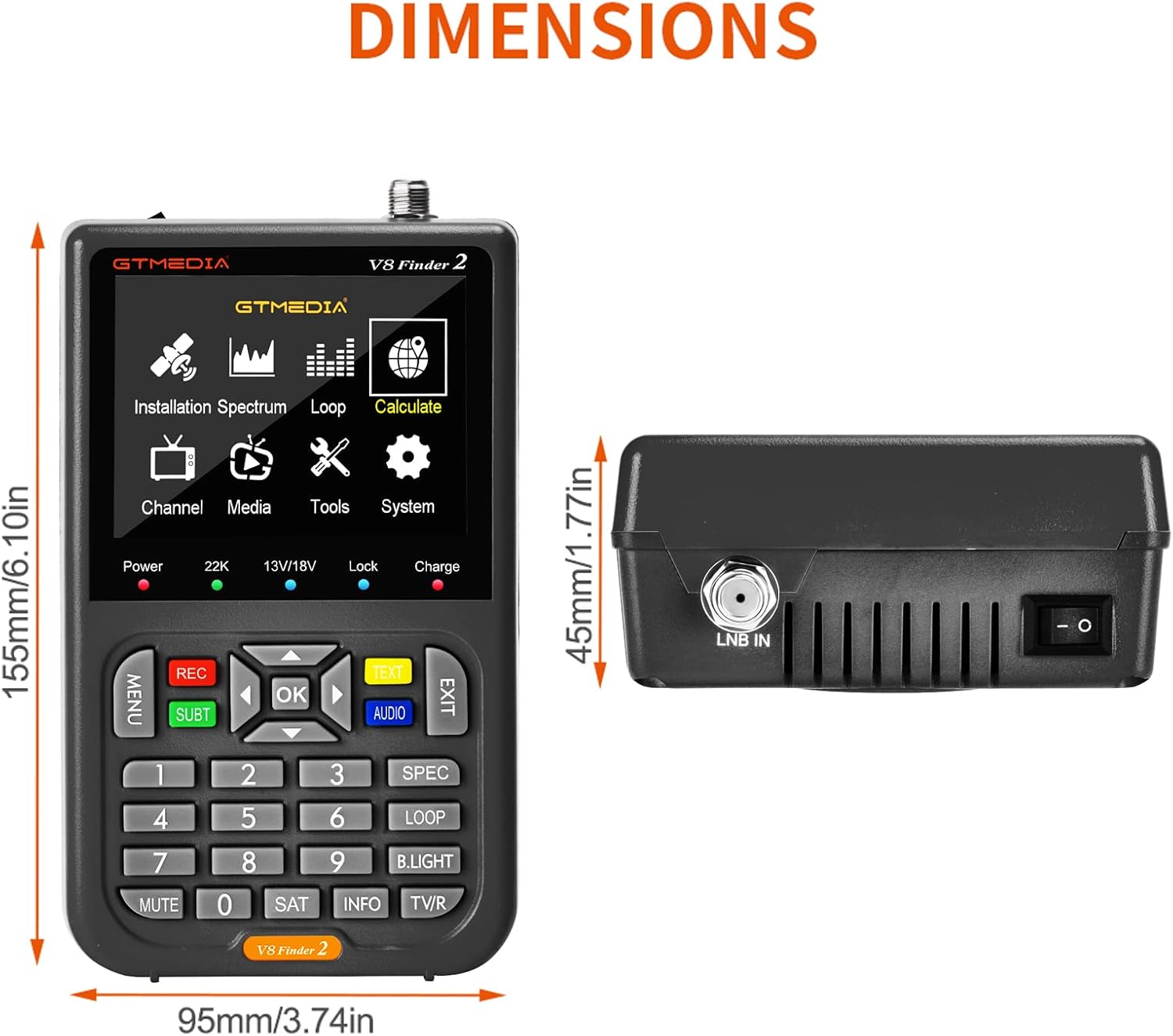
Figure 8: Physical dimensions of the V8 Finder 2.
9. אחריות ותמיכה
For warranty information and technical support, please refer to the product warranty card included in your package or visit the official docooler webאתר. שמור את קבלת הרכישה כהוכחת קנייה לתביעות אחריות.
יַצרָן: דוקולר
מותג: דוקולר
For further assistance, please contact docooler customer service.
Ask a question about this manual
Ask about setup, troubleshooting, compatibility, parts, safety, or missing instructions. Manuals+ will review the question and use this page’s manual context to help answer it.