
מָבוֹא
Thank you for choosing the PETLIBRO 5L Automatic Pet Feeder with 1080P Camera. This device is designed to provide convenient and reliable feeding for your pets, ensuring they receive their meals on schedule while allowing you to monitor and interact with them remotely. This manual provides essential information for setting up, operating, and maintaining your feeder.

The PETLIBRO 5L Automatic Pet Feeder offers a range of features including a 1080p HD camera, night vision, two-way audio, remote feeding, in-app monitoring, and easy cleanup.
הוראות בטיחות
- קרא בעיון את כל ההוראות לפני השימוש במזין.
- מכשיר זה מיועד לשימוש פנימי בלבד.
- אין לטבול את היחידה הראשית במים או נוזלים אחרים.
- הרחיקו את המזין מאור שמש ישיר וממקורות חום.
- Ensure the power cord is not damaged and is placed where pets cannot chew on it.
- Use only the original power adapter provided with the feeder.
- Always supervise children around the feeder.
- Only use dry pet food with a diameter between 2-15mm.
תוכן החבילה
ודא שכל הרכיבים נמצאים בחבילה:
- PETLIBRO Automatic Pet Feeder (Main Unit)
- קערת מזון מנירוסטה
- מתאם מתח
- מדריך למשתמש
- Desiccant Bag (may be pre-installed)
המוצר נגמרview
Familiarize yourself with the different parts of your PETLIBRO Automatic Pet Feeder.

The main unit of the feeder, featuring the food hopper, dispensing mechanism, 1080P camera, and control panel. A cat is shown eating from the stainless steel bowl, with a smartphone displaying the live camera feed.
- מיכל מזון: Stores dry pet food.
- Lid with Twist-Lock: Secures the food hopper and keeps food fresh.
- לוּחַ בַּקָרָה: Buttons for manual feeding and settings.
- 1080P HD מצלמה: לניטור והקלטה חיים.
- חיישן אינפרא אדום: Detects low food levels and blockages.
- רמקול ומיקרופון: לתקשורת שמע דו כיוונית.
- נקודת מכירה של מזון: Where food is dispensed into the bowl.
- קערת נירוסטה: ניתן להסרה לניקוי קל.
- יציאת חשמל: לחיבור מתאם ה-AC.
- תא סוללות: For backup batteries (not included).
הגדרה
1. פריקה והרכבה
- הסר את כל הרכיבים מהאריזה.
- הנח את יחידת ההזנה הראשית על משטח ישר ויציב.
- הכניסו את קערת הנירוסטה לחריץ המיועד לכך בתחתית מזין המזון.
2. ספק כוח
- חבר את מתאם החשמל ליציאת החשמל של המזין וחבר אותו לשקע בקיר.
- עבור כוח אוtage protection, install 3 D-cell alkaline batteries (not included) into the battery compartment at the bottom of the feeder. This ensures continuous operation during power interruptions.
3. מילוי מיכל המזון
- Open the Twist-Lock lid on top of the feeder.
- Pour dry pet food into the hopper. Ensure the food size is between 2-15mm.
- Close the lid securely by twisting it until it locks.
4. התקנת אפליקציה וחיבור Wi-Fi
- Download the PETLIBRO app from the App Store (iOS) or Google Play Store (Android).
- צור חשבון והיכנס.
- Follow the in-app instructions to add your feeder. Ensure your smartphone is connected to a 2.4GHz or 5GHz Wi-Fi network. The feeder supports both for a more stable connection.
- The app will guide you through connecting the feeder to your home Wi-Fi network.
5. הגדרת מצלמה
- Once connected to Wi-Fi, the 1080P camera will automatically activate.
- For video recording, insert a Micro SD card (up to 256GB, not included) into the designated slot, usually located near the camera or at the bottom of the unit.
הוראות הפעלה
1. האכלה ידנית
- Press the manual feed button on the feeder's control panel to dispense one portion of food instantly.
- Alternatively, use the 'Feed Now' option in the PETLIBRO app for immediate dispensing.
2. קביעת ארוחות דרך האפליקציה
The PETLIBRO app allows you to customize your pet's feeding schedule.

The PETLIBRO app provides an intuitive interface to set custom feeding times and amounts, and to review feeding logs.
- Open the PETLIBRO app and select your feeder.
- Navigate to the 'Feeding Schedule' section.
- Set up to 10 meals per day. For each meal, specify the time and the number of portions (1-50 portions per meal).
- שמור את לוח הזמנים שלך. מזין המזון יספק אוטומטית מזון בזמנים המתוכנתים.
- אתה יכול view feeding logs within the app to track your pet's meal history.
3. Two-Way Audio & Voice Recording
Communicate with your pet remotely using the two-way audio feature.

The feeder allows two-way audio communication, enabling you to speak to your pet and hear their responses through the app.
- Live Communication: In the app's live view, tap the microphone icon to speak to your pet. Your voice will be played through the feeder's speaker.
- הקלטת קול: Record a personalized voice message (up to 10 seconds) in the app. This message can be set to play at meal times (0-5 times per meal). A new recording will overwrite any previous one.
4. Monitoring with 1080P Camera and Night Vision
The integrated camera allows you to keep an eye on your pet at all times.

The 1080P camera provides clear vision, even at night, allowing you to monitor your pet's meals with high-definition infrared night vision.
- Access the live camera feed through the PETLIBRO app to view חיית המחמד שלך בזמן אמת.
- עדשת זווית רחבה של 145° מספקת תמונה רחבה view של אזור ההאכלה.
- Infrared night vision ensures clear visibility even in dark conditions.
- Videos can be stored on a Micro SD card (up to 256GB, not included).
5. Smart Alerts and Notifications
- זיהוי תנועה וקול: The feeder automatically records pet activity and saves video clips (SD card required). You will receive notifications on your phone for detected motion or sounds.
- Low Food Level Alert: The infrared sensor monitors the food level in the hopper. You will receive an alert on your phone when the food supply is low, prompting you to refill.
- Blockage Detection: The sensor also detects potential food blockages in the dispensing mechanism and will send an alert if an issue occurs.
- Wi-Fi Disconnection Alert: If the feeder loses its Wi-Fi connection, you will be notified via the app.
תַחזוּקָה
1. ניקוי מזין
ניקוי קבוע מבטיח היגיינה ותפקוד תקין של מתקן האכלה.
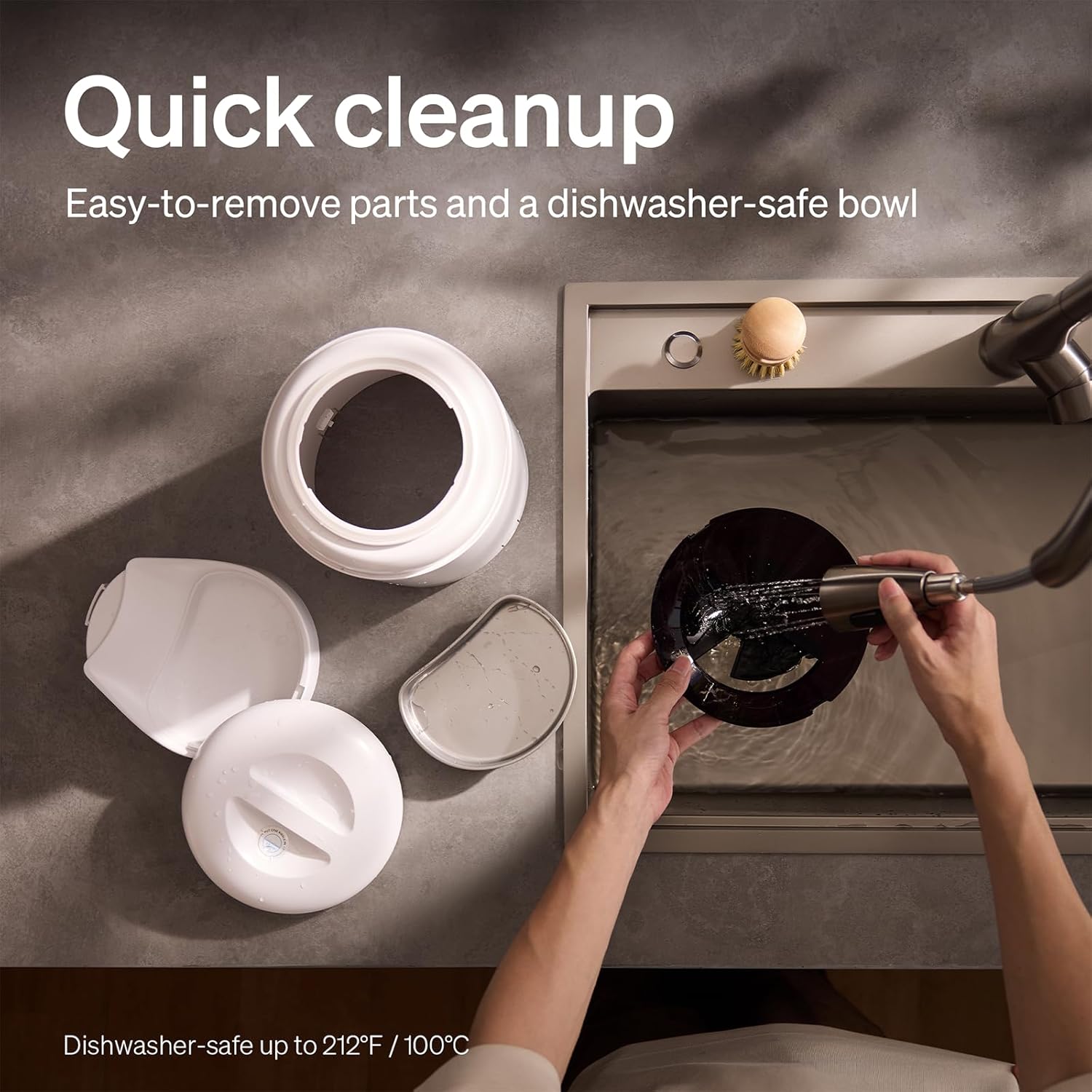
The feeder is designed for quick cleanup with easy-to-remove parts and a dishwasher-safe bowl.
- נתק חשמל: תמיד נתקו את המזין מהחשמל לפני ניקוי.
- הסר מזון: Empty any remaining food from the hopper.
- לְפַרֵק: Remove the food bowl, lid, and food hopper.
- Washable Parts: The stainless steel bowl and food hopper are dishwasher-safe (up to 100°C / 212°F) or can be hand-washed with mild soap and water.
- יחידה ראשית: נגב את היחידה הראשית עם חומר רך, דamp בַּד. אין לטבול אותו במים.
- יבש היטב: ודאו שכל החלקים יבשים לחלוטין לפני הרכבה מחדש ומילוי מחדש במזון.
2. החלפת יבוש
- The desiccant bag helps keep the food fresh. It is recommended to replace it every 15 days.
- Locate the desiccant compartment, usually under the lid.
- Remove the old desiccant bag and insert a new one.
פתרון בעיות
| בְּעָיָה | סיבה אפשרית | פִּתָרוֹן |
|---|---|---|
| מתקן האכלה לא מחלק אוכל. | Food blockage; empty hopper; dispensing mechanism issue. | Check for food blockages and clear them. Refill hopper if empty. Ensure food size is appropriate (2-15mm). |
| ניתוק Wi-Fi. | Weak Wi-Fi signal; router issues; incorrect password. | Ensure feeder is within Wi-Fi range. Restart your router. Reconnect the feeder to Wi-Fi via the app, verifying the password. |
| Camera not working or frequently disconnecting. | Poor Wi-Fi connection; app glitch; SD card issue. | Check Wi-Fi stability. Restart the feeder and the app. Ensure the SD card is properly inserted and not full. Consider a system reset if issues persist. |
| App shows "status unknown" or feeding errors. | Wi-Fi disconnection; app synchronization issue. | Verify Wi-Fi connection. Close and reopen the app. Restart the feeder. |
| הקלטת קול לא מתנגנת. | No recording saved; volume too low; incorrect schedule. | Ensure a voice message is recorded and saved in the app. Check the playback settings for meal times. |
מפרטים
| תכונה | פְּרָט |
|---|---|
| מספר דגם | AF203 |
| מידות (L x W x H) | 12 x 10 x 27 ס"מ |
| מִשׁקָל | 2.15 ק"ג |
| חוֹמֶר | נירוסטה (קערה) |
| יְכוֹלֶת | 5 ליטר |
| מין מטרה | חתול כלב |
| שימושים מומלצים | Automatic indoor dog/cat feeding |
| תכונות מיוחדות | 1080P Camera, Smart App, Two-way Audio |
| צֶבַע | לָבָן |
| טכנולוגיית קישוריות | Wi-Fi (2.4GHz ו-5GHz) |
| מצב פעולה | אוֹטוֹמָטִי |
| הוראות טיפול | Dishwasher safe (bowl) |
| סוללות נדרשות | No (for primary operation), Yes (for backup, 3 D-cell, not included) |
אחריות ותמיכה
PETLIBRO products come with a standard manufacturer's warranty. For detailed warranty information, please refer to the warranty card included in your package or visit the official PETLIBRO webאֲתַר.
If you encounter any issues or have questions regarding your PETLIBRO Automatic Pet Feeder, please contact PETLIBRO customer support through the following channels:
- אֶלֶקטרוֹנִי: Refer to your product packaging or the PETLIBRO webאתר האינטרנט לקבלת כתובת הדוא"ל העדכנית ביותר של התמיכה.
- Webאֲתַר: Visit the official PETLIBRO webאתר לשאלות נפוצות, מדריכים לפתרון בעיות וטפסי יצירת קשר.
- תמיכה בתוך האפליקציה: The PETLIBRO app may offer a support section for direct assistance.
Please have your model number (AF203) and purchase information ready when contacting support.