
Deiss DT-116A
מדחום בשר אלחוטי Bluetooth Deiss PRO - מדריך הוראות
מותג: Deiss | דֶגֶם: DT-116A
1. המוצר נגמרview
The Deiss PRO Bluetooth Meat Thermometer is designed to provide precise, instant-read temperatures for various meats, ensuring perfect cooking results. It features dual probes for multi-zone cooking and connects wirelessly to your smartphone via a dedicated app, allowing remote monitoring and alerts.

Figure 1: Deiss PRO Bluetooth Meat Thermometer and App Interface.
תכונות עיקריות:
- קריאת טמפרטורה מדויקת: Provides precise, instant-read temperatures for various food types.
- עיצוב בדיקה כפולה: Allows simultaneous monitoring of two different temperatures, such as two cuts of meat or meat and ambient oven/smoker temperature.
- קישוריות בלוטות': Connects to iOS/Android devices for remote monitoring and alerts.
- USDA-Recommended Presets: Includes pre-programmed temperature settings for common meats, with options to create custom settings.
- טווח טמפרטורות רחב: Operates from 32°F to 572°F (0°C to 300°C) with probes built to withstand up to 716°F (380°C).
- אפשרויות הרכבה מרובות: Features anti-slip pads, a hanging hole, and an internal magnet for versatile placement.
2. מה בקופסה
עם פתיחת האריזה, יש לוודא שכל הרכיבים נמצאים:
- Deiss PRO Bluetooth Meat Thermometer Unit
- 2 x Stainless Steel Probes with Waterproof Probe Cables
- 2 סוללות AAA (מותקנות מראש או כלולות בנפרד)
- מדריך הוראות (מסמך זה)

איור 2: תכולת החבילה.
3. מדריך התקנה
3.1. הגדרה ראשונית
- הכנס סוללות: If not already installed, open the battery compartment on the back of the thermometer unit and insert 2 AAA batteries, observing polarity.
- הפעלה: Press the power button on the thermometer unit to turn it on.
- הורד את האפליקציה: Scan the QR code provided in the product packaging or search for "Deiss Thermo" in your device's app store (iOS or Android). Download and install the application.

Download the Deiss Thermo App.
- חיבור גששים: Insert the probe cables into the corresponding ports (Probe 1 and Probe 2) on the side of the thermometer unit. Ensure they are securely connected.

Connect the probes.
3.2. זיווג Bluetooth
- אפשר Bluetooth: ודא שה-Bluetooth מופעל בטלפון החכם שלך.
- אפליקציה פתוחה: Launch the "Deiss Thermo" app. The app will automatically scan for and connect to your thermometer unit.
- אשר חיבור: Once connected, the app will display the current temperatures from the probes.

Figure 3: Connecting the thermometer to the app.
3.3. סרטון הדגמת מוצר
סרטון 1: אוברview and demonstration of the Deiss PRO Bluetooth Meat Thermometer, showing unboxing, setup, and usage.
4. הוראות הפעלה
4.1. שימוש בגשושים
- הכנס בדיקה: Carefully insert the stainless steel probe into the thickest part of the meat, avoiding bones. For dual probe use, insert the second probe into another piece of meat or position it to measure ambient oven/smoker temperature.

הכנס את הגשושית למזון שלך.
- צג טמפרטורות: The thermometer unit and the app will display real-time temperatures from both probes.

Figure 4: Proper probe insertion for accurate readings.
4.2. Using the Deiss Thermo App
- בחר סוג מזון: In the app, tap on the probe you wish to configure (P1 or P2). Select a food type from the USDA-recommended presets (e.g., Beef, Chicken, Pork, Fish, Turkey, Lamb, Hamburger, BBQ Smoke, Hot Smoke, Cold Smoke, Bread).

Select food type in the app.
- התאמה אישית של טמפרטורה (אופציונלי): For certain food types like beef, you can select desired doneness (Rare, Medium Rare, Medium, Medium Well, Well Done). You can also create custom temperature alerts by setting a specific target temperature.
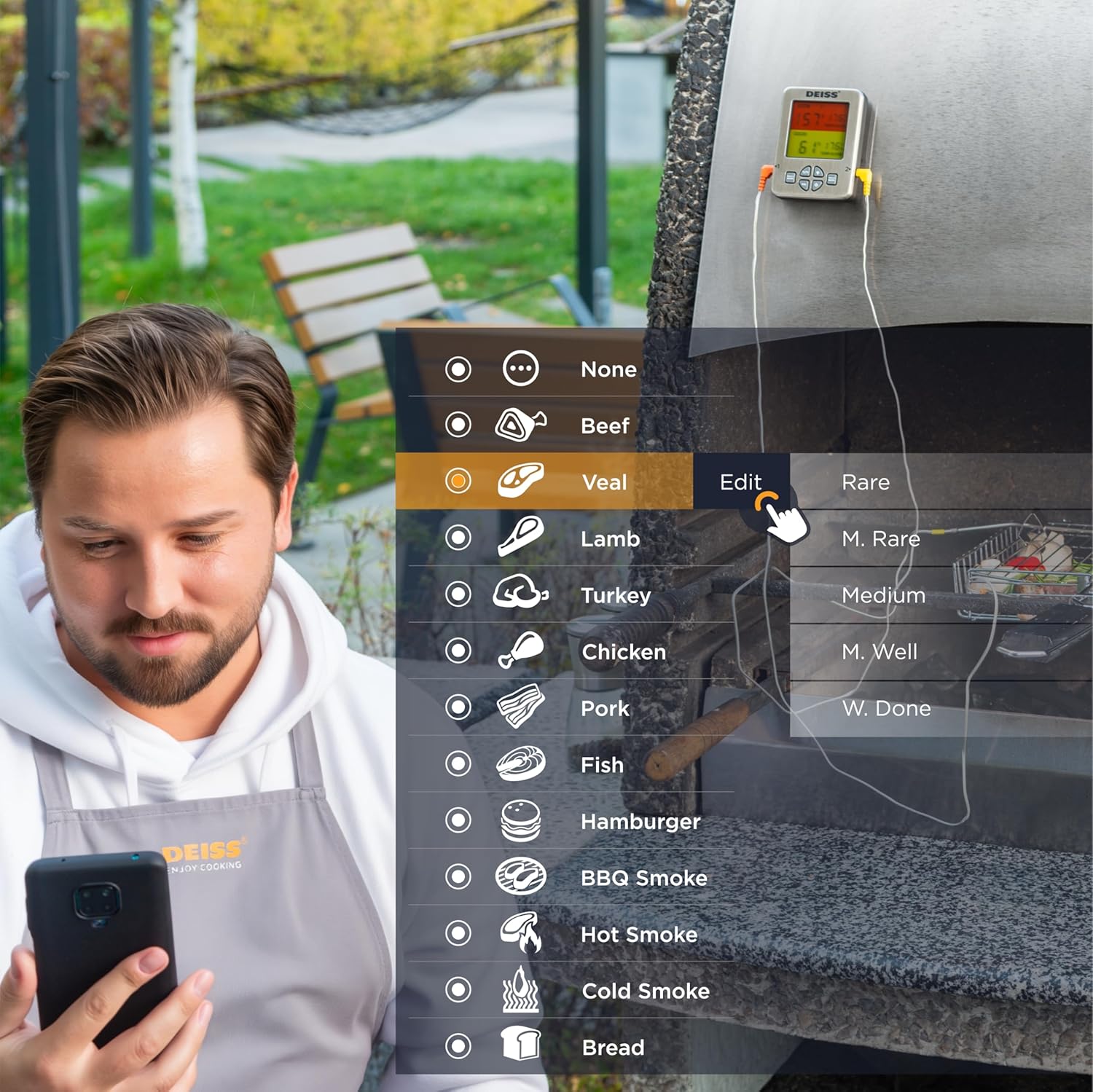
Figure 5: Customizing temperature settings in the app.
- הגדר טיימר: The app allows you to set a countdown timer for your cooking.

Utilize the timer function.
- גרף טמפרטורה: View a historical graph of the temperature readings for better cooking insights.

View temperature trends.
- קבלת התראות: The app will send real-time alerts to your phone when the target temperature is reached, or if the temperature deviates significantly. The thermometer unit also has an audible alarm.

Receive alerts for perfect doneness.
4.3. Unit Controls
- מתג °C/°F: Press the "C/F" button on the unit to toggle between Celsius and Fahrenheit temperature display.

מעבר בין צלזיוס לפרנהייט.
- בקרת עוצמת הקול: Use the "VOL" button to adjust the alarm volume.
- תאורה אחורית: The unit features a backlight for easy reading in low light conditions.

Figure 6: Thermometer unit controls and features.
5. טיפול ותחזוקה
- ניקוי גששים: The stainless steel probes are food-safe and designed to withstand high temperatures. After each use, wipe the probes clean with a damp cloth and mild detergent. Rinse thoroughly and dry completely before storage. Do not immerse the entire probe cable or the main unit in water.
- Cleaning Unit: נגבו את יחידת המדחום בעזרת מטלית רכהamp מטלית. אין להשתמש בחומרי ניקוי שוחקים או לטבול את המכשיר במים.
- אִחסוּן: Store the thermometer and probes in a clean, dry place when not in use. The unit has a hanging hole and internal magnets for convenient storage.

Figure 7: Multiple mounting and storage options.
- החלפת סוללה: Replace AAA batteries when the display indicates low power or the unit does not turn on.
6. פתרון תקלות
| בְּעָיָה | סיבה אפשרית | פִּתָרוֹן |
|---|---|---|
| מדחום לא נדלק. | סוללות מתות או שהוכנסו בצורה שגויה. | החליפו את הסוללות בסוללות AAA חדשות, תוך הקפדה על קוטביות נכונה. |
| אין חיבור בלוטות'. | Bluetooth is off on phone; app not open; device out of range; interference. | Ensure Bluetooth is enabled on your phone. Open the "Deiss Thermo" app. Move closer to the thermometer unit. Avoid strong electromagnetic interference. Restart both the thermometer and the app. |
| קריאת טמפרטורה לא מדויקת. | Probe not inserted correctly; probe damaged; temperature range exceeded. | Ensure the probe is inserted into the thickest part of the meat, away from bones. Check probes for visible damage. Ensure temperatures are within the specified range (32-572°F / 0-300°C). |
| App alarms are not working or are too frequent. | App notification settings; incorrect temperature set points. | Check your phone's notification settings for the "Deiss Thermo" app. Verify the target temperature settings in the app are correct for your desired doneness. Adjust alarm interval settings in the app if available. |
| התצוגה עמומה או מהבהבת. | סוללה חלשה. | החלף סוללות. |
7. מפרט מוצר
| תכונה | פְּרָט |
|---|---|
| מספר דגם | DT-116A |
| מידות המוצר | 3.86 x 2.93 x 1 אינץ'; 8.15 אונקיות |
| טווח טמפרטורה | 32°F עד 572°F (0°C עד 300°C) |
| Probe Withstand Temperature | עד 716°F (380°C) |
| דִיוּק | ±1.8°F (±1°C) resolution |
| קישוריות | בלוטות' |
| מקור כוח | 2 סוללות AAA (כלולות) |
| סוג תצוגה | LCD דיגיטלי עם תאורה אחורית |
| חומר בדיקה | נירוסטה |
| חומר חיצוני | פּלָסטִי |
| הוראות טיפול | Oven Safe (probes), Wipe Clean (unit) |
| יַצרָן | Deiss Kitchenware |
| ארץ מוצא | סִין |

איור 8: מידות המוצר.
8. אחריות ותמיכה
For warranty information, technical support, or any inquiries regarding your Deiss PRO Bluetooth Meat Thermometer, please contact Deiss Kitchenware customer service or visit their official website. Refer to the product packaging or the Deiss Thermo app for specific contact details.
You can also visit the Deiss Store on Amazon for more information: Deiss Kitchenware Store.
Ask a question about this manual
Ask about setup, troubleshooting, compatibility, parts, safety, or missing instructions. Manuals+ will review the question and use this page’s manual context to help answer it.