
DARKROCK MH200
מדריך למשתמש למארז מחשב DARKROCK MH200
דגם: MH200
1. הקדמה
Welcome to the user manual for the DARKROCK MH200 White PC Computer Case. This compact mid-tower case is designed for both office and gaming setups, featuring high-airflow mesh panels and versatile component support. This manual provides detailed information on the case's features, specifications, installation, operation, and maintenance to ensure optimal performance and longevity.
2. תכונות עיקריות
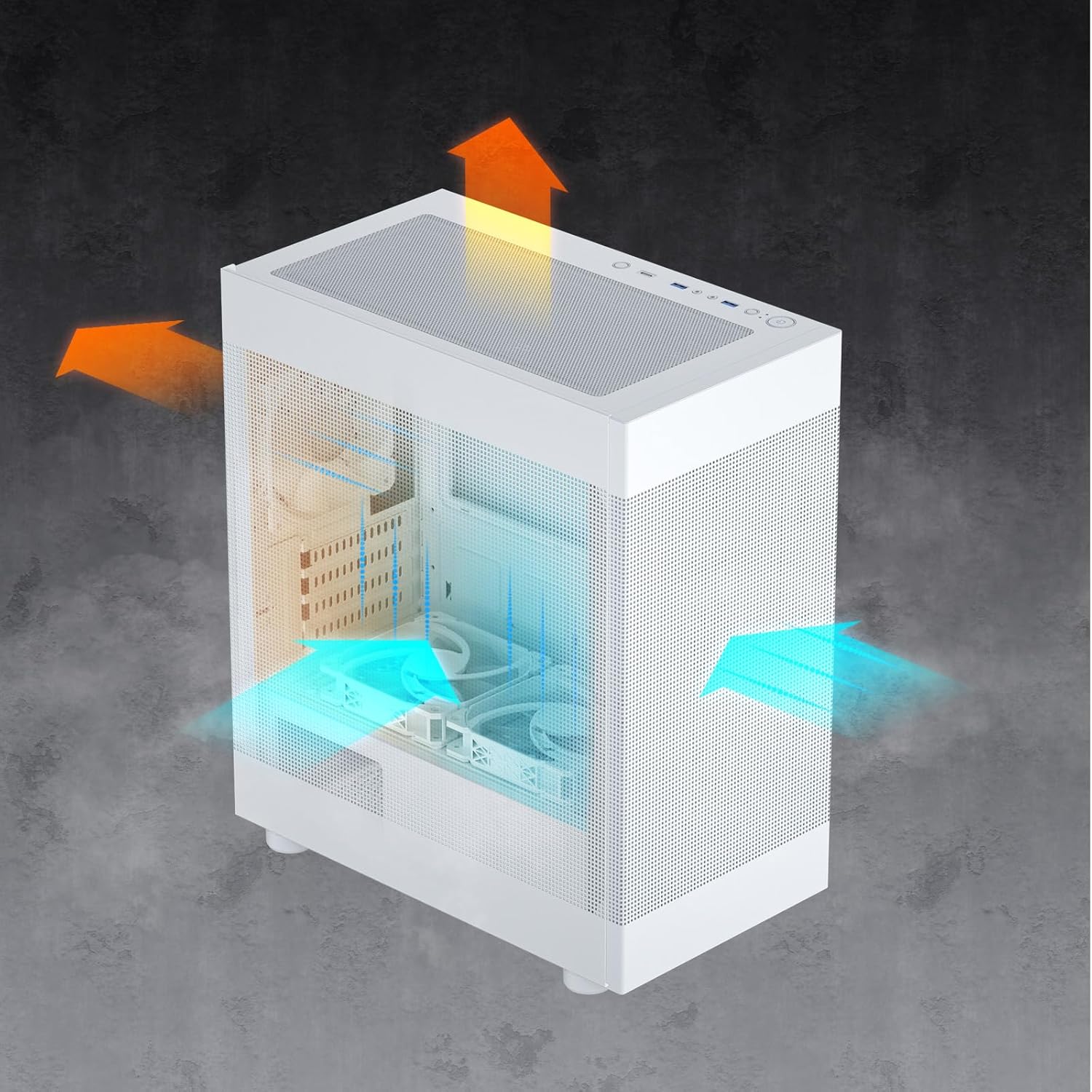
- Premium Cooling Performance: Equipped with front and side mesh panels for enhanced airflow. Top and bottom panels feature magnetic mesh dust filters for easy cleaning and improved thermal management.
- Ready for Upgrade: Spacious interior accommodates CPU coolers up to 165mm in height and graphics cards up to 330mm in length, supporting most NVIDIA GeForce RTX 40 Series GPUs.
- Powerful I/O Panel: Conveniently located top panel with a Type-C port, two USB 3.0 ports, and audio jacks for easy connectivity of peripherals and storage devices.
- עיצוב מלוטש ומודרני: Available in white, supporting Micro ATX and Mini-ITX motherboards. Includes a pre-installed ARGB 120mm fan in the rear for vibrant lighting effects.
- Various Cooling Options: Supports up to eight fans and a 280mm radiator on the top, ensuring excellent airflow and cooling for your PC components.


3. מפרטים
| תְכוּנָה | פְּרָט |
|---|---|
| מותג | אפל אפל |
| שם הדגם | MH200 |
| סוג מקרה | מגדל אמצע |
| צֶבַע | לָבָן |
| חוֹמֶר | מַתֶכֶת |
| תאימות לוח אם | מיקרו ATX, מיני ITX |
| מידות פריט (LxWxH) | 14.17 x 8.35 x 16.53 אינץ' |
| משקל פריט | 8.4 פאונד |
| מקסימום גובה מצנן מעבד | 165 מ"מ |
| אורך GPU מקסימלי | 330 מ"מ |
| סוג הרכבה של ספק כוח | הר תחתון |
| יציאות I/O | 1x Type-C, 2x USB 3.0, Audio Jacks |
| מאוורר מותקן מראש | 1x 120mm ARGB fan (rear) |
| תמיכת מעריצים | Up to 8 fans |
| תמיכת רדיאטור | Up to 280mm (top) |


4. תכולת החבילה
אנא בדקו את תוכן החבילה בעת פתיחת הקופסה כדי לוודא שכל הפריטים נמצאים:
- DARKROCK MH200 PC Computer Case (White)
- 1x 120mm ARGB Fan (pre-installed in rear)
- קופסת אביזרים (ברגים, אזיקונים, מרווחים וכו')
- מדריך למשתמש (מסמך זה)

5. התקנה והתקנה
Follow these steps to install your components into the DARKROCK MH200 case. For detailed visual instructions, please refer to the official מדריך התקנה (PDF).
- הכינו את התיק: Carefully remove the side panels and front panel by gently pulling them away from the chassis. The mesh panels are designed for easy removal.
- התקן לוח אם: Secure your Micro ATX or Mini ITX motherboard onto the pre-installed standoffs using the appropriate screws from the accessory box.
- התקנת ספק כוח (PSU): Mount your power supply unit in the bottom rear compartment of the case. Ensure proper orientation for cable management.
- התקנת כונני אחסון: Install 2.5" SSDs behind the motherboard tray and 3.5" HDDs in the removable drive cage located at the bottom front.
- התקנת כרטיס מסך (GPU): Insert your graphics card into the appropriate PCIe slot on your motherboard. Ensure it is securely fastened. The case supports GPUs up to 330mm in length.
- התקנת מקרר מעבד: Mount your CPU cooler. The case supports coolers up to 165mm in height.
- Install Additional Fans/Radiators: Install any additional cooling fans or liquid radiators as desired. Refer to the specifications section for supported sizes and locations.
- ניהול כבלים: Route all necessary cables through the cutouts and tie-down points behind the motherboard tray for a clean build and improved airflow.
- Reattach Panels: Once all components are installed and cables are managed, carefully reattach the front and side mesh panels.
6. תפעול
The DARKROCK MH200 case features a convenient top I/O panel for easy access to essential ports and controls.

- לחצן הפעלה: Press to turn your computer on or off.
- לחצן איפוס: לחץ כדי להפעיל מחדש את המחשב.
- יציאות USB 3.0: Connect high-speed USB devices such as external hard drives, flash drives, or peripherals.
- סוג C נמל: Connect modern USB Type-C devices for fast data transfer.
- שקעי אודיו: Connect headphones, microphones, or speakers.
- לחצן LED: Control the lighting effects of the pre-installed ARGB fan and any other compatible ARGB components connected to the case's controller (if applicable).
7. תחזוקה
תחזוקה שוטפת מסייעת להבטיח ביצועים אופטימליים ומאריכה את תוחלת החיים של רכיבי המחשב שלך.
- ניקוי מסנן אבק: The top and bottom panels are equipped with magnetic dust filters. Gently remove them and clean with water or a soft brush. Ensure they are completely dry before reattaching.
- ניקוי מארז: השתמש רך, דamp cloth to wipe down the exterior of the case. Avoid abrasive cleaners or solvents.
- הסרת אבק פנימית: Periodically use compressed air to clear dust from internal components and fans. Ensure the system is powered off and unplugged before performing internal cleaning.
8. פתרון תקלות
If you encounter issues with your DARKROCK MH200 case, refer to the common problems and solutions below:
- אין כוח:
פִּתָרוֹן: Ensure the power supply is properly connected to the wall outlet and the motherboard. Check all front panel header connections (Power SW, Reset SW) to the motherboard.
- מאווררים לא מסתובבים / ARGB לא נדלק:
פִּתָרוֹן: Verify that the fan power cables are securely connected to the motherboard or fan controller. Check ARGB connections to the motherboard's ARGB header or dedicated controller. Ensure the LED button on the I/O panel is functioning.
- יציאות USB לא עובדות:
פִּתָרוֹן: Confirm that the USB 3.0 and Type-C headers from the case are correctly plugged into the corresponding ports on your motherboard.
- Audio Jacks Not Working:
פִּתָרוֹן: Ensure the HD Audio cable from the case is properly connected to the audio header on your motherboard.
- Excessive Dust Buildup:
פִּתָרוֹן: Regularly clean the magnetic dust filters on the top and bottom panels. Consider increasing fan airflow or adjusting fan curves if temperatures are high due to dust.
9. אחריות ותמיכה
DARKROCK products are manufactured to high quality standards. For warranty information, technical support, or to contact customer service, please visit the official DARKROCK store on Amazon or their official webאֲתַר.
Official DARKROCK Store: https://www.amazon.com/stores/DARKROCK/page/05A96EC3-7BC6-4877-926F-CDD98356ADCA
Ask a question about this manual
Ask about setup, troubleshooting, compatibility, parts, safety, or missing instructions. Manuals+ will review the question and use this page’s manual context to help answer it.