
1. הקדמה
This manual provides instructions for the proper use and care of your Docooler Portable USB Cassette Player. This device allows you to play audio cassettes and convert their content into digital MP3 files via a USB connection to a computer. Please read this manual thoroughly before operating the device to ensure optimal performance and longevity.
2. המוצר נגמרview
The Docooler Portable USB Cassette Player is a compact, handheld device designed for playing and digitizing audio cassettes. It features a transparent casing, allowing visibility of the internal mechanism.
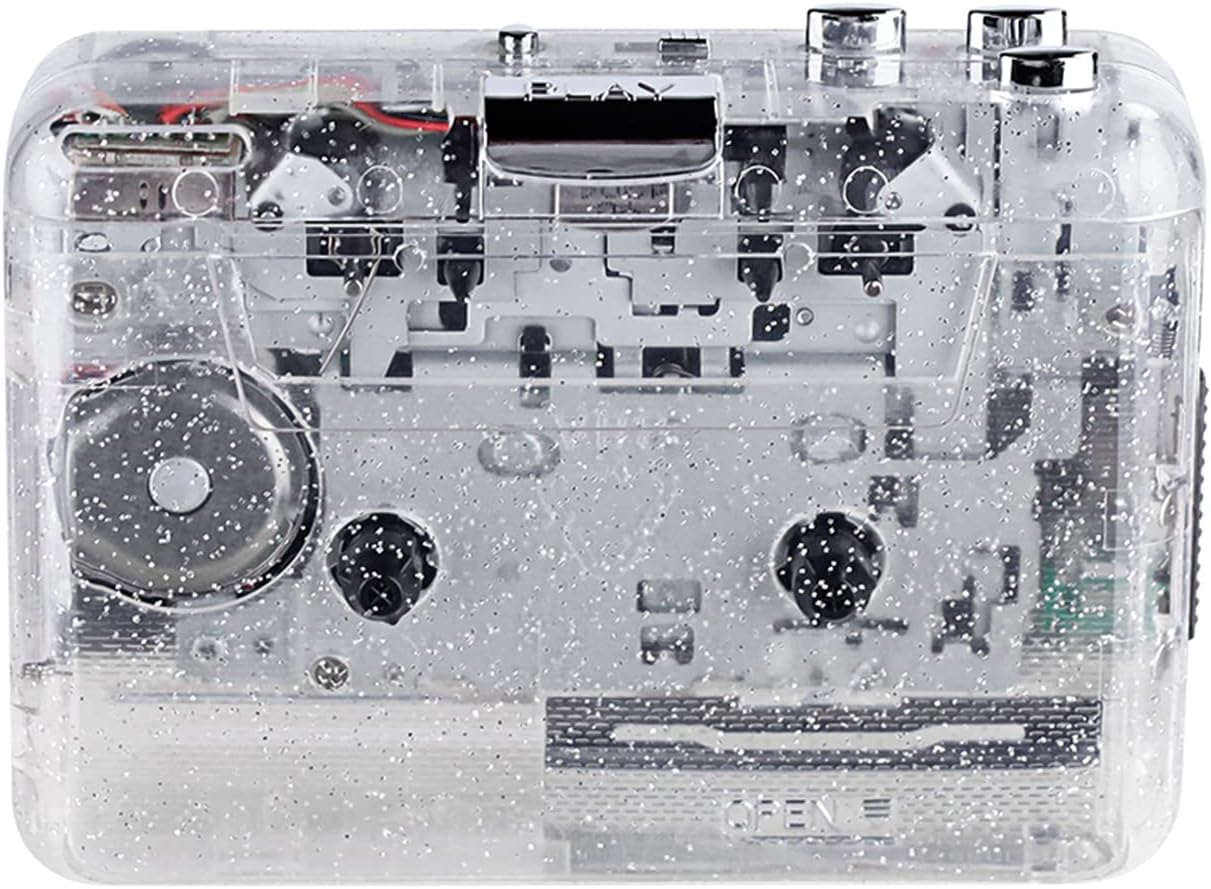
איור 1: חזית view of the Docooler Portable USB Cassette Player, showcasinהעיצוב השקוף שלו.

Figure 2: Various angles of the cassette player, including top, side, and open views.
תכולת החבילה:
- Docooler Portable USB Cassette Player
- כבל USB
- מדריך למשתמש (מסמך זה)
- Headphones (may vary by package)
3. התקנה
3.1 אספקת חשמל
The cassette player can be powered by either batteries or a USB connection.
התקנת סוללה:
- אתר את תא הסוללות במכשיר.
- פתח את מכסה תא הסוללות.
- הכניסו 2 סוללות AA (לא כלולות), תוך הקפדה על קוטביות נכונה (+/-).
- סגור היטב את מכסה תא הסוללות.
USB כוח:
Connect the provided USB cable to the player's USB port and the other end to a powered USB port on your computer or a USB wall adapter. The device will draw power from the USB connection.
4. הוראות הפעלה
4.1 Playing a Cassette Tape
- Open the cassette compartment cover.
- Insert an audio cassette tape with the open edge facing upwards.
- סגור היטב את מכסה תא הקסטה.
- Connect headphones or external speakers to the 3.5mm audio output jack.
- הקש על לְשַׂחֵק לחצן כדי להתחיל את ההשמעה.
- השתמש ב- לְהַפְסִיק כפתור כדי לעצור את ההפעלה.
- השתמש ב- FF (הרצה קדימה) ו REW (הריצה לאחור) כפתורים כדי לנווט בין הקלטת.
- Adjust the volume using the volume control dial.
- The "DIR" button allows you to quickly flip the tape direction. The "play mode" button can be used to reverse playback once or an unlimited number of times.

Figure 3: The cassette player in use, demonstrating tape insertion and playback setup.

Figure 4: Users listening to audio through headphones connected to the cassette player.
4.2 Converting Tapes to MP3 Files
The Docooler Portable USB Cassette Player can convert your analog cassette audio into digital MP3 files. This process requires a computer and compatible audio recording software (not included).
- Ensure the cassette player is powered (via batteries or USB).
- Connect the cassette player to your computer using the provided USB cable.
- Install and open your preferred audio recording software on your computer. Software such as Audacity (free and open-source) is commonly used for this purpose.
- Configure your recording software to recognize the cassette player as an audio input device.
- Insert the cassette tape you wish to convert into the player.
- Start recording in your software, then press the לְשַׂחֵק button on the cassette player.
- Monitor the recording process. Once the tape has finished playing, stop the recording in your software.
- Save the recorded audio as an MP3 file במחשב שלך.

Figure 5: Illustration of the process to convert cassette audio to MP3 files using the player and a computer.
5. תחזוקה
5.1 ניקוי ההתקן
- נגבו את החלק החיצוני של הנגן בעזרת מטלית רכה ויבשה.
- אין להשתמש בחומרי ניקוי נוזליים או בחומרים שוחקים, מכיוון שהם עלולים לפגוע במשטח.
- Periodically clean the tape heads and pinch rollers using a cotton swab lightly dampמצופים באלכוהול איזופרופילי כדי להבטיח איכות צליל אופטימלית ולמנוע נזק לקלטת.
5.2 אחסון
- כאשר אינך בשימוש למשך תקופות ממושכות, הוציא את הסוללות כדי למנוע דליפה.
- יש לאחסן את הנגן במקום קריר ויבש, הרחק מאור שמש ישיר וטמפרטורות קיצוניות.
6. פתרון תקלות
| בְּעָיָה | סיבה אפשרית | פִּתָרוֹן |
|---|---|---|
| אין כוח | Dead batteries; USB cable not connected properly. | Replace batteries; ensure USB cable is securely connected. |
| אין קול | Headphones/speakers not connected; volume too low; dirty tape heads. | Connect audio output device; increase volume; clean tape heads. |
| Poor sound quality (hissing, muffled) | Dirty tape heads; worn-out tape; low battery. | Clean tape heads; try a different tape; replace batteries. |
| Tape not playing or moving | Tape jammed; mechanism issue; low battery. | Check tape for damage; replace batteries. |
| Cannot convert to MP3 | USB connection issue; software not configured correctly; no recording software. | Ensure USB is connected; check software settings; install compatible recording software. |
7. מפרטים
- דֶגֶם: B0C69FDZF6
- ספק כוח: 2 x AA Batteries or USB 5V DC
- מִמְשָׁק: USB 2.0
- פלט שמע: שקע סטריאו 3.5 מ"מ
- מידות: 7.2 x 5.91 x 1.54 אינץ' (בערך)
- מִשׁקָל: 9.6 אונקיות (בערך)
- יַצרָן: דוקולר
8. מידע בטיחות
- אין לחשוף את המכשיר למים או ללחות מוגזמת.
- הימנע מנפילה או הכפיפה של המכשיר למכות חזקות.
- אל תנסה לפרק או לתקן את המכשיר בעצמך. פנה לאנשי שירות מוסמכים.
- הרחק מהישג ידם של ילדים.
- השלך סוללות בהתאם לתקנות המקומיות.
9. אחריות ותמיכה
For warranty information or technical support, please refer to the documentation included with your purchase or contact Docooler customer service through their official website or the retailer where the product was purchased. Please have your model number (B0C69FDZF6) and purchase date available when contacting support.