
1. הקדמה
Thank you for choosing the SPLITSKY NZFS Kids Alarm Clock. This device combines an alarm clock, white noise sleep aid, and an 8-mode RGB night light, designed to assist with sleep and wake-up routines for children and adults. Please read this manual thoroughly to understand its features and ensure proper operation.
מידע בטיחות:
- הרחק את המכשיר ממים ומסביבות לחות גבוהה.
- אל תנסה לפרק או לתקן את המכשיר בעצמך.
- Use only the provided USB-C power cable or a certified equivalent.
- הקפידו על אוורור נאות סביב המכשיר.
2. תכולת החבילה
ודא שכל הפריטים נמצאים בחבילה שלך:
- SPLITSKY NZFS Kids Alarm Clock
- 1.2M (4.7 inch) USB-C Power Cable
- מדריך למשתמש (מסמך זה)
- 1 x CR2032 Lithium Ion Battery (pre-installed for memory backup)
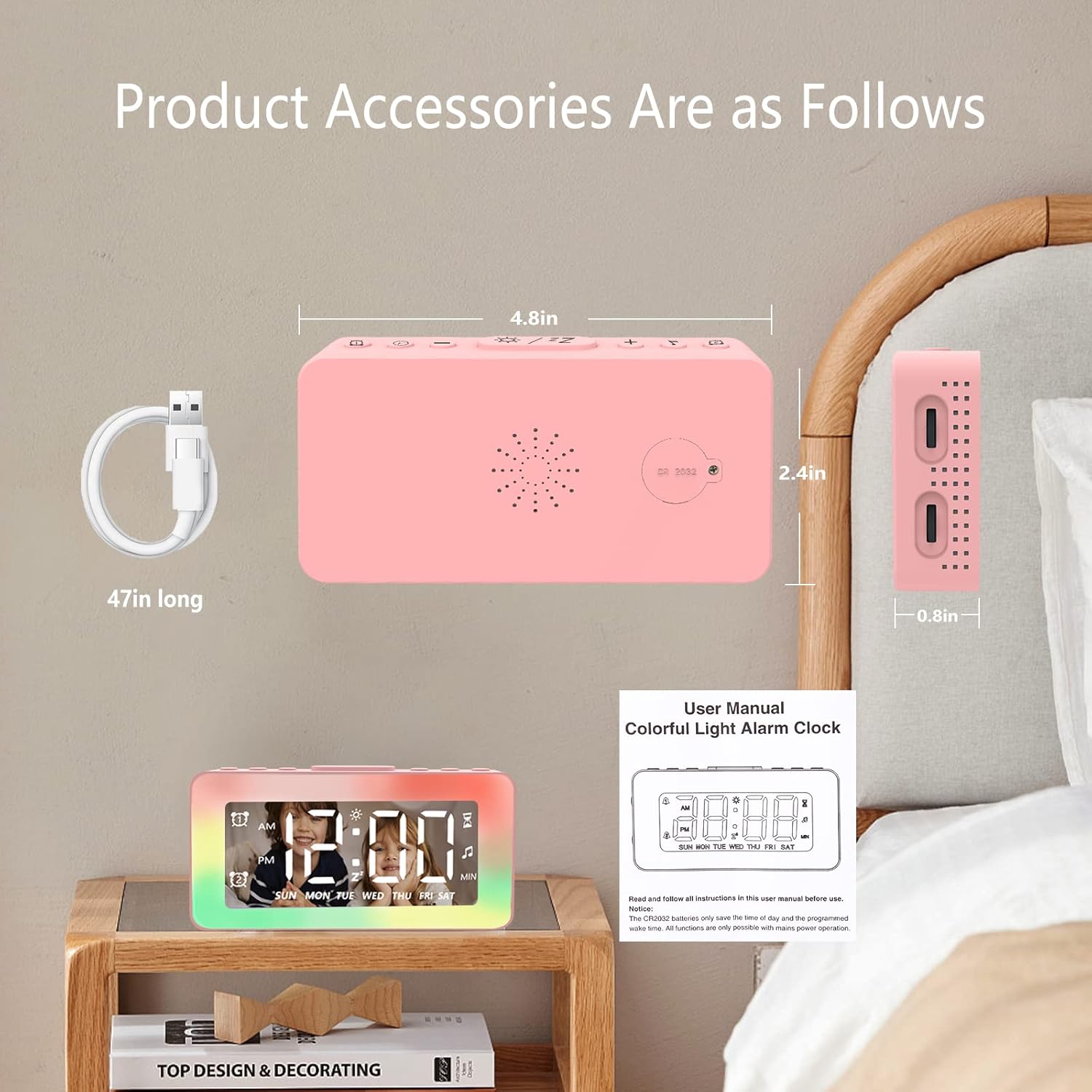
Image: The SPLITSKY NZFS Kids Alarm Clock, a USB-C power cable, and the user manual are included in the package.
3. המוצר נגמרview
Familiarize yourself with the buttons and ports on your alarm clock:

תמונה: מפורט view of the alarm clock's top buttons and side ports, including Alarm 1, Time Setting, Light Minus/Settings, Snooze/Light Mode Switch, Light Plus/Setup, Music Switch, Alarm 2, Volume Setting, Time Brightness Setting, USB Output Charging Port, and Type-C Input Interface.
- לחצן אזעקה 1: Set and activate Alarm 1.
- לחצן הגדרת זמן: התאם את השעה הנוכחית.
- Light Minus / Settings Button: Decrease light brightness or navigate settings.
- Snooze / Light Mode Switch Button: Activate snooze, or cycle through light modes.
- Light Plus / Setup Button: Increase light brightness or confirm settings.
- Music Switch Button: Cycle through white noise sounds.
- לחצן אזעקה 2: Set and activate Alarm 2.
- Volume Setting Wheel (Side): Adjust alarm and white noise volume.
- Time Brightness Setting Wheel (Side): התאם את בהירות התצוגה.
- USB Output Charging Port (Side): Charge external devices.
- Type-C Input Interface (Side): Connect power cable to the alarm clock.
4. התקנה
4.1 חיבור מתח
- Connect the provided USB-C power cable to the Type-C Input Interface on the side of the alarm clock.
- חבר את הקצה השני של כבל ה-USB-C לספק כוח USB תואם (לא כלול) או ליציאת USB.
- התצוגה תאיר, ציון שהשעון מופעל.

Image: The SPLITSKY NZFS Kids Alarm Clock is shown powered on and connected via its USB-C port, also demonstrating its capability to charge a smartphone.
4.2 Battery Installation (Memory Backup)
The alarm clock includes a pre-installed CR2032 battery. This battery serves as a memory backup to retain time and alarm settings during a power outage or when the main power is disconnected. It does not power the clock for regular operation.
- If the battery needs replacement, locate the battery compartment on the back of the unit.
- השתמש במברג קטן כדי לפתוח את התא.
- החלף בסוללת CR2032 חדשה, תוך הקפדה על קוטביות נכונה.
- סגור היטב את התא.
5. הוראות הפעלה
5.1 Setting the Time (12H/24H Format)
- לחץ והחזק את לחצן הגדרת זמן עד שספרות השעות יתחילו להבהב.
- השתמש ב- Light Minus / Settings Button (למטה) או Light Plus / Setup Button (up) to adjust the hour.
- הקש על לחצן הגדרת זמן again to move to minute adjustment. Adjust minutes using the Light Minus/Plus buttons.
- הקש על לחצן הגדרת זמן a third time to select 12-hour or 24-hour format. Adjust using the Light Minus/Plus buttons.
- הקש על לחצן הגדרת זמן שוב כדי לאשר ולצאת ממצב הגדרת זמן.
5.2 Setting Alarms (Dual Alarm, Daily/Weekday/Weekend Mode)
השעון תומך בשני אזעקות עצמאיות (אזעקה 1 ואזעקה 2).
- לחץ והחזק את לחצן אזעקה 1 (עבור אזעקה 1) או לחצן אזעקה 2 (for Alarm 2) until the alarm hour digits flash.
- השתמש ב- Light Minus / Settings Button or Light Plus / Setup Button כדי להתאים את השעה.
- Press the respective Alarm Button again to move to minute adjustment. Adjust minutes using the Light Minus/Plus buttons.
- Press the respective Alarm Button again to select the alarm mode:
- מצב יומי: אזעקה נשמעת כל יום.
- Weekday Mode: אזעקה נשמעת בימים שני עד שישי.
- מצב סוף שבוע: אזעקה תישמע בשבת ובראשון.
- Press the respective Alarm Button once more to confirm and exit alarm setting mode.
- כדי להפעיל/להשבית אזעקה, לחצו לחיצה קצרה על לחצן אזעקה 1 or לחצן אזעקה 2סמל אזעקה יופיע/ייעלם על הצג.
5.3 פונקציית נודניק
When an alarm sounds, tap the Snooze / Light Mode Switch Button on top to activate snooze. The alarm will pause for 9 minutes and then sound again. This can be repeated multiple times.
5.4 Night Light (8 Modes RGB, 10-level dimming)
The alarm clock features 6 solid color lights and 2 ambient colorful lights.
- לחץ קצר על Snooze / Light Mode Switch Button to turn on the night light and cycle through the 8 color modes.
- To adjust the brightness (10 levels), use the Light Minus / Settings Button or Light Plus / Setup Button while the night light is active.
- To turn off the night light, continue pressing the Snooze / Light Mode Switch Button עד שהאור נכבה.

Image: Multiple SPLITSKY NZFS Kids Alarm Clocks are shown, each displaying a different color from the 8 available RGB night light modes.
5.5 White Noise Sleep Aid (8 Sounds)
השעון מציע 8 צלילים מרגיעים המסייעים לשינה.
- לחץ קצר על לחצן החלפת מוזיקה to turn on the white noise and cycle through the available sounds.
- To adjust the volume (16 levels), use the Volume Setting Wheel on the side of the clock.
- To turn off the white noise, continue pressing the לחצן החלפת מוזיקה until the sound stops.

Image: The SPLITSKY NZFS Kids Alarm Clock is displayed on a bedside table, with icons illustrating the various white noise options such as rain, cicadas, piano, bonfire, waves, birdsong, and church bells.
5.6 Sleep Timer (10-120 minutes)
The sleep timer allows you to set a duration for the white noise and/or night light to play before automatically turning off.
- While white noise or night light is active, press and hold the לחצן החלפת מוזיקה (for white noise timer) or Snooze / Light Mode Switch Button (for light timer).
- השתמש ב- Light Minus / Settings Button or Light Plus / Setup Button to select the desired timer duration (10, 20, 30, 60, 90, 120 minutes).
- Press the respective button again to confirm the timer setting. The timer icon will appear on the display.
5.7 התאמת בהירות התצוגה
Adjust the brightness of the LED time display using the Time Brightness Setting Wheel on the side of the clock.
5.8 יציאת טעינה USB
The USB output charging port on the side of the alarm clock can be used to charge other small electronic devices, such as smartphones. Connect your device's charging cable to this port.
6. תחזוקה
6.1 ניקוי
- ודא שהמכשיר מנותק מהחשמל לפני הניקוי.
- נגב את המשטח עם מטלית רכה ויבשה.
- אין להשתמש בחומרי ניקוי שוחקים, ממסים או תרסיסים כימיים.
6.2 אחסון
When not in use for extended periods, store the alarm clock in a cool, dry place, away from direct sunlight and extreme temperatures.
7. פתרון תקלות
If you encounter issues with your SPLITSKY NZFS Kids Alarm Clock, refer to the table below for common problems and solutions.
| בְּעָיָה | סיבה אפשרית | פִּתָרוֹן |
|---|---|---|
| תצוגת השעון כבויה או עמומה. | Not connected to power; Time brightness set too low. | Ensure USB-C cable is securely connected to a power source. Adjust the Time Brightness Setting Wheel. |
| האזעקה לא נשמעת. | Alarm not activated; Alarm volume too low. | Check if the alarm icon is displayed. If not, short press the respective Alarm Button to activate. Adjust the Volume Setting Wheel. |
| Time/settings reset after power disconnection. | CR2032 backup battery is depleted or missing. | Replace the CR2032 battery in the battery compartment. |
| Night light or white noise not working. | Function not activated; Sleep timer active. | לחץ קצר על Snooze / Light Mode Switch Button or לחצן החלפת מוזיקה to activate. Check if a sleep timer is set. |
8. מפרטים
| תכונה | פְּרָט |
|---|---|
| מותג | ספליטסקי |
| מספר דגם | NZFS |
| סוג תצוגה | LED דיגיטלי |
| מידות המוצר | 3.17"W x 3.17"H (approximately 8.05 cm W x 8.05 cm H) |
| משקל פריט | 8.1 אונקיות (כ-230 גרם) |
| מקור כוח | Corded Electric (USB-C), Battery Powered (CR2032 for memory) |
| מצבי תאורת לילה | 8 (6 solid colors, 2 ambient colorful) with 10-level dimming |
| צלילי רעש לבן | 8 צלילים מרגיעים |
| צלילי אזעקה | 7 wake-up alarm tones with 16-level volume control |
| תכונות אזעקה | Dual Alarm, Daily/Weekday/Weekend modes, 9-minute Snooze |
| פונקציית טיימר | 10-120 minute sleep timer for sounds and lights |
| קישוריות | USB-C Input, USB-A Output (for charging external devices) |
| חוֹמֶר | אקרילוניטריל בוטדיאן סטירן |
9. אחריות ותמיכה
9.1 מידע אחריות
Please refer to the warranty information provided at the time of purchase or contact your retailer for details regarding the product warranty. Keep your proof of purchase for any warranty claims.
9.2 תמיכת לקוחות
For technical assistance, troubleshooting beyond this manual, or general inquiries, please contact the seller through the platform where you purchased the product. Provide your order number and a detailed description of the issue for prompt support.