
HOU A2696/A2777/A2757
מדריך למשתמש של כיסוי מקלדת HOU Smart Folio
דגם: A2696/A2777/A2757
מותג: HOU
מָבוֹא
This manual provides comprehensive instructions for the HOU Smart Folio Keyboard Case, designed to enhance your iPad experience. It covers setup, operation, maintenance, and troubleshooting to ensure optimal performance and longevity of your device.

Image: The HOU Smart Folio Keyboard Case in white, shown with an iPad inserted and the keyboard unfolded, ready for use. The image highlights the sleek design and integrated keyboard.
תְאִימוּת
The HOU Smart Folio Keyboard Case is specifically designed for the following iPad models:
- 10.9-inch iPad 10th Generation 2022 (Model Numbers: A2696, A2777, A2757)
- 11-inch iPad 11th Generation A16 2025
To verify your iPad model number, navigate to הגדרות > כללי > אודות במכשיר שלך.

Image: A visual guide showing how to find your iPad's model number and confirming compatibility with iPad 10th Generation (2022) and iPad 11th Generation A16 (2025), while indicating incompatibility with other iPad Pro/Air models.
מה יש בקופסה
- HOU Smart Folio Keyboard Case
- כבל טעינה מגנטי
- מדריך הוראות למוצר (מסמך זה)
תכונות מפתח
- עיצוב דק במיוחד וקל משקל: At 0.6 cm thin and weighing 434 grams, designed for portability.
- חומר עמיד: Constructed from PU (with silicon) and synthetic leather, offering wear-resistant and stain-resistant properties.
- טעינה מגנטית: Innovative power solution allowing direct power "borrowing" from the tablet via the included USB-C magnetic cable.
- מתכוונן Viewזוויות: Features dual magnetic points for stable triangular support, offering 115° for typing and 125° for media viewing.
- פונקציית שינה/ערה אוטומטית: Automatically wakes your iPad when opened and puts it to sleep when closed, conserving battery.
- Full-size Chiclet Keys: Provides a comfortable and accurate typing experience with scissor foot structure.

תמונה: פרו צדדיfile of the HOU keyboard case highlighting its ultra-slim thickness and lightweight design (434g), along with icons for anti-fingerprints, oil resistance, impact resistance, dustproof, and scratch proof.

Image: An illustration demonstrating the powerful magnetic connection and smart layout that allows for adjustable viewing angles, ensuring stable support for the iPad.
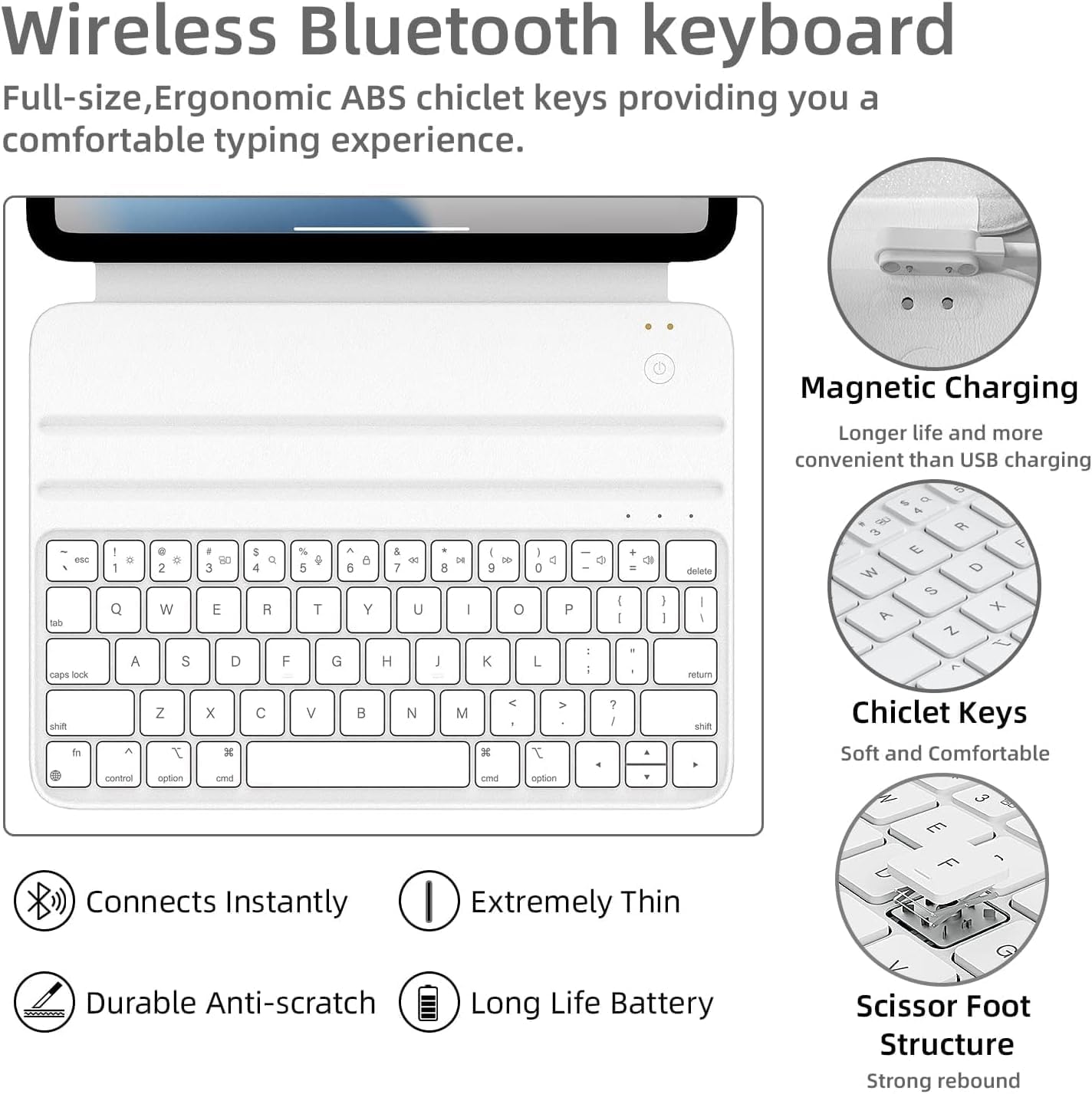
Image: A visual representation of the auto sleep/wake function, showing the iPad screen turning on when the case is opened and off when closed.

תמונה: תקריב view of the keyboard keys, highlighting features like 1.2mm key travel, skin-friendly coating, scissor switch mechanism, and silent keys.
הגדרה
1. טעינת המקלדת
The keyboard features an innovative magnetic charging solution. Connect the included USB-C cable to your iPad on one end and magnetically attach the other end to the keyboard's charging port. The keyboard will draw power directly from your iPad. A full charge provides approximately one week of battery life.

תמונה: תקורה view showing the HOU keyboard case connected to an iPad via the magnetic charging cable, illustrating the power transfer.
2. זיווג Bluetooth
- ודא שהמקלדת טעונה.
- Turn on the keyboard using the concealed power switch.
- באייפד שלך, עבור אל הגדרות > Bluetooth.
- אפשר Bluetooth.
- Look for "HOU Keyboard" or a similar name in the "Other Devices" list and tap to connect.
- Once connected, the keyboard will automatically pair with your iPad when turned on in the future.

תמונה: מפורט view of the HOU wireless Bluetooth keyboard, highlighting features like magnetic charging, chiclet keys, instant connection, extreme thinness, durable anti-scratch surface, long battery life, and scissor foot structure.
3. חיבור האייפד שלך
Align your iPad with the magnetic back of the case. The strong magnets will securely hold your iPad in place, forming a stable triangular structure when unfolded for use.
הוראות הפעלה
מתכוונן Viewזוויות
The case allows for two primary viewזוויות:
- זווית 115°: Ideal for typing and productivity tasks.
- זווית 125°: Suitable for media consumption, such as watching movies or reading.
Simply adjust the iPad's position along the magnetic grooves to achieve the desired angle.

Image: An X-ray style illustration showing the iPad magnetically attached to the keyboard case, highlighting the dual magnetic grooves that allow for stable, adjustable angles.
Keyboard Shortcuts and Functions
The keyboard provides a full set of function keys for quick access to iPad features. Press the Fn key in combination with the corresponding function key to activate features such as volume control, media playback, and screen brightness.
Video: A demonstration of the HOU Keyboard Case for iPad, showcasing its slim design, sustainable faux leather material, smooth typing experience with pinpoint accuracy, and seamless integration with the iPad, including adjustable viewזוויות.
תַחזוּקָה
- ניקוי: The silicon-containing tech leather fabric is designed to be stain-resistant. For minor spills or dirt, wipe the surface gently with a soft, damp מטלית. הימנעו מכימיקלים חזקים או חומרי ניקוי שוחקים.
- אִחסוּן: When not in use, keep the keyboard case closed to protect both the iPad and the keyboard. The auto-sleep function will help conserve battery.
- טיפול: While durable, avoid excessive force or bending of the case to maintain its structural integrity and magnetic connections.

Image: A close-up of the HOU keyboard case surface with markers, demonstrating its stain-resistant and easy-to-clean properties.
פתרון בעיות
| בְּעָיָה | סיבה אפשרית | פִּתָרוֹן |
|---|---|---|
| המקלדת לא מתחברת דרך בלוטות'. | Keyboard battery low; Bluetooth off on iPad; keyboard not in pairing mode; interference. | Charge the keyboard. Ensure iPad Bluetooth is on. Turn keyboard off and on. Forget device in iPad Bluetooth settings and re-pair. Move closer to iPad. |
| Keys are unresponsive or delayed. | סוללה חלשה; בעיית חיבור; תקלת תוכנה. | Charge the keyboard. Reconnect Bluetooth. Restart iPad. |
| האייפד לא מתעורר/נכנס למצב שינה אוטומטית. | iPad not properly aligned; feature disabled in iPad settings. | Ensure iPad is correctly seated in the case. Check iPad settings for "Lock/Unlock" or "Cover Lock/Unlock" feature and ensure it's enabled. |
| Magnetic connection feels weak. | Incorrect iPad model; debris on magnets. | Verify iPad model compatibility. Clean magnetic surfaces on both the iPad and the case. |
מפרטים
| תכונה | פְּרָט |
|---|---|
| מידות המוצר | 9.8 x 3.3 x 0.3 אינץ' |
| משקל פריט | 15.2 אונקיות (כ-434 גרם) |
| יַצרָן | HOU |
| דגמי אייפד תואמים | 10.9-inch iPad 10th Generation 2022 (A2696/A2777/A2757), 11-inch iPad 11th Generation A16 2025 |
| סוֹלְלָה | 300 mAh (1 C battery included) |
| קישוריות | בלוטות' |
| שיטת טעינה | Magnetic (via USB-C cable) |
אחריות ותמיכה
HOU products are manufactured with high-quality standards. For any issues or inquiries, please refer to your purchase platform for specific warranty details and customer support contact information. Keep your proof of purchase for warranty claims.
Ask a question about this manual
Ask about setup, troubleshooting, compatibility, parts, safety, or missing instructions. Manuals+ will review the question and use this page’s manual context to help answer it.