
מָבוֹא
This manual provides detailed instructions for the installation, operation, and maintenance of your Strong SRT 7040 Digital Satellite HD Receiver. Please read this manual carefully before using the device to ensure proper functionality and to prevent damage.

Image: The Strong SRT 7040 DTT Tuner and its retail packaging.
The Strong SRT 7040 is a Full HD digital satellite receiver designed for Free-To-Air (FTA) channels. It features a USB port for multimedia playback and software updates, and supports Dolby Audio for enhanced sound quality.
1. התקנה
1.1 פירוק
הוציאו בזהירות את כל הרכיבים מהאריזה. ודאו שהפריטים הבאים נמצאים:
- Strong SRT 7040 DTT Tuner
- שלט רחוק (עם 2 סוללות AAA)
- מתאם מתח
- מדריך למשתמש
1.2 חיבור ההתקן
Follow these steps to connect your SRT 7040 receiver:
- קלט לווין: Connect your satellite dish cable to the ישב פנימה port on the back of the receiver.
- Video Output (HDMI): חבר כבל HDMI מה- HDMI port on the receiver to an HDMI input on your television.
- Video Output (SCART): Alternatively, for older televisions, connect a SCART cable from the טלוויזיה SCART port on the receiver to the SCART input on your television.
- Audio Output (Digital): For digital audio, connect a coaxial cable from the COAXIAL S/PDIF port to your digital audio ampחיים יותר.
- Audio Output (Analog): For analog audio, connect RCA cables from the AUDIO R/L ports to your audio Hi-Fi ampחיים יותר.
- התקן USB: If desired, connect a USB storage device to the USB port for multimedia playback or software updates.
- כּוֹחַ: חבר את מתאם המתח לחשמל 12V === 1.5A input on the receiver, then plug the adapter into a wall outlet.

Image: Rear panel connections of the Strong SRT 7040 DTT Tuner, showing SAT IN, HDMI, TV SCART, COAXIAL S/PDIF, AUDIO R/L, USB, and Power input.
1.3 First-Time Installation and Channel Scan
Upon first power-on, the receiver will guide you through an initial setup wizard. Follow the on-screen prompts to select your language, country, and perform an automatic channel scan. This process will detect and store all available satellite channels.
2. הוראות הפעלה
2.1 שלט רחוק מעלview
The included remote control allows you to access all functions of the SRT 7040. Insert the two AAA batteries into the remote control, ensuring correct polarity.

Image: The remote control for the Strong SRT 7040 DTT Tuner, showing buttons for power, numbers, volume, channel, menu, and special functions.
2.2 פונקציות בסיסיות
- כּוֹחַ: הקש על כּוֹחַ button to turn the receiver on or off (standby mode).
- בחירת ערוץ: השתמש ב- CH+ / CH- buttons to change channels sequentially, or use the numeric keypad to enter a channel number directly.
- בקרת עוצמת הקול: השתמש ב- VOL+ / כרך- כפתורים כדי לכוונן את עוצמת השמע.
- לְהַשְׁתִיק: הקש על לְהַשְׁתִיק כפתור כדי להשתיק את השמע באופן זמני.
2.3 ניווט בתפריט
הקש על תַפרִיט כדי לגשת לתפריט הראשי. השתמש במקשי החצים (UP, לְמַטָה, שְׁמֹאל, יָמִינָה) to navigate through options and OK כדי לאשר את הבחירות. לחץ יְצִיאָה to return to the previous screen or live TV.
2.4 תכונות מיוחדות
- טיימרים: The receiver supports programming timers for recording or switching to specific channels at scheduled times. Access this feature via the menu.
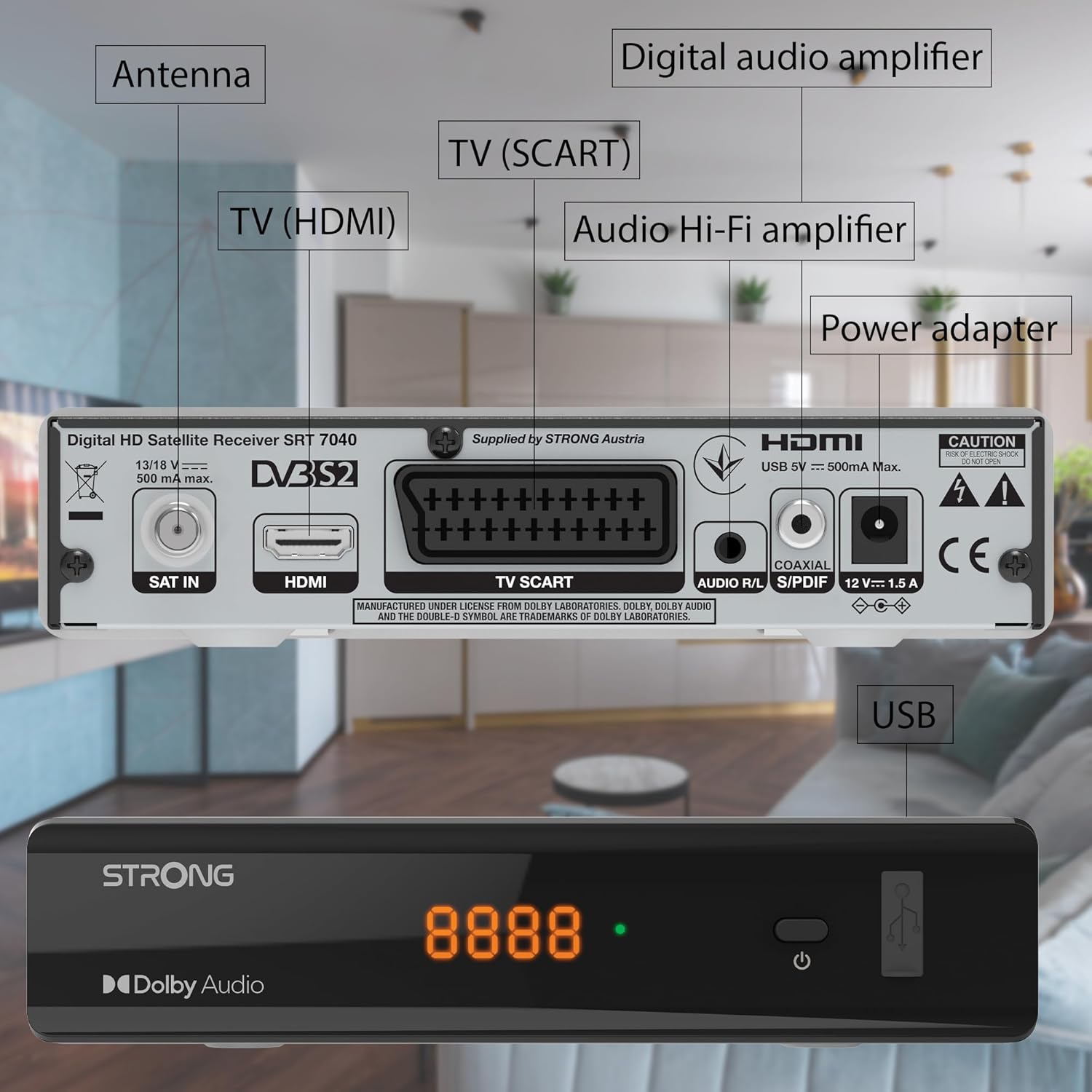
Image: The Strong SRT 7040 DTT Tuner displaying a timer icon, indicating its scheduling capabilities.
- Favorite Lists: Create customized lists of your preferred channels for quick access.
- כתוביות: Enable or disable subtitles for compatible broadcasts using the תַת כפתור בשלט.
- מדריך תוכניות אלקטרוני (EPG): הקש על EPG כפתור ל view program information for upcoming broadcasts.
- Dolby Audio: The receiver supports Dolby Audio for a high-quality sound experience.

Image: The Strong SRT 7040 DTT Tuner with the Dolby Audio logo, illustrating its sound processing capability.
3. תחזוקה
3.1 ניקוי
To clean the receiver, disconnect it from the power supply. Use a soft, dry cloth to wipe the exterior. Do not use liquid cleaners, aerosols, or abrasive materials, as these can damage the finish or internal components.
3.2 עדכוני תוכנה
בדקו מעת לעת את הוראות היצרן website for available software updates. Updates can improve performance, add new features, or resolve issues. Software updates are typically performed via the USB port following specific instructions provided with the update file.
3.3 מידע בטיחות
- Do not open the receiver casinז. אין חלקים בפנים הניתנים לתיקון על ידי המשתמש. יש לפנות לכל טיפול וטיפול באנשי מקצוע מוסמכים.
- הרחק את המקלט מאור שמש ישיר, מקורות חום ולחות.
- יש לוודא אוורור נאות סביב המכשיר כדי למנוע התחממות יתר.
- השתמש רק במתאם החשמל המצורף.
4. פתרון תקלות
If you encounter problems with your SRT 7040, consult the following table before contacting support.
| בְּעָיָה | סיבה אפשרית | פִּתָרוֹן |
|---|---|---|
| אין כוח | Power adapter not connected; Power outlet faulty | Check power adapter connection; Try a different power outlet |
| אין אות / מסך שחור | Satellite cable loose or disconnected; Incorrect input selected on TV; Satellite dish alignment issue | Check SAT IN cable connection; Ensure TV is on correct HDMI/SCART input; Perform a channel scan; Consult a professional for dish alignment if necessary |
| השלט רחוק לא עובד | סוללות התרוקנו או הוכנסו בצורה שגויה; חסימה בין השלט למקלט | Replace batteries; Ensure correct polarity; Remove any obstructions; Point remote directly at receiver |
| איכות תמונה ירודה | Weak satellite signal; Incorrect display settings | Check satellite signal strength in menu; Adjust TV display settings; Ensure Full HD content is being broadcast |
5. מפרטים
The following are the technical specifications for the Strong SRT 7040 Digital Satellite HD Receiver:
- דֶגֶם: SRT 7040 (SAT FTA Full HD)
- מותג: חָזָק
- מידות: 3.39 x 6.46 x 1.38 אינץ' (8.6 x 16.4 x 3.5 ס"מ)
- משקל פריט: 9.2 אונקיות (260 גרם)
- צֶבַע: שָׁחוֹר
- טכנולוגיית קישוריות: USB
- כרך ידtage: 100 - 240 וולט
- תֶדֶר: 50 - 60 הרץ
- צריכת חשמל: 18 kWh (operational, typical)
- טווח טמפרטורת עבודה: 0ºC עד 40ºC
- לחות יחסית: 10% - 95%
- סוללות: 2 סוללות AAA (כלולות לשלט רחוק)
- קיים מפרט: DVB-S2
- כּוֹלֵל: Wally Receiver
6. אחריות ותמיכה
For warranty information and technical support, please refer to the warranty card included in your product packaging or visit the official Strong webאתר. שמור את קבלת הרכישה כהוכחת קנייה לתביעות אחריות.
For further assistance, you may contact Strong customer service through the contact details provided on their official webאֲתַר.