
1. הקדמה
The Vrriis WL091 Wireless HDMI Transmitter and Receiver kit provides a seamless solution for streaming 1080P video and audio wirelessly. This device supports dual-mode flexible meetings, allowing for mirroring or extended display modes. It offers stable 5GHz transmission up to 330 feet (line of sight) and is compatible with various operating systems including Windows, Mac, iOS, and Android.
2. תכולת החבילה
אנא ודא שכל הפריטים נמצאים בחבילה שלך:
- 1 x משדר HDMI אלחוטי (TX)
- 1 x מקלט HDMI אלחוטי (RX)
- 2 מתאמי מתח 5V2A
- 2 כבלי חשמל מסוג C
- 1 x כבל מאריך HDMI
- 1 x מדריך למשתמש

Image: Contents of the Vrriis WL091 Wireless HDMI Transmitter and Receiver package, including the transmitter, receiver, power adapters, cables, and user manual.
3. הוראות התקנה
Follow these steps to set up your Vrriis WL091 Wireless HDMI system:
- הפעל את המשדר (TX): Connect the provided 5V2A power adapter and Type-C cable to the Transmitter. The indicator light will turn green upon successful power-on.
- Connect Transmitter to Source Device: Plug the Transmitter into the HDMI port of your laptop, PC, or other source device.
- הפעל את המקלט (RX): Connect the second 5V2A power adapter and Type-C cable to the Receiver.
- Connect Receiver to Display Device: Use an HDMI cable to connect the Receiver to your monitor, projector, or HDTV.
- התאמה אוטומטית: The Transmitter and Receiver are pre-paired from the factory. Once both are powered and connected, they will automatically establish a connection, and your screen will be mirrored or extended.
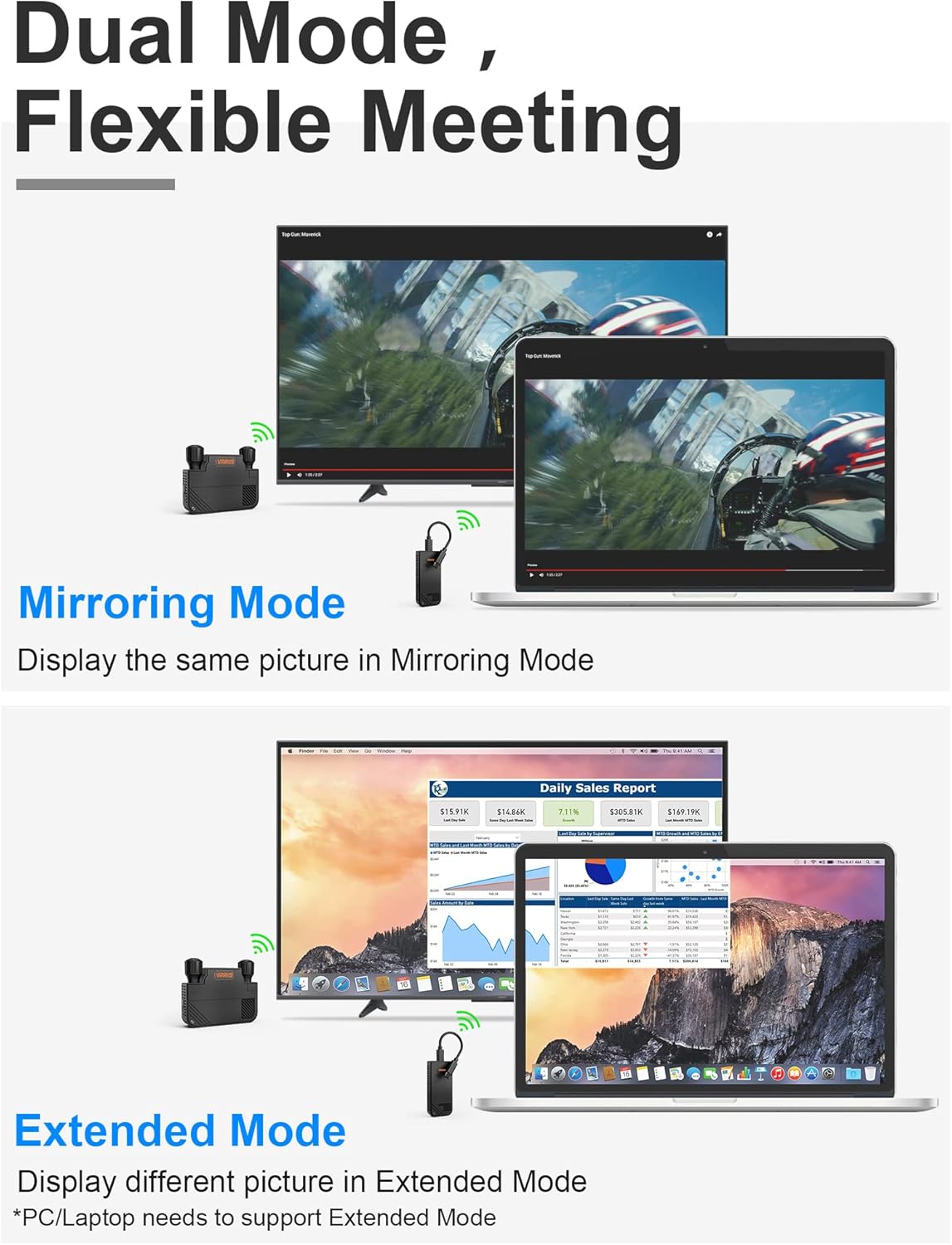
Image: The Vrriis WL091 Transmitter connected to a laptop's USB-C port, illustrating the compact design and plug-and-play functionality.
Video: A demonstration of how to connect the Vrriis WL091 Wireless HDMI Transmitter and Receiver to a laptop and display, showing the power-on sequence and automatic pairing.
4. הוראות הפעלה
4.1 Dual Mode Display (Mirroring & Extended)
The system supports two display modes:
- מצב שיקוף: The content displayed on your source device (e.g., laptop) will be duplicated on the large screen.
- מצב מורחב: The large screen will act as an extension of your source device's display, allowing you to view different content on each screen. Note: Your PC/Laptop must support Extended Mode for this functionality.

Image: Visual representation of the mirroring mode, where the same content is shown on both screens, and extended mode, where different content is displayed.
4.2 מספר משדרים למקלט אחד
The Vrriis WL091 system allows for connecting multiple transmitters to a single receiver, supporting up to 8 transmitters. This is ideal for flexible meeting environments where multiple presenters need to share their screens.
- Adding a New Transmitter: Each time a new transmitter is added to the system, it needs to be paired with the receiver.
- תהליך זיווג:
- Ensure the receiver is powered on and connected to the display.
- On the receiver, press and hold the reset button (often accessible with a thimble or pin) until the display shows "Ready to Pair".
- On the new transmitter, press and hold the pause button.
- The screen will indicate "Pairing..." and then "Pairing OK" upon successful connection.
- Switching Between Transmitters: Once multiple transmitters are paired, you can switch between them with a single button press on the active transmitter.

Image: An office meeting room setup demonstrating multiple laptops wirelessly connected to a central display, highlighting the multi-transmitter capability.
Video: A guide on how to add additional transmitters to the Vrriis WL091 system, including the pairing process and switching between multiple source devices.
4.3 מצב פרטיות
To temporarily stop casting your screen to the large display, press the pause button on the Transmitter. This will activate privacy mode, preventing your content from being shown on the shared screen. Press the button again to resume casting.
5. מפרטים
| תכונה | מִפרָט |
|---|---|
| מידות המוצר | 3.74 x 1.37 x 0.74 אינץ' |
| משקל פריט | 4.6 אונקיות |
| טכנולוגיית קישוריות | 5GHz אלחוטי |
| מקור כוח | External Power (via 5V2A Adapter and Type C Cable) |
| חוֹמֶר | פוליקרבונט (PC) |
| מרחק שידור מקסימלי | 330FT (100M) Line of Sight; 132FT for Windows PC; 60FT through wall |
| תמיכה ברזולוציה | Ultra HD 1080P@60Hz |
| חֶבִיוֹן | 0.06S |
| תְאִימוּת | Windows, Mac, iOS, Android (Phone/Tablet/Laptop to TV/Monitor/Projector with HDMI Port). Type C transmitter supports Thunderbolt 3/4, USB 3.1 GEN 1/2. |

תמונה: מפורט view of the Vrriis WL091 Transmitter and Receiver, showing product dimensions.
6. פתרון תקלות
- חום המכשיר: It is normal for the device to become slightly warm during operation. This does not affect its performance or safety.
- No Display/Connection Issues:
- Ensure both the Transmitter and Receiver are properly powered and their indicator lights are green.
- Verify all HDMI and Type-C cable connections are secure.
- Confirm your display device is set to the correct HDMI input.
- If using Extended Mode, ensure your PC/Laptop supports this feature.
- Re-attempt the pairing process if the connection is not established automatically.
7. אחריות ותמיכה
The Vrriis WL091 Wireless HDMI Transmitter and Receiver comes with a אחריות החלפה של היצרן ל-1 שנים.
For any questions, concerns, or technical assistance, please contact our customer support. You can typically find a 'Ask a Question' option on the product's purchase page, and we aim to reply within 24 hours.