
1. מידע בטיחות חשוב
Please read all instructions carefully before using the DreamSky DS2201 Digital Alarm Clock. Keep this manual for future reference.
- אין לחשוף את המכשיר למים או ללחות מוגזמת.
- הימנעו מהצבת השעון בקרבת מקורות חום או באור שמש ישיר.
- השתמש רק במתאם החשמל המצורף.
- The backup batteries are for alarm function during power outages only; the display will not light up when running on battery power alone.
- אל תנסה לפרק או לתקן את המכשיר בעצמך. פנה לאנשי שירות מוסמכים לקבלת סיוע.
2. תכולת החבילה
ודא שכל הפריטים נמצאים בחבילה:
- DreamSky Wooden Digital Alarm Clock (Model: DS2201)
- מתאם מתח (DC 5V/1A)
- מדריך למשתמש
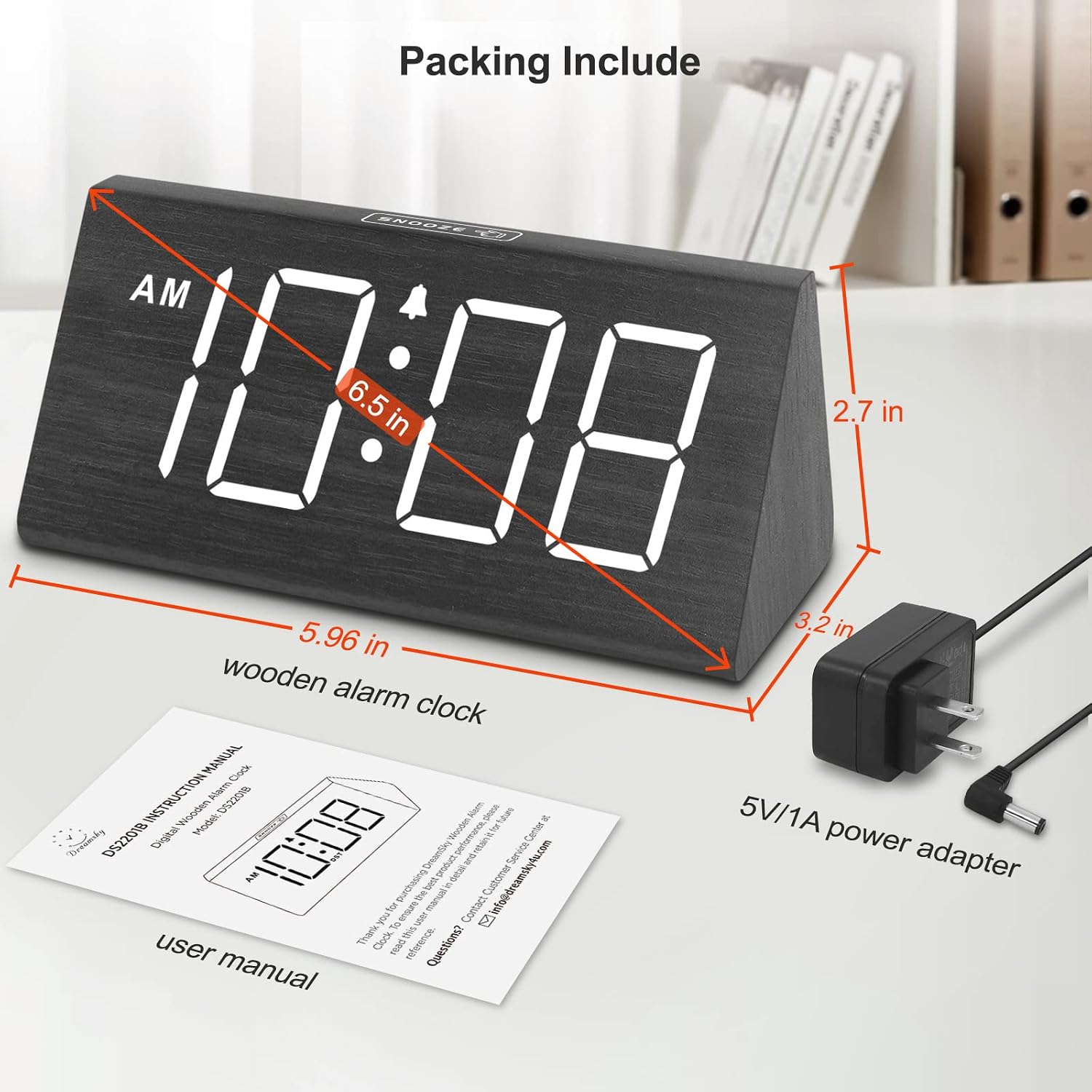
Image: The DreamSky DS2201 Wooden Digital Alarm Clock, its power adapter, and the user manual, illustrating the items included in the package and the clock's dimensions.
3. המוצר נגמרview
The DreamSky DS2201 features a clear digital display and intuitive controls for easy operation.

תמונה: חזית view of the DreamSky DS2201 Wooden Digital Alarm Clock, showcasing its large, easy-to-read digital display.
תכונות עיקריות:
- תצוגה דיגיטלית גדולה: 1.8-inch numbers for clear visibility.
- בהירות ניתנת לעמעום ב-5 רמות: Adjustable display intensity.
- נפח אזעקה מתכוונן: 5 levels, suitable for light to heavy sleepers.
- פונקצית נודניק: Provides an extra 9 minutes of sleep.
- יציאת טעינה מסוג USB: Conveniently charge smart devices.
- גיבוי סוללה: Ensures alarm function during power outages (display off).
- Manual DST Button: For easy Daylight Saving Time adjustments.
4. הוראות התקנה
4.1 חיבור מתח
- Connect the provided power adapter to the DC 5V port on the back of the alarm clock.
- Plug the power adapter into a standard electrical outlet. The clock display will light up.

Image: The rear of the DreamSky DS2201, highlighting the DC 5V power input and the USB charging port, with the power adapter connected.
4.2 התקנת סוללה (גיבוי)
The clock requires 2 AAA alkaline batteries (not included) for backup functionality. These batteries ensure the alarm will still sound during a power outagה, אך התצוגה לא תידאר.
- אתר את תא הסוללה בתחתית השעון.
- פתח את מכסה תא הסוללות.
- Insert 2 new AAA alkaline batteries, ensuring correct polarity (+ and -).
- סגור היטב את מכסה תא הסוללות.
פֶּתֶק: The clock is primarily adapter-powered. The display will not light up when operating on battery power only.
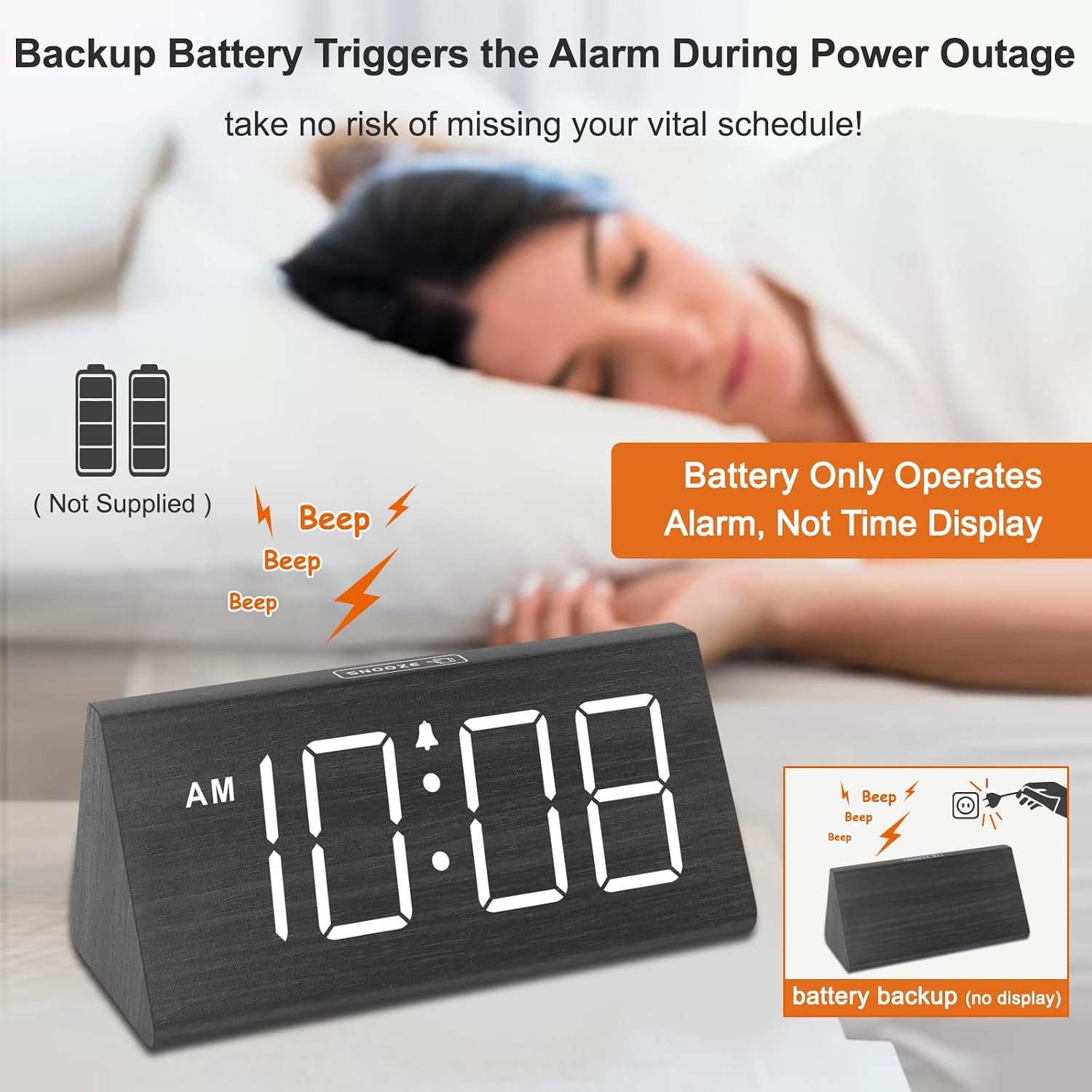
Image: A visual representation of the DreamSky DS2201's battery backup feature, indicating that batteries (not included) enable the alarm to function during a power outage, though the display remains off.
5. הוראות הפעלה
5.1 Setting Time (12/24 Hour Format)
Refer to the buttons on the back of the clock for time setting.
- Press the 'TIME SET' button to enter time setting mode. The hour digits will flash.
- השתמשו בלחצנים '+' או '-' כדי לכוון את השעה.
- Press 'TIME SET' again to move to minute setting. The minute digits will flash.
- Use the '+' or '-' buttons to adjust the minute.
- Press 'TIME SET' a third time to confirm and exit time setting mode.
- To switch between 12-hour (AM/PM) and 24-hour formats, press the '12/24H' button.

Image: The DreamSky DS2201 displaying both 12-hour (AM/PM) and 24-hour time formats, alongside a visual representation of its 5-level adjustable brightness settings.
5.2 Setting Alarm & Volume
- Press the 'ALARM SET' button to enter alarm setting mode. The alarm hour digits will flash.
- השתמשו בלחצנים '+' או '-' כדי לכוונן את שעת ההתראה.
- לחץ שוב על 'ALARM SET' כדי לעבור להגדרת דקות האזעקה. ספרות דקות האזעקה יהבהבו.
- Use the '+' or '-' buttons to adjust the alarm minute.
- Press 'ALARM SET' a third time to confirm the alarm time.
- To adjust the alarm volume (5 levels), press the 'VOLUME' button repeatedly until your desired level (V1-V5) is reached.
- To activate/deactivate the alarm, press the 'ALARM ON/OFF' button. An alarm icon will appear/disappear on the display.

Image: The DreamSky DS2201 highlighting its 5-level adjustable alarm volume, the easily accessible snooze button, and the duration of the alarm (2 minutes) and snooze (9 minutes).
5.3 פונקציית נודניק
When the alarm sounds, press the large 'SNOOZE' button located on the top of the clock. The alarm will pause for 9 minutes and then sound again.
5.4 התאמת בהירות
The display brightness can be adjusted to 5 levels or turned off completely.
- Press the 'DIMMER' button on the back of the clock repeatedly to cycle through the brightness levels (L1, L2, L3, L4, L5) and the 'OFF' option.
- Select the brightness level that is most comfortable for your environment.
5.5 שעון קיץ (DST)
To adjust for Daylight Saving Time, simply press the 'DST' button on the back of the clock. The time will advance or go back by one hour, and 'DST' will appear on the display when active.
5.6 יציאת טעינה USB
The clock features a USB charging port (5V/1A) on the back, allowing you to charge small electronic devices such as smartphones or tablets.
- Connect your device's USB charging cable to the USB port on the clock.
- Ensure the clock is powered by the AC adapter for the USB charging function to work.
Image: The DreamSky DS2201 in use, demonstrating its USB charging capability with a smartphone connected, and showing the clock is powered via its adapter.
6. תחזוקה
To ensure the longevity and proper functioning of your DreamSky DS2201 Digital Alarm Clock, follow these simple maintenance guidelines:
- ניקוי: Wipe the clock surface with a soft, dry cloth. Do not use abrasive cleaners, waxes, or solvents as they may damage the finish.
- מיקום: הנח את השעון על משטח יציב ושטוח הרחק מאור שמש ישיר, חום מוגזם או לחות.
- כּוֹחַ: Always use the original power adapter. Unplug the clock if it will not be used for an extended period.
- סוללות: Replace backup batteries annually or when they are depleted to ensure continuous alarm functionality during power outages. Remove batteries if the clock will be stored for a long time to prevent leakage.
7. פתרון תקלות
If you encounter issues with your DreamSky DS2201, please refer to the following common problems and solutions:
| בְּעָיָה | סיבה אפשרית | פִּתָרוֹן |
|---|---|---|
| Display is off / No time shown | Not connected to power adapter; Running on backup batteries only. | Ensure the power adapter is securely plugged into the clock and a working outlet. The display does not light up when running on backup batteries. |
| אזעקה לא נשמעת | Alarm is not activated; Alarm volume is too low; Incorrect alarm time set. | Press 'ALARM ON/OFF' to ensure the alarm icon is displayed. Adjust alarm volume using the 'VOLUME' button. Verify the alarm time is set correctly. |
| טעינת USB לא עובדת | Clock not connected to AC power; Device cable faulty. | Ensure the clock is powered by the AC adapter. Try a different USB cable or device to confirm the issue is not with the cable/device. |
| הזמן אינו נכון | Time not set correctly; DST setting incorrect. | Re-set the time using the 'TIME SET' button. Check the 'DST' setting and adjust if necessary. |
8. מפרטים
| תכונה | פְּרָט |
|---|---|
| מותג | DreamSky |
| מספר דגם | DS2201 |
| צֶבַע | שָׁחוֹר |
| סוג תצוגה | LED דיגיטלי |
| חוֹמֶר | עֵץ |
| מידות המוצר | 5.96 אינץ' רוחב x 2.7 אינץ' גובה x 3.2 אינץ' עומק |
| משקל פריט | 10.9 אונקיות (0.68 פאונד) |
| מקור כוח | Corded Electric (Adapter Included) |
| סוללות גיבוי | 2 סוללות AAA (לא כלולות) |
| יציאת טעינת USB | 5V/1A |
| עוצמת קול אזעקה | 5 רמות מתכווננות |
| בהירות תצוגה | 5 adjustable levels + OFF |
9. אחריות ותמיכה
שעון מעורר דיגיטלי מעץ DreamSky DS2201 מגיע עם א אחריות החלפה לשנה מתאריך הרכישה.
If you experience any issues with your product or require technical assistance, please contact DreamSky customer support through the retailer's platform or the official DreamSky website. Please have your model number (DS2201) and purchase details ready when contacting support.
למידע נוסף, בקר באתר DreamSky Store on Amazon.