
LEVOIT LTF-F422-WUS
מדריך למשתמש של מאוורר מגדל קלאסי 42 אינץ' של LEVOIT
This manual provides essential information for the safe and efficient operation, maintenance, and troubleshooting of your LEVOIT Classic 42-inch Tower Fan.
הוראות בטיחות חשובות
To reduce the risk of fire, electric shock, or injury, please read and follow all instructions and warnings before using this appliance.
- Always place the fan on a stable, level surface.
- אין להפעיל את המאוורר עם כבל או תקע פגומים.
- הרחיקו את המאוורר ממים או דגים.amp אזורים.
- אין להכניס אצבעות או חפצים זרים לפתחים כלשהם.
- נתקו את המאוורר מהחשמל לפני ניקוי או ביצוע כל תחזוקה.
- מוצר זה מכיל כימיקלים הידועים למדינת קליפורניה כגורמים לסרטן ולפגמים מולדים או נזקי רבייה אחרים.
המוצר נגמרview
The LEVOIT Classic 42-inch Tower Fan (Model: LTF-F422-WUS) is designed to provide powerful and quiet air circulation for your home. It features a DC motor for energy efficiency and a user-friendly design.

תמונה: חזית view of the LEVOIT Classic 42-inch Tower Fan in white, showing its sleek design, digital display, and the included remote control. Blue arrows indicate airflow and oscillation.
תכונות עיקריות:
- זרימת אוויר חזקה: Experience 1252 CFM airflow with speeds up to 25ft/s.
- פעולה שקטה: Operates as low as 25dB, ideal for bedrooms and quiet environments.
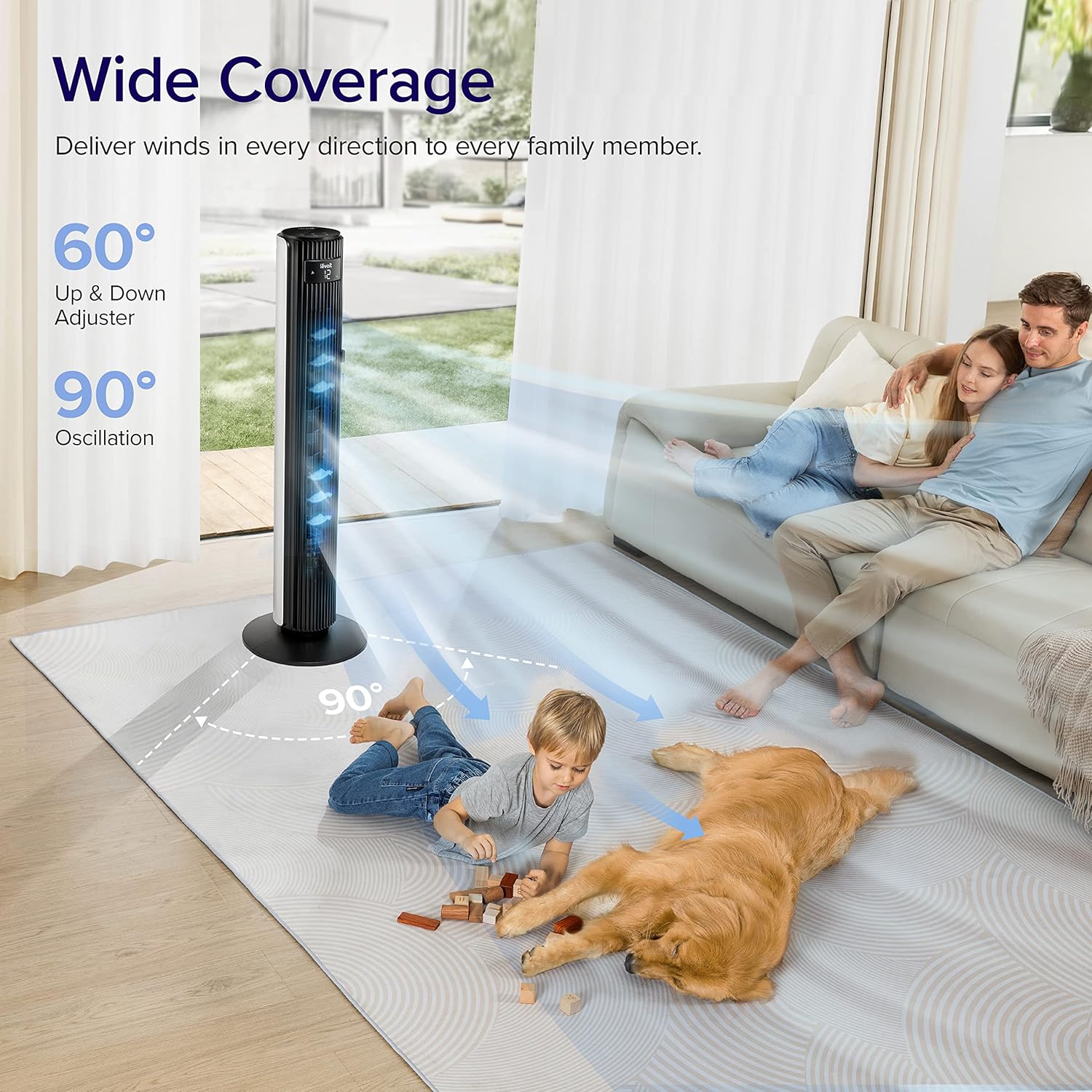
- תנודה רחבה: Features 90° horizontal and 60° vertical oscillation for comprehensive air distribution.
- נוחות להתאמה אישית: Offers 12 speed settings and 4 modes (Normal, Auto, Turbo, Advanced Sleep).
- Temperature-Responsive: Built-in sensor adjusts fan speed based on room temperature in Auto mode.
- תחזוקה קלה: Detachable back cover and filter for thorough cleaning.
- עיצוב ידידותי למשתמש: Includes a hidden handle and built-in remote storage.
מדריך התקנה
1. Unboxing ו-Component Check
Carefully open the box from the indicated side and remove all components. Ensure all parts are present before proceeding with assembly.
Video: This video demonstrates the unboxing process, base assembly, remote control storage, and fan blade removal for cleaning.
2. מכלול בסיס
The fan base comes in two halves. Align the two pieces and attach them together securely. Unscrew the nut from the bottom of the tower fan, then attach the assembled base to the fan and fasten the nut to secure it.

Image: Diagram illustrating the assembly of the fan base, showing how the two halves connect and attach to the main fan unit.
3. הגדרת שלט רחוק
The remote control comes with an insulating tab to preserve battery life. Pull out this tab before first use. The remote can be stored neatly in a dedicated slot on the back of the fan.
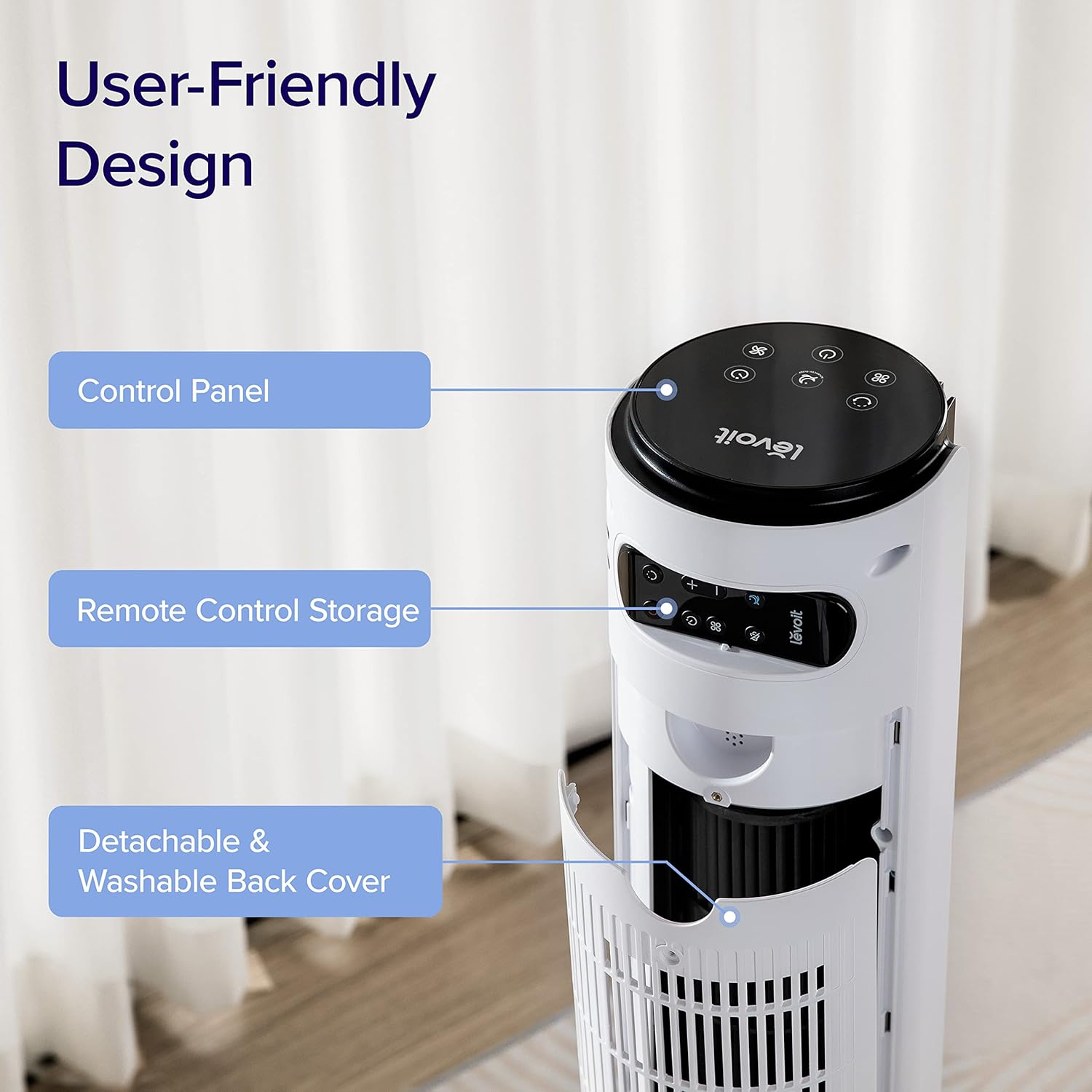
תמונה: תקריב view of the top rear of the LEVOIT Tower Fan, highlighting the integrated storage compartment for the remote control.
Operating Your Tower Fan
Your LEVOIT tower fan offers various settings for personalized comfort.
1. לוח בקרה ותצוגה
The fan features a touch-sensitive control panel on top and an LED display on the front. The display shows current settings such as speed, mode, and timer.
תמונה: מלמעלה למטה view of the LEVOIT Tower Fan's control panel with various touch buttons for power, mode, speed, oscillation, and timer. The front LED display shows the current fan speed.
2. דרכי פעולה
- מצב רגיל: Default mode allowing manual speed adjustment.
- מצב אוטומטי: Fan speed adjusts automatically based on room temperature detected by the built-in sensor.
- מצב טורבו: Provides quick cooling and air circulation, starting at the highest speed with oscillation. Speed decreases as room temperature drops.
- מצב שינה מתקדם: Display and sound automatically turn off after 5 seconds. Fan does not oscillate for the first hour, then oscillates and decreases speeds to maintain comfort. Speed then changes by temperature.
3. Speed and Oscillation
- הגדרות 12 מהירויות: Choose from gentle breezes (1-3) to storm-strength winds (10-12).
- תנודה אופקית של 90°: Distributes air across a wide area.
- תנודה אנכית של 60°: Adjusts airflow up to 30° up or down for targeted cooling.

Image: A family and a dog enjoying the wide coverage of the LEVOIT Tower Fan's 90-degree horizontal and 60-degree vertical oscillation, illustrating effective air distribution.
4. פונקציית טיימר
הגדר את המאוורר לכיבוי אוטומטי לאחר פרק זמן מוגדר, עד 12 שעות, לחיסכון באנרגיה ולנוחות.
תחזוקה וניקיון
ניקוי קבוע מבטיח ביצועים אופטימליים ואורך חיים של המאוורר שלכם.
1. Detachable Back Cover and Filter
Unlike traditional tower fans, the LEVOIT Classic features a detachable back cover and filter for easy and thorough cleaning. This allows access to the wind wheel for maintenance.

Image: Illustration of the LEVOIT Tower Fan's detachable back cover and internal fan blade, submerged in water to demonstrate its washable components for hassle-free cleaning.
2. הוראות ניקוי
- נתק את המאוורר לפני הניקוי.
- Use a soft cloth or brush to clean the exterior surfaces.
- To clean the internal wind wheel, remove the screw under the remote storage slot, then remove the back cover. Locate and remove the screw at the bottom of the fan blade, then carefully pull out the fan blade. Clean with a soft cloth or water.
- ודא שכל החלקים יבשים לחלוטין לפני ההרכבה מחדש.
מדריך פתרון בעיות
| בְּעָיָה | פִּתָרוֹן |
|---|---|
| Fan suddenly starts to oscillate. | This is normal in Advanced Sleep Mode. It automatically starts oscillating after one hour of operation. |
| Air output decreased after cleaning the wind wheel. | Ensure screws are aligned with the flat surface of the motor shaft during installation, not the arc surface. Incorrect alignment will reduce air output. |
| Fan suddenly stops. | Check if the timer was accidentally set. Kindly check and try again. |
| Top control panel is not responsive. | Check if the fan is in Advanced Sleep Mode or if the screen is manually turned off. In screen-off state, the operation panel enters a semi-sleep state to prevent accidental touch. Press twice to wake up the panel and then adjust settings. |
מפרט מוצר
- מותג: LEVOIT
- שם הדגם: Classic 42-inch
- מספר דגם: LTF-F422-WUS
- צֶבַע: לָבָן
- מידות המוצר: 6.3" D x 6.7" W x 42.4" H
- משקל פריט: 11 פאונד
- מקור כוח: DC
- מהtage: 26 וואט
- רמת רעש: 25 dB
- קיבולת זרימת אוויר: 1252 רגל מעוקב לדקה (CFM)
- מספר רמות הספק: 12
- תְנוּדָה: 90° אופקי, 60° אנכי
- שָׁעוֹן עֶצֶר: 12 שעות
- שיטת בקרה: מרחוק, מגע
- רכיבים כלולים: מְרוּחָק
- חוֹמֶר: פּלָסטִי
- הסמכות: CA65, FCC, TSCA
אחריות ותמיכה
LEVOIT products come with a limited warranty. For detailed warranty information and customer support, please refer to the official LEVOIT webלאתר או לפנות לשירות הלקוחות שלהם.
תמיכת לקוחות של LEVOIT:
- Visit the official LEVOIT Store: חנות LEVOIT באמזון
- For further assistance, refer to the contact information provided in your product packaging or on the LEVOIT webאֲתַר.
Ask a question about this manual
Ask about setup, troubleshooting, compatibility, parts, safety, or missing instructions. Manuals+ will review the question and use this page’s manual context to help answer it.