
1. הקדמה
This manual provides detailed instructions for the installation, operation, and maintenance of your Generic Dash Cam, specifically designed as an accessory for the BYD Atto 3 EV. Please read this manual thoroughly before installation and use to ensure proper function and longevity of the product.
2. המוצר נגמרview
The Generic Dash Cam is a compact, high-definition camera accessory intended to integrate seamlessly with your BYD Atto 3 EV's existing system. This package includes the camera unit only, designed for vehicles that already have the necessary wiring installed.

תמונה 2.1: מלפנים ומאחור view of the dash cam unit. The front features the camera lens, while the back shows the blue connector port.
תכונות עיקריות:
- Designed for BYD Atto 3 EV compatibility.
- Plug-and-play installation (camera only variant).
- רזולוציית לכידת וידאו 1080p.
- 120-degree wide-angle lens.
3. התקנה והתקנה
Before beginning installation, ensure your vehicle is turned off and the ignition is disengaged. This dash cam is designed for a plug-and-play setup, assuming your BYD Atto 3 EV has the factory-installed wiring for a dash cam.
- Identify the Dash Cam Port: The BYD Atto 3 EV features blue and white ports on its main unit. The white port is typically for the car monitor (interior), while the blue port is designated for the dash cam. Locate the blue connector port in your vehicle. If you find a cable already plugged into the blue connector, your car has a factory-installed cable, and this camera-only unit is suitable for direct connection.
- אתר את אזור ההתקנה: The dash cam is typically installed near the rearview mirror or within the overhead console area. Carefully remove any trim panels as needed to access the camera mounting point and wiring.
- Connect the Dash Cam: Align the blue connector on the dash cam with the corresponding blue port in your vehicle's wiring harness. Gently push until it clicks into place, ensuring a secure connection.
- אבטח את המצלמה: Mount the dash cam securely in its designated slot. Ensure the lens has a clear, unobstructed view של הדרך קדימה.
- Reassemble Trim (if applicable): Carefully reattach any trim panels removed during the installation process.
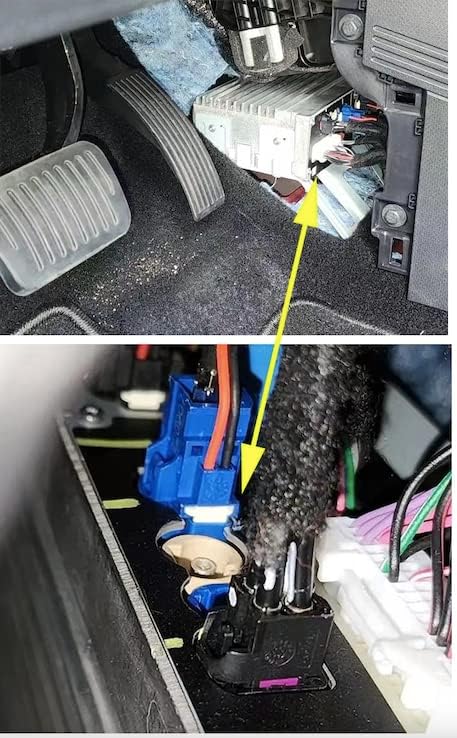
תמונה 3.1: Illustration of the blue connector port on the vehicle's main unit, indicated by a yellow circle and arrow. This is where the dash cam connects.

תמונה 3.2: The dash cam unit installed in the overhead console area, highlighted by a yellow dotted circle.
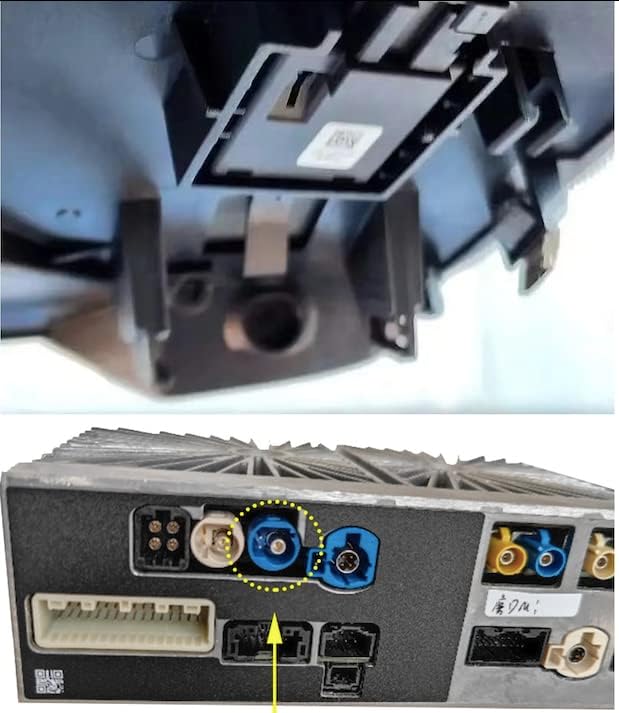
תמונה 3.3: תקריב view of the connection point for the dash cam, showing the blue connector.

תמונה 3.4: The dash cam unit securely mounted in its housing, with the lens visible.
4. הוראות הפעלה
Once properly installed, the Generic Dash Cam is designed to operate automatically in conjunction with your BYD Atto 3 EV's system. It typically begins recording when the vehicle is powered on and stops when the vehicle is turned off.
- הקלטה אוטומטית: The dash cam will automatically start recording video when the vehicle's ignition is turned on.
- אחסון וידאו: פו מוקלטtage is typically stored on the vehicle's integrated storage system or a compatible memory card (if applicable and supported by the vehicle's system). Refer to your BYD Atto 3 EV's infotainment manual for details on accessing and managing dash cam footage.
- Viewינג פוtage: פוtage can usually be viewed directly through the vehicle's infotainment screen.
5. תחזוקה
כדי להבטיח ביצועים אופטימליים ואורך חיים של מצלמת הרכב שלכם, יש לפעול לפי הנחיות התחזוקה הבאות:
- ניקוי העדשה: Periodically clean the camera lens with a soft, dry, lint-free cloth. Avoid abrasive materials or harsh chemicals that could scratch the lens.
- תנאים סביבתיים: Avoid exposing the dash cam to extreme temperatures or direct sunlight for prolonged periods when the vehicle is parked, as this can affect performance and lifespan.
- עדכוני קושחה: Check with your BYD service center or the dash cam manufacturer for any available firmware updates that may improve performance or add features.
6. פתרון תקלות
אם נתקלתם בבעיות עם מצלמת הרכב שלכם, עיינו בבעיות הנפוצות ובפתרונות הבאות:
| בְּעָיָה | סיבה אפשרית | פִּתָרוֹן |
|---|---|---|
| Dash cam not recording or not detected. | Loose connection, incorrect port, vehicle system issue. | Ensure the blue connector is securely plugged into the correct blue port. Check your vehicle's infotainment system settings for dash cam detection. |
| איכות וידאו ירודה. | Dirty lens, environmental factors (fog, glare). | Clean the camera lens. Ensure the windshield area in front of the camera is clear. |
| Intermittent recording. | Power supply issue, vehicle system conflict. | Verify the connection is stable. Consult your BYD service center if the issue persists, as it may relate to the vehicle's power management for accessories. |
7. מפרטים
Below are the technical specifications for the Generic Dash Cam (Model B0BYDBKB7F):
- מותג: כְּלָלִי
- מספר דגם: B0BYDBKB7F
- UPC: 767951222621
- מידות המוצר: אורך 1.2 אינץ', רוחב 1.57 אינץ', גובה 1.1 אינץ'
- משקל פריט: 300 גרם
- מכשירים תואמים: Monitor (BYD Atto 3 EV integrated system)
- טכנולוגיית חיישן אופטי: CMOS
- סוג עדשה: זווית רחבה, קבוע
- זווית אמיתית של View: 120 מעלות
- סוג מחבר: RCA (integrated into vehicle system)
- רזולוציית לכידת וידאו: 1080p
- יַצרָן: BYD (as per product data)
- רכיבים כלולים: יחידת מצלמה
For internal reference, the part number may include 15339418SJR10301671.
8. אחריות ותמיכה
This Generic Dash Cam comes with a אחריות לשנה מתאריך הרכישה. אחריות זו מכסה פגמי ייצור ותקלות בשימוש רגיל.
For warranty claims, technical support, or any questions not covered in this manual, please contact the seller or your authorized service provider. Please have your purchase receipt and product model number (B0BYDBKB7F) available when contacting support.