
1. הקדמה
Thank you for choosing the LFF DAB/FM Digital Radio YT81107. This manual provides essential information for the safe and efficient use of your new radio. Please read these instructions carefully before operating the device and retain them for future reference.
מידע בטיחות
- אין לחשוף את המכשיר לגשם או לחות כדי למנוע שריפה או התחשמלות.
- אל תפתח את ה-casinז. הפנה את כל הטיפולים לצוות מוסמך.
- השתמשו רק במתאם החשמל או בסוללות שצוינו.
- הימנעו מטמפרטורות קיצוניות, אור שמש ישיר וסביבות מאובקות.
2. המוצר נגמרview
The LFF DAB/FM Digital Radio YT81107 offers versatile listening options with DAB+ and FM radio, Bluetooth connectivity, and convenient features like a dual alarm and sleep timer. Its compact design and dual power options make it suitable for various environments.
תכונות מפתח
- DAB+ and FM Digital Radio Tuner
- Bluetooth Connectivity for Audio Streaming
- תצוגת LCD בצבע מלא
- 60 Preset Stations (30 DAB+, 30 FM)
- Dual Alarm Clock Function
- טיימר שינה מתכוונן
- שקע אוזניות 3.5 מ"מ
- AC Power Adapter or Battery Operated (4x AA batteries, not included)

איור 2.1: חזית view of the LFF DAB/FM Digital Radio highlighting its main features.
בקרות ורכיבים
Familiarize yourself with the buttons and ports on your radio:

איור 2.2: חזית וחלק עליון view of the radio with labeled controls.
- לחצן הפעלה / מצב: Turns the radio on/off and switches between modes (DAB, FM, Bluetooth).
- כפתור תפריט/מידע: גישה להגדרות תפריט או הצגת מידע על תחנה.
- כפתור אזעקה: מגדיר ומנהל אזעקות.
- כפתורים מוגדרים מראש (1-5): Quickly access saved favorite stations.
- Volume Knob/Select: Rotates to adjust volume or navigate menus; press to confirm selection.
- Tuning/Scroll Buttons: ניווט בין תחנות או אפשרויות תפריט.
- לְהַצִיג: Full-color LCD screen.
- רַמקוֹל: פלט שמע משולב.
- אַנטֶנָה: אנטנה טלסקופית נפתחת לקליטת רדיו.
- נמל DC IN: לחיבור מתאם מתח AC.
- שקע אוזניות: פלט 3.5 מ"מ להאזנה פרטית.
- תא סוללות: Located on the back for 4x AA batteries.
3. התקנה
הפעלת הרדיו
Your radio can be powered by the included AC adapter or by batteries for portable use.
- מתח AC: Connect the supplied AC adapter to the DC IN port on the back of the radio and plug it into a standard wall outlet.
- כוח סוללה: Open the battery compartment on the back and insert 4x 1.5V AA (LR6) batteries (not included), ensuring correct polarity. Close the compartment securely.

Figure 3.1: Power options and physical dimensions of the radio.
התאמת אנטנה
לקבלת קליטת רדיו אופטימלית, פרשו את האנטנה הטלסקופית במלואה. כוונו את מיקומה לקבלת איכות האות הטובה ביותר.
4. הוראות הפעלה
הפעלה/כיבוי ובחירת מצב
- הקש על עוצמה/מצב כפתור כדי להפעיל או לכבות את הרדיו.
- While on, press the עוצמה/מצב button repeatedly to cycle through available modes: DAB, FM, and Bluetooth.
פעולת רדיו DAB/FM
Ensure the antenna is fully extended for best reception.

Figure 4.1: Radio reception ranges and preset capacity.
- סריקה אוטומטית: במצב DAB או FM, לחץ והחזק את הלחצן תפריט/מידע button to initiate an automatic scan for available stations. The radio will store them automatically.
- כוונון ידני: השתמש ב- Tuning/Scroll כפתורים כדי לכוונן את התדר באופן ידני.
- בחירת תחנות: סובב את ה Volume Knob/Select to browse through available stations. Press the knob to select a station.
- שמירת הגדרות קבועות מראש: To save a station, tune to the desired station, then press and hold one of the כפתורים מוגדרים מראש (1-5) until the display confirms it's saved. You can save up to 30 DAB+ and 30 FM stations.
- זוכר קביעות מוגדרות מראש: לחץ לחיצה קצרה על אחד מהלחצנים כפתורים מוגדרים מראש (1-5) to recall a saved station.
מצב Bluetooth
חברו את הסמארטפון, הטאבלט או מכשיר אחר התומך ב-Bluetooth כדי להזרים אודיו באופן אלחוטי.
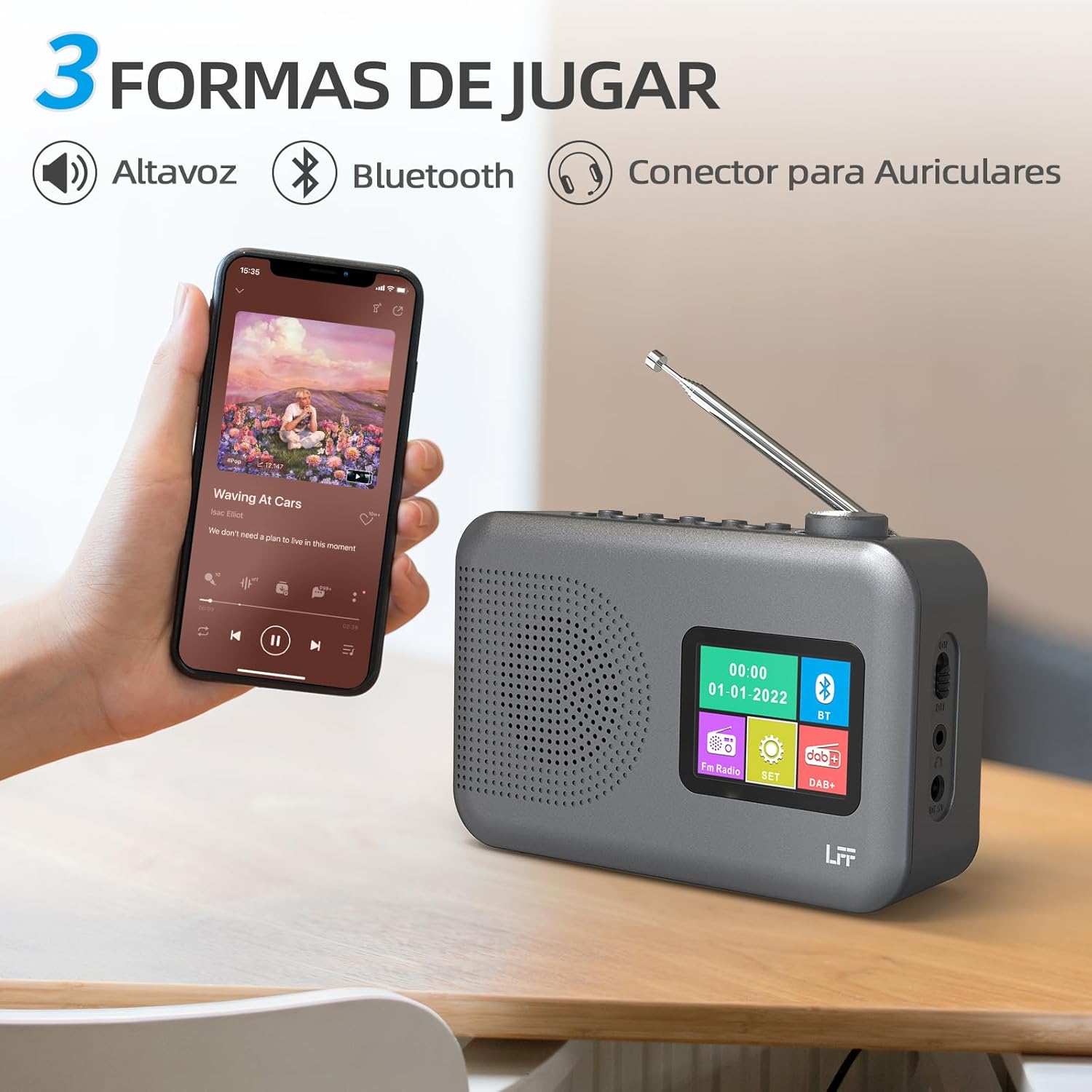
Figure 4.2: Bluetooth connectivity and audio playback options.
- העבר את הרדיו למצב בלוטות' באמצעות עוצמה/מצב button. The display will show "Bluetooth Pairing" or similar.
- On your device, enable Bluetooth and search for "LFF YT81107" (or similar).
- Select the radio to pair. Once connected, you can play audio from your device through the radio's speaker.
- Adjust volume using the radio's כפתור עוצמת הקול or your connected device.
פונקציית שעון מעורר
הגדר עד שתי אזעקות עצמאיות.
- הקש על אַזעָקָה button to enter alarm settings.
- השתמש ב- Tuning/Scroll כפתורים ו Volume Knob/Select to set the alarm time, source (DAB, FM, or buzzer), and frequency (daily, weekdays, weekends, once).
- הקש על אַזעָקָה לחץ שוב על הכפתור כדי לאשר ולהפעיל את האזעקה.
- When an alarm sounds, press any button (except Power) to snooze, or press the עוצמה/מצב כפתור כדי לכבות אותו.
טיימר שינה
טיימר השינה מאפשר לרדיו לכבות באופן אוטומטי לאחר פרק זמן מוגדר.

Figure 4.3: Sleep timer function in use.
- הקש על תפריט/מידע לחצן כדי לגשת לתפריט הראשי.
- Navigate to the "Sleep Timer" option using the Tuning/Scroll לחצני ולחץ על Volume Knob/Select.
- Select your desired duration (15, 30, 45, 60, 90, or 120 minutes) and confirm. The radio will automatically turn off after the selected time.
שימוש באוזניות
For private listening, connect standard 3.5mm headphones to the headphone jack on the side of the radio. The internal speaker will be muted automatically.
Note: This radio does not support Bluetooth headphones. The 3.5mm headphone jack is for wired headphones only.
5. תחזוקה
- ניקוי: נגבו את הרדיו במטלית רכה ויבשה. אין להשתמש בחומרי ניקוי שוחקים או ממסים.
- החלפת סוללה: If using batteries, replace all four AA batteries when the low battery indicator appears on the display or when performance degrades. Ensure proper disposal of old batteries.
- אִחסוּן: אם מאחסנים את הרדיו לתקופה ממושכת, הוציאו את הסוללות כדי למנוע דליפה.
6. פתרון תקלות
| בְּעָיָה | סיבה אפשרית | פִּתָרוֹן |
|---|---|---|
| אין כוח | מתאם ה-AC אינו מחובר או פגום; הסוללות התרוקנו או הוכנסו בצורה שגויה. | Check AC adapter connection and power outlet. Replace batteries or ensure correct polarity. |
| קליטת רדיו גרועה | אנטנה לא מורחבת; אזור אות חלש; הפרעות. | פרש וכוונן את האנטנה הטלסקופית במלואה. נסה להזיז את הרדיו למיקום אחר. |
| בלוטות' לא מתחבר | Radio not in Bluetooth mode; device not in pairing mode; radio already connected to another device. | Ensure radio is in Bluetooth mode. Put your device in pairing mode. Disconnect from other Bluetooth devices. |
| אזעקה לא נשמעת | Alarm not activated; volume too low; incorrect alarm settings. | Check alarm settings and ensure it is enabled. Increase volume. Verify alarm time and source. |
7. מפרטים
| תכונה | פְּרָט |
|---|---|
| מספר דגם | YT81107 |
| מותג | סיומת LFF |
| טכנולוגיית כוונון | DAB+, FM |
| להקות רדיו נתמכות | DAB+ (174.928 - 239.2 MHz), FM (87.5 - 108 MHz) |
| קישוריות | Bluetooth, 3.5mm Headphone Jack |
| מקור כוח | AC Adapter (included), 4x 1.5V AA (LR6) Batteries (not included) |
| מידות (L x W x H) | 16.1 ס"מ x 5.9 ס"מ x 10.9 ס"מ |
| צֶבַע | אָפוֹר |
| תכונות מיוחדות | DAB Radio, DAB Plus Radio, DAB+ Radio, FM Radio, Color Display, Bluetooth, Dual Alarm, Sleep Timer |
| מכשירים תואמים | אוזניות, נגן MP3, סמארטפון, מחשב נייד, רמקול, טאבלט |
8. אחריות ותמיכה
LFF is committed to providing high-quality products. If you encounter any quality issues with your LFF DAB/FM Digital Radio YT81107, please contact us directly. Our customer support team is available to assist you and resolve any problems you may experience.
אנא עיין במסמכי הרכישה שלך לקבלת תנאי אחריות ספציפיים ופרטי יצירת קשר.