
Café CTD90DP4NW2
מדריך למשתמש לתנור אפייה כפול מובנה חכם עם חימום וקיר 30 אינץ' מסדרת המקצועית Café™ Professional
Model: CTD90DP4NW2
מָבוֹא
This manual provides essential information for the safe and efficient operation, installation, and maintenance of your Café™ Professional Series 30" Smart Built-In Convection Double Wall Oven. Please read this manual thoroughly before using the appliance and retain it for future reference.

איור 1: חזית view of the Café Professional Series 30" Smart Built-In Convection Double Wall Oven.
מידע בטיחות
Always adhere to local codes and ordinances. Ensure proper grounding and ventilation. Disconnect power before servicing. Refer to the installation instructions for detailed electrical requirements.
- אין לאחסן חומרים דליקים בתנור או בקרבתו.
- השתמשו בכפפות תנור בעת טיפול בפריטים חמים.
- השגיח על ילדים ליד המכשיר.
- Do not use water on grease fires; smother the fire or use a dry chemical/foam extinguisher.
התקנה והתקנה
This oven is designed for built-in installation. Ensure your cabinet cutout meets the specified dimensions for a proper fit. The oven is electric and requires appropriate electrical supply as per local codes.
בדיקות טרום התקנה
- Verify electrical supply matches oven requirements.
- Ensure cabinet opening dimensions are accurate.
- Confirm all packing materials are removed from the oven cavity.
SmartHQ App Connection
To utilize smart features, download the SmartHQ App on your smartphone. Follow the in-app instructions to connect your oven to your home Wi-Fi network. This enables remote control, software updates, and access to personalized features.

Figure 2: Oven installed in a kitchen cabinet, demonstrating its built-in design.
הוראות הפעלה
Your Café™ Double Wall Oven offers advanced cooking technologies for versatile meal preparation.
לוח בקרה ותצוגה
The oven features a full-color display for easy navigation of settings and cooking modes. Use the touch interface to select desired functions.

Figure 3: Oven control panel display showing menu options.
מצבי בישול
- הסעה אירופאית אמיתית עם אוויר ישיר: Utilizes a third heating element and a reversing fan for even heat distribution and superior cooking results.
- ללא חימום אוויר פריי: Cook crispy foods without preheating, a basket, or a special tray.
- מצבי בישול מדויקים: Automatically track progress and adjust time/temperature for optimal results.
- Food Dehydrator: A dedicated setting for dehydrating fruits, vegetables, and making jerky.
- In-Oven Broiling: A flexible broiling element covers the full width of the drawer for even broiling.
שימוש בבדיקת הטמפרטורה
Insert the precision temperature probe into the thickest part of the food. Connect the probe to the designated port inside the oven. The oven will monitor the internal temperature and alert you when the desired doneness is reached.
מצלמה בתוך התנור
Monitor your food's progress from your smartphone using the built-in in-oven camera. Access the live stream via the SmartHQ App without opening the oven door.
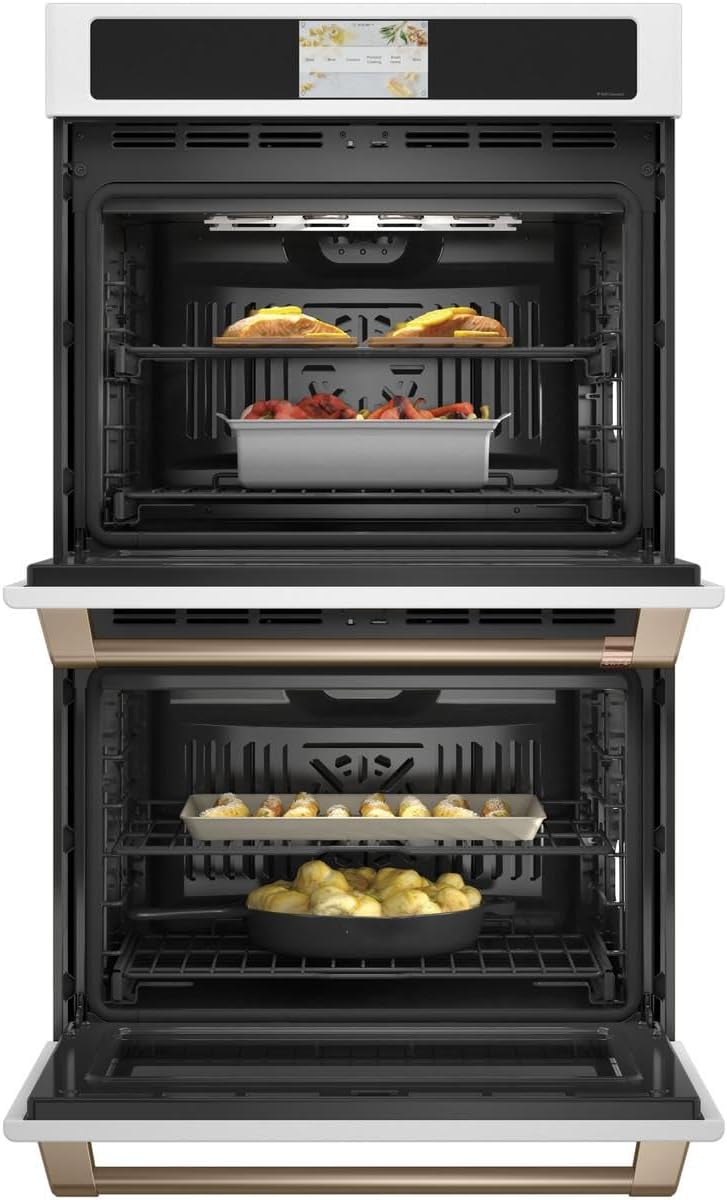
Figure 4: Oven interior with food, demonstrating cooking space.
תחזוקה וניקיון
ניקוי ותחזוקה קבועים יבטיחו את אורך החיים וביצועים אופטימליים של התנור שלכם.
מחזור ניקוי עצמי
The oven features a self-clean cycle that uses high temperatures to burn off food soils. Ensure all racks are removed unless they are specifically designed to remain during self-clean. The easy-glide, never-scrub racks can be left in during this cycle.

Figure 5: Empty oven interior, showing racks ready for cleaning or use.
אפשרות ניקוי בקיטור
For light soils, the steam clean option provides a quick and low-odor cleaning method. Follow the instructions on the display for initiating a steam clean cycle.
ניקוי חיצוני
Clean the exterior surfaces with a soft cloth and mild soap. Avoid abrasive cleaners that can damage the finish. For Matte White finish, use non-abrasive cleaners specifically designed for matte surfaces.
פתרון בעיות
לפני פנייה לשירות,view הבעיות והפתרונות הנפוצים הבאים.
| בְּעָיָה | סיבה אפשרית | פִּתָרוֹן |
|---|---|---|
| תנור לא מחמם | אין אספקת חשמל; מפסק החשמל מופעל. | בדוק את חיבור כבל החשמל; אפס את מפסק החשמל. |
| בישול לא אחיד | Improper rack position; overloaded oven; dirty convection fan. | Refer to cooking guide for rack positions; avoid overcrowding; clean oven interior. |
| התצוגה לא מגיבה | Temporary software glitch; power interruption. | Turn off power at the circuit breaker for 5 minutes, then restore. |
| בעיות קישוריות Wi-Fi | סיסמת Wi-Fi שגויה; נתב רחוק מדי; הפרעות רשת. | Verify password; move router closer or use extender; check for other devices on network. |
מפרטים
Key specifications for the Café™ Professional Series 30" Smart Built-In Convection Double Wall Oven.
| תכונה | פְּרָט |
|---|---|
| מותג | Café™ |
| מספר דגם | CTD90DP4NW2 |
| יְכוֹלֶת | 10 רגל מעוקב (סה"כ) |
| סוג התקנה | Built-In, Wall Mount |
| סוג דלק | חַשׁמַלִי |
| מצב בישול בתנור | הולכת חום |
| צֶבַע | לבן מט |
| משקל פריט | 260 פאונד |
| תכונות מיוחדות | Double Wall, Wi-Fi, In-Oven Camera, No Preheat Air Fry, Precision Cooking Modes, Food Dehydrator, Self-Clean, Steam Clean, Temperature Probe, Soft-Close Door |
אחריות ותמיכה
For warranty information, please refer to the warranty card included with your appliance or visit the official Café Appliances website. For technical support or service, contact Café customer service.
אין סרטוני מוצר רשמיים זמינים עבור דגם זה כרגע.
Ask a question about this manual
Ask about setup, troubleshooting, compatibility, parts, safety, or missing instructions. Manuals+ will review the question and use this page’s manual context to help answer it.