
1. הקדמה
תודה על הרכישהasing the LFF LDR113-EU Kitchen Radio. This manual provides essential information for the safe and efficient operation of your device. Please read it thoroughly before use and retain it for future reference.
The LFF LDR113-EU is a versatile kitchen radio featuring DAB+, FM, and Bluetooth connectivity. It includes dual alarms, a sleep timer, and 60 station presets, designed for both tabletop use and under-cabinet mounting.
2. מידע בטיחות
- מקור כוח: השתמשו רק במתאם החשמל המצורף. ודאו שהעוצמהtage תואם לספק הכוח המקומי שלך.
- מים ולחות: Do not expose the device to water, rain, or excessive moisture. Avoid placing liquids near the radio.
- אוורור: יש לוודא אוורור נאות סביב המכשיר. אין לחסום פתחי אוורור.
- חוֹם: הרחק את המכשיר ממקורות חום כגון רדיאטורים, אוגרי חום, תנורים או מכשירים אחרים המייצרים חום.
- ניקוי: יש לנתק את המכשיר מהחשמל לפני הניקוי. יש להשתמש במטלית רכה ויבשה. אין להשתמש בחומרי ניקוי נוזליים או בחומרי ניקוי בתרסיס.
- שֵׁרוּת: אל תנסה לתת שירות למוצר זה בעצמך. הפנה את כל השירות לאנשי שירות מוסמכים.
- מיקום: Place the radio on a stable, level surface or mount it securely according to the instructions.
3. תכולת החבילה
אנא ודאו שכל הפריטים נמצאים בחבילה:
- LFF LDR113-EU Kitchen Radio
- מתאם מתח
- Mounting Kit (screws, spacers, mounting template)
- מדריך למשתמש (מסמך זה)
4. המוצר נגמרview
הכירו את רכיבי הרדיו ובקרותיו.

איור 4.1: חֲזִית view of the LFF LDR113-EU Kitchen Radio, showing the LCD display on the left, control buttons in the center, and a large rotary knob on the right. The buttons include power, mode, menu, info, preset, timer/sleep, and navigation arrows. The rotary knob is for volume and selection.

איור 4.2: Diagram illustrating the key features of the LFF Kitchen Radio, including DAB/DAB+ radio, FM radio, two alarms, sleep timer, Bluetooth connectivity, and 60 station presets.
4.1. בקרות ותצוגה
- תצוגת LCD צבעונית: Shows current mode, station information, time, and settings.
- לחצן הפעלה: מפעיל/כיבוי את הרדיו.
- לחצן מצב: מעבר בין מצבי DAB+, FM ו-Bluetooth.
- כפתור תפריט/מידע: Accesses menu options or displays station information.
- כפתורים מוגדרים מראש (1-5): Quick access to saved stations.
- כפתור טיימר/שינה: Sets sleep timer or alarm functions.
- כפתורי ניווט (למעלה/למטה/שמאלה/ימינה): Navigates through menus and station lists.
- Rotary Knob (Volume/Enter): Adjusts volume, scrolls through options, and confirms selections.
5. התקנה
5.1. חיבור חשמל
- חבר את מתאם החשמל ליציאת DC IN בגב הרדיו.
- חבר את מתאם החשמל לשקע בקיר.
- הרדיו יופעל או ייכנס למצב המתנה.
5.2. Initial Scan (DAB+ and FM)
Upon first power-on, the radio will typically perform an automatic scan for DAB+ and FM stations. If not, follow these steps:
- הקש על מצב כדי לבחור מצב DAB+ או FM.
- For DAB+, the radio will usually initiate a full scan automatically. If not, navigate to the 'Full Scan' option in the DAB+ menu and press the rotary knob to confirm.
- For FM, navigate to the 'Auto Scan' option in the FM menu and press the rotary knob to confirm.
- The radio will search for available stations and store them.

איור 5.1: The LFF Kitchen Radio's LCD color screen displaying the main menu with icons for Digital Radio (DAB+), FM Radio, and Bluetooth, indicating available modes.
6. הוראות הפעלה
6.1. הפעלה/כיבוי
הקש על כּוֹחַ כפתור להפעלה או כיבוי הרדיו (מצב המתנה).
6.2. בחירת מצב
הקש על מצב button repeatedly to cycle through DAB+, FM, and Bluetooth modes.
6.3. הפעלת רדיו DAB+
- In DAB+ mode, use the למעלה/למטה navigation buttons or the rotary knob to browse available stations.
- Press the rotary knob to select a station.
- לִלְחוֹץ תפריט/מידע אֶל view מידע על תחנה (למשל, סוג תוכנית, עוצמת אות).
6.4. תפעול רדיו FM
- במצב FM, השתמשו ב- למעלה/למטה navigation buttons to tune to stations manually.
- לחץ והחזק את למעלה/למטה buttons for automatic station seeking.
- לִלְחוֹץ תפריט/מידע אֶל view מידע על תחנה.
6.5. קישוריות בלוטות'
Connect your smartphone or other Bluetooth-enabled device to the radio.
- הקש על מצב button to select Bluetooth mode. The display will show 'Bluetooth Pairing'.
- במכשיר הנייד שלך, הפעל את Bluetooth וחפש מכשירים זמינים.
- Select 'LFF LDR113-EU' from the list of devices.
- Once connected, the radio display will show 'Bluetooth Connected'. You can now play audio from your device through the radio.
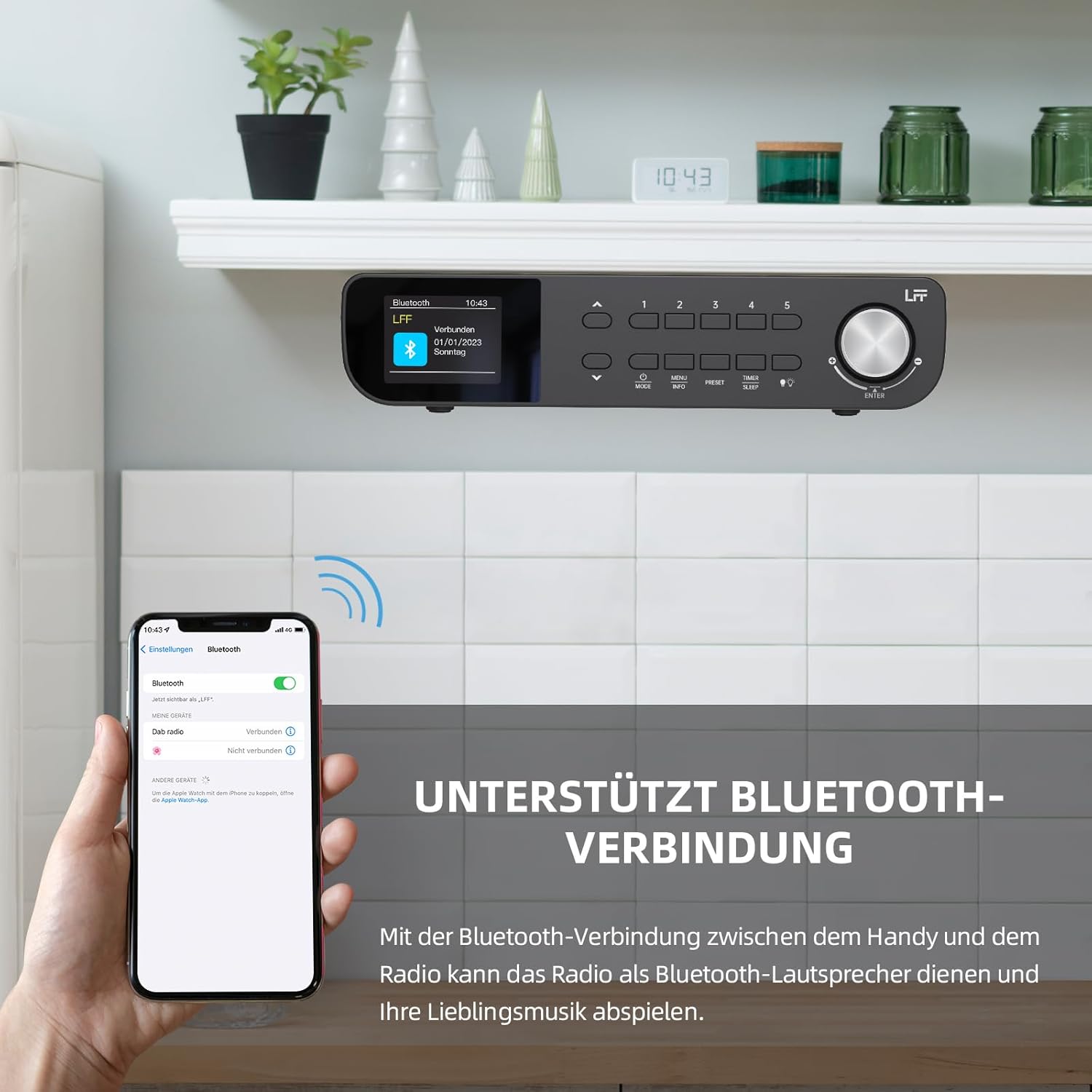
איור 6.1: The LFF Kitchen Radio displaying a successful Bluetooth connection, with a smartphone screen showing the radio as a connected device.

איור 6.2: תקריב view of the radio's display indicating 'LFF' and 'Connected' under the Bluetooth menu, confirming a successful pairing.
6.6. הגדרת אזעקות
לרדיו שני אזעקות עצמאיות.
- הקש על טיימר/שינה button repeatedly until 'Alarm 1' or 'Alarm 2' appears.
- Use the navigation buttons and rotary knob to set the alarm time, source (DAB+, FM, or Buzzer), and frequency (daily, weekdays, weekends, once).
- Confirm settings by pressing the rotary knob.

איור 6.3: Close-up of the radio's display showing the current time and options to activate or deactivate Alarm 1 and Alarm 2.
6.7. טיימר שינה
טיימר השינה מאפשר לרדיו לכבות באופן אוטומטי לאחר פרק זמן מוגדר.
- הקש על טיימר/שינה button repeatedly until 'Sleep Timer' appears.
- Use the navigation buttons or rotary knob to select the desired sleep duration (e.g., 15, 30, 60 minutes).
- אשר על ידי לחיצה על הכפתור הסיבובי.

איור 6.4: Close-up of the radio's display showing the 'Sleep Timer' setting, with an option to set the duration, for example, to 30 minutes.
6.8. הגדרות קבועות מראש
Save up to 60 favorite stations for quick access.
- כדי לשמור הגדרה קבועה מראש: כוונן לתחנה הרצויה. לחץ והחזק אחד מהלחצנים הגדרה קבועה מראש (1-5) buttons until 'Preset Saved' appears. For additional presets, use the 'Preset Store' option in the menu.
- כדי להחזיר הגדרה מראש: לחץ לחיצה קצרה על אחד מהלחצנים הגדרה קבועה מראש (1-5) buttons. For other presets, navigate to 'Preset Recall' in the menu.
6.9. נורת לד
The radio includes an integrated LED light, useful for illuminating the area below if mounted under a cabinet.
- הקש על אוֹר button (if available, or navigate through menu) to turn the LED light on or off.

איור 6.5: The LFF Kitchen Radio mounted under a kitchen cabinet, with its integrated LED light providing illumination to the countertop below.
6.10. הצגת בהירות
Adjust the display backlight brightness to suit your environment.
- Access the 'Display' or 'Settings' menu.
- Select 'Brightness' and choose from High, Medium, or Low settings.

איור 6.6: A visual comparison of the LFF Kitchen Radio's display at three different backlight brightness levels: High, Medium, and Low, demonstrating the adjustable visibility.
7. הוראות הרכבה
The LFF LDR113-EU Kitchen Radio offers flexible placement options: tabletop or under-cabinet mounting.
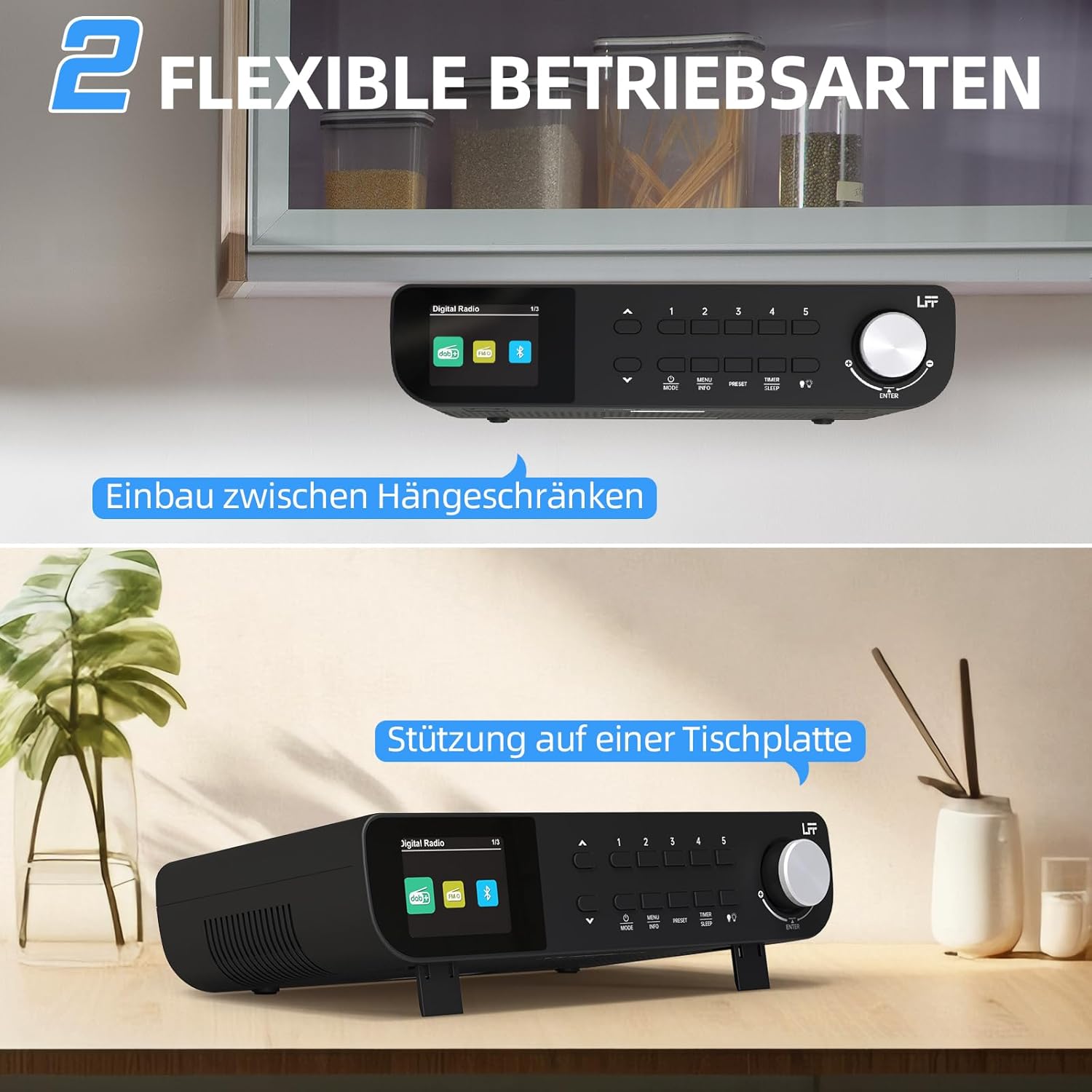
איור 7.1: The LFF Kitchen Radio displayed in two common installation scenarios: mounted underneath a kitchen cabinet and placed freestanding on a tabletop.
7.1. Tabletop Placement
Simply place the radio on a stable, flat surface. Ensure it is not near the edge to prevent accidental falls.
7.2. Under-Cabinet Mounting
For under-cabinet installation, use the provided mounting kit.
- הכן את המיקום: Choose a suitable location under a kitchen cabinet, ensuring there is enough space and access to a power outlet.
- סמן חורים לקדוח: Use the provided mounting template to mark the drill holes on the underside of the cabinet.
- לקדוח חורים של טייס: קדחו חורי טייס במיקומים המסומנים.
- Attach Mounting Plate (if applicable): Some models may include a separate mounting plate. Attach this to the cabinet using the screws.
- Secure the Radio: Align the radio with the mounting holes or plate and secure it using the provided screws. Ensure it is firmly attached.
- חבר חשמל: חבר את מתאם החשמל.

איור 7.2: Detailed diagram showing the steps for under-cabinet mounting, including measuring distances (e.g., 58mm) and securing the radio with screws.
8. תחזוקה
- ניקוי: To clean the radio, disconnect it from the power supply. Use a soft, dry, lint-free cloth. Do not use abrasive cleaners, waxes, or solvents.
- אַנטֶנָה: Ensure the antenna is extended for optimal reception in DAB+ and FM modes. Handle it gently to avoid damage.
- אִחסוּן: אם מאחסנים את הרדיו לתקופה ממושכת, נתקו אותו מהחשמל ואחסנו אותו במקום קריר ויבש.
9. פתרון תקלות
| בְּעָיָה | סיבה אפשרית | פִּתָרוֹן |
|---|---|---|
| אין כוח | מתאם החשמל לא מחובר או ששקע פגום. | בדוק את חיבור החשמל. נסה שקע אחר. |
| קליטת DAB+/FM גרועה | אנטנה לא מורחבת, אות חלש או הפרעות. | Fully extend the antenna. Reposition the radio. Perform a full scan. |
| בלוטות' לא מתחבר | Radio not in pairing mode, device too far, or already connected to another device. | Ensure radio is in Bluetooth mode. Move device closer. Disconnect from other devices. |
| אין קול | Volume too low, mute activated, or incorrect mode. | Increase volume. Check if mute is active. Ensure correct mode (DAB+, FM, Bluetooth). |
| התצוגה לא עובדת | Brightness too low or device malfunction. | Adjust display brightness. If problem persists, contact support. |
10. מפרטים

איור 10.1: Diagram showing the dimensions of the LFF Kitchen Radio: 250mm length, 146mm width, and 55mm height.
| תכונה | פְּרָט |
|---|---|
| מותג | סיומת LFF |
| מספר דגם | LDR113-EU |
| צֶבַע | שָׁחוֹר |
| קישוריות | בלוטות' |
| טכנולוגיית כוונון | DAB פלוס, FM |
| מקור כוח | כבל חשמלי |
| תֶדֶר | 108 MHz (FM max) |
| מידות (L x W x H) | 250 מ"מ x 146 מ"מ x 55 מ"מ |
| הגדרות קבועות מראש | 60 |
| לְהַצִיג | מסך LCD צבעוני |
| תכונות מיוחדות | Dual Alarms, Sleep Timer, Under-cabinet mounting option, LED Light |
11. אחריות ותמיכה
This product comes with a standard manufacturer's warranty. Please refer to the warranty card included in your package for specific terms and conditions. For technical support, troubleshooting assistance, or warranty claims, please contact your retailer or the LFF customer service department.