
מָבוֹא
This manual provides essential information for the safe and efficient use of your ONN 42-Inch Full HD LED Smart TV, Model 100018254. Please read these instructions thoroughly before operating your television and retain them for future reference.
מה יש בקופסה
ודא שכל הרכיבים קיימים לפני שתמשיך בהתקנה.
- ONN 42-Inch Full HD LED Smart TV
- שְׁלַט רָחוֹק
- מעמד טלוויזיה (2 יחידות)
- ברגים למעמד טלוויזיה
- כבל חשמל
- מדריך התחלה מהירה (לא כלול במדריך זה)

תמונה: חזית view of the ONN 42-inch Smart TV displaying the Roku TV home screen with various streaming app icons like Netflix, Disney+, Apple TV, Hulu, Peacock, and Roku Channel. The TV is black with slim bezels and two stand feet.
הגדרה
1. חיבור מעמד הטלוויזיה
- הנח בזהירות את הטלוויזיה כשמסך הטלוויזיה כלפי מטה על משטח רך ונקי כדי למנוע נזק.
- יישר כל חלק מעמד עם חורי הברגים המתאימים בתחתית הטלוויזיה.
- אבטחו כל חלק מעמד באמצעות הברגים המצורפים. ודאו שהם מהודקים היטב.

Image: A diagram illustrating the dimensions of the ONN 42-inch TV, showing its width as 43 inches and height as 37 inches when placed on its stand.
2. התקנה על הקיר (אופציונלי)
This TV is compatible with VESA standard wall mounts. Refer to your wall mount's instructions for proper installation. Ensure the wall mount can support the weight of the television.

תמונה: אחורי view of the ONN 42-inch TV, highlighting the VESA mounting screw holes in a square pattern and various input ports on the side and bottom right.
3. התקני חיבור
חברו את המכשירים החיצוניים שלכם כגון ממיר כבלים, קונסולות משחקים או נגני Blu-ray ליציאות הקלט של הטלוויזיה.
- HDMI: For high-definition audio and video. Use an HDMI cable to connect devices like set-top boxes, game consoles, or streaming sticks.
- USB: לחיבור התקני אחסון USB להפעלת מדיה files.
- Wi-Fi: For internet connectivity to access smart TV features and streaming services.
4. אשף הפעלה והגדרה ראשוניים
- חבר את כבל החשמל לטלוויזיה ולאחר מכן לשקע בקיר.
- לחץ על כפתור ההפעלה בשלט רחוק או על הטלוויזיה עצמה.
- Follow the on-screen instructions to complete the initial setup, including language selection, network connection (Wi-Fi), channel scanning, and linking to your Roku account (if applicable).
הפעלת הטלוויזיה
1. שלט רחוק מעלview
The remote control allows you to navigate the TV's interface and control various functions.
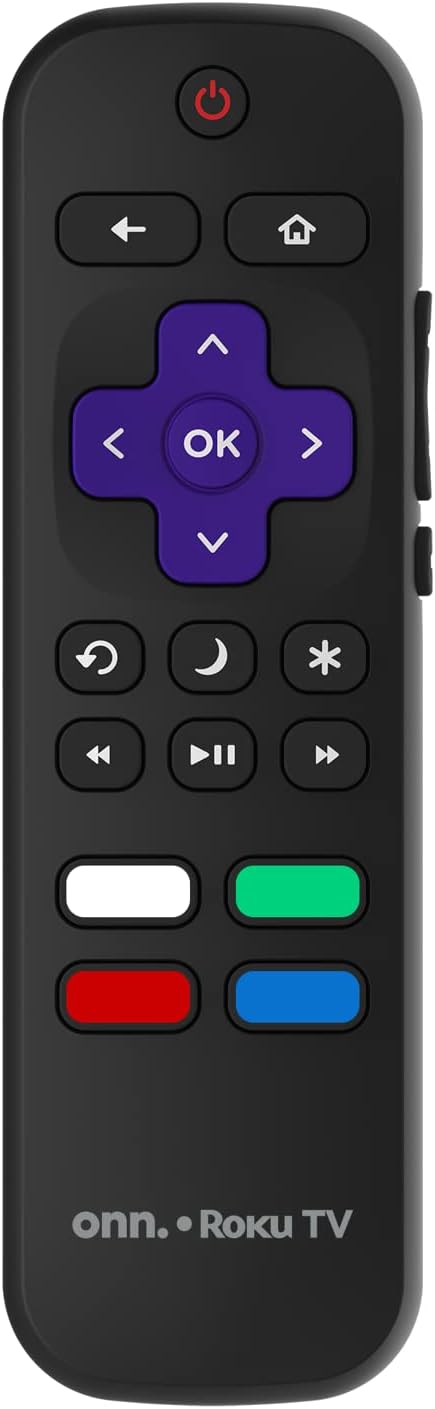
Image: The ONN Roku TV remote control, featuring a power button, directional pad, OK button, home button, back button, volume controls, and dedicated buttons for popular streaming services.
- לחצן הפעלה: מפעיל או מכבה את הטלוויזיה.
- Directional Pad (D-Pad) & OK: ניווט בתפריטים ואישור בחירות.
- כפתור בית: חוזר למסך הבית של טלוויזיית Roku.
- כפתור חזרה: חוזר למסך או לתפריט הקודם.
- עוצמת הקול מעלה/הנמכת: מכוונן את עוצמת השמע.
- כפתור השתק: השתקה או ביטול השתקת השמע.
- ערוץ למעלה/למטה: Changes channels (for antenna/cable inputs).
- כפתורי אפליקציה ייעודיים: Quick access to popular streaming services like Netflix, Hulu, etc.
2. תכונות טלוויזיה חכמה
Your ONN Smart TV provides access to a wide range of streaming content and smart functionalities.
- שירותי סטרימינג: Access pre-installed apps like Netflix, YouTube, and many more through the Roku Channel Store.
- שליטה קולית: Compatible with Alexa and Google Assistant for hands-free control (requires a separate compatible voice assistant device).
- עדכוני תוכנה אוטומטיים: The TV will automatically update its software when connected to the internet, ensuring you have the latest features and security.
3. בחירת קלט
To switch between connected devices (e.g., cable box, game console), use the קֶלֶט button on your remote or select the desired input from the Roku TV home screen.
4. הגדרות תמונה וקול
Access the TV's settings menu to customize picture and sound preferences. Navigate to Settings > TV picture settings or הגדרות> שמע to adjust options like brightness, contrast, color, sound mode, and equalizer settings.
תַחזוּקָה
1. ניקוי המסך
- Always turn off the TV and unplug it before cleaning.
- השתמשו במטלית רכה ונטולת סיבים, מעט רטובהampנשטף במים או בחומר ניקוי מיוחד למסכים.
- אין לרסס חומר ניקוי ישירות על המסך. יש למרוח אותו תחילה על המטלית.
- הימנעו משימוש בחומרי ניקוי שוחקים, אלכוהול, בנזן או מדללים, מכיוון שאלה עלולים לפגוע במסך.
2. עדכוני תוכנה
Ensure your TV is connected to the internet to receive automatic software updates. These updates improve performance, add features, and enhance security. You can manually check for updates in the הגדרות > מערכת > עדכון מערכת תַפרִיט.
פתרון בעיות
אם נתקלת בבעיות עם הטלוויזיה שלך, עיין בפתרונות הנפוצים הבאים:
אין כוח
- בדוק אם כבל החשמל מחובר היטב גם לטלוויזיה וגם לשקע בקיר.
- ודא ששקע הקיר תקין על ידי חיבור מכשיר אחר.
- נסה ללחוץ על כפתור ההפעלה בטלוויזיה עצמה, לא רק על השלט.
אין תמונה / תמונה מעוותת
- ודא שמקור הקלט הנכון נבחר (לדוגמה, HDMI 1, HDMI 2).
- בדוק את כל חיבורי הכבלים בין הטלוויזיה למכשירים חיצוניים.
- נסה כבל HDMI אחר אם אפשר.
- כוונן את הגדרות התמונה (בהירות, ניגודיות) בתפריט הטלוויזיה.
אין קול / קול חלש
- Check if the TV is muted or if the volume is turned down.
- Ensure external audio devices (soundbars, receivers) are properly connected and powered on.
- בדוק את הגדרות השמע בתפריט הטלוויזיה.
בעיות חיבור לרשת
- Verify your Wi-Fi router is powered on and functioning.
- הפעל מחדש את הנתב והמודם שלך.
- עבור אל הגדרות > רשת > בדיקת חיבור בטלוויזיה שלך כדי לאבחן את הבעיה.
- ודא שאתה מזין את סיסמת ה-Wi-Fi הנכונה.
מפרטים
| תכונה | פְּרָט |
|---|---|
| מספר דגם | 100018254 |
| גודל מסך | 42 אינץ' |
| טכנולוגיית תצוגה | LED |
| הַחְלָטָה | 1080p (HD מלא) |
| קצב רענון | 60 הרץ |
| קישוריות | USB, Wi-Fi |
| שירותי אינטרנט נתמכים | Netflix, YouTube (and others via Roku platform) |
| שיטת בקרה | Voice (via Alexa & Google Assistant compatible devices), Remote Control |
| סוג הרכבה | מתקן קיר (תואם VESA) |
| צֶבַע | שָׁחוֹר |
| UPC | 671227025567 |

Image: Energy Guide label for Television Model 100018254, indicating an estimated yearly energy cost of $11 based on 12 cents per kWh and 5 hours use per day.
אחריות ותמיכה
For warranty information and technical support, please refer to the documentation included with your purchase or visit the official ONN support webאֲתַר. שמור את קבלה הרכישה שלך לתביעות אחריות.