
מָבוֹא
This manual provides detailed instructions for the Keychron Q8 Alice 65% Layout Gasket Hot Swappable Custom Mechanical Keyboard. The Q8 is an all-metal mechanical keyboard featuring an ergonomic Alice layout, QMK/VIA programmability, a rotary knob, RGB backlighting, and a Type-C wired connection. It is designed for enhanced typing comfort and customization for both Mac and Windows users.

תכונות המוצר
Ergonomic Alice Layout
The Q8 features a 65% Alice layout, splitting the keyboard into left and right halves. This curved split keyframe promotes a more natural typing posture, aiming to reduce wrist fatigue and forearm muscle strain during extended use.

Programmable Rotary Knob
The integrated rotary knob is fully programmable via QMK and VIA software. It can be customized for various functions such as adjusting volume, screen brightness, brush size, or navigating media clips.

שקעים הניתנים להחלפה חמה
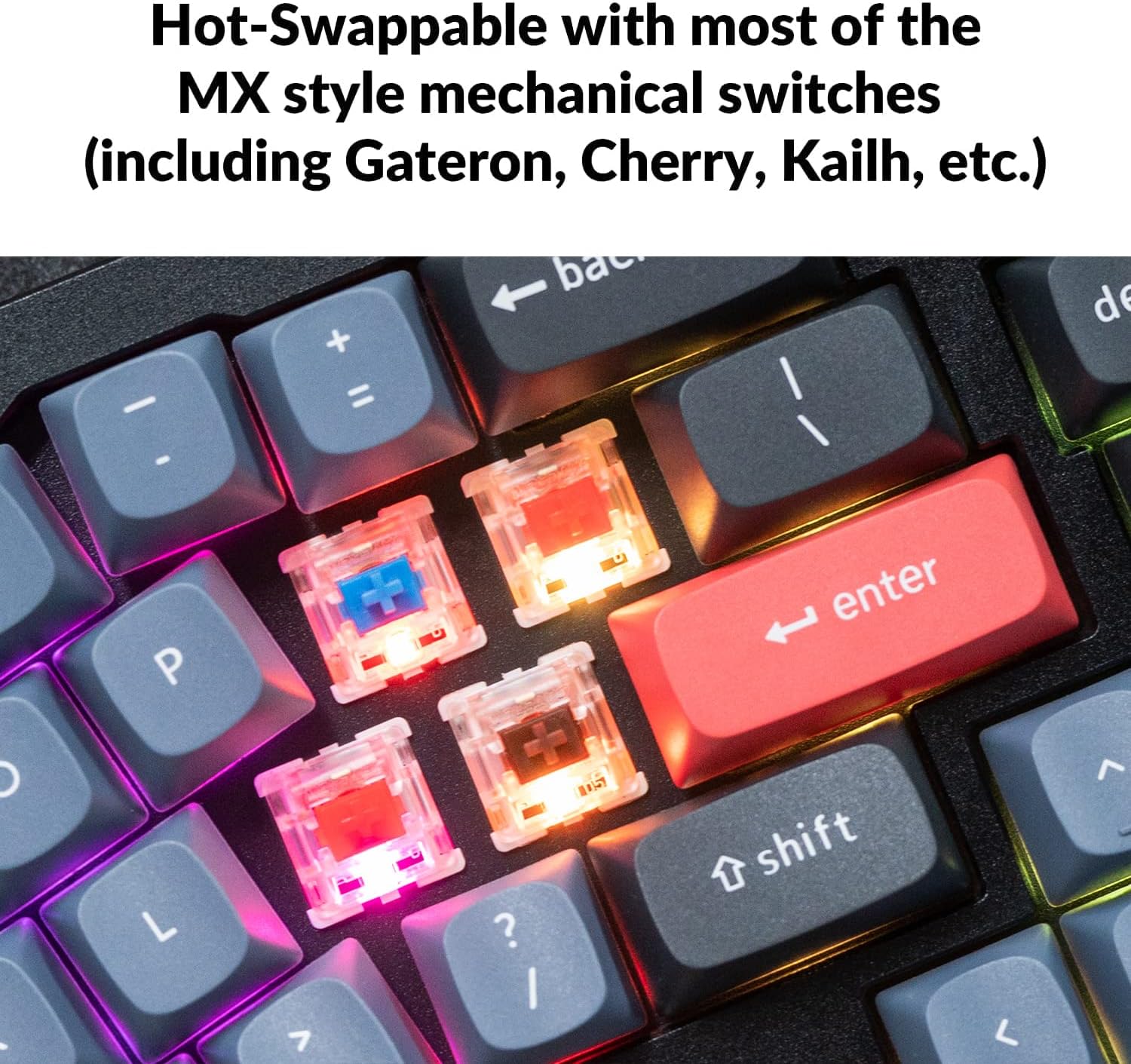
The keyboard features hot-swappable sockets compatible with most 3-pin and 5-pin MX style mechanical switches (e.g., Gateron, Cherry, Kailh). This allows for easy switch replacement without soldering. The large keys (space bar, shift, enter, delete) are equipped with screw-in PCB stabilizers for enhanced stability and smoothness.

תאורת LED אחורית RGB הפונה דרומה
The RGB LEDs are south-facing, designed to provide better illumination from the typist's perspective, especially with non-shine-through PBT keycaps. This orientation also prevents interference when using OEM or Cherry-profile מקשים.

Double-Gasket Design
The Q8 incorporates an innovative double-gasket design. In addition to gaskets on the plates, silicone pads are placed between the top and bottom cases. This construction significantly reduces sound resonance and noise from metal impacts, maintaining the flexibility of the gasket structure while improving overall typing sound.

Pre-lubed Gateron G Pro Brown Switches
The fully assembled Q8 version comes with factory pre-lubricated Gateron G Pro Brown switches. These tactile switches offer an optimized molded design for precise positioning and reduced wobble, ensuring a smoother and more consistent typing experience.

Full CNC Aluminum Body
The keyboard chassis is crafted from a full aluminum CNC machined body, providing durability, a premium feel, and significant weight to prevent movement during use.

מכסי מפתח PBT כפולים
The Q8 comes with durable double-shot PBT keycaps. This manufacturing process ensures legends will not fade over time, providing a long-lasting and tactile typing surface.
מבנה פנימי מעלview
The Keychron Q8 is constructed with multiple layers for optimal performance and sound. This includes keycaps, switches, top case, plate, gaskets, PCB, acoustic tape, silicone gaskets, and the bottom case.

הגדרה
חיבור המקלדת
The Keychron Q8 is a wired keyboard. Connect it to your computer using the provided Type-C to Type-C cable. A Type-A to Type-C adapter is also included for compatibility with Type-A USB ports.

מתג מערכת הפעלה
Locate the operating system switch on the back or side of the keyboard. Slide the switch to the appropriate position for either Windows or macOS to ensure correct key mapping and functionality.

הוראות הפעלה
התאמה אישית של QMK/VIA
The Keychron Q8 supports QMK and VIA firmware, allowing for extensive customization of key assignments, macros, and lighting effects. Download the VIA software from the official Keychron website to access these features. Connect your keyboard, open VIA, and begin remapping keys or creating custom macros.

פונקציונליות הכפתור
The rotary knob's default functions typically include volume control. Through VIA software, you can reassign the knob to control various system functions or application-specific commands, such as zooming, scrolling, or adjusting backlight hue.
החלפת מקלדת ומתג
To replace keycaps, use the included keycap puller to gently remove the desired keycap. To replace switches, first remove the keycap, then use a switch puller (not included, but often bundled with switches or available separately) to carefully extract the switch from its socket. Align the new switch's pins with the socket holes and press firmly until it clicks into place. Ensure the pins are not bent during insertion.
תַחזוּקָה
ניקוי
Regular cleaning helps maintain the keyboard's performance and appearance. Use a soft brush or compressed air to remove dust and debris from between the keycaps. For deeper cleaning, remove the keycaps using the provided keycap puller and wipe them with a damp מטלית. ודאו שכל הרכיבים יבשים לפני ההרכבה מחדש.
טיפול במתגים ובמקשים
Avoid applying excessive force when removing or inserting keycaps and switches to prevent damage to the components or the PCB sockets. Store spare keycaps and switches in a clean, dry place.
פתרון בעיות
- המקלדת לא מגיבה: Ensure the USB-C cable is securely connected to both the keyboard and the computer. Try a different USB port or cable. Verify the operating system switch is set correctly.
- מפתחות לא נרשמים: If specific keys are not working, check if the switches are fully seated in their sockets. For hot-swappable switches, try removing and reinserting the switch, or replace it with a known working switch.
- בעיות תאורת RGB אחורית: If the backlight is not functioning or displaying incorrectly, ensure the keyboard is properly powered. Check VIA software settings for any custom lighting profiles that might be overriding default settings.
- תוכנת QMK/VIA לא מזהה מקלדת: Ensure the latest version of VIA is installed. Close any other keyboard-related software that might interfere. Reconnect the keyboard.
For further assistance, refer to the official Keychron support resources or contact customer service.
מפרטים
| מותג | Keychron |
| שם הדגם | Q8 |
| מַעֲרָך | 65% Alice Layout (68 keys) |
| קישוריות | חוטי (USB Type-C) |
| מתגים | Gateron G Pro Brown (Tactile, Pre-lubed) |
| ניתן להחלפה חמה | Yes (Compatible with 3-pin and 5-pin MX style switches) |
| תאורה אחורית | נורת LED RGB הפונה דרומה |
| חומר גוף | אלומיניום CNC מלא |
| מפתחות מפתחות | PBT כפול |
| יכולת תכנות | תמיכה ב-QMK/VIA |
| מכשירים תואמים | Computers with USB-C port (Mac, Windows) |
| אביזרים כלולים | Keycap Puller, USB-C Cable, USB-A to C Adapter |
אחריות ותמיכה
Keychron products typically come with a manufacturer's warranty. For specific warranty terms, registration, and technical support, please visit the official Keychron webאתר או צרו קשר ישירות עם שירות הלקוחות שלהם. שמרו את קבלת הרכישה כהוכחת קנייה לתביעות אחריות.
מפתחות רשמי Webאֲתַר: www.keychron.com